Hacking Loadiine GX2

  • Thread starter Thread starter Cyan
  • Start date Start date
  • Views Views 2,637,429
  • Replies Replies 6,197
  • Likes Likes 132
Is it normal to have big big loading times?
When i tried yoshies wooly world over loadiine, before each stage it takes like good 20 seconds to load. with the normal game it takes about 2-3 seconds
Same with super mario 3d world, even more annoying though. before each stage, after each stage, basically everywhere it takes forever to load.

Should i change sd card or does everyone have those problems?
Yeah, I'm interested in this too, is ir normal to have really long loading times?
 
I love dumb questions, I put New Mario U updates in the good folder, but I don'T see in loadiine where to tell to use that update

When I click on super mario U it auto start the game

thanks

Sorry to bump again but I really need help with this
 
At us it loads a Tiny menu

I apoligize, when i reformated my SD card earlier, it seem i gave the wrong loadiine, so i now have the menu an i thank you for that

But now i have a problem

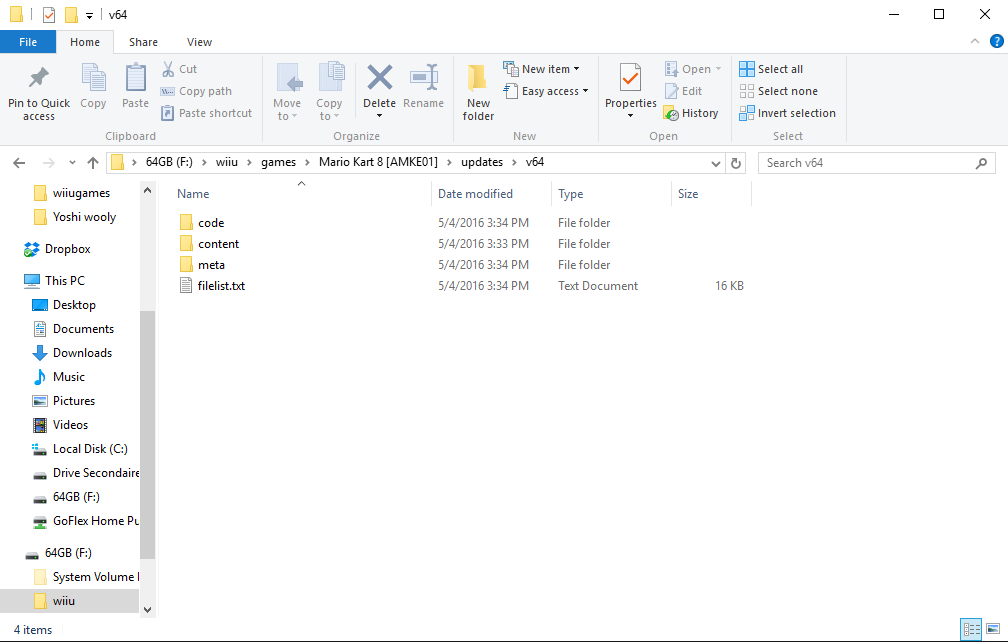
I downloaded Mario Kart 8 Update with JNUStool and when i boot the v64 game crash, if i boot the normal version it work

I am able to boot NSMBU update np

b11bd6578b4b72cc9b51f929463082d6.PNG
 
Will it someday be possible to have USB support with only kernel access ? I know that IOSU could allow USB access but in the meantime...
 
Will it someday be possible to have USB support with only kernel access ? I know that IOSU could allow USB access but in the meantime...
Unlikely.
From what I've heard, IOSU handles USB access.
Kernel doesn't have any way to access the USB.
Only way would be if a games comes out that makes use of the USB ports for storage or something, but I doubt it.
 
Unlikely.
From what I've heard, IOSU handles USB access.
Kernel doesn't have any way to access the USB.
Only way would be if a games comes out that makes use of the USB ports for storage or something, but I doubt it.
That's what I thought...
Well, thanks for the answer, I guess we'll have to wait 'till IOSU gets released (if it does)
 
that is odd it shouldn't be taking that long, load times only take a few seconds for me and I have beat the game with no issues besides cutscenes stuttering and skipping

Not sure then. Every time I load it it takes over 2 minutes to get to a loading screen then it's like 8 minutes loading.
 
hi, ive got some VC games and injected roms etc but they dont have meta folder. loadiine v4 shows them but gx2 doesnt? any ideas? thanks
 
Speaking of Hyrule Warriors, I put the code, content, and meta files on my SD card correctly, was able to load the exploit and homebrew launcher on 5.5.1, it shows up in Loadiine, loads all of the update prompts after getting the v144 update with JNUSTool and replacing the game files, but then freezes at a black screen after the Koei Tecmo and Omega Force logo screens.

Any idea as to why it's doing that?

To add to this, I tried Captain Toad with the same version of Loadiine and it works fine.

So I updated Loadiine to the latest nightly build as of this post (8f0f7a8) and when I try to launch Hyrule Warriors with all default settings, it crashes with the stack dump error screen a couple of other people recently posted. I then fell bac to the next-to-latest Loadiine build (a5a7dcf) and Hyrule Warriors is back to giving me a black screen again.

Any ideas? My SD card hasn't been in a Mac at all and I made sure all of the folders are named properly and in the right place. Does it just take forever to load?

Edit: Launching Hyrule Warriors in any other way except for <settings default> and Mii Maker Mode send me to Mii Maker instead of launching the game.
 
Last edited by Moraduke,
I'm beginning to believe there's a bug where the per-game launcher settings aren't honored. In my case, I need to use the Smash Bros launch method to run Yoshi's Wooly World. If my default is Mii Maker launch method and I set the game-specific launch method for Wooly World to SB, it kicks me right back into Mii Maker rather than honor the setting I've configured.

Anyone else having this issue? I was tempted to report it but wanted confirmation from other users. I'm using Loadiine-nightly-54d6440 on 5.5.1.

--------------------- MERGED ---------------------------

Yeah, I'm interested in this too, is ir normal to have really long loading times?

I believe the Wii U SD card interface maxes out at about 10MB/sec, which explains why it's so slow and why buying a fast card doesn't do any good.

I'll probably experiment with formatting the card with 64k clusters, which may help to reduce seeks, but that's no silver bullet.
 
Working for me !! Thanks @KiiWii
Covers i use take up alot of space LOL

Finally fixed it. Can you confirm that its now scaled in the newest nightly?
I also added a setting to disable/enable the HID controllers and updated to use the newest controller_patcher (for hid controller, hopefully fixes some issues)

I'm beginning to believe there's a bug where the per-game launcher settings aren't honored. In my case, I need to use the Smash Bros launch method to run Yoshi's Wooly World. If my default is Mii Maker launch method and I set the game-specific launch method for Wooly World to SB, it kicks me right back into Mii Maker rather than honor the setting I've configured.
Is the game booting afterwards if you start ssbu? For some people the autoboot method is not working. Try to boot SSBU once, then the autoboot from loadiine should work

You could also take a look into the logs using the udp_reader (https://github.com/dimok789/loadiine_gx2/tree/master/udp_debug_reader) and setting the right IP in the config file (DebugLoggerIP=) on your SD Card

 
Last edited by Maschell,
  • Like
Reactions: KiiWii
So it looks like the Minecraft game isn't loading for me, and is frozen on the "MC Wii U Edition supports User Generated Content and Game Chat." screen. Welp.

Edit: To unfreeze it - Have to shut down the Wii U. >.<
I fixed Minecraft's freezing by creating a new profile without linking an NNID. This seems to fix games that crash when trying to connect to the internet on startup.
 
Finally fixed it. Can you confirm that its now scaled in the newest nightly?
I also added a setting to disable/enable the HID controllers and updated to use the newest controller_patcher (for hid controller, hopefully fixes some issues)


Is the game booting afterwards if you start ssbu? For some people the autoboot method is not working. Try to boot SSBU once, then the autoboot from loadiine should work

You could also take a look into the logs using the udp_reader (https://github.com/dimok789/loadiine_gx2/tree/master/udp_debug_reader) and setting the right IP in the config file (DebugLoggerIP=) on your SD Card
I will test it out tomorrow for you.
 

Site & Scene News

Popular threads in this forum