Review K1 GBA SP

  • Thread starter Thread starter Another World
  • Start date Start date
  • Views Views 149,462
  • Replies Replies 134
  • Likes Likes 6
as mentioned in the first (rather detailed) post, saves are stored in DRAM and there is no battery back-up. In order to keep your saves you must either press *+START or enter the in-game menu. Both the function key and the menu are triggers to dump the save from DRAM to the microSD card. this also works with the embedded emulation in regards to "virtual" SRAM.

-another world

The post is a awesome review!
Thank you very much for the response!
 
I really hope, they come out with an update with an auto save option,
just lost about 2 hours of work, because I forgot to backup my save. :(
I normally back up when ever I save in game, and power off from the k1 menu, but this time I forgot...
maybe an adjustable auto save?
AutoSave:
[off]-[save every: (1) (3) (5) (10) minuets]-[when in game save detected]

Something like that.
 
what i would like is when the system detects that the power is low enough to perhaps shut off in the next 10 minutes, that it auto-saves. so that way i'm not spamming the save function key for 2 hrs while the light is red.

-another world
 
This clone looks interesting, but I guess I'll stick with my GBA SP2+ M3perfect miniSD + F2A256mb+GB bridge.
There's not a thing out there that I wasn't able to flawlessly play with this setup.

The 'only' thing that could win me over, like I said before, it's if actually the built in emulators would take full advantage of the 320 x 240 screen resolution. Sure they would have to make some serious recoding, but having to shrink down emulators resolution to 240 × 160 when the display is capable of so much more, is a major let down for me.
 
Testing results for MultiPlayer Link.

MarioKart MultiPak

K1-GBA = Perfect
GBA-K1 = Perfect

MarioKart Single Pak

K1-GBA = Perfect
GBA-K1 = Perfect

Sonic Advance = Same Results.

Cable used = Official Link Cable with multi link connector.
 
  • Like
Reactions: 1 person
what i would like is when the system detects that the power is low enough to perhaps shut off in the next 10 minutes, that it auto-saves. so that way i'm not spamming the save function key for 2 hrs while the light is red.

-another world

I know right!
even the ds/dsi/3ds doesn't have that!
it would be a great feature,
we should email them about that.
 
what i would like is when the system detects that the power is low enough to perhaps shut off in the next 10 minutes, that it auto-saves. so that way i'm not spamming the save function key for 2 hrs while the light is red.

-another world

I know right!
even the ds/dsi/3ds doesn't have that!
it would be a great feature,
we should email them about that.

What? By the time all the 3DS's lights start to blink red you should know it's time to save. :D
 
the K1 doesn't blink. it goes red and you can still game for more than an hour. i've used it on red for over 2 hours (turning on/off, taking photos, playing homebrew, etc, for the review). then all of a sudden it just shuts down. its not like there is a set amount of play time once the light turns red.

-another world
 
the K1 doesn't blink. it goes red and you can still game for more than an hour. i've used it on red for over 2 hours (turning on/off, taking photos, playing homebrew, etc, for the review). then all of a sudden it just shuts down. its not like there is a set amount of play time once the light turns red.

-another world

Well yes, I was referring to his 3DS mention. Couldn't that be implemented software wise? Or is the light just dependent on how much juice is left in the battery?
 
I'm sure that software could do this.

Actually I'm pretty sure Firmware can fix most of these issues.

Code:
Sound Bugs - Power Indicater - Etc
 
maybe some one could develop some custom fw :D
once an sdk is released.
Video playback! powerSaving!
I really need to learn some c\c++, of what ever the use to make firmware these days...
 
Just a question.
How would we be able to update the firmware?
Would it be just a file that we have to run once?
And where would we be able to download the update?
 
Just a question.
How would we be able to update the firmware?
Would it be just a file that we have to run once?
And where would we be able to download the update?
I'm guessing it would be like with DS flash karts,
download the file to your micro sd card
run the file, and it installs to your device.
 
I have tested my link cables and GC adapters very thoroughly and I have bad news! Here is what we are looking at:

......


B-T00LwB2k24KGrHqUOKpYEy2BjC0BBM8V8.jpg

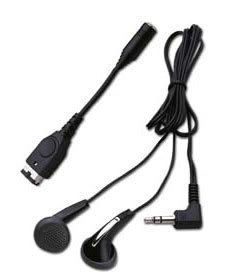
"Joytech GBA SP Earphone Adapter with stereo earphones. Enjoy Dynamic stereo sound from your GBA SP."...

Headphone Adapter test
What a tragedy. The adapter works with my real GBA SP in all cases. With the K1 GBA anytime the adapter is used outside the MP3 viewing screen the screen goes black and a loud buzzing noise is produced over the headphones. If the system is on any menu or a game is playing, if you plug in the headphone adapter the screen will go black. If headphones or speaker s are connected you will hear a bit of the desired audio in a huge mess of distorted sound and buzzing.
If you are listening to an MP3 with the device and then plug in the adapter, it works as intended. You can listen to one MP3 with the device just fine but anything beyond that will produce horrible results.
The saddest part is that this is obviously a software problem that wasn't tested. It is probably not a hardware issue for my unit.

I have to correct myself because I was totally wrong here. The headphones work fine. I just had to switch it from video out mode back to game mode ( * + Left ). I am an idiot.
 
Just a question.
How would we be able to update the firmware?
Would it be just a file that we have to run once?
And where would we be able to download the update?

so far there are no updates, the k1 gba sp with pid number 00610603 comes with the latest firmware. the old version with pid number 00610601, as sold by China Taobao, has already received 2 updates. when an update is made available for the k1gba.com k1 gba sp units you can apply it rather easily. below is a link to MaxZhou's site where he hosts the updates and some instructions.

please do not attempt to install updates not designed for the system.

site: http://kteam.ys168.com/

instructions and information (google translated):
K1 Firmware Update -- Instructions (maxzhou88's Game Players version)

1. Download the firmware update file "K_FW.bin"
2. Copy "K_FW.bin" to your TF card and be sure to put the file under root directory
3. Keep pressing and holding the SELECT button and switch on your device's Power switch
4. You will see the following message shown on the screen:

New firmware loaded.
B: Abort & test firmware
START: Update firmware to SPI

5. Press "START" button to update Or Press "B" button to quit and test the new firmware

6. If you choose "START", you will see the following message:

Updating SPI...
K_FW.BIN

7. When finished, please switch off and then power on your device again.
8. Everything should be done now.
(9. If something wrong, repeat the update procedure again.)

NOTE:

1. The new firmware update procedure is now brick-proof.
That is to say you can re-flash your device following above procedure again once you encounter some problem
(Say low battery or turn off the device when updating.) You can also go back to older version if you want.

2. This update is only valid for Maxzhou88's K1 device. Please check your PID on the HELP page of main page:
(Using L/R to navigate to pages on main screen)
Make sure you see the correct PID : 00610601
-------------- Machine Info --------------
PID 00610601
 
Just for information.
The K1GBA seems to be on sale on Italian ebay.
But the "problem" is, that it is advertised as New Gameboy Advance SP with 32000 games already installed".
So if you are not carefull, you might think that you are buying an original GBA SP with brigther screen...
 
Ok, so I bought a link cable from the K1 site, and can't get it to link for:
Mario Advance2: super mario world
Megaman bn1-6
Tetris worlds

Any one else having issues with these games?
or is my k1's link port broken??
 
How do I get NES games to work? They all seem to be stuck at the Gameboy title screen (files are in .zips like the gba games). Also is there a list of game for the cheat menu? Most I've tried don't have one, I did try river city ransom so I know the cheat system is working at least.
 

Site & Scene News

Popular threads in this forum