



Finally done with this personal project! 100% real no fake final_FINAL.
This thread is to announce my custom shader for RetroArch.
For the past year (since may 2025) I've been working in "Input Animated Overlays" that reacts to both Touched and Bluetooth/USB Gamepad Inputs.
Some of my overlays were made with Handhelds in mind, specially the GBA and NDS.
I always felt that, while my Input Animated Overlays where working correctly, they were missing an important feature: Drop Shadow.
I won't bore you with the story... but basically, RetroArch has recently added Gyro Sensor suport to Shaders.
This custom shader, is precisely that, a Gyro Sensor sensitive shader that adds/draws a drop shadow on viewport based on Phone Tilt/Movement.
For the past week, I've been experimenting witht this new feature (soon to be anounced by Libretro/Retroarch) as it's currently only available in nightly builds of RetroArch for all platforms.
I'm currently using this nightly: https://buildbot.libretro.com/nightly/android/2026-03-05-RetroArch.apk
Please, download that or subsequent versions in order to test my Shader in your mobile devices!
Experimenting, I've finally decided what features my custom shader should have, and have in mind that this is my personal taste and it's thought to be a complementation for my Input Animated Overlays. Since Gyro/Accelerometer data isn't available for GL/GLSL/Direct Video Drivers, this shader will only work and be recognized by RetroArch if your Video Driver is set to VULKAN.
Current features of this shader are:
Vertical Scanlines:
- Line width
- Separation
- Opacity
You can toggle on and off and control the parameters that makes up Vertical Scanlines.
Horizontal Scanlines:
- Line height
- Separation
- Opacity
You can toggle on and off and control the parameters that makes up Horizontal Scanlines.
Turn both ON, and you'll draw a GRID.
Turn Vertical OFF and Horizontal ON and you'll draw a "CRT-Like" Scanline.
Turn Horizontal OFF and Vertical ON and you'll draw a "NDS-Like" Grid.
By adjusting both Width and Height as well as separation of Vertical/Horizontal Scanlines, you can adjust the grid, CRT Scanline and "NDS-Like Grid" independently and based on the viewport of your current game.
GBC has a sharper Grid than DMG Gameboy, so by using minimum parameters you can get a sharper grid.
DMG has a bigger Grid than GBC, so by using "separation" you can increase the size of the grid to adjust your DMG games.
If you set a small scale viewport and do a GRID and set the Width/Height to a minimum level, you can simulate the look of "Virtual Console" Games in a 3DS Screen.
My shader is worked around to Viewport Scaling instead of Native Scaling, because RetroArch supports many aspect ratios, this ensures that Shader works reliably with all these Aspect Ratios + Custom Aspect Ratio.
LCD Temperature:
- 0=OFF
- 1=Cold
- 2=Neutral
- 3=Warm
Most Gameboy Cores already features things like 15-bit RGB palettes and Interframe Blending. so this setting is redundant if you use for instance: Gambatte with Internal Palette set to "DMG" or "Pocket" or "Light". But I thought about adding this features for regular GBC, GBA and NDS games in which you can simulate different ambient light enviroments.
LCD Tint:
- 0=OFF
- 1=DMG (Green)
- 2=Pocket (Grey)
- 3=GBC (Warm)
- 4=GBA (Washed out)
- 5=SP (Brighter)
- 6=MICRO (Vivid/Neutral)
Another redundant feature if you use Gambatte/mGBA/OTHER with included Internal Palettes, still, for GBC and GBA it adds a slight tint on top of the real game's colors.
It's very subtle and this doesn't suddenly turn your GBA game into monochrome, for instance.
These will enhance Internal Palettes, for instance: "Gambatte Internal Palette DMG + LCD Tint 1 = A more Green Viewport + LCD Temperature 3 = A Puke Green Viewport (slightly yellow instead of full green)
Please, experiment with parameters to suit your personal preference!
Subpixel Spread:
This is only relevant if you want to make use of subpixels "bleeding out RGB-like" colors in every pixel of the viewport.
This is still in experimental mode as it makes me a bit dizzy when using the "Drop Shadow" feature.
It's currently capped at 4 subpixels because it's done with GBA in mind, since in my device, mGBA scales GBA games in integer scaling of x4 Native Resolution, which fits perfectly with my Input Animated Overlays.
I think this feature is more "Personal" than something someone who isn't me can actually make use of.
Please, try this parameter and play around with it.
Drop Shadow:
This feature has full GYRO SUPPORT!
It's done to simulate light hitting the LCD and casting a shadow of every sprite. Tests in my potato devices indicates that this isn't compromising Framerate/Speed of emulated games (according to personal tests) so results may vary.
This feature works only when you tilt/incline your device. If you lay your device in a flat surface, it'll remain completely still until it detects either movement/inclination.
The more you tilt your device, the longer the drop shadow will be printed on screen.
It currently has a parameter of 0=OFF up to 1=MAX... in which "MAX" means a "Pure Black at 90% opacity" and it's very subtle for instance, at 0.10.
Please try it!
Round Corners:
Since I have designed Input Animated Overlays with round corners in viewport, this feature is still experimental.
It's in order to compliment MY OVERLAYS.
Feel free to use though if you somehow likes to blow the viewport at 21:9 in modern devices with round corners.
This parameter won't round viewport, it'll only draw a black circle on each corner of viewport.
NORMAL GAME / NO SHADER
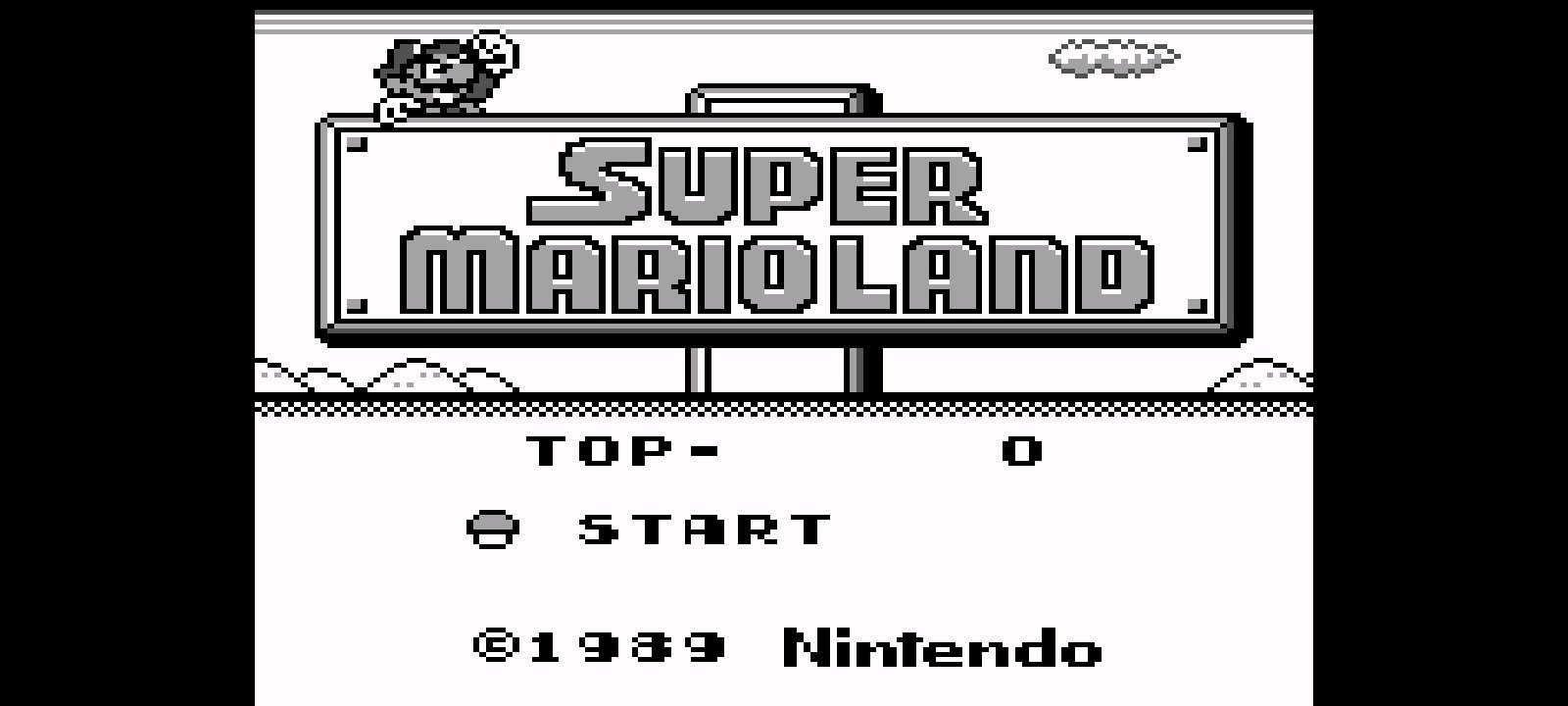

V Scan ON
H Scan OFF

H Scan ON
V Scan OFF

V Scan ON
H Scan ON


LCD = COLD/NEUTRAL/WARM
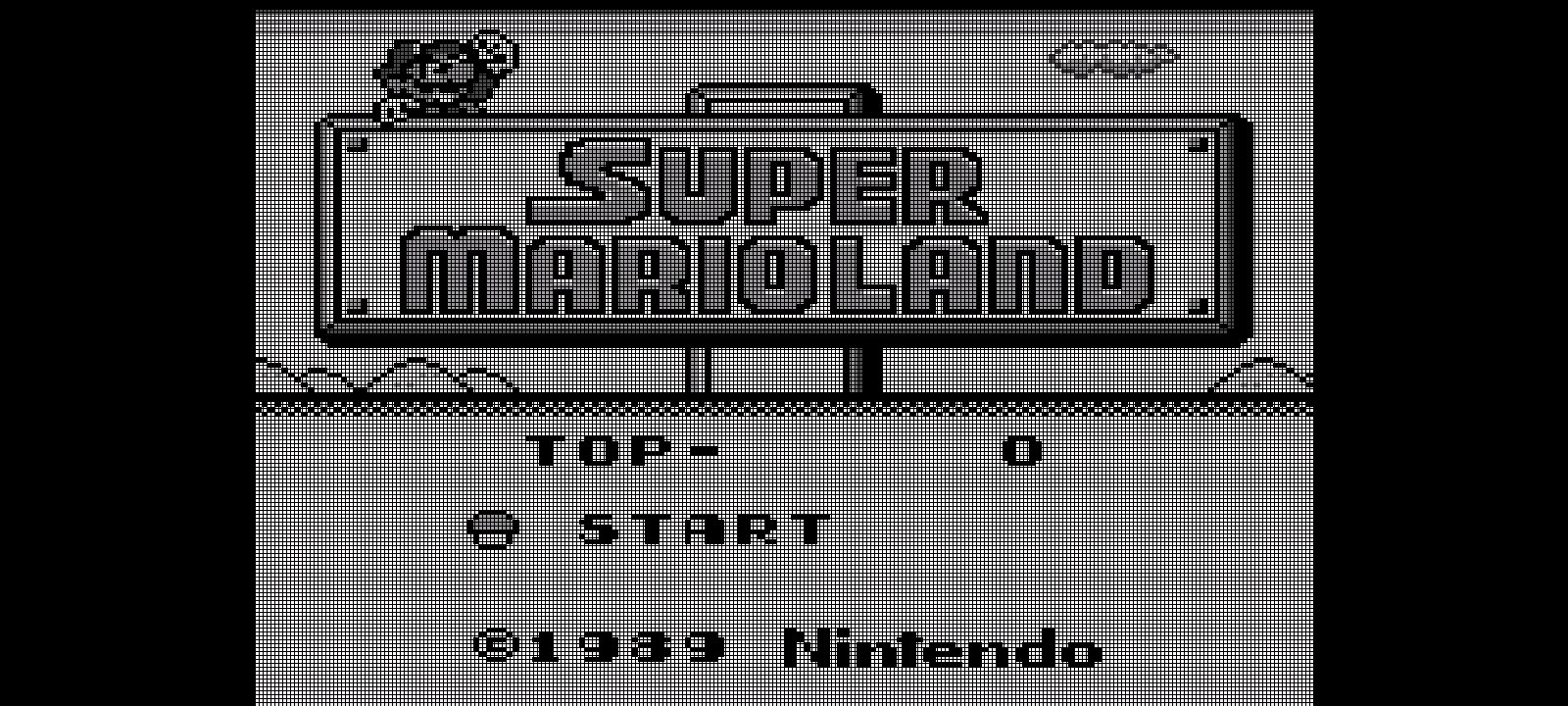
V+H SCANLINE ON + DROP SHADOW ON


Shader + Input Animated Overlay
Please consider buying me a coffee to support my RetroArch related projects: https://ko-fi.com/menamorarte
What's This?
This thread is to announce my custom shader for RetroArch.
For the past year (since may 2025) I've been working in "Input Animated Overlays" that reacts to both Touched and Bluetooth/USB Gamepad Inputs.
Some of my overlays were made with Handhelds in mind, specially the GBA and NDS.
I always felt that, while my Input Animated Overlays where working correctly, they were missing an important feature: Drop Shadow.
I won't bore you with the story... but basically, RetroArch has recently added Gyro Sensor suport to Shaders.
This custom shader, is precisely that, a Gyro Sensor sensitive shader that adds/draws a drop shadow on viewport based on Phone Tilt/Movement.
For the past week, I've been experimenting witht this new feature (soon to be anounced by Libretro/Retroarch) as it's currently only available in nightly builds of RetroArch for all platforms.
I'm currently using this nightly: https://buildbot.libretro.com/nightly/android/2026-03-05-RetroArch.apk
Please, download that or subsequent versions in order to test my Shader in your mobile devices!
What This Does
Experimenting, I've finally decided what features my custom shader should have, and have in mind that this is my personal taste and it's thought to be a complementation for my Input Animated Overlays. Since Gyro/Accelerometer data isn't available for GL/GLSL/Direct Video Drivers, this shader will only work and be recognized by RetroArch if your Video Driver is set to VULKAN.
Current features of this shader are:
LCD Master.slang
Vertical Scanlines:
- Line width
- Separation
- Opacity
You can toggle on and off and control the parameters that makes up Vertical Scanlines.
Horizontal Scanlines:
- Line height
- Separation
- Opacity
You can toggle on and off and control the parameters that makes up Horizontal Scanlines.
Turn both ON, and you'll draw a GRID.
Turn Vertical OFF and Horizontal ON and you'll draw a "CRT-Like" Scanline.
Turn Horizontal OFF and Vertical ON and you'll draw a "NDS-Like" Grid.
By adjusting both Width and Height as well as separation of Vertical/Horizontal Scanlines, you can adjust the grid, CRT Scanline and "NDS-Like Grid" independently and based on the viewport of your current game.
GBC has a sharper Grid than DMG Gameboy, so by using minimum parameters you can get a sharper grid.
DMG has a bigger Grid than GBC, so by using "separation" you can increase the size of the grid to adjust your DMG games.
If you set a small scale viewport and do a GRID and set the Width/Height to a minimum level, you can simulate the look of "Virtual Console" Games in a 3DS Screen.
My shader is worked around to Viewport Scaling instead of Native Scaling, because RetroArch supports many aspect ratios, this ensures that Shader works reliably with all these Aspect Ratios + Custom Aspect Ratio.
LCD Temperature:
- 0=OFF
- 1=Cold
- 2=Neutral
- 3=Warm
Most Gameboy Cores already features things like 15-bit RGB palettes and Interframe Blending. so this setting is redundant if you use for instance: Gambatte with Internal Palette set to "DMG" or "Pocket" or "Light". But I thought about adding this features for regular GBC, GBA and NDS games in which you can simulate different ambient light enviroments.
LCD Tint:
- 0=OFF
- 1=DMG (Green)
- 2=Pocket (Grey)
- 3=GBC (Warm)
- 4=GBA (Washed out)
- 5=SP (Brighter)
- 6=MICRO (Vivid/Neutral)
Another redundant feature if you use Gambatte/mGBA/OTHER with included Internal Palettes, still, for GBC and GBA it adds a slight tint on top of the real game's colors.
It's very subtle and this doesn't suddenly turn your GBA game into monochrome, for instance.
These will enhance Internal Palettes, for instance: "Gambatte Internal Palette DMG + LCD Tint 1 = A more Green Viewport + LCD Temperature 3 = A Puke Green Viewport (slightly yellow instead of full green)
Please, experiment with parameters to suit your personal preference!
Subpixel Spread:
This is only relevant if you want to make use of subpixels "bleeding out RGB-like" colors in every pixel of the viewport.
This is still in experimental mode as it makes me a bit dizzy when using the "Drop Shadow" feature.
It's currently capped at 4 subpixels because it's done with GBA in mind, since in my device, mGBA scales GBA games in integer scaling of x4 Native Resolution, which fits perfectly with my Input Animated Overlays.
I think this feature is more "Personal" than something someone who isn't me can actually make use of.
Please, try this parameter and play around with it.
Drop Shadow:
This feature has full GYRO SUPPORT!
It's done to simulate light hitting the LCD and casting a shadow of every sprite. Tests in my potato devices indicates that this isn't compromising Framerate/Speed of emulated games (according to personal tests) so results may vary.
This feature works only when you tilt/incline your device. If you lay your device in a flat surface, it'll remain completely still until it detects either movement/inclination.
The more you tilt your device, the longer the drop shadow will be printed on screen.
It currently has a parameter of 0=OFF up to 1=MAX... in which "MAX" means a "Pure Black at 90% opacity" and it's very subtle for instance, at 0.10.
Please try it!
Round Corners:
Since I have designed Input Animated Overlays with round corners in viewport, this feature is still experimental.
It's in order to compliment MY OVERLAYS.
Feel free to use though if you somehow likes to blow the viewport at 21:9 in modern devices with round corners.
This parameter won't round viewport, it'll only draw a black circle on each corner of viewport.
Gallery
NORMAL GAME / NO SHADER
V Scan ON
H Scan OFF
H Scan ON
V Scan OFF
V Scan ON
H Scan ON
LCD = COLD/NEUTRAL/WARM
V+H SCANLINE ON + DROP SHADOW ON
Shader + Input Animated Overlay
Please consider buying me a coffee to support my RetroArch related projects: https://ko-fi.com/menamorarte
Last edited by JuanMena,


