Gaming Internal IP address keeps changing

  • Thread starter Thread starter AlanJohn
  • Start date Start date
  • Views Views 6,623
  • Replies Replies 14

AlanJohn

くたばれ
Global Moderator
Joined
Jan 6, 2011
Messages
3,858
Solutions
5
Reaction score
7,459
Trophies
4
Age
28
Location
Canada,New Jersey
Website
www.deenextreme.com
XP
8,761
Country
Ukraine
My internal ip address keeps changing from 192.168.1.100 to 192.168.1.101.
This is really annoying since I run a MC server and I have to port-forward my ports each time and sometimes I can't even access my own server!
I have a cheap Callisto821+ modem I got from my ISP and a crap D-Link DIR-300 WiFi router I got from the internets. I've got a DSi, Iphone, laptop and a notebook connected to this thing.

Can anyone help?

 
There's a guide to set up a static IP on various operating systems here.
http://portforward.com/networking/staticip.htm
 
Turn off DHCP server on Your router, and set up static IP on all Your network devices (PC, DS, &c.)
DHCP annoyed me too :P

For me, I didn't care what happened to the other devices on my network. But my pc, same situation, running a MC server, would switch from 192.168.1.6 to .1.7 to .1.8 at random. I ran ipconfig -all, found out my current internal address, then went to my router (a verizon one) advanced - ip address distribution - connection list

find your device, click edit, and check off "static lease" to change your dhcp status from dynamic to static, while leaaving everyone elses alone.
 
@Rydian I think AlanJohn is confused between a static external IP and a static internal one. You have a couple of choices here but as you have a cheap router some are probably not available (I can either tie my machines to netbios name, mac address aka static DCHP or use those pieces of info to create port forwarding both of which are nicer but tend not be available on cheaper routers).
Sure you can disable DCHP but that gets annoying if you have friends over and they want to add their phones, consoles, handhelds and whatever else so you can either limit the DCHP pool and set a static address outside that (do note that sometimes this can conflict with security- DMZ might only be applied to DCHP or something) so I might cheat and assume there will never be 200 devices on my network and pick a high number within the DCHP range).

"I can't even access my own server"
Just so you know the vast majority of routers will redirect "external requests" from inside the network to internal IP addresses.
 
I had the exact same issue, and it made it annoying as hell when I was trying to do stuff between my DS and my computer. As FAST6191 said, I think you should leave DHCP enabled and setup a static internal IP. The way it works now, your router is going to assign the first computer it sees an internal IP address of 192.168.1.100 and the next will get 192.168.1.101, etc. That means that if everyone shuts off their computers before going to bed at night, the next morning, the first person to boot up will now be 192.168.1.100.

Personally I went into the Windows network settings and setup a static IP for myself of 192.168.1.123 since we will never have more than 22 devices trying to connect to that router. To do this, you will need to know the DNS servers that your router is currently using so you can tell Windows to use those. These can be obtained either from the router's configuration page (hopefully) or from the "ipconfig \all" command-line tool. Note that you will have to clear these settings whenever you go to an unknown network, and then re-make them once you're back home. This wasn't an issue with my desktop, but I imagine with a laptop it could be annoying.

But as FAST said, the solution is NOT to request a static IP from your ISP. All that that will do is give your router itself a never-changing IP address. The router will still continue to dynamically assign addresses to the various devices in your house. But you said you have a static IP, so you probably already know that much.

...or just go into your router's options and change all the port forwarding options whenever you need to let something through directly to your computer. I hosted things infrequently enough that I eventually did this instead of bothering with the whole static IP thing.
 
I've configured my DHCP to use between x.x.x.100 and 150, and manually configure static IPs (for the 3 main computers) between 10 and 50. That way my iPad and other handhelds can help themselves to the DHCP pool whilst the computers never lose their own address. I can't tell you how to set that up with your network - that all depends on your router settings and local network settings on each computer.
 
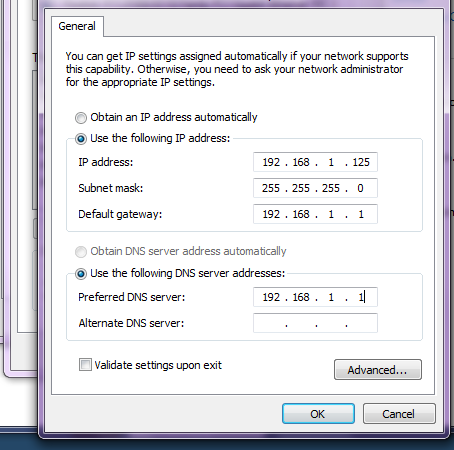
I have problems with installing a static internal.

When I set the IPv4 settings it just changes it to an unidentified network and I can't access the internet...
Screenshot the settings you're putting in.
gallery_271505_136_37968.png
 
The DNS settings are your problem - you've directed it towards your router (which won't have any DNS functionality). You either need to enter the DNS settings for your ISP (which Rydian often criticises) or one for google (I've never used it, so I don't know the address off the top of my head).
 
The DNS settings are your problem - you've directed it towards your router (which won't have any DNS functionality). You either need to enter the DNS settings for your ISP (which Rydian often criticises) or one for google (I've never used it, so I don't know the address off the top of my head).

Not necessarily true. I have DHCP disabled and direct DNS straight back to the Gateway, that being my router and everything works dandy. The router has no DNS functionality, but it should pass the DNS it recieved from the WAN port onto the connected devices.
 

Site & Scene News

Popular threads in this forum