Homebrew Homebrew app [Release] Switify – Native Spotify app and background playback overlay for Nintendo Switch

HiroshiYamauchi

Well-Known Member
Member
Joined
Jan 30, 2008
Messages
298
Reaction score
86
Trophies
1
XP
1,675
Country
Brazil
UPDATED 08/19/2026


New releases

Standalone NRO 0.7.0 highlights​

  • Full lyrics view with a fixed current/upcoming-line panel, timestamps, and
    active-row highlighting when Spotify supplies Musixmatch line timing.
  • Optional line-synced lyrics directly inside the full player, enabled by
    default and updated during normal playback or seeking.
  • Black, animated RGB Gradient, and animated RGB Solid full-player
    backgrounds. RGB Solid is the default; the normal Now Playing tab remains
    unchanged.
  • Followed podcast shows in Home and Your Library, with authenticated,
    paginated playable episode lists and podcast-aware labels.
  • Complete multi-thousand-track Liked Songs and playlist sessions with Play
    All, session caching, and only 100 interface rows materialized at once.
  • Large player, podcast, and collection artwork now uses Spotify's largest
    supplied image instead of the 300-pixel card endpoint.
  • Session lyrics caching avoids repeat network requests for the same track.
  • Removed unused AAC, MP3, ALAC, and Opus decoder paths; Spotify playback
    continues to use selectable 160 or 320 kbps OGG Vorbis streams.
  • Preserved loaded dashboards, libraries, collections, and artwork across tab
    changes.
  • Hardened playback-state publication and Shuffle/Repeat queue updates.

Overlay and background service 0.5.0 highlights​

  • Restored Nintendo 64 Nintendo Switch Online compatibility in hardware
    testing by reducing persistent decoder, socket, queue, cache, and artwork
    pressure.
  • Remote 50-track collection fetches, 25-item overlay pages, and a bounded
    100-track playback window replace thousand-track up-front loading.
  • Followed podcasts are available under Your Library with playable episodes.
  • Automatic service startup retries with bounded backoff, supervises Dormant
    transitions, and recovers without requiring the manual retry path during a
    normal launch.
  • Loading screens retain a local B-button escape and catalog work stays away
    from Ultrahand's render thread.
  • Search and browser input is claimed by the overlay instead of being repeated
    into the foreground game or application.
  • Play/Pause uses an explicit requested state. Pending playback-state, seek,
    volume, Shuffle, Repeat, and quality requests coalesce so stale actions are
    not replayed later.
  • Closing Ultrahand releases overlay-owned artwork, network, and IPC resources;
    reopening reconnects cleanly while the independent service keeps playing.
  • Artwork networking is just-in-time: cache hits claim no BSD session and a
    cache miss releases its session immediately after the transfer.
  • Centered artwork and a clearer volume layout keep the percentage readable
    while aligning the Volume label with its slider.
  • The service remains dormant at console boot and opens audout only when audio
    playback actually begins.

-----------------------------------------------------------------------------------------------------------------------------------------------------------------------------------

Hi guys,

Just like twiNX, I built this app for my own use, but since it’s working well I decided to share it.

The app is called Switify. It is an unofficial, controller-friendly Spotify client made specifically for Nintendo Switch homebrew.


1786907606217.png


Switify has two separate components:

  • A full-screen NRO application for browsing Spotify and playing music normally.
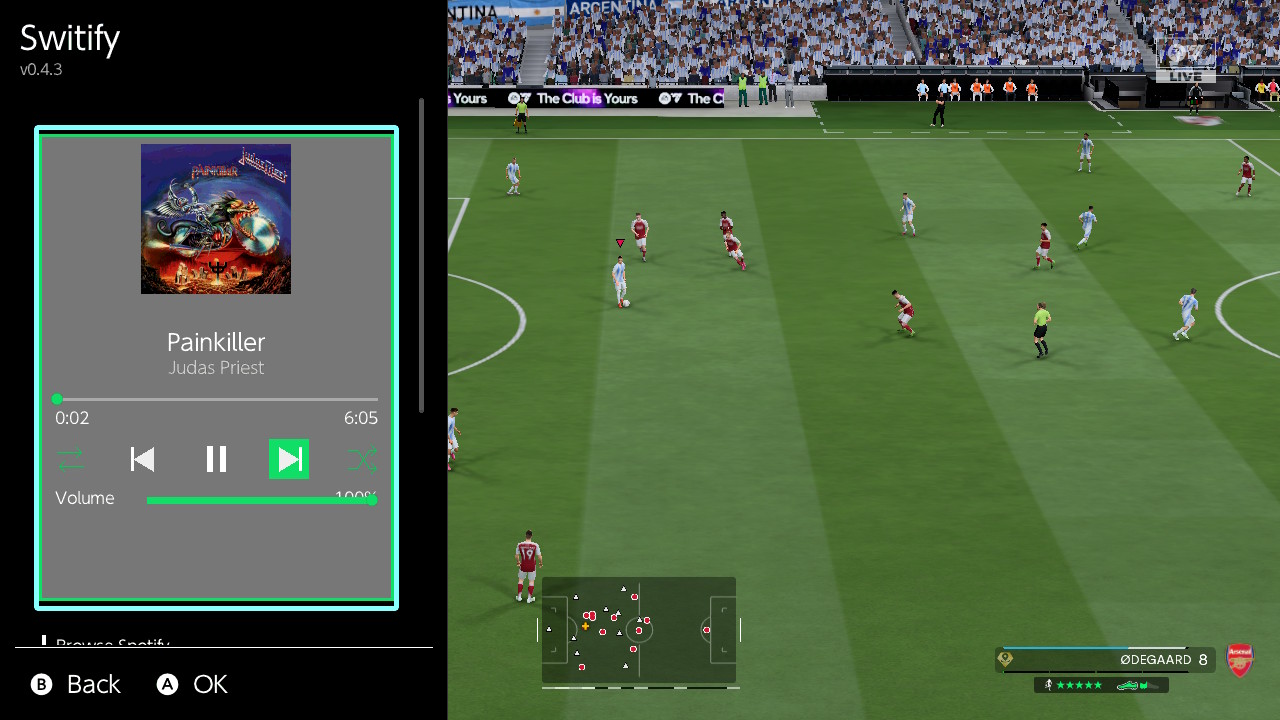
  • An optional Ultrahand overlay with a background service, allowing music to continue playing while you use another application or play a game.
The main goal was to make Spotify feel natural to use on the Switch, with an interface designed around controller navigation instead of a desktop-style layout.


Main app features​

  • Spotify Home with All, Music, and Podcasts filters
  • Recently played content and personalized recommendations
  • Search for songs, artists, albums, playlists, and podcasts
  • Liked Songs, playlists, saved albums, shows, and episodes
  • Support for large libraries and playlists through pagination
  • Collection and playlist pages with artwork and track lists
  • Persistent mini-player
  • Full Now Playing screen
  • Theater-style player mode
  • Shuffle
  • Previous, Play/Pause, and Next controls
  • Repeat Off, Repeat All, and Repeat One
  • Queue and current playlist display
  • Seek and volume controls
  • Heart button for adding or removing songs from Liked Songs
  • Persistent volume across sessions
  • Optional global playback shortcuts
  • Three-band Bass, Mid, and Treble equalizer
  • Normal 160 kbps and High 320 kbps Spotify Vorbis quality options
  • Persistent artwork cache
  • Restores the last song and playlist after reopening the app
  • Playback always starts paused and never resumes without user input

1786907432465.jpeg

1786907450286.jpeg

1786907462574.jpeg

1786907477492.jpeg

1786907490580.jpeg

1786907506375.jpeg

1786907521907.jpeg

Background overlay features​

Switify also includes an optional Ultrahand overlay and Atmosphere background service.

The overlay provides:

  • Background music while using another application or playing a game
  • Artwork, title, artist, progress, and playback status
  • Shuffle
  • Previous, Play/Pause, and Next
  • Repeat Off, Repeat All, and Repeat One
  • Queue and playlist browsing
  • Seeking
  • A visible volume slider with persistent volume
  • Normal and High streaming-quality options
  • Home, Search, Library, and collection browsing
  • Paginated views designed to use less memory
  • Restoration of the previous session in a paused state
The background service is dormant by default. It does not start when the console boots and is launched automatically only when the Switify overlay is opened.

The NRO and overlay are independent applications. The only things they share are authentication, settings, cached artwork, and session information.
1786907384511.jpeg


1786907406826.jpeg

Installing​

Download the latest release from:

GitHub:
https://github.com/DomazinUS/Switify

The first public release contains:

  • Switify 0.6.3 — full-screen NRO
  • Switify Overlay 0.4.3 — Ultrahand overlay and background service
  • Complete matching source code
  • SHA-256 checksums

Installing the full app​

Download Switify-0.6.3.zip and extract it to the root of the SD card.

The resulting file should be:

/switch/Switify/Switify.nro
I recommend launching Switify through title override so it receives the full application memory allocation:

  1. Hold R while opening a game.
  2. Keep holding R until Homebrew Menu appears.
  3. Launch Switify.
A forwarder can also be used if it provides full application memory.

Initial Spotify sign-in​

A Spotify Premium account is required.

Switify does not require you to create a Spotify developer application, Client ID, or client secret.

For the first login:

  1. Connect the Switch and your phone to the same Wi-Fi network.
  2. Open Switify on the Switch.
  3. Open Spotify on your phone.
  4. Open Connect to a device.
  5. Select Switify.
  6. Wait for the Switch to confirm the connection.
Switify stores the reusable authentication locally on the SD card. You only need to repeat this process if you sign out, delete the credentials, or Spotify invalidates the saved session.

The credentials file is stored at:

/config/Switify/credentials.json
Do not share this file or attach it to a bug report.

Installing the overlay​

You must successfully authenticate using the full NRO before using the overlay. The overlay intentionally does not have a separate login process.

Download Switify-Overlay-0.4.3.zip and extract it to the root of the SD card.

It installs:

/switch/.overlays/Switify.ovl
/atmosphere/contents/4200000000535754/exefs.nsp
/atmosphere/contents/4200000000535754/toolbox.json
After installing or updating the overlay package, reboot the Switch once so Atmosphere discovers the background service.

Then open Ultrahand and select Switify. The background service will start automatically.

There is no boot2.flag, so Switify does not consume background resources immediately after boot.

Do not run the standalone NRO and background service at the same time, since each one has its own independent Spotify and audio engine.

Optional global playback controls​

The standalone app includes an option to enable global controller shortcuts:

  • Y — Play/Pause
  • L — Previous track
  • R — Next track
  • ZL — Rewind
  • ZR — Fast-forward
These shortcuts can be enabled in Settings.

Streaming quality​

Both the full app and overlay provide two quality modes:

  • Normal — 160 kbps Vorbis
  • High — 320 kbps Vorbis
Quality changes take effect the next time the corresponding playback engine starts.

Normal uses less network bandwidth and is the safest initial option. High provides better compression quality but requires a more stable connection.

Current limitations​

  • Spotify Premium is required for native playback.
  • Switify does not download Spotify music for offline use.
  • The full NRO and background service should not run simultaneously.
  • Spotify uses undocumented internal protocols that may change in the future.
  • The overlay’s background service currently conflicts with the Nintendo 64 Nintendo Switch Online application. N64 games can remain on a black screen while the Switify service is resident, even when music is paused. Stop the Switify background service before opening that application.
The app and overlay have been tested extensively on real hardware, but this is still the first public release. Bug reports and feedback are welcome through GitHub or here on GBATemp.

Switify is an independent project and is not affiliated with Spotify, Nintendo, or their subsidiaries.

Hope someone finds it useful!
 
Last edited by HiroshiYamauchi,
First of all, amazing work! Having Spotify on the Switch is something I've personally been waiting for a long time.

However, I'm running into an issue: when I connect my account, the app basically isn't working for me and I'm not sure why. I don't get any audio playback at all, and I can't change songs manually. Also, I have a Spotify Premium account, so the account type shouldn't be the problem.

I'm attaching my logs below so you can check it out. Any help would be appreciated!!
 

Attachments

First of all, amazing work! Having Spotify on the Switch is something I've personally been waiting for a long time.

However, I'm running into an issue: when I connect my account, the app basically isn't working for me and I'm not sure why. I don't get any audio playback at all, and I can't change songs manually. Also, I have a Spotify Premium account, so the account type shouldn't be the problem.

I'm attaching my logs below so you can check it out. Any help would be appreciated!!


Thanks for you feedback! It's really unfortunate, but the reality is that Spotify hates its costumers, so they disable/limit some features for some of the accounts, specially if it's a recent one. Your Spotify login is successful, but Spotify is rejecting the audio-key requests required for playback. This is a known upstream problem affecting some Premium accounts, particularly newer accounts. Could you tell me approximately when your Spotify account was created? If possible, testing an older Premium account on the same Switch would confirm it.


Do you mind testing the attached version to see if it changes anything for you? If still not working, please, send me this log:

sdmc:/config/Switify/app.log


Thank you!
 

Attachments

  • Wow
  • Like
Reactions: cearp and _Sannix
Thanks for you feedback! It's really unfortunate, but the reality is that Spotify hates its costumers, so they disable/limit some features for some of the accounts, specially if it's a recent one. Your Spotify login is successful, but Spotify is rejecting the audio-key requests required for playback. This is a known upstream problem affecting some Premium accounts, particularly newer accounts. Could you tell me approximately when your Spotify account was created? If possible, testing an older Premium account on the same Switch would confirm it.


Do you mind testing the attached version to see if it changes anything for you? If still not working, please, send me this log:

sdmc:/config/Switify/app.log


Thank you!
Hey! Tested both versions and yeah, my sister's account works flawlessly on both (her account is over a year old). Mine is fairly new (around 2 months old), so Spotify is definitely blocking the audio keys on their end for newer accounts.

Sucks for me, but at least we confirmed what's going on! Thanks a lot for taking the time to test this and help out!!
 

Attachments

  • Like
Reactions: HiroshiYamauchi
Omg. This is awesome. People sometimes scoff at me when I say I mod all my consoles. Why would you do that? I don't think people really understand how much potential exists for the Switch but Nintendo refused to anything but the bare minimum. Black Theme and White theme, no music, no Netflix, some of the worst possible online implementations.
 
  • Like
Reactions: cearp
Wonderful, gonna try this this afternoon. Someone else already asked you to make it compatible with youtube music... What about Navidrome/Jellyfin/Plex ? :D
 
If you plan to only use the app part, this project can do it. I'd love to see a version of the overlay for it though https://gbatemp.net/threads/release...or-the-nintendo-switch-switchfin-fork.682373/
I'm mainly interested in the overlay indeed. I'm using Navidrome daily so having an overlay which could connect to a subsonic server would be amazing...

EDIT : The nro app works perfectly! But the overlay doesn't start... Service is shown as dormant, when I try Retry automatic startup it shortly shows "Launch failed" with 0x00010801 (M1 D132). When I try Refresh connection Détails shows "Background service is n..."
 
Last edited by morback,
Hi people, for anyone that can't get the overlay service to start, remember that you need to restart your Switch at least once:

Installing the overlay​

You must successfully authenticate using the full NRO before using the overlay. The overlay intentionally does not have a separate login process.

Download Switify-Overlay-0.4.3.zip and extract it to the root of the SD card.

It installs:

/switch/.overlays/Switify.ovl
/atmosphere/contents/4200000000535754/exefs.nsp
/atmosphere/contents/4200000000535754/toolbox.json
After installing or updating the overlay package, reboot the Switch once so Atmosphere discovers the background service.

Then open Ultrahand and select Switify. The background service will start automatically.
 
Last edited by HiroshiYamauchi,
Hi people, for anyone that can't get the overlay service to start, remember that you need to restart your Switch at least once:

Installing the overlay​

You must successfully authenticate using the full NRO before using the overlay. The overlay intentionally does not have a separate login process.

Download Switify-Overlay-0.4.3.zip and extract it to the root of the SD card.

It installs:

/switch/.overlays/Switify.ovl
/atmosphere/contents/4200000000535754/exefs.nsp
/atmosphere/contents/4200000000535754/toolbox.json
After installing or updating the overlay package, reboot the Switch once so Atmosphere discovers the background service.

Then open Ultrahand and select Switify. The background service will start automatically.
I did everything mentioned here. Only difference is I copied both zip contents and started the nro only, connected my account then performed the reboot and tried the overlay. After several reboots it still wasn't working.
I'll try to delete the overlay and reinstall it.
 
I did everything mentioned here. Only difference is I copied both zip contents and started the nro only, connected my account then performed the reboot and tried the overlay. After several reboots it still wasn't working.
I'll try to delete the overlay and reinstall it.


Can you send me these logs?

/config/Switify/background-ready.log
/config/Switify/background.log
/config/Switify/background.log.previous
/config/Switify/app.log
 
The only one present is app.log
Thanks! No other logs means that Switify background service never reached its own logging and initialization code. Can you try doing the following?


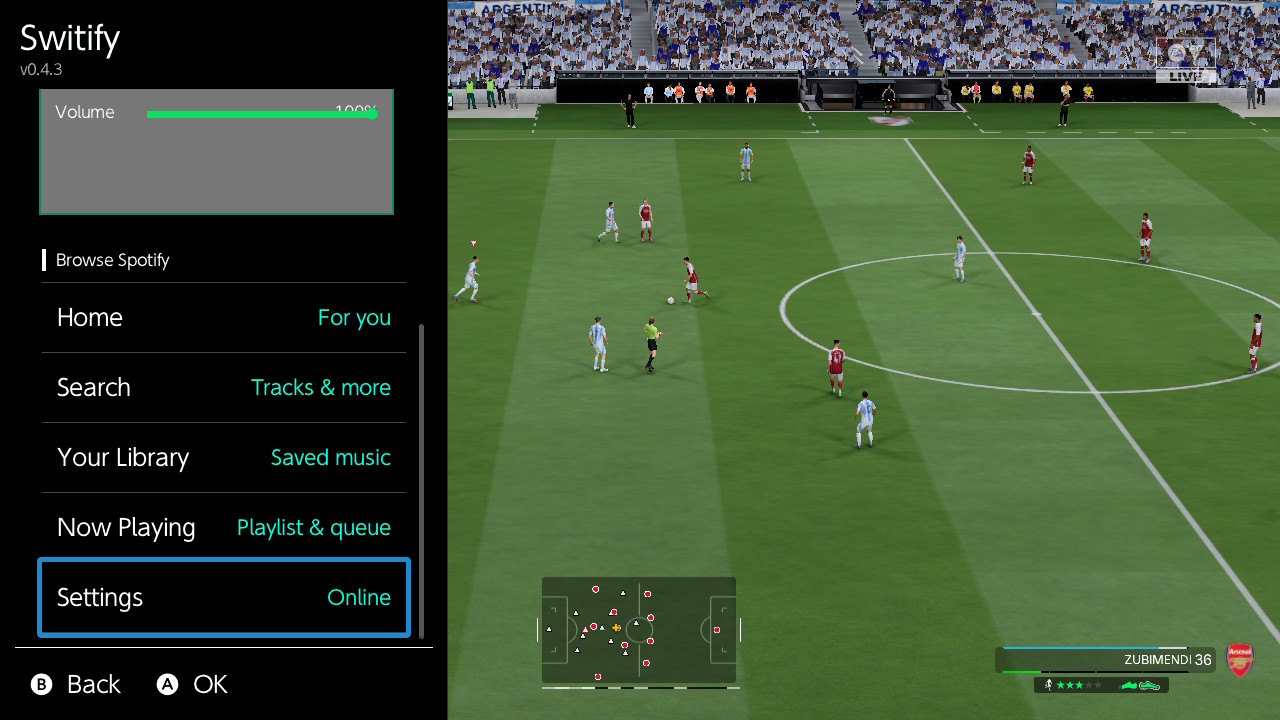
Open the Switify overlay, scroll down to Settings and press A:

1787081733672.png


If it says the servce is Dormant, try "Retry automatic startup":

1787081822311.png


It should change the Dormant status to Online:

1787081932398.png


If not, try pressing "Refresh connection" and retry the steps above. Let me know how that goes and if it still not working, let me know the error it shows in the second line "Details".
 
Thanks! No other logs means that Switify background service never reached its own logging and initialization code. Can you try doing the following?


Open the Switify overlay, scroll down to Settings and press A:

View attachment 586688


If it says the servce is Dormant, try "Retry automatic startup":

View attachment 586691


It should change the Dormant status to Online:

View attachment 586692

If not, try pressing "Refresh connection" and retry the steps above. Let me know how that goes and if it still not working, let me know the error it shows in the second line "Details".
When I go to the settings, details shows 0x000110801 (M1 D132). Then when I try "Retry automatic startup" Service shows "Launch failed" for about 0.5s then dormant again. If I try "Refresh connection" Details shows "Background service is n..."
 
When I go to the settings, details shows 0x000110801 (M1 D132). Then when I try "Retry automatic startup" Service shows "Launch failed" for about 0.5s then dormant again. If I try "Refresh connection" Details shows "Background service is n..."


Thanks for taking the time to test it.

The problem you are having means the Switch kernel does not have enough available system resources to launch the normal Switify background service. This can happen when several sysmodules are installed or running simultaneously.

I have prepared a special lightweight compatibility build for you to test. It uses less memory and fewer system resources:

  • Smaller overlay
  • Reduced background-service memory reservation
  • No separate artwork network session or worker thread
  • Only the audio decoder Switify actually uses
The main compromise is that album artwork is disabled in this build. A music-note placeholder will appear instead, but browsing, playback, playlists, search, volume, shuffle, repeat, and other controls should continue working normally. Please, let me know how that goes. If it still fails, send me the text shown under Service and Details, plus any new files created inside (careful with credentials.json, never share that one please):

/config/Switify/
Post automatically merged:

Updated versions for the app and overlay are now available, check OP for details.
 

Attachments

Last edited by HiroshiYamauchi,

Thanks! No other logs means that Switify background service never reached its own logging and initialization code. Can you try doing the following?


Open the Switify overlay, scroll down to Settings and press A:

View attachment 586688


If it says the servce is Dormant, try "Retry automatic startup":

View attachment 586691


It should change the Dormant status to Online:

View attachment 586692

If not, try pressing "Refresh connection" and retry the steps above. Let me know how that goes and if it still not working, let me know the error it shows in the second line "Details".
When I go to the settings details shows 0x000110801 (M1 D132). Then when I try "Retry automatic startup" Service shows "Launch failed" for about 0.5s. If I try "Refresh connection" Details shows "Background service is n..."
Post automatically merged:

Thanks for taking the time to test it.

The problem you are having means the Switch kernel does not have enough available system resources to launch the normal Switify background service. This can happen when several sysmodules are installed or running simultaneously.

I have prepared a special lightweight compatibility build for you to test. It uses less memory and fewer system resources:

  • Smaller overlay
  • Reduced background-service memory reservation
  • No separate artwork network session or worker thread
  • Only the audio decoder Switify actually uses
The main compromise is that album artwork is disabled in this build. A music-note placeholder will appear instead, but browsing, playback, playlists, search, volume, shuffle, repeat, and other controls should continue working normally. Please, let me know how that goes. If it still fails, send me the text shown under Service and Details, plus any new files created inside (careful with credentials.json, never share that one please):

/config/Switify/
Post automatically merged:

Updated versions for the app and overlay are now available, check OP for details.

Wow thank you!!
I don't have a lot of spare time right now so I'll not be able to test before tonight (CET).
Also I'm not 100% sure I configured the sysmodule memory allocation to 8MB in the Ultrahand overlay settings. I'll need to verify that.
 

Site & Scene News

Popular threads in this forum