UPDATED 08/19/2026
New releases
-----------------------------------------------------------------------------------------------------------------------------------------------------------------------------------
Hi guys,
Just like twiNX, I built this app for my own use, but since it’s working well I decided to share it.
The app is called Switify. It is an unofficial, controller-friendly Spotify client made specifically for Nintendo Switch homebrew.

Switify has two separate components:
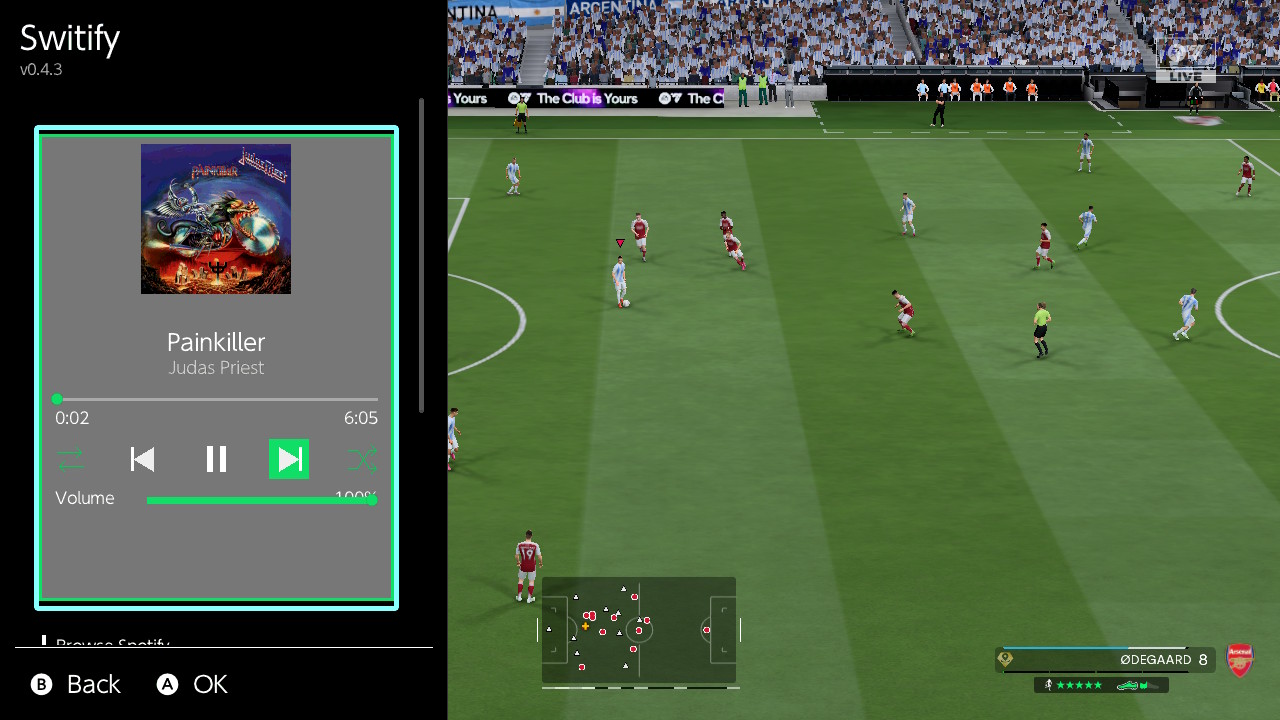
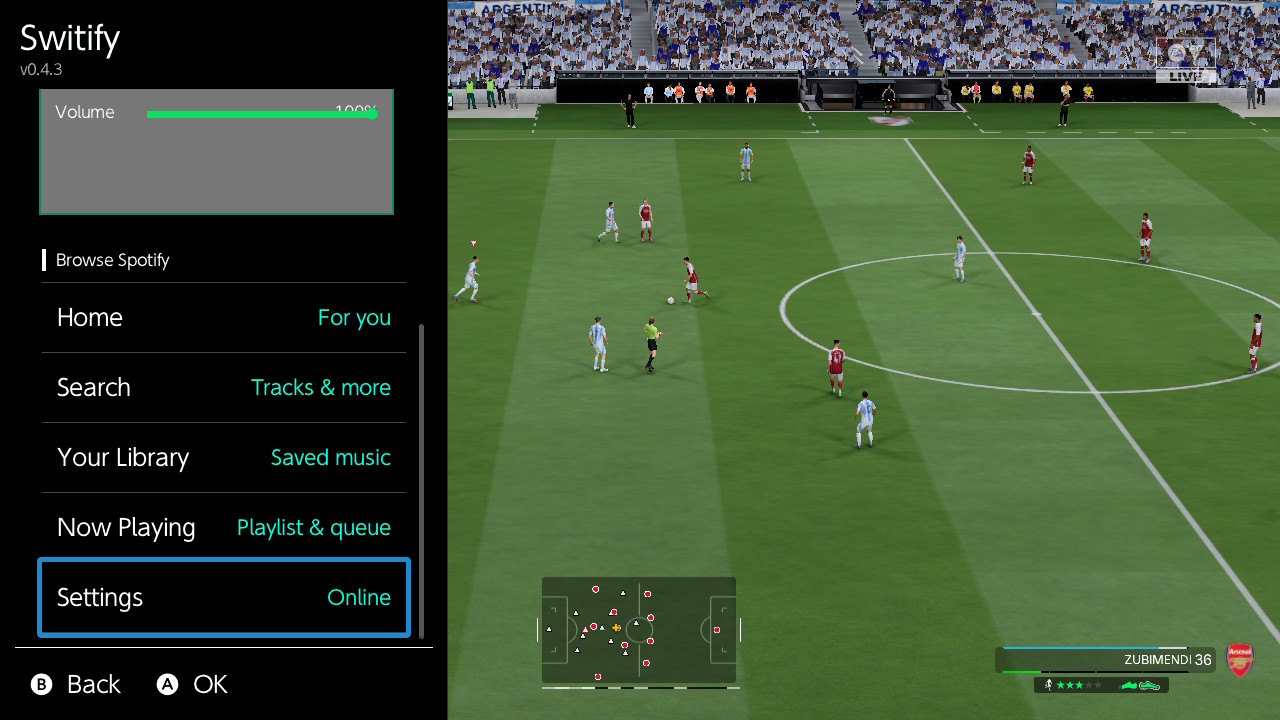
The overlay provides:
The NRO and overlay are independent applications. The only things they share are authentication, settings, cached artwork, and session information.
GitHub:
https://github.com/DomazinUS/Switify
The first public release contains:
The resulting file should be:
/switch/Switify/Switify.nro
I recommend launching Switify through title override so it receives the full application memory allocation:
Switify does not require you to create a Spotify developer application, Client ID, or client secret.
For the first login:
The credentials file is stored at:
/config/Switify/credentials.json
Do not share this file or attach it to a bug report.
Download Switify-Overlay-0.4.3.zip and extract it to the root of the SD card.
It installs:
/switch/.overlays/Switify.ovl
/atmosphere/contents/4200000000535754/exefs.nsp
/atmosphere/contents/4200000000535754/toolbox.json
After installing or updating the overlay package, reboot the Switch once so Atmosphere discovers the background service.
Then open Ultrahand and select Switify. The background service will start automatically.
There is no boot2.flag, so Switify does not consume background resources immediately after boot.
Do not run the standalone NRO and background service at the same time, since each one has its own independent Spotify and audio engine.
Normal uses less network bandwidth and is the safest initial option. High provides better compression quality but requires a more stable connection.
Switify is an independent project and is not affiliated with Spotify, Nintendo, or their subsidiaries.
Hope someone finds it useful!
New releases
Standalone NRO 0.7.0 highlights
- Full lyrics view with a fixed current/upcoming-line panel, timestamps, and
active-row highlighting when Spotify supplies Musixmatch line timing. - Optional line-synced lyrics directly inside the full player, enabled by
default and updated during normal playback or seeking. - Black, animated RGB Gradient, and animated RGB Solid full-player
backgrounds. RGB Solid is the default; the normal Now Playing tab remains
unchanged. - Followed podcast shows in Home and Your Library, with authenticated,
paginated playable episode lists and podcast-aware labels. - Complete multi-thousand-track Liked Songs and playlist sessions with Play
All, session caching, and only 100 interface rows materialized at once. - Large player, podcast, and collection artwork now uses Spotify's largest
supplied image instead of the 300-pixel card endpoint. - Session lyrics caching avoids repeat network requests for the same track.
- Removed unused AAC, MP3, ALAC, and Opus decoder paths; Spotify playback
continues to use selectable 160 or 320 kbps OGG Vorbis streams. - Preserved loaded dashboards, libraries, collections, and artwork across tab
changes. - Hardened playback-state publication and Shuffle/Repeat queue updates.
Overlay and background service 0.5.0 highlights
- Restored Nintendo 64 Nintendo Switch Online compatibility in hardware
testing by reducing persistent decoder, socket, queue, cache, and artwork
pressure. - Remote 50-track collection fetches, 25-item overlay pages, and a bounded
100-track playback window replace thousand-track up-front loading. - Followed podcasts are available under Your Library with playable episodes.
- Automatic service startup retries with bounded backoff, supervises Dormant
transitions, and recovers without requiring the manual retry path during a
normal launch. - Loading screens retain a local B-button escape and catalog work stays away
from Ultrahand's render thread. - Search and browser input is claimed by the overlay instead of being repeated
into the foreground game or application. - Play/Pause uses an explicit requested state. Pending playback-state, seek,
volume, Shuffle, Repeat, and quality requests coalesce so stale actions are
not replayed later. - Closing Ultrahand releases overlay-owned artwork, network, and IPC resources;
reopening reconnects cleanly while the independent service keeps playing. - Artwork networking is just-in-time: cache hits claim no BSD session and a
cache miss releases its session immediately after the transfer. - Centered artwork and a clearer volume layout keep the percentage readable
while aligning the Volume label with its slider. - The service remains dormant at console boot and opens audout only when audio
playback actually begins.
-----------------------------------------------------------------------------------------------------------------------------------------------------------------------------------
Hi guys,
Just like twiNX, I built this app for my own use, but since it’s working well I decided to share it.
The app is called Switify. It is an unofficial, controller-friendly Spotify client made specifically for Nintendo Switch homebrew.
Switify has two separate components:
- A full-screen NRO application for browsing Spotify and playing music normally.
- An optional Ultrahand overlay with a background service, allowing music to continue playing while you use another application or play a game.
Main app features
- Spotify Home with All, Music, and Podcasts filters
- Recently played content and personalized recommendations
- Search for songs, artists, albums, playlists, and podcasts
- Liked Songs, playlists, saved albums, shows, and episodes
- Support for large libraries and playlists through pagination
- Collection and playlist pages with artwork and track lists
- Persistent mini-player
- Full Now Playing screen
- Theater-style player mode
- Shuffle
- Previous, Play/Pause, and Next controls
- Repeat Off, Repeat All, and Repeat One
- Queue and current playlist display
- Seek and volume controls
- Heart button for adding or removing songs from Liked Songs
- Persistent volume across sessions
- Optional global playback shortcuts
- Three-band Bass, Mid, and Treble equalizer
- Normal 160 kbps and High 320 kbps Spotify Vorbis quality options
- Persistent artwork cache
- Restores the last song and playlist after reopening the app
- Playback always starts paused and never resumes without user input
Background overlay features
Switify also includes an optional Ultrahand overlay and Atmosphere background service.The overlay provides:
- Background music while using another application or playing a game
- Artwork, title, artist, progress, and playback status
- Shuffle
- Previous, Play/Pause, and Next
- Repeat Off, Repeat All, and Repeat One
- Queue and playlist browsing
- Seeking
- A visible volume slider with persistent volume
- Normal and High streaming-quality options
- Home, Search, Library, and collection browsing
- Paginated views designed to use less memory
- Restoration of the previous session in a paused state
The NRO and overlay are independent applications. The only things they share are authentication, settings, cached artwork, and session information.
Installing
Download the latest release from:GitHub:
https://github.com/DomazinUS/Switify
The first public release contains:
- Switify 0.6.3 — full-screen NRO
- Switify Overlay 0.4.3 — Ultrahand overlay and background service
- Complete matching source code
- SHA-256 checksums
Installing the full app
Download Switify-0.6.3.zip and extract it to the root of the SD card.The resulting file should be:
/switch/Switify/Switify.nro
I recommend launching Switify through title override so it receives the full application memory allocation:
- Hold R while opening a game.
- Keep holding R until Homebrew Menu appears.
- Launch Switify.
Initial Spotify sign-in
A Spotify Premium account is required.Switify does not require you to create a Spotify developer application, Client ID, or client secret.
For the first login:
- Connect the Switch and your phone to the same Wi-Fi network.
- Open Switify on the Switch.
- Open Spotify on your phone.
- Open Connect to a device.
- Select Switify.
- Wait for the Switch to confirm the connection.
The credentials file is stored at:
/config/Switify/credentials.json
Do not share this file or attach it to a bug report.
Installing the overlay
You must successfully authenticate using the full NRO before using the overlay. The overlay intentionally does not have a separate login process.Download Switify-Overlay-0.4.3.zip and extract it to the root of the SD card.
It installs:
/switch/.overlays/Switify.ovl
/atmosphere/contents/4200000000535754/exefs.nsp
/atmosphere/contents/4200000000535754/toolbox.json
After installing or updating the overlay package, reboot the Switch once so Atmosphere discovers the background service.
Then open Ultrahand and select Switify. The background service will start automatically.
There is no boot2.flag, so Switify does not consume background resources immediately after boot.
Do not run the standalone NRO and background service at the same time, since each one has its own independent Spotify and audio engine.
Optional global playback controls
The standalone app includes an option to enable global controller shortcuts:- Y — Play/Pause
- L — Previous track
- R — Next track
- ZL — Rewind
- ZR — Fast-forward
Streaming quality
Both the full app and overlay provide two quality modes:- Normal — 160 kbps Vorbis
- High — 320 kbps Vorbis
Normal uses less network bandwidth and is the safest initial option. High provides better compression quality but requires a more stable connection.
Current limitations
- Spotify Premium is required for native playback.
- Switify does not download Spotify music for offline use.
- The full NRO and background service should not run simultaneously.
- Spotify uses undocumented internal protocols that may change in the future.
The overlay’s background service currently conflicts with the Nintendo 64 Nintendo Switch Online application. N64 games can remain on a black screen while the Switify service is resident, even when music is paused. Stop the Switify background service before opening that application.
Switify is an independent project and is not affiliated with Spotify, Nintendo, or their subsidiaries.
Hope someone finds it useful!
Last edited by HiroshiYamauchi,