Tutorial
Updated
How to compile and install arm9loaderhax
This guide is probably obsolete, use this instead. Just drag your otp.bin to your browser window and it will compile it for you, I'm leaving the original guide below for those who likes to DIY.
Original post:
Hopefully this guide should silence the whiners
Before we begin I have to say this is my very first guide that I made from my experience and information from other Temp members, and English isn't my primary language so I might make mistakes. If you find any just tell me and I'll try my best to correct them. (The screenshot in the spoiler was taken in OS X with wineskin because I'm lazy, this guide is for Windows only)
So you just dumped your OTP and wondering how do you compile A9LH for your 3DS? Here's a guide to instruct you how to compile and install the payload on your device. This guide assumes you know the basics of 3DS homebrew and Windows command prompt,and just stay away from this if you don't - menuhax is good enough for most people IMO. (I am serious)
DISCLAIMER: Any modifications to your 3DS are done at your own risk. I am not responsible for any bricks that may occur during this process (use your common sense and read the guide carefully)
0. Requirements:
There's a test binary (forgot who made it) that will power off your 3DS upon pressing any buttons except ZL, ZR or home. Simply copy it to the root of your SD card, wait for a couple seconds and press a button. If your 3DS powers off, then A9LH is successfully installed and woking correctly (congrats ). If your 3DS powers off the moment you turn it on, check if the file is named "arm9loaderhax.bin" and placed in the root directory, if it power led stay on and won't respond to button pressed then your 3DS is probably bricked
If you want a cold boot (permanent) CFW (the reason to get A9LH in the first place), check out @Aurora Wright's ReiNand fork. She already documented it very well so I'm not going through it in this thread
FAQ
Q: I'm getting "python: command not found"
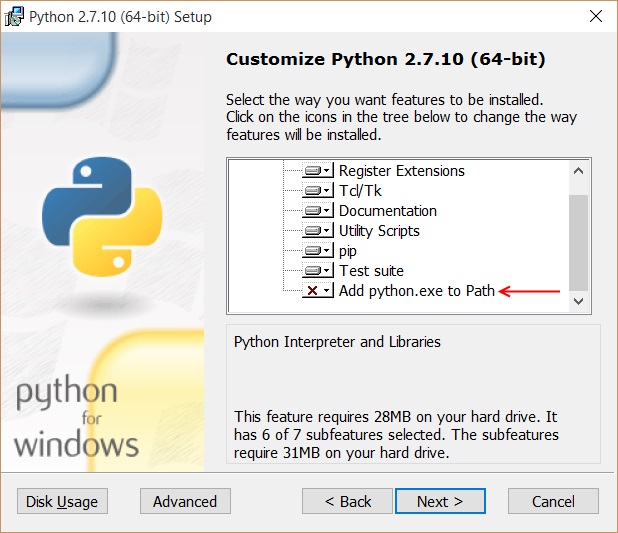
A: Make sure you select "add python.exe to path" during installation, alternatively you can set the PATH variable manually by entering this in cmd (Thanks @Kever)
Q: How to uninstall A9LH?[/SIZE][/SIZE]
A: Restore a sysNAND backup made before running arm9loaderhax.3dsx
Original post:
Hopefully this guide should silence the whiners
Before we begin I have to say this is my very first guide that I made from my experience and information from other Temp members, and English isn't my primary language so I might make mistakes. If you find any just tell me and I'll try my best to correct them. (The screenshot in the spoiler was taken in OS X with wineskin because I'm lazy, this guide is for Windows only)
So you just dumped your OTP and wondering how do you compile A9LH for your 3DS? Here's a guide to instruct you how to compile and install the payload on your device. This guide assumes you know the basics of 3DS homebrew and Windows command prompt,and just stay away from this if you don't - menuhax is good enough for most people IMO. (I am serious)
DISCLAIMER: Any modifications to your 3DS are done at your own risk. I am not responsible for any bricks that may occur during this process (use your common sense and read the guide carefully)
0. Requirements:
- arm9loaderhax source (https://github.com/capito27/arm9loaderhax), it includes all the file dumps you'll need, except your own OTP
- miniPasta (https://github.com/d0k3/MiniPasta/releases , N3DS only)
- OTP.bin (DO NOT use dumps that are not from your console or the one included with the A9LH source, you WILL brick your 3DS, guaranteed.)
- Python 2.7.11 x86-64 (https://www.python.org/downloads/windows)
- PyCrypto (http://www.voidspace.org.uk/python/pycrypto-2.6.1/pycrypto-2.6.1.win-amd64-py2.7.exe)
- Make(http://gnuwin32.sourceforge.net/packages/make.htm)
- devkitARM (https://sourceforge.net/projects/devkitpro/files/Automated Installer/ , part of devkitPro)
- Your brain
- If you have an existing install of Python 3.x/32-bit 2.7.x, remove it first
- Install Python 2.7 x86-64, make sure you install "add python.exe to patch" sub feature during installation (it's not set by default)
- Install PyCrypto
- Install devkitPro 1.6.0, you will be be presented with tons of packages but the only ones we're interested are under devkitARM, simply uncheck everything else.
- Install Make, you should download the file with md5:8ae51379d1f3eef8360df4e674f17d6d
- Extract the A9LH source to any directory
- Copy your OTP.bin to the data_input folder and overwrite the one that's included with the zip file
- Open a CMD window (Shift+right click on the explorer window or cd into it manually)at the root directory of the source files, type "make" (without quotes) and enter.
- Wait for a minute or so, a data_output folder will appear and there should be no errors
- Copy the arm9loaderhax.3dsx file from the newly created folder to /3ds/ on your SD card (the installer is built specifically for the 3DS you dumped its OTP from, if you want to install A9LH on more than one 3DS you will to recompile the payload with their respective OTP.bin files)
- Ensure you have a dump of your SysNAND before you continue
- Enter hblauncher using an entry point of your choice
- Run arm9loaderhax.3dsx (see below if you're stuck on "exploiting arm9")
- The payload will be installed to your NAND and your 3DS will then be rebooted to black screens afterwards. Don't panic, turn off your 3DS
- Download and copy the miniPasta 3dsx to your SD card
- Run miniPasta, the screen will turn black for a few seconds and you will be kicked back to home menu afterwards
- Re-enter hblauncher and try running the A9LH installer again
There's a test binary (forgot who made it) that will power off your 3DS upon pressing any buttons except ZL, ZR or home. Simply copy it to the root of your SD card, wait for a couple seconds and press a button. If your 3DS powers off, then A9LH is successfully installed and woking correctly (congrats
). If your 3DS powers off the moment you turn it on, check if the file is named "arm9loaderhax.bin" and placed in the root directory, if it power led stay on and won't respond to button pressed then your 3DS is probably bricked If you want a cold boot (permanent) CFW (the reason to get A9LH in the first place), check out @Aurora Wright's ReiNand fork. She already documented it very well so I'm not going through it in this thread
FAQ
Q: I'm getting "python: command not found"
A: Make sure you select "add python.exe to path" during installation, alternatively you can set the PATH variable manually by entering this in cmd (Thanks @Kever)
Code:
set PATH=C:\Python27;%PATH%A: Restore a sysNAND backup made before running arm9loaderhax.3dsx
Last edited by lefthandsword,