





Homebrew Homebrew Forwarder ISO's

  • Thread starter Thread starter kLiNiKaL
  • Start date Start date
  • Views Views 201,876
  • Replies Replies 797
Crap, as you were told to do in another thread. I heard only wiiscrubber 1.4 works with marcans iso template?
 
roku93 said:
Crap, as you were told to do in another thread. I heard only wiiscrubber 1.4 works with marcans iso template?
Well hell, I never did try running the .dol all by itself. LOL. Anyways, I'm trying to pry out of the hands that know the modifications necessary to make TriiForce run a hard coded game. Hopefully we'll figure it out soon enough and I think actually recompiling the source for each game and replacing the current .dol in the TriiForce ISO would be quicker than using Crap. But anyway we can get it working is OK by me. There is at least one individual who is willing to take a look at the source and hopefully provide an example of modifying it to do what we want later tonight. And others have been helpful in pointing me in the right direction. It'll all come together soon enough.
smile.gif
 
Skizzo said:
I think actually recompiling the source for each game and replacing the current .dol in the TriiForce ISO would be quicker than using Crap. But anyway we can get it working is OK by me. There is at least one individual who is willing to take a look at the source and hopefully provide an example of modifying it to do what we want later tonight. And others have been helpful in pointing me in the right direction. It'll all come together soon enough.
smile.gif

I think a better approach is to only modify the source code for triiforce 1 time. Just make a mod that reads argv[1]. Then you can tell that mod what game to boot from the dol that is booting it. then all you need to do is change 4 letters in the dol and youre done.
 
giantpune said:
Skizzo said:
I think actually recompiling the source for each game and replacing the current .dol in the TriiForce ISO would be quicker than using Crap. But anyway we can get it working is OK by me. There is at least one individual who is willing to take a look at the source and hopefully provide an example of modifying it to do what we want later tonight. And others have been helpful in pointing me in the right direction. It'll all come together soon enough.
smile.gif

I think a better approach is to only modify the source code for triiforce 1 time. Just make a mod that reads argv[1]. Then you can tell that mod what game to boot from the dol that is booting it. then all you need to do is change 4 letters in the dol and youre done.

Thus increase the chain of loaders by one
smile.gif
(main.dol -> forwarder-> triiforce-> game dol)
And introduce compatibility issues if you update the triiforce on the sd cad. I don't think that's a good idea... actually all this is not a good idea, just making discs out of homebrew and stuff because usb loaders doesn't do it by themselves... no further comment...

Btw, you can take the craptriiforce.dol (in crap archive under the loaders folder) and hex edit it. The title id placeholder TCRP

Source http://code.google.com/p/crapwii/source/br...k/Craptriiforce
 
TiMeBoMb4u2 said:
Hyaku Shiki said:
Hi Guys,
I'm trying to understand what you're all doing here. Are you making WiiWare forwarders ... but they are chosen from within Wiiflow? So you choose a game cover or program cover and it loads the .dol file for the wiiware or HBC, etc?
Thanks,
HS
Yes.
biggrin.gif

Is there a step-by-step on setting it up? I'd love to try.

Thanks,
 
* You need to install devkitpro

* HERE is all you need to create ISOs

*
You will also need to copy the files libogc to c:\dekitpro\libogc\

1-
49525630.jpg


2-

69126068.jpg


3-

*open main.cpp and search for homebrewchannel.
* Replace each instance with your application name.
* You can also change the splash screen by changing the .png file in \source\image\background.png

4- Recompile the source


5-
12162196.jpg


6- Replace the main.dol using WiiScrubber
17445739.jpg


7-
98957432.jpg


Add sound

8-
Extract files from iso template with wiiscrubber 1.4
78011214.jpg


9-

58599676.jpg


10-
Extract your wad with Wad Unpacker
90470578.jpg


11-1
Rename 00000000.app to opening.bnr And move it to Sound folder
68184183.jpg


11-2


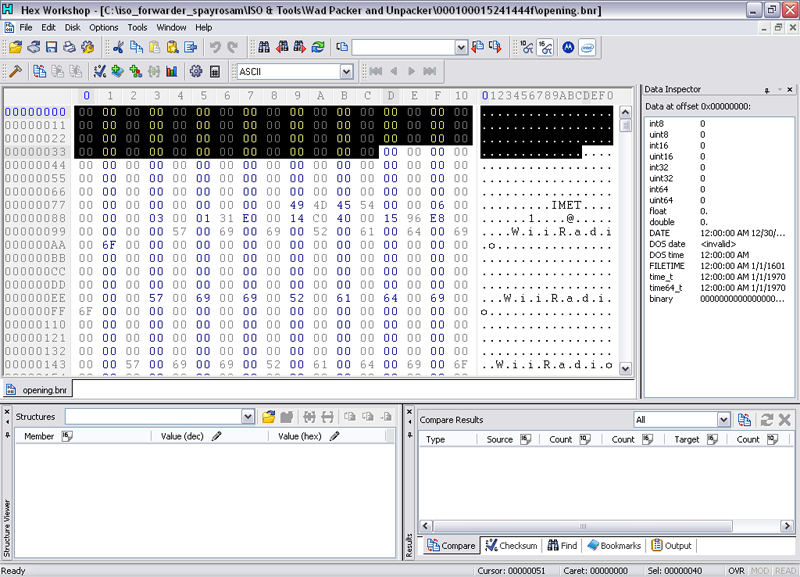
After unpacking your WAD and renaming the "00000000.app" file, you will need to remove the first 64bytes of the "opening.bnr" file. Otherwise, the sound may not play.

screen01.png


screen02.png


12-
Build a partition with partition builder 1.2 On source directory use a directory with a opening.bnr
17685277.jpg


13-
Load that partition again with wiiscrubber
48216026.jpg


14-
Use ISO Renamer v3 to change the ID ((automatically) C??P00 = PAL / C??E00 = NTSC-U) and name of the ISO
51235088.jpg


Done
wink.gif
 
spayrosam said:
* You need to install devkitpro

* HERE is all you need to create ISOs

*
You will also need to copy the files libogc to c:\dekitpro\libogc\

1-
49525630.jpg


2-

69126068.jpg


3-

*open main.cpp and search for homebrewchannel.
* Replace each instance with your application name.
* You can also change the splash screen by changing the .png file in \source\image\background.png

4- Recompile the source


5-
12162196.jpg


6- Replace the main.dol using WiiScrubber
17445739.jpg


7-
98957432.jpg


Add sound

8-
Extract files from iso template with wiiscrubber 1.4
78011214.jpg


9-

58599676.jpg


10-
Extract your wad with Wad Unpacker
90470578.jpg


11-
Rename 00000000.app to opening.bnr And move it to Sound folder
68184183.jpg


12-
Build a partition with partition builder 1.2 On source directory use a directory with a opening.bnr
17685277.jpg


13-
Load that partition again with wiiscrubber
48216026.jpg


14-
Use ISO Renamer v3 to change the ID ((automatically) C??P00 = PAL / C??E00 = NTSC-U) and name of the ISO
51235088.jpg


Done
wink.gif

AMAZING TUTORIAL!
I was going to do this, but I didn't get the time.
biggrin.gif

Don't forget... After unpacking your WAD and renaming the "00000000.app" file, you will need to remove the first 64bytes of the "opening.bnr" file. Otherwise, the sound may not play.

screen01.png


screen02.png
 
mmm now we allready have a new "template" this time with a "opening.bnr" in it (mario 64 iso for exemple). For instance, its supposed we just need to replace the old opening.bnr for a new one. Its not necesary to rebuild partition ... well thats on theory xD
 
WiiCrazy said:
Jiiwah said:
WiiCrazy said:
Source http://code.google.com/p/crapwii/source/br...k/Craptriiforce

My compiled dol works perfectly on HBC but not in ISO
cry.gif


Hmm, try changing the executable's entry point in the makefile or use another apploader maybe...
And, how doesn't it work... Crash? Codedump? Just black screen? Failure to mount usb / emulated nand?


RIIIIIIGHT, Mega Thanks WiiCrazy, it works now.
bow.gif


So, here is my news ISO. They all boot on the NAND backup with TriiForce. They all sound from wadand they have no splash.

Actionloop Twist-ISO-WA2P00

Bomberman Blast-ISO-WM8P00

Super Mario 64-ISO-NAAP00

World of Goo-ISO-WGOP00

My other ISO here : &showtopic=181011&view=findpost&p=2349382

Nobody to create the missing covers ??

QUOTE(Warren_303 @ Oct 26 2009, 07:31 PM)
Those are great, could you make NTSC ISO's too. I'm sure many people would use them including myself.

You're the only one to have asked, but I would.
 
If the template that spayrosam posted was used, these ISO's are Region Free...You will just need to rename the ISO ID, for downloading the correct region DVD covers.

yay.gif
 
Jiiwah said:
WiiCrazy said:
Jiiwah said:
WiiCrazy said:
Source http://code.google.com/p/crapwii/source/br...k/Craptriiforce

My compiled dol works perfectly on HBC but not in ISO
cry.gif


Hmm, try changing the executable's entry point in the makefile or use another apploader maybe...
And, how doesn't it work... Crash? Codedump? Just black screen? Failure to mount usb / emulated nand?


RIIIIIIGHT, Mega Thanks WiiCrazy, it works now.
bow.gif


So, here is my news ISO. They all boot on the NAND backup with TriiForce. They all sound from wadand they have no splash.

Actionloop Twist-ISO-WA2P00

Bomberman Blast-ISO-WM8P00

Super Mario 64-ISO-NAAP00

World of Goo-ISO-WGOP00

My other ISO here : &showtopic=181011&view=findpost&p=2349382

Nobody to create the missing covers ??

QUOTE(Warren_303 @ Oct 26 2009, 07:31 PM)
Those are great, could you make NTSC ISO's too. I'm sure many people would use them including myself.

You're the only one to have asked, but I would.

tested and works

I take my leave of my ISOs (wiiware VC)

Great work
bow.gif
 
TiMeBoMb4u2 said:
Anyone know how to add a custom sound file?
I have a MP3 track I would like to add to an ISO.

unsure.gif


Ewes v11

- Extract the 00.app file from a Wad.
- Extract the Bin`s from a Wad or 00.app.
- Change the TitleID of a Wad.
- Make a Wad RegionFree.
- Make an 00.App file.
- Extract Tpl`s from Wad`s, App`s and Bin`s.
- Make a Wad out of a 00.App and Dol.
- Convert a Tpl to Png.
- Convert a Mp3 to a Sound.bin.
- Convert a Elf to Dol.
- Extract the Brlyt and Brlan from a wad or 00.app.
- Inject a 00.app file into a Wad.
- Make a Banner or Icon.bin.
- Extract the Opening.bnr from a Iso file.
- Extract everyting from a Wad.
- Browse the files inside the Wad Just like WinRAR does with Rar files.
- Preview the tpl's in a wad,00.app or bin file.
- Unpack the sound.bin to either Wav or Bns.
- Change the NANDloader in a wad.
 
spayrosam said:
TiMeBoMb4u2 said:
Anyone know how to add a custom sound file?
I have a MP3 track I would like to add to an ISO.
unsure.gif
Ewes v11

- Extract the 00.app file from a Wad.
- Extract the Bin`s from a Wad or 00.app.
- Change the TitleID of a Wad.
- Make a Wad RegionFree.
- Make an 00.App file.
- Extract Tpl`s from Wad`s, App`s and Bin`s.
- Make a Wad out of a 00.App and Dol.
- Convert a Tpl to Png.
- Convert a Mp3 to a Sound.bin.
- Convert a Elf to Dol.
- Extract the Brlyt and Brlan from a wad or 00.app.
- Inject a 00.app file into a Wad.
- Make a Banner or Icon.bin.
- Extract the Opening.bnr from a Iso file.
- Extract everyting from a Wad.
- Browse the files inside the Wad Just like WinRAR does with Rar files.
- Preview the tpl's in a wad,00.app or bin file.
- Unpack the sound.bin to either Wav or Bns.
- Change the NANDloader in a wad.
Ewes v11 is detected as a threat, by my antivirus!

unsure.gif
 

Site & Scene News

Popular threads in this forum