Hacking Help in Migrating SX Core SX-OS to Atmosphere[Boot.dat? error]

  • Thread starter Thread starter beromon
  • Start date Start date
  • Views Views 7,455
  • Replies Replies 10

beromon

New Member
Newbie
Joined
Dec 5, 2021
Messages
2
Reaction score
0
Trophies
0
Age
29
XP
76
Country
Brazil
Sorry if there are other posts with this problem, I tried to find but didn't get to solve my problem.
Here is my situation:
Nintendo Switch Mariko
SX Core
OFW 10.2
SX OS 3.1.0 on Emunand[128gb sd card]


I'm using until now the SX OS and wanted to migrate to Atmosphere, so I got a new sd card with more space[256gb].
Since the sd card is new, I tried this tutorial here rentry . org / MarikoEmuNAND to set up atmosphere
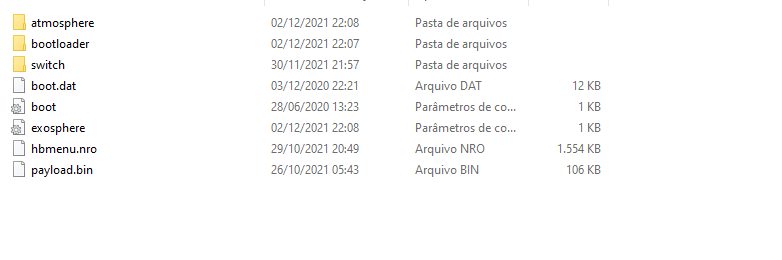
Formated to FAT32 and followed all those steps, but get the boot.dat? screen
1638735444833.png

Here's the folder at the end.
Also tried to put the license.dat, but didn't work.
 
Looks like the SD card is incompatible T_T After I put the same files in the 128gb one, it worked. How dumb of me to purchase from a different brand just because the model looked like it was made to Nintendo Switch. R$300 wasted(~60 dollars).
Anyone knows some way to make the 256gb work?
 
you need to have the boot.dat with 3.1.0 its 12kb yours. the original boot.dat is 21.78mb
 
  • Like
Reactions: doom95
YOu trying to load into atmo? They you need atmo's payload, you prolly using old SX's payload.
 
you need to have the boot.dat with 3.1.0 its 12kb yours. the original boot.dat is 21.78mb

absolutely NOT true.

he's using SX loader, which is the only CORRECT method to launch Atmosphere directly.
using SXOS to do that is not the good way to do it (except if you like to lose your time)

BTW OP's problem was the quality of the microSD. It has nothing to do with SX loader or SXOS...it will not help trascotta too...


ps : best way to remove anything related to SX and fully embrace AMS is to reflash the chip with spacecraft-nx. As simple as that !

@trascotta check that you're using FAT32, check the names of the files (and the extension..if you don' show extensions on your OS, you may have something like payload.bin.bin instead of payload.bin)

without reflashing SX Core with spacecraft-nx : boot.dat (sx loader 1.1) → payload.bin (hekate) → package3 (AMS)
or
with reflashing SX Core with spacecraft-nx : payload.bin (Hekate or Fusee) → package3 (AMS)
 
Last edited by Badablek,
absolutely NOT true.

he's using SX loader, which is the only CORRECT method to launch Atmosphere directly.
using SXOS to do that is not the good way to do it (except if you like to lose your time)

BTW OP's problem was the quality of the microSD. It has nothing to do with SX loader or SXOS...it will not help trascotta too...


ps : best way to remove anything related to SX and fully embrace AMS is to reflash the chip with spacecraft-nx. As simple as that !

@trascotta check that you're using FAT32, check the names of the files (and the extension..if you don' show extensions on your OS, you may have something like payload.bin.bin instead of payload.bin)

without reflashing SX Core with spacecraft-nx : boot.dat (sx loader 1.1) → payload.bin (hekate) → package3 (AMS)
or
with reflashing SX Core with spacecraft-nx : payload.bin (Hekate or Fusee) → package3 (AMS)
I've tried mirroring the orginal SD card(sandisk 256 to a huawei 512), and i still get the boot.dat error even if i don't modify any files.
"without reflashing SX Core with spacecraft-nx : boot.dat (sx loader 1.1) → payload.bin (hekate) → package3 (AMS)" - also gives boot.dat error
 
of course, because everything is loaded from it.

you can check if it's fake or not, with h2testw
you should also check if you have only one partition (FAT32)
 
Sorry if there are other posts with this problem, I tried to find but didn't get to solve my problem.
Here is my situation:
Nintendo Switch Mariko
SX Core
OFW 10.2
SX OS 3.1.0 on Emunand[128gb sd card]


I'm using until now the SX OS and wanted to migrate to Atmosphere, so I got a new sd card with more space[256gb].
Since the sd card is new, I tried this tutorial here rentry . org / MarikoEmuNAND to set up atmosphere
Formated to FAT32 and followed all those steps, but get the boot.dat? screen
View attachment 288416
Here's the folder at the end.
Also tried to put the license.dat, but didn't work.
Hello, I have installed an SX Core V2 chip on my Mariko. The led turns green (good welds) but not blue and the screen remains black.
The problem is that I am on V 11.0.1.
I therefore wish to go under Atmosphere or Hetake
So I followed the procedure:
- I prepare my SD via SDSetup while reformatting it in exFat,
- I put my switch in RCM mode via TEGRA and a JIG, the switch goes correctly in RCM
- I tried injecting the hekate BIN but at this moment the TEGRA program crashes (9 times out of 10), or gives me an error code:
Was only able to read 4 out of 16 bytes of device id. Error while injecting payload (RC = -7), in French:
Could only read 4 of 16 bytes of device id. Error during payload injection (RC = -7).
The Switch screen remains black.
So I am stuck and I need your help.
Thanks in advance.
 
Last edited by PopofMolotof,
Hello, I have installed an SX Core V2 chip on my Mariko. The led turns green (good welds) but not blue and the screen remains black.
The problem is that I am on V 11.0.1.
I therefore wish to go under Atmosphere or Hetake
So I followed the procedure:
- I prepare my SD via SDSetup while reformatting it in exFat,
- I put my switch in RCM mode via TEGRA and a JIG, the switch goes correctly in RCM
- I tried injecting the hekate BIN but at this moment the TEGRA program crashes (9 times out of 10), or gives me an error code:
Was only able to read 4 out of 16 bytes of device id. Error while injecting payload (RC = -7), in French:
Could only read 4 of 16 bytes of device id. Error during payload injection (RC = -7).
The Switch screen remains black.
So I am stuck and I need your help.
Thanks in advance.
Try formatting the SD card as FAT32.
 

Site & Scene News

Popular threads in this forum