[Help] Accidently installed patch before the game, now can't install same patch.

  • Thread starter Thread starter vinzor
  • Start date Start date
  • Views Views 4,739
  • Replies Replies 14

vinzor

Member
Newcomer
Joined
Dec 31, 2021
Messages
15
Reaction score
0
Trophies
0
Age
23
XP
73
Country
Russia
I accidently installed Crash Team Racing : Nitro Fueled patch before installing the game, now I'm getting this error - 0x80990019 / CE-32930-7 (corrupted data)
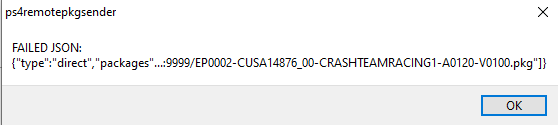
1641464730777.png

I checked in PS4 explorer and there is no patch folder for this game, I also rebuilt database and getting the same error.
I fully reinstalled the game and it's the same error.
Patch also don't installing from HDD.
I don't know what to do, any thoughts?

 
I accidently installed Crash Team Racing : Nitro Fueled patch before installing the game, now I'm getting this error - 0x80990019 / CE-32930-7 (corrupted data)
View attachment 292562
I checked in PS4 explorer and there is no patch folder for this game, I also rebuilt database and getting the same error.
I fully reinstalled the game and it's the same error.
Patch also don't installing from HDD.
I don't know what to do, any thoughts?
You installed Orbis Patch Installer? You can delete the patch with that and then install the one you want with it too.
 
check I think user/download folder. see if the patch is in there. if it's not there or in user/patch, not sure where it could've gone, but the patch is probably recorded in the app.db, so you could check the info table of that just to see if it has app version 1.20 for that particular game.
 
You installed Orbis Patch Installer? You can delete the patch with that and then install the one you want with it too.
Are'nt orbis patches meant to install on the official release? I am installing fake pkg, also I am maybe installing the wrong pkgs, so I will try other release and respond if issue was the wrong pkgs.
 
Are'nt orbis patches meant to install on the official release? I am installing fake pkg, also I am maybe installing the wrong pkgs, so I will try other release and respond if issue was the wrong pkgs.
I think he's talking about the app, not orbis patches website.
 
check the app.db in system_data/priv/mms . look in the info table and see if it's located in there. change the app version to 1.00 and see if you can install that stuff after injecting the modified file.
 
check the app.db in system_data/priv/mms . look in the info table and see if it's located in there. change the app version to 1.00 and see if you can install that stuff after injecting the modified file.
I am reinstalling game from the other source right now, also I checked app.db, opened via Notepad++ and there was a ton of nulls and etc, I searched for game CUSA and there was nothing about patch.
 
I reinstalled the game from other source and there is same error. Some day I will format my PS4 and install the game properly.
 
If you are installing using remote package installer, it will not let you install something if it is already installed on your PS4.

Copy the patch to USB and install it that way, it will say it is already installed, then let you install it again.

If the patch is from orbis patches (official patch pkg) it will only work with an official disc game.
If the patch is a fake pkg, it will only work with the game it was dumped with.
e.g a pathch for a game dumped by xxx wiill not work with a patch dumped by yyy.

It fake pkg patch does not work with your game you have it needs to be re-married to that games pkg.
 

Site & Scene News

Popular threads in this forum