
Guide On Patching Boktai To Work With OPEN_AGB_FIRM

  • Thread starter Thread starter Maxwellp
  • Start date Start date
  • Views Views 7,136
  • Replies Replies 11
  • Likes Likes 6

Maxwellp

Well-Known Member
Newcomer
Joined
Aug 5, 2011
Messages
68
Reaction score
66
Trophies
1
Location
Pennsylvania
XP
1,035
Country
United States
I just wanted to make a quick guide on how I think EEPROMV122 games can be fixed from not saving on the newly released Open_Agb_Firm for 3DS. It took lots of testing and frustration so hopefully someone will find this for themselves and implement it in an easier way.

A dumped Boktai rom needs altered in 3 ways: SRAM patch, IPS patch, and SRAM Hex edit. The downloaded tools needed for this are GBA Tools Advance(gbata), a sunlight IPS patch (there are several), and any free hex editor(I use HxD.) Of course you'll need the open_agb_firm installed on your 3ds too.

1. Open gbata.exe and select your boktai file.
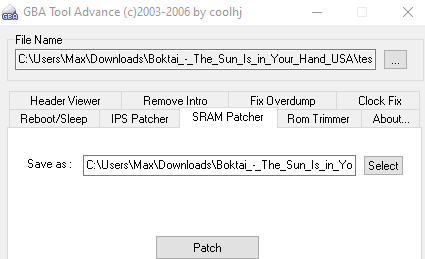
1645775387268.png


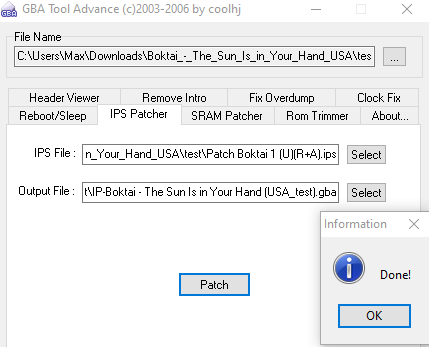
2. Select the SRAM Patcher tab and save location/filename. Patch the rom.
1645775768198.png


3. Select IPS Patcher tab and use your sunlight patch.

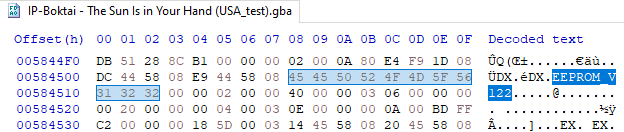
4. With your fully patched rom, open it in a Hex Editor and search for 'EEPROM_V122'
1645775882218.png


5. Replace the values as shown and save the file.

1645775964127.png


6. Drop the completed ROM on your SD card and test running from Open_AGB_Firm. It should default to using the default mode 14 (sram 256k) to save.

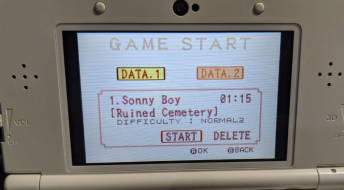
I've tested this playing off and on for over an hour with no save issues so far. Sunlight and plant growth works as well. I've also done the same with Yoshis Island with success.
1645776168535.png
 
Thank you creating and sharing this guide.

Does the RTC work with OPEN_AGB_FIRM? I tried playing this game as a CIA inject (using NSUI), but the clock resets every time I exit the game.

Also, there is a Sleep option in the pause menu. Do you know if the 3ds goes into sleep mode using that option?

Thanks again!
 
Your method was very easy to follow and saving the game worked as expected.

Regarding the RTC, I guess that I had a misconception about it: I thought that you could exit the game, come back the next day, and have the clock be on time; however, from what I've been reading, I think it is flat out impossible to have a GBA game synchronize with the 3DS clock. Other than that, the in-game time does progress as you play.

And for anyone else following this guide, on step #2 I had to delete "output-" from the file name that is autogenerated. This way when you do step #3 you don't have to select a new file to apply the IPS patch.

Thanks again, Maxwellp!
 
I just wanted to make a quick guide on how I think EEPROMV122 games can be fixed from not saving on the newly released Open_Agb_Firm for 3DS. It took lots of testing and frustration so hopefully someone will find this for themselves and implement it in an easier way.

A dumped Boktai rom needs altered in 3 ways: SRAM patch, IPS patch, and SRAM Hex edit. The downloaded tools needed for this are GBA Tools Advance(gbata), a sunlight IPS patch (there are several), and any free hex editor(I use HxD.) Of course you'll need the open_agb_firm installed on your 3ds too.

1. Open gbata.exe and select your boktai file.

View attachment 299498

2. Select the SRAM Patcher tab and save location/filename. Patch the rom.

View attachment 299500

3. Select IPS Patcher tab and use your sunlight patch.

4. With your fully patched rom, open it in a Hex Editor and search for 'EEPROM_V122'

View attachment 299501

5. Replace the values as shown and save the file.

View attachment 299502

6. Drop the completed ROM on your SD card and test running from Open_AGB_Firm. It should default to using the default mode 14 (sram 256k) to save.

I've tested this playing off and on for over an hour with no save issues so far. Sunlight and plant growth works as well. I've also done the same with Yoshis Island with success.

View attachment 299503
What about Boktai 2 & Boktai 3? saving still not working for me,I tried gbata & lunar ips but nothing works, could you guide me how to patch or change the save file type or to make it enable save.
Post automatically merged:
 
Last edited by YOHWEHX987,
What about Boktai 2 & Boktai 3? saving still not working for me,I tried gbata & lunar ips but nothing works, could you guide me how to patch or change the save file type or to make it enable save.
Post automatically merged:
I don't know why it would be any different. Were you able to do the whole process for boktai 1 successfully?
 
This might sound strange, for me changing to 256k is not working, but changing to 64k works fine.
Post automatically merged:

This might sound strange, for me changing to 256k is not working, but changing to 64k works fine.
 
I just wanted to make a quick guide on how I think EEPROMV122 games can be fixed from not saving on the newly released Open_Agb_Firm for 3DS. It took lots of testing and frustration so hopefully someone will find this for themselves and implement it in an easier way.

A dumped Boktai rom needs altered in 3 ways: SRAM patch, IPS patch, and SRAM Hex edit. The downloaded tools needed for this are GBA Tools Advance(gbata), a sunlight IPS patch (there are several), and any free hex editor(I use HxD.) Of course you'll need the open_agb_firm installed on your 3ds too.

1. Open gbata.exe and select your boktai file.

View attachment 299498

2. Select the SRAM Patcher tab and save location/filename. Patch the rom.

View attachment 299500

3. Select IPS Patcher tab and use your sunlight patch.

4. With your fully patched rom, open it in a Hex Editor and search for 'EEPROM_V122'

View attachment 299501

5. Replace the values as shown and save the file.

View attachment 299502

6. Drop the completed ROM on your SD card and test running from Open_AGB_Firm. It should default to using the default mode 14 (sram 256k) to save.

I've tested this playing off and on for over an hour with no save issues so far. Sunlight and plant growth works as well. I've also done the same with Yoshis Island with success.

View attachment 299503
I tried this but is not working on the latest beta release of open_agb_firm. Also tried replacing 256k for 64k no luck.

If anyone found a solution, please share! Thank you.
 
The changelog for openagbfirm below might affect how this is read, but I haven't tested.

Did you try an older version with the same rom and save file to confirm its the new build thats the problem?


What's Changed

Added an option to use current rom directory for config and saves by @Exagone313 in #209
dd90d49 Changed the config format to use strings for every setting where it makes sense. This is a breaking change!
 
The changelog for openagbfirm below might affect how this is read, but I haven't tested.

Did you try an older version with the same rom and save file to confirm its the new build thats the problem?


What's Changed

Added an option to use current rom directory for config and saves by @Exagone313 in #209
dd90d49 Changed the config format to use strings for every setting where it makes sense. This is a breaking change!
I have not tried older builds, I'm fairly new to the scene so instead i went for an emulator mgba (i think it's called), fairly good results with some choppy audio in some scenes, other boktai games work fine on open_agb_firm though!
 

Site & Scene News

Popular threads in this forum