Gaming Google Search Results Redirect Virus

  • Thread starter Thread starter MissingNo._
  • Start date Start date
  • Views Views 5,437
  • Replies Replies 41

MissingNo._

Well-Known Member
Member
Joined
Apr 12, 2009
Messages
756
Reaction score
6
Trophies
2
XP
365
Country
United States
The topic says almost all of it.
When I click on a search result that comes from Google or most other search websites, it redirects me with a results5.google.com website as the redirection 'tube'.
Some sites that are in any way affilated with Google have random pop-ups that occur often.

I've heard of this in 2001 or 2000, and I'm not sure how to start looking for a cure to this virus.
Can anyone help?

 
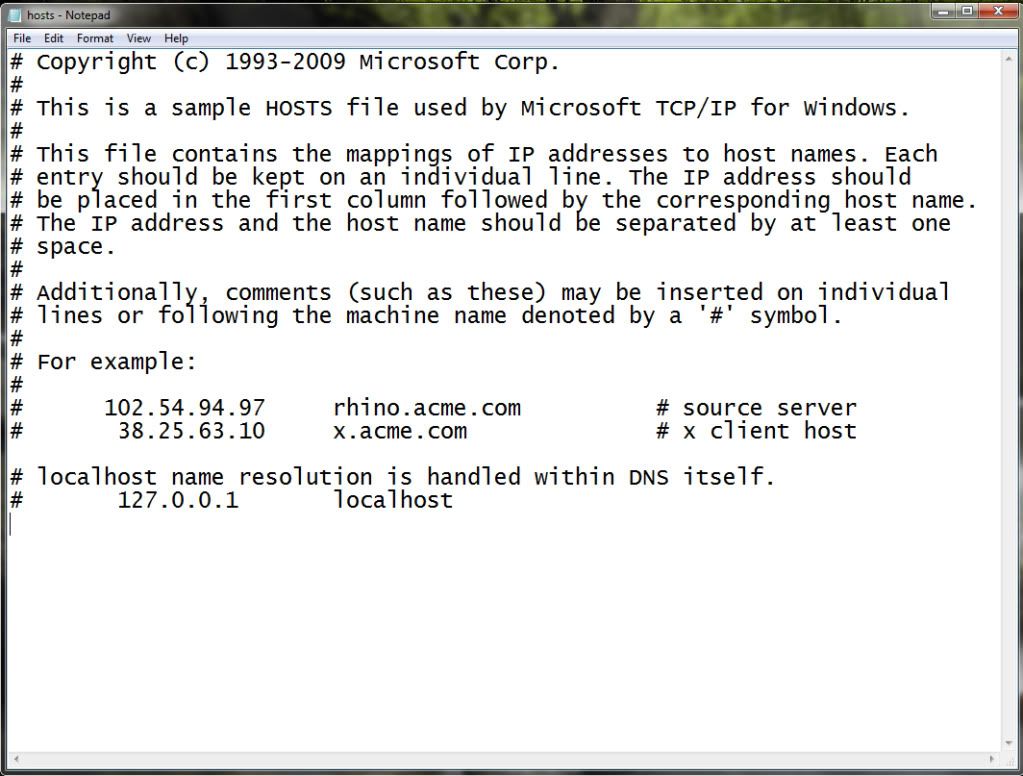
Find your Hosts file which can be located in C:\Windows\system32\drivers\etc. Open it in notepad (open it as an admin if your in Vista or 7). Remove everything that's not this:

Hosts.jpg


Save it and set the hosts file as Read-Only.
 
@DeliciousRice: Failed

@Hakoda: I cannot figure out how to open it as an admin.
I opened it, though. It had an IP address that wasn't after a #. I deleted it, but I couldn't save the file. I needed to be an admin, I think.
 
Go to Start --> All Programs --> Right-click on Notepad --> Run as Admin. In notepad, click Open --> Navigate to the Hosts file --> Set to view all file types in the small drop-down menu --> Open Hosts
 
Oh! Sorry, wrong program. I meant to post this link:
http://jpshortstuff.247fixes.com/GooredFix.exe

Instructions:
* Ensure all Firefox windows are closed.
* To run the tool, double-click it (XP), or right-click and select Run As Administrator (Vista).
* When prompted to run the scan, click Yes.
* It doesn't take long to run, once it is finished move onto the next step

(Next step would have been to use the thing I posted earlier, so just ignore the last step above)
 
Hakoda said:
Go to Start --> All Programs --> Right-click on Notepad --> Run as Admin. In notepad, click Open --> Navigate to the Hosts file --> Set to view all file types in the small drop-down menu --> Open Hosts

It has appeared to work, yet I didn't restart my computer yet.
And it does it only sometimes.
I'll post back here if I experience it still. After a good reboot.
 
It appears to be doing it with Yahoo! Google is fine.

EDIT: I mean Yahoo! is having a problem, but Google isn't.

EDIT 2: Scratch that. It's having all of the same problems again.

EDIT 3:
@DeliciousRice: TDSSKiller: Failed
@Hakoda: Failed
 
Programs to try:

Spyware:
Spybot Search and Destroy
Adaware SE (Adware).

Malware
Malwarebytes Anti-Malware
Super Anti-Spyware (or similar).

Malwarebytes has saved my butt plenty of times, but I've heard that Suepr Anti-Spyware is just as powerful if not more powerful. I'd reccomend cracking either program for a higher level of real-time protection. Spywarebot scans for and fixes vulnerabilities in your browsers as well, so it's pretty useful too. Either way, make sure to update the programs to the most recent update, for example, I just updated from 4304 to 4369 on Malwarebytes and it's only been maybe 2-3 weeks since the last scan. Make sure that you clear your internet cache and temporary files (CC Cleaner) with your browser CLOSED. If you're paranoid you could also consider disconnecting from the internet while running all of this. Most of these programs are free or have free-versions for home use (with semi-limited features).
 
Whatever program you're running to try and fix your problems, I recommend doing it in Safe Mode. This will stop any automatic scripts (seeds) from repairing any files/virus you find/quarantine/delete, as well as prevent certain types of seeds from stealthing themselves to your scans.
 
Originality said:
Whatever program you're running to try and fix your problems, I recommend doing it in Safe Mode. This will stop any automatic scripts (seeds) from repairing any files/virus you find/quarantine/delete, as well as prevent certain types of seeds from stealthing themselves to your scans.

Safe Mode w/ or w/o networking(interwebs)? I'm assuming the first, in which case he should update his programs before booting into safe mode ; )
 
I2aven's_Sage said:
Originality said:
Whatever program you're running to try and fix your problems, I recommend doing it in Safe Mode. This will stop any automatic scripts (seeds) from repairing any files/virus you find/quarantine/delete, as well as prevent certain types of seeds from stealthing themselves to your scans.

Safe Mode w/ or w/o networking(interwebs)? I'm assuming the first, in which case he should update his programs before booting into safe mode ; )
I agree as giving the computer access to the internet could allow it to snag that nasty virus again. Use the programs that have been provided. Once the virus has been caught and removed, edit the Hosts file again and reboot. You can't just keep editing the Hosts file with the virus still there.

What AV are you running?
 
Well if it's redirecting you and it's not your host file it's properly most likely changed router configurations in "DNS Address".

Find out how to access your router (it varies depending on make/ model) and login details which should be default if you haven't changed it ( can be found out by googling or going on makers site). Access example: 192.168.0.1 or 192.168.1.1, logins could be: admin; admin, admin;password etc.

Once in navigate to where your DNS settings are and it should automatically be fetched from your ISP, if it's not and it's using a primary/ Secondary DNS server change the settings.

If it isn't and settings are normal then it could just be spyware/ malware/ virus.
 
DeliciousRice said:
Oh! Sorry, wrong program. I meant to post this link:
http://jpshortstuff.247fixes.com/GooredFix.exe

Instructions:
* Ensure all Firefox windows are closed.
* To run the tool, double-click it (XP), or right-click and select Run As Administrator (Vista).
* When prompted to run the scan, click Yes.
* It doesn't take long to run, once it is finished move onto the next step

(Next step would have been to use the thing I posted earlier, so just ignore the last step above)
Thank you sooo much. I had the same google virus and this fixed it for me.
smile.gif
 
can't believe no one has asked which browser you're using yet. a bad extension or search service could easily cause these issues.
 
1. Run with more antiviruses ( some can pick up viruses that others can't). Microsoft security essentials has the highest detection rate at the moment.

2. FULLY uninstall the browser the reinstall it. This means delete it from regedit as well but make sure you know what you're delting first (do this at your own risk.)

3. If it's not working by now, choose a different browser.
 

Site & Scene News

Popular threads in this forum