GameCube Backup Manager [Official Post]

  • Thread starter Thread starter Laete_Meireles
  • Start date Start date
  • Views Views 140,999
  • Replies Replies 107
  • Likes Likes 22
Trying this out, got some multidisc games I want to use in Nintendont (as well as a bunch of other games) that are just named ISOs in a folder, this seemed the easiest way.
Seems to have correctly made a game.iso and disc2.iso for my multidisc games.

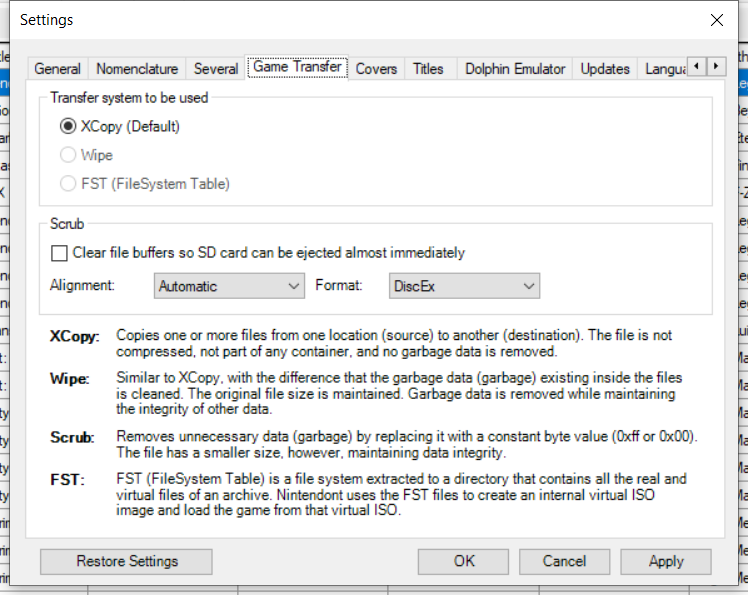
But does anybody know why so many of the options are grayed out?
My games are already in .nkit.iso format (presumably the same thing as the "Scrub" option), and the files kept the same size after converting, so I don't need any of the options in the second screenshot. But would like to be able to verify hashes and such.
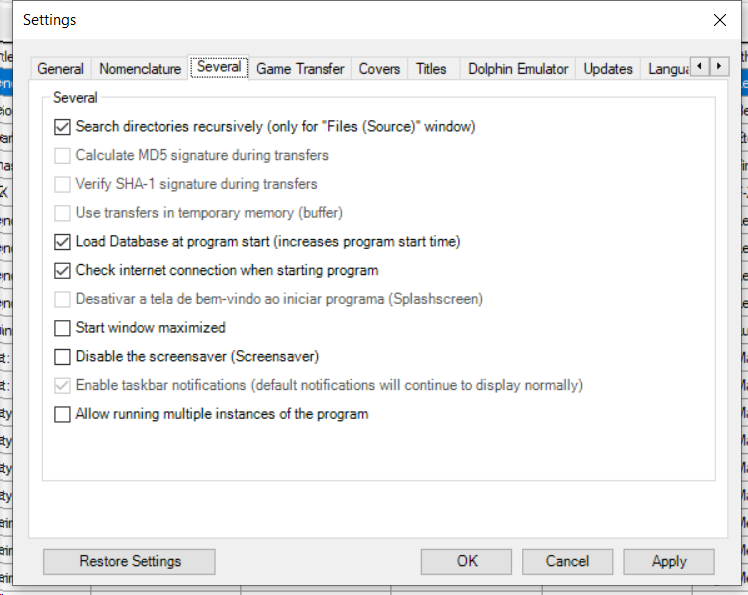
grayed.png
grayed2.png
 
Hey, I've been trying to work out some issues im having with this program. It works amazingly for awhile but after about 400 titles it stops working. I found out turning off screensaver gets rid of the error but then the program just gets really glitchy looking and stops. I have tried to do it in batches but once about 400 are on the target drive it seems to error over and over
Post automatically merged:

I'm an idiot it was a specific game that seems corrupted or something along those lines.
 
Last edited by TacoDayDreams,
I can't post links yet, but I've found the nKit 2 UI is pretty stable and great for converting between formats. If you search for the nkit github wiki you'll find a link to the discord. Once in the Discord you'll find the latest version of Nkit UI and the console version in the releases channel. Worthy a try!
 
  • Like
Reactions: XFlak
I can't post links yet, but I've found the nKit 2 UI is pretty stable and great for converting between formats. If you search for the nkit github wiki you'll find a link to the discord. Once in the Discord you'll find the latest version of Nkit UI and the console version in the releases channel. Worthy a try!
there is another way to get it NOT DISCORD, discord is a mess, a soup of things and you have to browse for pages and pages of messages before find anything.
 
  • Like
Reactions: ViRGE
How do I get covers for USB Loader GX?
Hello,

Downloading covers from the loader (Wii connected to the internet)

Go to USBLoader GX, and once you have the list of your games in front of you, press the Wiimote Button 1 button. Check the ones you want to download. Then press OK.
There you go, you'll see a bar indicating the download progress.
 
  • Like
Reactions: Blythe93

Site & Scene News

Popular threads in this forum