Fix computer permissions?

Aether Lion

GBATemp's Pet Lion
OP
Member
Joined
May 1, 2016
Messages
418
Trophies
0
Age
26
Location
Penisylvania
XP
421
Country
United States
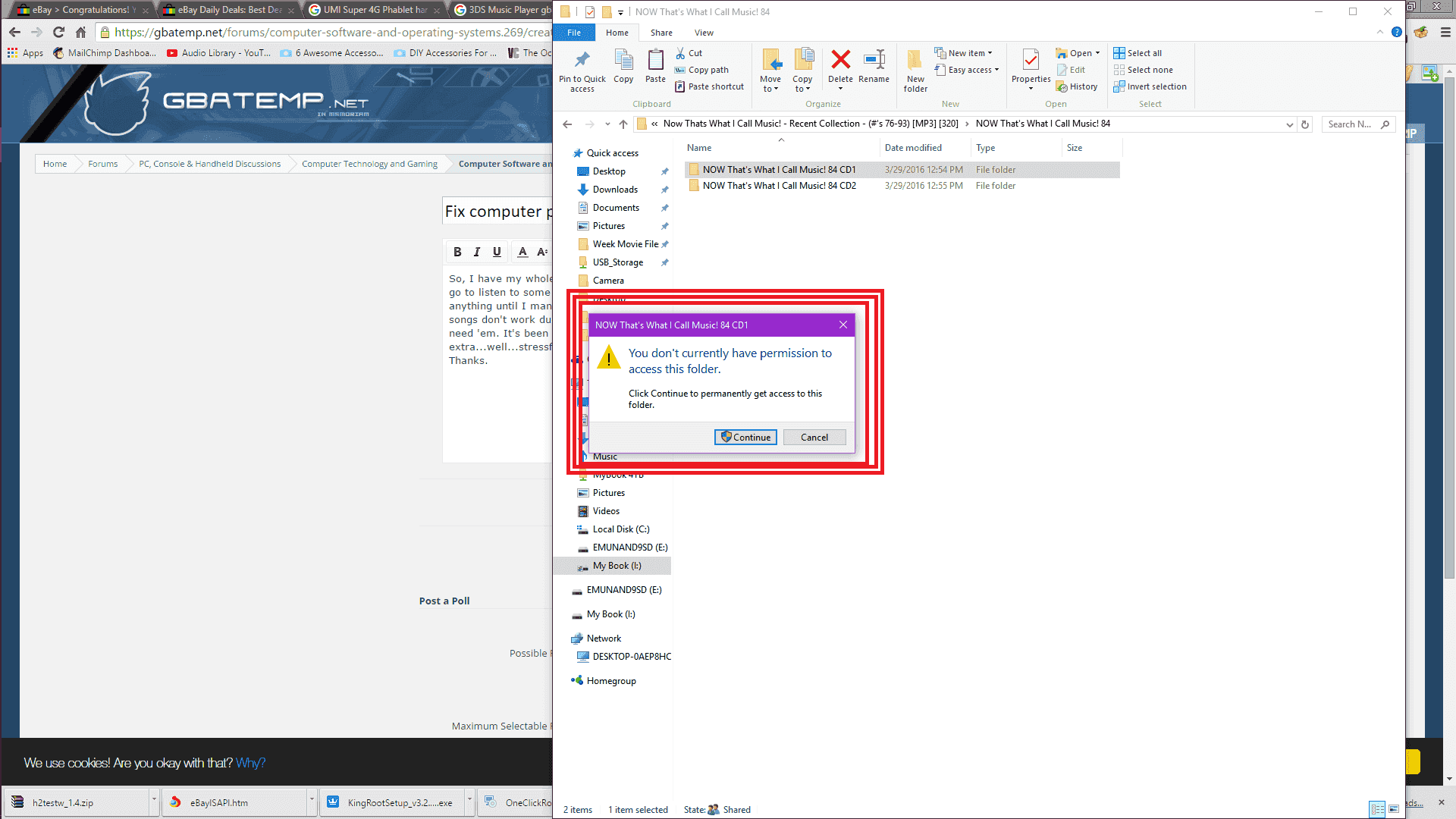
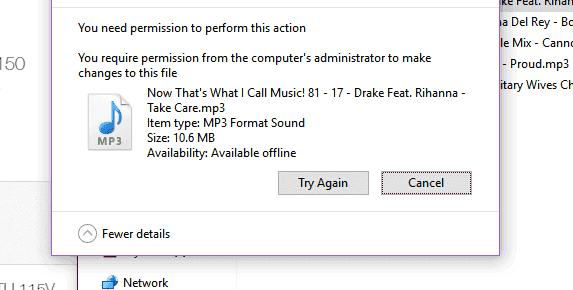
So, I have my whole music collection on a 4TB external HDD. On any computer I plug it into, whenever I go to listen to some of the certain albums, or search a song, they won't come up in search results or anything until I manual go into each folder and click "Continue" to gain permissions. Even then, some songs don't work due to permissions. There are a LOT of folders. Is there any way I can just batch remove the permissions entirely so I don't have to repeat it for every PC I use this on? I don't need 'em. It's been a stressful day already and not being able to listen to my mopey music is extra...well...stressful.:mellow:
Thanks.
Untitled.png
Untitled.png
 
Last edited by Aether Lion,

Aether Lion

GBATemp's Pet Lion
OP
Member
Joined
May 1, 2016
Messages
418
Trophies
0
Age
26
Location
Penisylvania
XP
421
Country
United States
Then try to take Ownership over the Folders
Guide
I've used the "take ownership" a lot in the past. I have it. But I have to repeat that every time with every computer? It doesn't work for all of the sub-folders, the deeper ones I have to go into and do manually one at a time. I can't just batch remove the needed permissions entirely for all computers somehow?
 

Kliffcom

Well-Known Member
Member
Joined
Aug 26, 2014
Messages
144
Trophies
0
Age
25
XP
186
Country
Gambia, The
I don't know. Try to do it with the complete drive like here:

It seems to overwrite all permissions
 

Joom

 ❤❤❤
Member
Joined
Jan 8, 2016
Messages
6,026
Trophies
1
Location
US
Website
mogbox.net
XP
5,988
Country
United States
Code:
icacls * /T /Q /C /RESET
Open a Command Prompt, cd to the drive containing your music, and run that (as an administrator). The problem with using NTFS on an external drive is that it stores file permissions for each user that touches it. So when you hook it up to a different computer, the permissions get fubar'd. Running take ownership won't fix this either. Also, if you value your music, stop storing it on an external drive. You're gonna end up losing it when a bad sector comes along. Might be tomorrow, might be in four years. Take it from someone that lost around 10,000 songs and 200 movies and shows. I used an external for a few years as an NTFS home directory that I could use between Linux and Windows, and then one day poof. Half of everything I had was gone. They're not designed to last. I recommend signing up for Google Music. They let you upload 20,000 songs for free that can be played anywhere. If you want to invest the money, you can get a NAS and run a media server at home and then install something like Subsonic or XAMPP and just stream your music from wherever you are.
 
Last edited by Joom,

Aether Lion

GBATemp's Pet Lion
OP
Member
Joined
May 1, 2016
Messages
418
Trophies
0
Age
26
Location
Penisylvania
XP
421
Country
United States
Code:
icacls * /T /Q /C /RESET
Open a Command Prompt, cd to the drive containing your music, and run that (as an administrator). The problem with using NTFS on an external drive is that it stores file permissions for each user that touches it. So when you hook it up to a different computer, the permissions get fubar'd. Running take ownership won't fix this either. Also, if you value your music, stop storing it on an external drive. You're gonna end up losing it when a bad sector comes along. Might be tomorrow, might be in four years. Take it from someone that lost around 10,000 songs and 200 movies and shows. I used an external for a few years as an NTFS home directory that I could use between Linux and Windows, and then one day poof. Half of everything I had was gone. They're not designed to last. I recommend signing up for Google Music. They let you upload 20,000 songs for free that can be played anywhere. If you want to invest the money, you can get a NAS and run a media server at home and then install something like Subsonic or XAMPP and just stream your music from wherever you are.

Right now I have:
http://www.amazon.com/Book-Desktop-...ie=UTF8&qid=1464536191&sr=8-1&keywords=WD+4TB

I am supposed to have?
http://www.amazon.com/Cloud-Persona..._1?ie=UTF8&qid=1464536152&sr=8-1&keywords=NAS

Wouldn't they both eventually wear out from reading data anyways?
 

Joom

 ❤❤❤
Member
Joined
Jan 8, 2016
Messages
6,026
Trophies
1
Location
US
Website
mogbox.net
XP
5,988
Country
United States
A NAS (or even just a regular, extra desktop that serves as a media server) will last longer due to the drives not constantly being unplugged and plugged in elsewhere. And since the connection type isn't USB, the power source is much more reliable and faster. But yes, drives do fail eventually. They're not indestructible. Though USB externals go out fairly quickly and should not be relied on. Also, I would avoid anything from Western Digital and Seagate. They're notorious for failing fast. I recommend Toshiba, Hitachi, or Samsung.
 
Last edited by Joom,

Sono

cripple piss
Developer
Joined
Oct 16, 2015
Messages
2,654
Trophies
2
Location
rehabilitation center
XP
8,220
Country
Hungary
Also, I would avoid anything from Western Digital and Seagate. They're notorious for failing fast. I recommend Toshiba, Hitachi, or Samsung.

I somehow accept the belief, that external WD drives fail, but I don't believe, that external Samsung drives are good xD
Also, do you know approx. how fast do external WD drives fail? I shutdown my computer before unplugging the external harddrive, because I'm running Linux from it.
 

Joom

 ❤❤❤
Member
Joined
Jan 8, 2016
Messages
6,026
Trophies
1
Location
US
Website
mogbox.net
XP
5,988
Country
United States
I somehow accept the belief, that external WD drives fail, but I don't believe, that external Samsung drives are good xD
Also, do you know approx. how fast do external WD drives fail? I shutdown my computer before unplugging the external harddrive, because I'm running Linux from it.
Samsung is better than the former at the very least. I don't know an approximate amount of time to give the drives, but it's not long. Also, running an OS from one will speed up the process as well as slow down general operations of the system. There's entirely too much I/O going on to be properly handled over USB. With the rising popularity of SSDs, internal hard drives are becoming very inexpensive. You can get a decent 1 TB drive for about $40 nowadays.
 
Last edited by Joom,
  • Like
Reactions: Sono

JaapDaniels

Well-Known Member
Member
Joined
Apr 22, 2012
Messages
1,080
Trophies
1
Age
39
Website
github.com
XP
2,067
Country
Netherlands
So, I have my whole music collection on a 4TB external HDD. On any computer I plug it into, whenever I go to listen to some of the certain albums, or search a song, they won't come up in search results or anything until I manual go into each folder and click "Continue" to gain permissions. Even then, some songs don't work due to permissions. There are a LOT of folders. Is there any way I can just batch remove the permissions entirely so I don't have to repeat it for every PC I use this on? I don't need 'em. It's been a stressful day already and not being able to listen to my mopey music is extra...well...stressful.:mellow:
Thanks.
View attachment 50970 View attachment 50971
you 're still logged to torrent client that keeps resetting the settings of the files and folders downloading or already downloaded, remove the torrent out of your client list (also it's illegal to upload these files since copyright, so be aware what you post)
 

Sono

cripple piss
Developer
Joined
Oct 16, 2015
Messages
2,654
Trophies
2
Location
rehabilitation center
XP
8,220
Country
Hungary
Samsung is better than the former at the very least. I don't know an approximate amount of time to give the drives, but it's not long. Also, running an OS from one will speed up the process as well as slow down general operations of the system. There's entirely too much I/O going on to be properly handled over USB. With the rising popularity of SSDs, internal hard drives are becoming very inexpensive. You can get a decent 1 TB drive for about $40 nowadays.

Well, I hope if it dies, then it dies instantly, so data recovery would still be possible. Also, I lost my trust in flash storage, since every flash storage I have (except the one I have in the 3DS) is corrupted. Some of them are ~10yr old, some of them are only a few months, but all of them are corrupted, so that's why I want to use a HDD, because I need a lot of constant (re)write operations. And I got my WD HDD for 70€ (40USD is ~36EUR), so it's a very good price. Where do I find those? Is it a HDD for that price, or an SSD? Because I need a HDD.

Also, sorry for derailing the thread a bit :wtf:
 

Aether Lion

GBATemp's Pet Lion
OP
Member
Joined
May 1, 2016
Messages
418
Trophies
0
Age
26
Location
Penisylvania
XP
421
Country
United States
I mean I think discussing the types of drives that should be used is kind of related in a twisted way so you're fine.
Couldn't I just plug this into the USB port on my router and share it over the network and therefore have it be safer? :P
 

Joom

 ❤❤❤
Member
Joined
Jan 8, 2016
Messages
6,026
Trophies
1
Location
US
Website
mogbox.net
XP
5,988
Country
United States
you 're still logged to torrent client that keeps resetting the settings of the files and folders downloading or already downloaded, remove the torrent out of your client list (also it's illegal to upload these files since copyright, so be aware what you post)
*facepalm* Don't speak when you don't know what you're talking about. It's better to seem bright than open your mouth and remove all doubt.

I mean I think discussing the types of drives that should be used is kind of related in a twisted way so you're fine.
Couldn't I just plug this into the USB port on my router and share it over the network and therefore have it be safer? :P
It might last a little bit longer, but I still wouldn't trust it that much. Like I said, Google Music is a viable, free solution. They don't care where the music came from, and won't go "HURR DURR U DIN'T PAY 4 DIS". I've used it since the public beta came out and it's been really handy.
 

Sono

cripple piss
Developer
Joined
Oct 16, 2015
Messages
2,654
Trophies
2
Location
rehabilitation center
XP
8,220
Country
Hungary
I mean I think discussing the types of drives that should be used is kind of related in a twisted way so you're fine.
Couldn't I just plug this into the USB port on my router and share it over the network and therefore have it be safer? :P

Now that you said, I *just* noticed, that there's an USB 3.0 on the modem the ISP gave us :rofl2:
 

Aether Lion

GBATemp's Pet Lion
OP
Member
Joined
May 1, 2016
Messages
418
Trophies
0
Age
26
Location
Penisylvania
XP
421
Country
United States
*facepalm* Don't speak when you don't know what you're talking about. It's better to seem bright than open your mouth and remove all doubt.


It might last a little bit longer, but I still wouldn't trust it that much. Like I said, Google Music is a viable, free solution. They don't care where the music came from, and won't go "HURR DURR U DIN'T PAY 4 DIS". I've used it since the public beta came out and it's been really handy.
I mean but of course all of my music is legal. ;D Yeahyeah....legal af....
Like I dunno I have a backup of all of my important stuff, so I should be fine.
My music collection is MUCH larger than 20,000 songs. :P It's like 200GB or so.


Now that you said, I *just* noticed, that there's an USB 3.0 on the modem the ISP gave us :rofl2:
You're welcome. ;) You can donate to me here. LEL


It's a link to Google calm down.
 
General chit-chat
Help Users
  • JuanMena @ JuanMena:
    Kissing random dudes choking in celery? Really? Need to study for that?
  • K3N1 @ K3N1:
    Yes it requires a degree
  • K3N1 @ K3N1:
    I could also yank out the rest of my teeth but theirs professionals for that
  • x65943 @ x65943:
    If your throat closes, putting oxygen in your mouth will not solve anything - as you will be introducing oxygen prior to the area of obstruction
  • JuanMena @ JuanMena:
    Just kiss me Kyle.
  • x65943 @ x65943:
    You either need to be intubated to bypass obstruction or create a stoma inferior to the the area of obstruction to survive
  • x65943 @ x65943:
    "Just kiss me Kyle." And I thought all the godreborn gay stuff was a smear campaign
  • JuanMena @ JuanMena:
    If I die, tell my momma I won't be carrying Baby Jesus this christmas :sad::cry:
  • K3N1 @ K3N1:
    Smear campaigns are in The political section now?
  • JuanMena @ JuanMena:
    Chary! Chary! Chary, Chary, Chary!
  • Sonic Angel Knight @ Sonic Angel Knight:
    Pork Provolone :P
  • Psionic Roshambo @ Psionic Roshambo:
    Sounds yummy
  • K3N1 @ K3N1:
    Sweet found my Wii u PSU right after I ordered a new one :tpi:
  • JuanMena @ JuanMena:
    It was waiting for you to order another one.
    Seems like, your PSU was waiting for a partner.
  • JuanMena @ JuanMena:
    Keep them both
    separated or you'll have more PSUs each year.
  • K3N1 @ K3N1:
    Well one you insert one PSU into the other one you get power
  • JuanMena @ JuanMena:
    It literally turns it on.
  • K3N1 @ K3N1:
    Yeah power supplies are filthy perverts
  • K3N1 @ K3N1:
    @Psionic Roshambo has a new friend
    +1
  • JuanMena @ JuanMena:
    It's Kyle, the guy that went to school to be a Certified man Kisser.
  • Psionic Roshambo @ Psionic Roshambo:
    Cartmans hand has taco flavored kisses
  • A @ abraarukuk:
    hi guys
  • Iron_Masuku @ Iron_Masuku:
    Hello
    Skelletonike @ Skelletonike: hmm