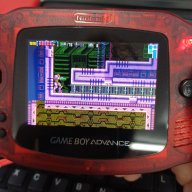
there's no matter with the power. I also test with charger plug in but still have white screen after booting game. Rarely has a game boot normally, most of the case are white screen or glitch
Is anyone using the Air with an Analogue pocket? It seems to work fine on the latest firmware with standard games but whole point for buying it for me was the play Pokémon rom hacks that require RTC. Currently trying to boot a hack results in glitched textures and then a freeze. Playing these hacks on original gba/nds seems to work fine
there's no matter with the power. I also test with charger plug in but still have white screen after booting game. Rarely has a game boot normally, most of the case are white screen or glitch
Unfortunately, we lost access to github.com/ez-flash due to the loss of the F2A credential. so we had to recreate a new GitHub account for subsequent code pushes, and along with this change, we pushed out the kernel source code for the EZ-FLASH Air at the same time.
Sadly after flashing the result kernel it just boots with a blank screen. Maybe because I am using devkitARM_r67 instead of the devkitARM_r53. Anyway the source code above may be useful to someone.
Edit: just an update, the issue seems to be that the built kernel is too big, probably because the fact I am using devkitARM_r67 instead of devkitARM_r53. I made a commit that disabled the support for Chinese characters in the FatFs module and now I got a working (but still broken, e.g., the graphics are garbage) kernel: https://github.com/m45t3r/air-kernel/commit/20390b1bf088c3999200d87a7d724978437d11cd.
The resulting "ezairkernel.gba" needs to be less 1048576 before running the "Link_kernel_image.exe" or my "make link-kernel-image" command, otherwise this will cause the blank screen issue that I described before.
Sadly after flashing the result kernel it just boots with a blank screen. Maybe because I am using devkitARM_r67 instead of the devkitARM_r53. Anyway the source code above may be useful to someone.
Sadly after flashing the result kernel it just boots with a blank screen. Maybe because I am using devkitARM_r67 instead of the devkitARM_r53. Anyway the source code above may be useful to someone.
Edit: just an update, the issue seems to be that the built kernel is too big, probably because the fact I am using devkitARM_r67 instead of devkitARM_r53. I made a commit that disabled the support for Chinese characters in the FatFs module and now I got a working (but still broken, e.g., the graphics are garbage) kernel: https://github.com/m45t3r/air-kernel/commit/20390b1bf088c3999200d87a7d724978437d11cd.
The resulting "ezairkernel.gba" needs to be less 1048576 before running the "Link_kernel_image.exe" or my "make link-kernel-image" command, otherwise this will cause the blank screen issue that I described before.
One more update: it seems that linking the "image.bin" is not strictly necessary, just renaming the resulting "ezairkernel.gba" to "ezairkernel.bin" also works. This means we can ignore the size limit above. After rebooting the EzFlash Air will ask to update the FW image from V2 to V3, but applying this does nothing (at least it doesn't seem to break the flashcard either).
Anyway, it seems the initial source code release is maybe slightly broken, I noted at least 2 issues:
- Garbage graphics in the NOR rom page list
- If you go to the about menu the kernel seems to crash (I get a black screen)
But at least booting the roms that I already had flashed did work. I did not try to flash a new image with my compiled image though.
Post automatically merged:
More updates: I figured out that it is possible to disable the FW update here: https://github.com/m45t3r/air-kernel/commit/bf43c72cba929d9ebd8c3dc2096943fb812fb32c. So now it will stop trying to update the FW file. I think this logic for update is broken anyway (or actually, it is commented-out for some reason), it seems that the FW versions are hardcoded but it is not checked if the FW is actually newer than the old version, so even if you update the version it will try to update again. Also, the FW update seems dangerous since if a broken "image.bin" is flashed it is very likely the flashcard will become a brick, so it seems more safe to always update from official releases.
About what I said before that "image.bin" not being necessary is not strictly correct. The assets used by the kernel seems to be embedded in "image.bin", so for the firmware to work without the "image.bin" it would be necessary to extract the embedded assets from the "image.bin" and add it to the C source code using bin2c or something similar, otherwise the menu will render in a broken state. I think this is an approach similar to https://gbatemp.net/threads/new-theme-for-ez-flash-omega.520665/.
EZ FLASH AIR NEW UPDATE :
Firmware 4/Kernel 1.05
1.Updated NOR Management, freely delete and re-burn ROMs.
(no need to delete starting from the last ROM)
Check NOR usage in real time.
2.Updated flashing and reading ROMs compatibility.
Note: After updating FW4 K1.05, FORMAT or completely DELETE ROMs before re-burn on the FIRST use please!!!
After being announced last week, the first of two broadcasts is set to go live later today with a stark focus on The Legend of Zelda and its 40th anniversary...
The PlayStation 5 scene has received a massive breakthrough with the public release of Relapse, a new exploit chain developed by Nathan Fargo in collaboration with...
It's that time again folks, an update for the Switch and Switch 2, and a surprisingly big one at that! At lease for folks on the Switch 2. The most notable feature...
It is with a heavy heart that I announce the departure of our beloved Chary from the position of Chief Editor. Chary took over early 2021 and has done a wonderful job...
The 2007 Nintendo Wii classic Super Mario Galaxy has reportedly been 100% decompiled by the SMGCommunity under the project codename Petari, and now a standalone PC...
The second of a two-part special, a more traditional Nintendo Direct is set to air today. Unlike the Zelda Direct the contents of this one is still relatively up in...
It's that time again. Prepare your Switch updates! Or prepare to forgive your sister's nephew's dog for updating your Switch a few weeks ago. Atmosphere v1.12.0 has...
After an accidental leaking of their review video from Linus Tech Tips last week, we somewhat knew that news on Steam's latest VR venture was imminent. Today the...
Over the weekend a number of Switch and Switch 2 related subreddits came alive with people reporting bans on their Switch 2 consoles out of nowhere. The error code...
Are you tired of waiting for Nintendo to release a definitive version of their GameCube classic on a console that's sold more than four units? Then step right up! A...
After being announced last week, the first of two broadcasts is set to go live later today with a stark focus on The Legend of Zelda and its 40th anniversary...
It's been something of a quiet week in the gaming space, with the deluge of big hitters trying to find their place before GTA 6 launches really kicking off next week...
The in-progress Switch port of the 2013 Rockstar Games Grand Theft Auto V has been forced to end progress after Take-Two Interactive has threatened legal action...
Are you tired of waiting for Nintendo to release a definitive version of their GameCube classic on a console that's sold more than four units? Then step right up! A...
It is with a heavy heart that I announce the departure of our beloved Chary from the position of Chief Editor. Chary took over early 2021 and has done a wonderful job...
After an accidental leaking of their review video from Linus Tech Tips last week, we somewhat knew that news on Steam's latest VR venture was imminent. Today the...
The second of a two-part special, a more traditional Nintendo Direct is set to air today. Unlike the Zelda Direct the contents of this one is still relatively up in...
Announced a few days ago, Nintendo of America have today launched their Customer Appreciation Sale. Featuring 30% discounts across a wide range of popular first-party...
From my post earlier this week you probably already know which game I'm talking about. Fire Emblem released yesterday to some pretty rave reviews. Looking at...
A few days ago Chary stepped down as Chief Editor after 5 wonderful years, and everyone guessed the seat wouldn't stay empty for very long. Back in 2021 I proudly...