Hardware EZ Flash IV - Client problems, looking for alternatives

  • Thread starter Thread starter don_luca
  • Start date Start date
  • Views Views 9,544
  • Replies Replies 39
Longest name I could find was

Twin Series 4 - Hamu Hamu Monster EX - Hamster Monogatari RPG + Fantasy Puzzle - Hamster Monogatari - Mahou no Meikyuu 1.2.3 (Japan)

which is 132 characters long so, yeah, if there's a limit of 53 character I can definitely see this becoming an issue.

Anyway, do you know who can I contact to tell them to make a change from ROM Header to CRC32/MD5?

I can look for strings longer than x characters and shroten them no problem, there shouldn't be too many.

I correct myself: there are actually quite a lot that exceed the 53 character limit.
I'm wondering why this limit exists since FAT32 has a file length limit of 255.
 
Last edited by don_luca,
I am not sure who is developing (or more or less just compiling) the EZ4client program these days.

Equally I would discourage a move to a straight up hash. It does mess with ROM hacks (and we do have automated tools to generate trainers/cheats these days) and whatever else.
 
Well, if you have a ROM Hack it means that you have to input the ROM Name yourself, no big deal really, I've done that for Betas and prototypes.
 
I would considerably rather the current arrangement (though I would sooner a current name = final name unless otherwise noted arrangement), that or use the extra parts of headers to make the header more reliable for those edge cases you mention (version is part of the header as well).
 
version is part of the header as well

Is it?
I should then give a more careful look in my hex editor.
Is it after the short name? Or is it in another place altogether?

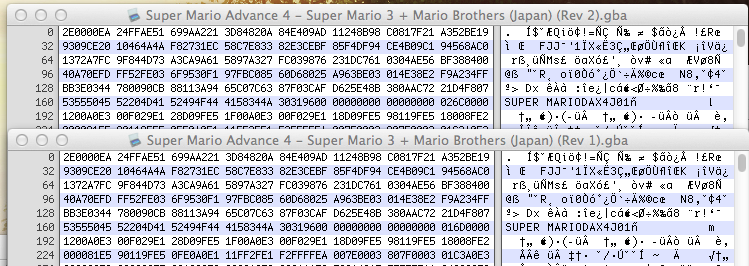
Maybe I'm blind, but I can't see any differences in the header

31c91be2e2c51b3863904ff1e7b9c622.png
 
Hi,

The lenght limit is 64 characters including the suffix (.gba/.sav). I didn't check if the rom name is stripped but I noticed the savename is at some point. So we need the 64 first chars of each rom name to be unique. As far as I'm concerned all is fine and all problem got fixed, so I don't have so much motivation to work further on this. I've tried a bit but I guess the corner cases need some search to be solved.

Basically you may do the things by hand if there's not too much special cases and/or script further. Here's ideas.


list_empty_headers()
{
for rom in *.gba; do
if [ ! "$(rom_header "$rom")" ]; then
echo "$rom"
fi
done
}

list_twins()
{
header="***"
for rom in *.gba; do
prev_header="$header"
prev_rom="$rom"
header="$(rom_header "$rom")"
if [ "$prev" = "$header"; then ]; then
echo "$prev_rom"
fi
done
}

list_long_names()
{
for rom in *.gba; do
if [ "${#rom}" -gt 64 ]; then
echo "$rom"
fi
done
}


list_twins() suppose the twins follows in alphabetic order. It output all the roms to be erased, meaning all the roms with equal headers except the last one.
 
I believe we're actually putting effort in a flawed design which is never a good thing.

The ROM Header isn't a good way to identify ROMs due mainly to Unlicensed software, Prototypes and Betas.

The Revision problem can be somehow fixed by putting the information in the romname.lst, although that would require a modification in the ez flash software itself to tell it to check for that bit of information.

To be honest, I'd rather try contacting someone over at EZ Flash team and tell them to switch to MD5 (or CRC32 or whatever hash they prefer) which would sort out all the problems listed so far.
 
I agree this is effort after a suspect design, however I do really oppose a shift to some kind of file identification via hashing in this instance. There are some great unlicensed games, prototypes/betas but more people would be troubled by the hashing being broken by modifications than are troubled by collisions on the header ID method used.
 
Well, if that's the case... why not both then? :P

Let the user decide:

An "official" mode based on hashes for verified ROM sets like no-intro and such, and a "Unlicensed" mode based on ROM header.

People can try both and see what works best for them.
It looks to me like the best solution.
 
  • Like
Reactions: codezer0
If modifying the ez software is a possibility then a "don't rename rom" option in config would be enough and far more easy to implement.
 
The problem is that if the flashcart doesn't support names longer than 64 characters then you have to shorten the names.

You can't just cut the name, you have to put a shorter name.
For example,

Super Mario Bros. Reloaded - The Grim Return of the all Powerful Bowser, Lord of the Koopas and Master Princess Kidnapper (J + U + E) (En,Sp,Fr,Nl,blablablablabla)

Would get shortened to

Super Mario Bros. Reloaded - The Grim Return of the all Powerful

For the sake of clarity, it would be better to rename it to

Super Mario Bros. Reloaded - The Return of Bowser (JUE)

This is important because if you have ROMs which have several revisions or regions, when they get shortened you would get all the same name if they exceed the 64 characters limit.

Anyway... does anyone know an email address where I can send or link this thread to the ez flash team explaining the matter?
 
I think this is the hardest part to automate. Is it possible for you to do this by hand?
 
I have an exam tomorrow + some business to do in the next days but from the next week I'm almost 100% free so I can definitely do this."
Should I create a new romname.lst with MD5 Hashes (more reliable than CRC32) and a "normal" one with ROM header?

Also, can anyone confirm that this 64 character limit on the game name exists?
I'd try this myself on my ezflash IV but unfortunately my power adatper broke and I'm waiting for a new one.
 
I confirm the limit on Ezflash iv micro. However I had no problem with 2 of my roms having more than 64 characters but the savename got shortened. So as I said the matter is not to have 64 char max but 64 uniq char. Anyway even if it's not everybody's solution I hacked something forward waiting for an eventual client update.


cd 'PATH_TO_THE_ROM_DIRECTORY'
header_name(){ hexdump -C "$1" | head -11 | tail -1 | sed -e "s/.*|\(.*\)|.*/\1/" -e "s/\./ /g"; }
rand_16(){ rand="R$RANDOM$RANDOM$RANDOM$RANDOM$RANDOM$RANDOM"; echo "${rand:0:16}"; }
new_header(){ head -c 160 "$1"; echo -n "$2"; tail -c +177 "$1"; }
patch_rom(){ new_header "$1" "$2" > "$1.new"; mv -f "$1.new" "$1"; }

name_check()
{
name=
for rom in "$@"; do
if [ "${#rom}" -gt 64 ]; then
if [ "${rom:0:64}" = "${name:0:64}" ]; then
echo "Name collision between '$name' and '$rom'."
fi
name="$rom"
fi
done
}

uniq_header()
{
header="$(header_name "$1")"
if [ ! "${header// /}" ] || [ "$prev" = "$header" ]; then
header="$(rand_16)"
patch_rom "$1" "$header"
else
prev="$header"
fi
}

romname_check(){ cut -f1 -d'|' romname.lst | sort | uniq -d; }
romname_lst(){ for rom in "$@"; do uniq_header "$rom"; echo "$header| - |${rom%.gba}"; done; }
name_check *.gba
romname_lst *.gba > romname.lst
romname_check romname.lst


The name_check() will help you to figure out which rom you have to rename manually to avoid savefile collision. The new uniq_header() function use rand_16(), new_header() and patch_rom(). Basically it wrote a random header in two cases. 1, when the header name is empty. 2, when the header name is the same than the previous rom. Here I consider that rom with same headers are following in alphanumeric order. Finaly the romname_check() will display the eventual non-uniq header found in romname.lst (so hopefully nothing).

I won't be there the next weeks I only registered to share my solution for this. So I hope I leave you with enough tools to fix this by yourself in case EZ peoples are not reactive enough.

Edit: Please try the code on a backup of your rom; There should be no damage if you respect the notice, but we never know... :)
 
Last edited by ploum,
Thanks again for your contribution, you've been very helpful.

I'll look for a way to contact ez flash and see if we can sort this out.

If I fail or they don't want to work on the software anymore, I'll try to sort this mess out myself and see if I find a solution.

There's always the option of rewriting the software using the ez4patch.dll, I already have a friend with the coding skills to make a new one.
 
Hi,

I am also fiddling with EZ IV client... and it sure is annoying.

@don_luca: Did you noticed that some header titles are shorter and are slightly different (comparing to the original romname.lst)? An example is the client recognizes "IRIDION3DAI3E" instead of "IRIDION3D AI3E", even though the hex dump shows the header to be "IRIDION3D AI3E". Does it try to do something with the white spaces?

Edit: The client is very buggy when it comes to parsing the romname.lst. I noticed that if the first entry is formatted neatly, then it messes up many other entries.
 
Last edited by alias98,
Hi, I wanted to give this post a bump since I'm on the same boat, I would like to have a full romset available on my 32GB microsd, but I need to bulk path all the roms.
There is also a 75-80 files per folder limitation, so I think that might be a big problem in the "SAVER" folder the cardtrige creates, right?
Any progress on finding a plan B?
Thanks!!
 
Hi, I wanted to give this post a bump since I'm on the same boat, I would like to have a full romset available on my 32GB microsd, but I need to bulk path all the roms.
There is also a 75-80 files per folder limitation, so I think that might be a big problem in the "SAVER" folder the cardtrige creates, right?
Any progress on finding a plan B?
Thanks!!
Long as you don't open the saver directory from within the EZ4, it should be fine. I've had more than that before before, but I never actually went into that directory except from my PC.
 

Site & Scene News

Popular threads in this forum