Hacking Error code 2153-1540?? Need help guys

  • Thread starter Thread starter Blue_Prince
  • Start date Start date
  • Views Views 15,930
  • Replies Replies 54

Blue_Prince

Member
Newcomer
Joined
Nov 24, 2020
Messages
24
Reaction score
2
Trophies
0
Age
36
XP
115
Country
United Arab Emirates
Hello GBATEMP community, first as a newbie I would like to thank everybody here for their hard work and for welcoming me in this community.

I'm getting the error code 2153-1540 in almost half of the games I installed, I'm not quite sure what's the problem, I'm on version 10.2.0 - AMS 0.15.0

Note: there some working games but I'm still testing so I'm gonna list the title names that shows the error.
---------------------------------------------------------------------------------------------------------------------------------------------
Into the dead 2
Gris
hob
Ghost runner
Donkey Kong
Mario odyssey
Dragon quest
Megaman ZR
Megaman X legacy collection ( I get the error when i start Megaman X 4 only)
Megaman x legacy collection 2
Knights and bikes
Oxenfree
Just dance 2020-2019
Sega collection
Zelda birth of the wild ( after the cave when you go to the first location and dock the sheikah slate and the rocks start falling and the screen turns black)
Blade II (After tutorial)
Pumpkin jack ( after main menu when you start playing)
Resident Evil Revelations ( after main menu when you Choose campaign)
Dead Cells
Mario Deluxe
Lego city undercover
----------------------------------------------------------------------------------------------------------
I really don't know what's the issue, I did format, set up every thing from the beginning, still getting the same error in these titles, some titles are working perfectly (byonetta-DMC3-Hades-yoshi..)

I hope I'm not asking much I searched a lot but couldn't find a clue.
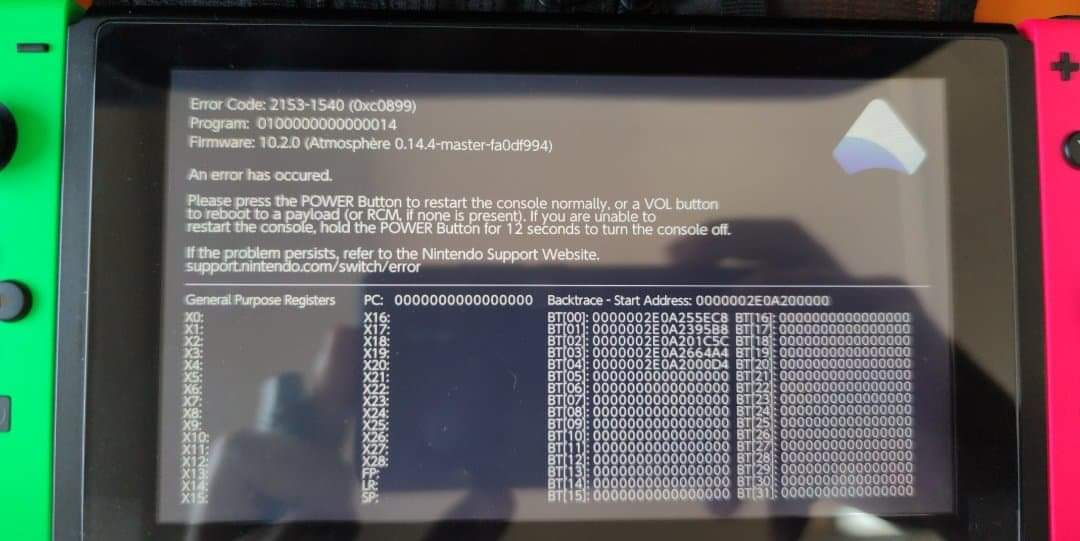
WhatsApp Image 2020-11-24 at 10.14.08 AM.jpeg
 
Hello GBATEMP community, first as a newbie I would like to thank everybody here for their hard work and for welcoming me in this community.

I'm getting the error code 2153-1540 in almost half of the games I installed, I'm not quite sure what's the problem, I'm on version 10.2.0 - AMS 0.15.0

Note: there some working games but I'm still testing so I'm gonna list the title names that shows the error.
---------------------------------------------------------------------------------------------------------------------------------------------
Into the dead 2
Gris
hob
Ghost runner
Donkey Kong
Mario odyssey
Dragon quest
Megaman ZR
Megaman X legacy collection ( I get the error when i start Megaman X 4 only)
Megaman x legacy collection 2
Knights and bikes
Oxenfree
Just dance 2020-2019
Sega collection
Zelda birth of the wild ( after the cave when you go to the first location and dock the sheikah slate and the rocks start falling and the screen turns black)
Blade II (After tutorial)
Pumpkin jack ( after main menu when you start playing)
Resident Evil Revelations ( after main menu when you Choose campaign)
Dead Cells
Mario Deluxe
Lego city undercover
----------------------------------------------------------------------------------------------------------
I really don't know what's the issue, I did format, set up every thing from the beginning, still getting the same error in these titles, some titles are working perfectly (byonetta-DMC3-Hades-yoshi..)

I hope I'm not asking much I searched a lot but couldn't find a clue.View attachment 235199
Uhm...Did you have TriPlayer or systune overlay installed? If so, try to delete it. Maybe it solve this problem. Hope it helps.
 
  • Like
Reactions: Blue_Prince
you may have messed up your AMS folders: you say it is 0.15.0 but the screenshot provided shows 0.14.4
Its actually on 0.15.0 but when I took the photo it was on 0.14.4, back then, the error stays until you boot the console, now whenever the error shows it stays less than a sec and reboots automatically so I could not manage to take a photo, but its the same error I've checked it...:sad::sad::sad:
 
Its actually on 0.15.0 but when I took the photo it was on 0.14.4, back then, the error stays until you boot the console, now whenever the error shows it stays less than a sec and reboots automatically so I could not manage to take a photo, but its the same error I've checked it...:sad::sad::sad:
Make sure you have proper sigpatches and disable cheats for the problematic games
 
  • Like
Reactions: Blue_Prince
Make sure you have proper sigpatches and disable cheats for the problematic games
I've installed proper Sigpatches via AIO updater and chose the second option since I'm booting Atmosphere through Hakate, still the problem persists, :sad::cry:

--------------------- MERGED ---------------------------

Uhm...Did you have TriPlayer or systune overlay installed? If so, try to delete it. Maybe it solve this problem. Hope it helps.
I will attach a fatal report from F:\atmosphere\fatal_reports as an example, maybe it will help??
-----------------------------------------------------------------------------------------------------------------------------------
Atmosphère Fatal Report (v1.1):
Result: 0xC0899 (2153-1540)

Program ID: 0100000000000014
Process Name: audio
Firmware: 10.2.0 (Atmosphère 0.15.0-master-1c71d12d)
General Purpose Registers:
Start Address: 00000036d5800000
Stack Trace:
ReturnAddress[00]: 00000036d5855ec8
ReturnAddress[01]: 00000036d58395b8
ReturnAddress[02]: 00000036d5801c5c
ReturnAddress[03]: 00000036d58664a4
ReturnAddress[04]: 00000036d58000d4
ReturnAddress[05]: 0000000000000000
ReturnAddress[06]: 0000000000000000
ReturnAddress[07]: 0000000000000000
ReturnAddress[08]: 0000000000000000
ReturnAddress[09]: 0000000000000000
ReturnAddress[10]: 0000000000000000
ReturnAddress[11]: 0000000000000000
ReturnAddress[12]: 0000000000000000
ReturnAddress[13]: 0000000000000000
ReturnAddress[14]: 0000000000000000
ReturnAddress[15]: 0000000000000000
ReturnAddress[16]: 0000000000000000
ReturnAddress[17]: 0000000000000000
ReturnAddress[18]: 0000000000000000
ReturnAddress[19]: 0000000000000000
ReturnAddress[20]: 0000000000000000
ReturnAddress[21]: 0000000000000000
ReturnAddress[22]: 0000000000000000
ReturnAddress[23]: 0000000000000000
ReturnAddress[24]: 0000000000000000
ReturnAddress[25]: 0000000000000000
ReturnAddress[26]: 0000000000000000
ReturnAddress[27]: 0000000000000000
ReturnAddress[28]: 0000000000000000
ReturnAddress[29]: 0000000000000000
ReturnAddress[30]: 0000000000000000
ReturnAddress[31]: 0000000000000000

------------------------------------------------------------------------------------------------
 
does this means I need to format the sd?
no

--------------------- MERGED ---------------------------

I've installed proper Sigpatches via AIO updater and chose the second option since I'm booting Atmosphere through Hakate, still the problem persists, :sad::cry:
Hekate chainloads fusee-primary or use fss0?
 
  • Like
Reactions: Blue_Prince
does this means I need to format the sd?
No dont format. fresh install of atmos. delete the atmosphere, Sept, switch, etc. Folders on sd card and replace with what you get from SDsetup. From what I think is that currently there could be some homebrew causing the issue or some broken file. For me a fresh install usually fixes these issues
 
  • Like
Reactions: Blue_Prince
I mean, from the original source (not Kosmos, Deepsea, Kifur, SXos, ReiNX, SDSetup, etc ...)
Dear Ghost92, it is from the original source.

--------------------- MERGED ---------------------------

No dont format. fresh install of atmos. delete the atmosphere, Sept, switch, etc. Folders on sd card and replace with what you get from SDsetup. From what I think is that currently there could be some homebrew causing the issue or some broken file. For me a fresh install usually fixes these issues

Dear Budsixz, I will try that and get back to you ASAP.
 
No dont format. fresh install of atmos. delete the atmosphere, Sept, switch, etc. Folders on sd card and replace with what you get from SDsetup. From what I think is that currently there could be some homebrew causing the issue or some broken file. For me a fresh install usually fixes these issues
SDSetup is untested (bot) and can bring you the same or worse problems. Like I said, Atmosphere Vanilla.
https://github.com/Atmosphere-NX/Atmosphere/releases

Sigpatched (fusee.zip)
https://github.com/ITotalJustice/patches/releases
 
Is there a walkthrough for a proper set up of Atmosphere Vanilla?
Download "atmosphere-0.15.0-master-1c71d12d hbl-2.3.4 hbmenu-3.3.0.zip" and "fusee-primary.bin", unzip "atmosphere-0.15.0-master-1c71d12d hbl-2.3.4 hbmenu -3.3.0.zip" to MicroSD clean. Download "fusee.zip", unzip to MicroSD.

Enter RMC Mode, Inject "fusee-primary.bin".

Done.
 
Last edited by Naminave,
  • Like
Reactions: Blue_Prince
Download "atmosphere-0.15.0-master-1c71d12d hbl-2.3.4 hbmenu-3.3.0.zip" and "fusee-primary.bin", unzip "atmosphere-0.15.0-master-1c71d12d hbl-2.3.4 hbmenu -3.3.0.zip" to MicroSD clean. Download "fusee.zip", unzip to MicroSD.

Enter RMC Mode, Inject "fusee-primary.bin".

Done.

OK I did everything as mentioned, still getting the same error, I formatted the SD for a fresh set up, still the issue is showing in the same mentioned games, tried ReiNX still getting the same issue, I'm really not sure what I'm missing here it's really frustrating
 

Site & Scene News

Popular threads in this forum