Hacking DSTWO Skins

  • Thread starter Thread starter CannonFoddr
  • Start date Start date
  • Views Views 283,456
  • Replies Replies 626
  • Likes Likes 3
OK i want a themes+loading screen+plug in screen(if possible) based around my favorite football club fc barcelona

Logo:
http://www.footiewallpapers.com/pic_upload...-24-316x320.jpg

3 of the players i want in this theme:
Just google Lionel Messi, David Villa and Iniesta use whatever pics suit the theme the best, but they must be wearing their barcy jearsy that looks like this:
http://www.spain-football.org/images/fc-ba...-home-09-10.jpg

And i preferred pm so that people dont say shit about me requesting a footy theme....
 
Bleach Skin Set :

6 skins including 1 animated skin.

Download these skins on this thread or :
On my website : Supercard Skins
With DSTwoTools directly by wifi on your DS : DS2Tools
On TwOne skins : TwOne Skins


Bleach Kon :

kone.gif

presentationkon.png

Download : Kon

Bleach Chad :
presentationchad.png

Download : Chad

Bleach Ichigo :
presentationichigo.png

Download : Ichigo

Bleach Inoue :
presentationinoue.png

Download : Inoue

Bleach Ishida :
presentationishida.png

Download : Ishida

Bleach Rukia :
presentationrukia.png

Download : Rukia
 
Nice skins.

I like that you used the two frame animation trick as well
smile.gif


On the subject of that, would any skinners like it if my DS Skin Maker allowed for these two frame animation previews? I haven't bothered updating DS Skin Maker for a while, so I think it's due an update, and thats something I think will come in handy.

Any other requests for an update?
 
Stormwave said:
Nice skins.

I like that you used the two frame animation trick as well
smile.gif


On the subject of that, would any skinners like it if my DS Skin Maker allowed for these two frame animation previews? I haven't bothered updating DS Skin Maker for a while, so I think it's due an update, and thats something I think will come in handy.

Any other requests for an update?
Thanks,

Let me try your program, i'm sure i will have a lot of requests and perhaps some bug report to do ^^.
 
Rockstar said:
Can somebody do my request
tongue.gif
? (Just asking)
Please be patient - it's only been a few days since you first asked
- don't forget you're asking for 3 sets of skins, using 3 different people (& a logo) & not given any preferences to how the screen(s) should be laid out

I myself was thinking I'd might make an attempt & modify the 'World cup skin' on the first post
Perhaps changing just the top screen with one of the footballer's (replacing the '2010/logo') & the Bacelona logo 'behind' the game icon/text (yet leaving the bottom screen the same)

Then using something similar to the top screen but with another footballer for the 'plugin' screen & the third footballer for the loading, although I'd personally would try & 'blend' the footballers into the background (although I'm not THAT good @ graphics) so that they were not too distracting
[title:perhaps something like one of the corners of this]
4975922375_7a57db0293.jpg
 
CannonFoddr said:
Rockstar said:
Can somebody do my request
tongue.gif
? (Just asking)
Please be patient - it's only been a few days since you first asked
- don't forget you're asking for 3 sets of skins, using 3 different people (& a logo) & not given any preferences to how the screen(s) should be laid out

I myself was thinking I'd might make an attempt & modify the 'World cup skin' on the first post
Perhaps changing just the top screen with one of the footballer's (replacing the '2010/logo') & the Bacelona logo 'behind' the game icon/text (yet leaving the bottom screen the same)

Then using something similar to the top screen but with another footballer for the 'plugin' screen & the third footballer for the loading, although I'd personally would try & 'blend' the footballers into the background (although I'm not THAT good @ graphics) so that they were not too distracting
[title:perhaps something like one of the corners of this]
4975922375_7a57db0293.jpg
I like your idea and i love the world cup skin so modifying it would be good, thanks alot and im sorry for being impatient
smile.gif
 
Well I guess I've put my foot in it & have somehow volunteered to do it
4976867179_be27a49e53.jpg

Anything you want to change before I continue???
Perhaps the bottom screen to also be red/blue ??
 
CannonFoddr said:
Well I guess I've put my foot in it & have somehow volunteered to do it
4976867179_be27a49e53.jpg

Anything you want to change before I continue???
Perhaps the bottom screen to also be red/blue ??
Yeah the bottom screen red and blue will look better other than that its looking great thanks lot!
 
I know that this may be a bit off topic, but I'm a curious newbie attempting to make DSTWO skins and I don't want to bother making a new topic to ask just ONE question. I'm also a newbie at graphics.

I know that the DSTWO uses 16 bit images, but when I finish creating images for the DSTWO and save it as a 16 bit image, the colors change to something else. How can I prevent it from changing? I've noticed that other DSTWO skin makers use 16 bit images too, but their images' colors don't change. I don't get it. Would someone care to enlighten me with a guide on graphics or something? I've found graphics guides, but I end up doing the same thing over and over again. Btw...I use GIMP...and sometimes Windows Paint because I don't get most of GIMP's features.
 
I am r4ymond said:
I know that this may be a bit off topic, but I'm a curious newbie attempting to make DSTWO skins and I don't want to bother making a new topic to ask just ONE question. I'm also a newbie at graphics.

I know that the DSTWO uses 16 bit images, but when I finish creating images for the DSTWO and save it as a 16 bit image, the colors change to something else. How can I prevent it from changing? I've noticed that other DSTWO skin makers use 16 bit images too, but their images' colors don't change. I don't get it. Would someone care to enlighten me with a guide on graphics or something? I've found graphics guides, but I end up doing the same thing over and over again. Btw...I use GIMP...and sometimes Windows Paint because I don't get most of GIMP's features.
Save it in 16bit with GIMP instead of the DSTWO Skin Editor.
 
jurassicplayer said:
I am r4ymond said:
I know that this may be a bit off topic, but I'm a curious newbie attempting to make DSTWO skins and I don't want to bother making a new topic to ask just ONE question. I'm also a newbie at graphics.

I know that the DSTWO uses 16 bit images, but when I finish creating images for the DSTWO and save it as a 16 bit image, the colors change to something else. How can I prevent it from changing? I've noticed that other DSTWO skin makers use 16 bit images too, but their images' colors don't change. I don't get it. Would someone care to enlighten me with a guide on graphics or something? I've found graphics guides, but I end up doing the same thing over and over again. Btw...I use GIMP...and sometimes Windows Paint because I don't get most of GIMP's features.
Save it in 16bit with GIMP instead of the DSTWO Skin Editor.

I've set the extensions to .bmp file and set it to 16 bit on GIMP, but it still won't work. I've tried the first and third option when trying to set which type of .bmp for 16 bit. When I load the skin, it just gets stuck at the Loading Screen.
 
any chance you could upload both a 'paint' saved version and the 16bit 'gimp' version of the same graphic so that we can compare them.

Also is it a particular colour that changes or several ?
(I'm thinking that perhaps one of the colours is accidentally being turned transparent)

Also iirc it's the 3rd option in gimp that has something like '1x 5r 5g 5b' (cant check at the moment as I'm on my phone) that you should be using

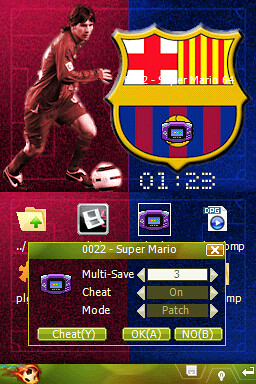
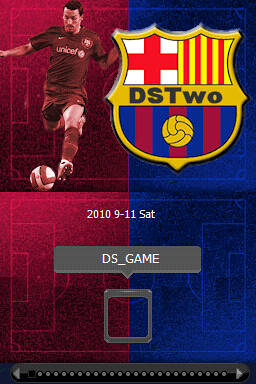
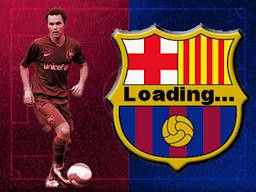
EDIT: @ Rockstar - here it is
Hope you like it
p.s. don't worry about the white text on the eos skin being out of place - it IS in the right place, just the preview grab was wrong
 
@ i am r4ymond: - I can't see much of a problem between colours on 'GIMP 16bit R5 G6 B5' and 'GIMP 16 Bit X1 R5 G5 B5', but can definately see a difference with the 'Paint' version

The reason is that the 'Paint' version is only 4-bit (or 16-colours only) & not 16-Bit.
In fact 'Paint' is UNABLE to save as 16bit, only 24-bit (hence why I always suggest using GIMP)

I can also see one other small problem as well - your pictures are 257x192 - they need to be 256x192. This could be why you get stuck on the 'Loading...' screen
 
CannonFoddr said:
@ i am r4ymond: - I can't see much of a problem between colours on 'GIMP 16bit R5 G6 B5' and 'GIMP 16 Bit X1 R5 G5 B5', but can definately see a difference with the 'Paint' version

The reason is that the 'Paint' version is only 4-bit (or 16-colours only) & not 16-Bit.
In fact 'Paint' is UNABLE to save as 16bit, only 24-bit (hence why I always suggest using GIMP)

I can also see one other small problem as well - your pictures are 257x192 - they need to be 256x192. This could be why you get stuck on the 'Loading...' screen

Ok, I'll try resizing the image to see if that's the problem. Looks like I won't be using Windows Paint on these images anymore.

EDIT: So I scaled the images to 256x192 and set it as 16 bit R5 G6 B5 and loaded up the skin with it, and the image still lost a bit of color, but it wasn't as bad as the Windows Paint image.

EDIT 2: YES! I set the images as 16 bit X1 R5 G5 B5, loaded up the skin, and have not encountered any color loss! Now that I've gotten that figured out, I can focus on making the images now
biggrin.gif
. Thanks for the help CannonFoddr.
 
I'll add the new SNES Emulator into the next version of DS Skin Maker (alongside a massive overhaul of the entire program).

The Supercard team are making it harder and harder to make full packs
smile.gif
 

Site & Scene News

Popular threads in this forum