Hacking DSTWO Skins

  • Thread starter Thread starter CannonFoddr
  • Start date Start date
  • Views Views 282,952
  • Replies Replies 626
  • Likes Likes 3
There is one more problem with skinning, actually -
If you'll notice, when you enter the menu and click on "DS_GAME", or just load any game, it will show a loading screen which looks like this:
loadingu.png


but this file/picture is nowhere to be found.
It seems like Supercard made the EOS unskinable...
 
Escape said:
There is one more problem with skinning, actually -
If you'll notice, when you enter the menu and click on "DS_GAME", or just load any game, it will show a loading screen which looks like this:
loadingu.png


but this file/picture is nowhere to be found.
It seems like Supercard made the EOS unskinable...
You can edit it with this nifty program.
 
Traitor said:
Escape said:
There is one more problem with skinning, actually -
If you'll notice, when you enter the menu and click on "DS_GAME", or just load any game, it will show a loading screen which looks like this:
loadingu.png


but this file/picture is nowhere to be found.
It seems like Supercard made the EOS unskinable...
You can edit it with this nifty program.

Thanks for that! now it's time to make mah ultimate skin!
BTW, this guy who made the loading screen modifier said that he also made a skin editor (unless I misunderstood?), any chance linking to it too?
smile.gif
this will sure make things quicker
tongue.gif
 
Escape said:
Traitor said:
Escape said:
There is one more problem with skinning, actually -
If you'll notice, when you enter the menu and click on "DS_GAME", or just load any game, it will show a loading screen which looks like this:
loadingu.png


but this file/picture is nowhere to be found.
It seems like Supercard made the EOS unskinable...

You can edit it with this nifty program.

Thanks for that! now it's time to make mah ultimate skin!
BTW, this guy who made the loading screen modifier said that he also made a skin editor (unless I misunderstood?), any chance linking to it too?
smile.gif
this will sure make things quicker
tongue.gif
It hasn't been updated for the DSTWO yet.
 
Where in the heck are the graphics for the clock? I have three skins (two by Supercard, the other one I found on the SC forum) and they all have different clocks...but I can't find the graphics anywhere. It's driving me nuts because the default one for the skin I was editing in the process of making my own looks terrible on my upper screen.
 
Kentoss said:
This is the upper screen so far as planned in photoshop:

upper_screen.png

****ing TAG this ****.


Also, man I am so tired of that loading screen. The slogan sounds so cheesy and is full of innuendo and broken English.
Enjoy yourself! All pleasure in it.
 
theplasmastorm said:
Kentoss said:
This is the upper screen so far as planned in photoshop:

upper_screen.png

****ing TAG this ****.


Also, man I am so tired of that loading screen. The slogan sounds so cheesy and is full of innuendo and broken English.
Enjoy yourself! All pleasure in it.

I have no idea what "****ing TAG this ****." means but I'm not working on that skin any more because of lack of calendar support. I've confirmed that EOS doesn't even load the files necessary to generate the calendar.

Currently I have a Minimalist design I'm working on, and once I've got that the way I like I'll probably post it here.
 
Minimalist designs are designs that are stripped down to their fundamental features, and aren't as complex looking as my design above. Usually have a simple color scheme with flat colors and basic information.

Also I can't make a skin that shows internal names in full on the file list, but I can do it like I did with the other skin on the top screen. I just don't have a lot of time for skinning, so don't rely on me to make one right now.
 
Kentoss said:
Minimalist designs are designs that are stripped down to their fundamental features, and aren't as complex looking as my design above. Usually have a simple color scheme with flat colors and basic information.

Also I can't make a skin that shows internal names in full on the file list, but I can do it like I did with the other skin on the top screen. I just don't have a lot of time for skinning, so don't rely on me to make one right now.
your skin is looking great the best thing eva hope you finish it soon
 
9th_Sage said:
Where in the heck are the graphics for the clock? I have three skins (two by Supercard, the other one I found on the SC forum) and they all have different clocks...but I can't find the graphics anywhere. It's driving me nuts because the default one for the skin I was editing in the process of making my own looks terrible on my upper screen.
I thought the graphics for the clock (& I'm guessing you mean the clock that shows when you've selected 'DS_Game') are 'clock_numbers.bmp' and 'clock_colon.bmp' found in '/_dstwo/ui/{skinname}/' folder

Have you got any 'Black' lines on the actual number graphics (like high/low-lights, shadows or outlines) by any chance ??
If so (I don't know about the DSTwo - but it's a problem with AKAIO) then these 'blacks' will become transparent, causing the background to show though the numbers

Make those 'blacks' (RGB 0,0,0) into 'Near-black' (e.g. RGB 10,10,10) instead should cure that problem

Did you use a program called 'AKEdit' to convert 24-bit graphics to 16-bit ?? - that program is well known to cause picture detail deterioration when used
 
CannonFoddr said:
9th_Sage said:
Where in the heck are the graphics for the clock? I have three skins (two by Supercard, the other one I found on the SC forum) and they all have different clocks...but I can't find the graphics anywhere. It's driving me nuts because the default one for the skin I was editing in the process of making my own looks terrible on my upper screen.
I thought the graphics for the clock (& I'm guessing you mean the clock that shows when you've selected 'DS_Game') are 'clock_numbers.bmp' and 'clock_colon.bmp' found in '/_dstwo/ui/{skinname}/' folder

Have you got any 'Black' lines on the actual number graphics (like high/low-lights, shadows or outlines) by any chance ??
If so (I don't know about the DSTwo - but it's a problem with AKAIO) then these 'blacks' will become transparent, causing the background to show though the numbers

Make those 'blacks' (RGB 0,0,0) into 'Near-black' (e.g. RGB 10,10,10) instead should cure that problem

Did you use a program called 'AKEdit' to convert 24-bit graphics to 16-bit ?? - that program is well known to cause picture detail deterioration when used
D'oh...somehow I was missing those last night. I shouldn't try doing this kind of thing late at night I guess. Thanks.
 
WhooHoo - got my DSTwo today (25th), so actually tried out my DS_Game 'skins'... they don't look to shabby considering...

However - the 'pink' is growing on me, so much so - I'm actually considering altering the GBAEmulator and moonshell skins to 'match'
 
Man, I'm so gonna do a skin for the beautiful EOS!!! Time to get my creative magic on!
Hmm what should I base it on? Random anime, game ... or Colours and text? Something abstract maybe?

@CannonFoddr I was also thinking of doing a moonshell skin based on the DS Two pink skin lol. But nah, to busy doing other stuff, I'll just do a skin for the DS Two.
 
@CannonFoddr

Thanks for the skins. I'm using the grey one.


Is there a way you could use images from movie avatar?

Cheers
 
tajio said:
Man, I'm so gonna do a skin for the beautiful EOS!!! Time to get my creative magic on!
Hmm what should I base it on? Random anime, game ... or Colours and text? Something abstract maybe?

@CannonFoddr I was also thinking of doing a moonshell skin based on the DS Two pink skin lol. But nah, to busy doing other stuff, I'll just do a skin for the DS Two.
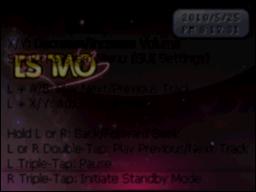
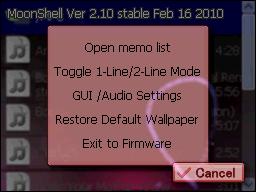
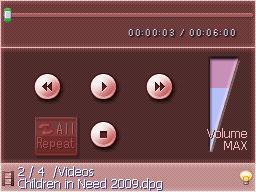
Too late - I've quickly cobbled a 'pink' DSTwo Moonshell skin here (& when I mean 'quickly cobbled' I MEAN 'it - not everything been been 'changed')
4640043116_5535a6a5e6_o.jpg

4640042944_3d746a9a0f_o.jpg
4639434133_3e1b6d210e_o.jpg

@ dacore270: Hmmm - I've never made a skin from scratch before (I've usually 'copied' or modified someone else's) but I MIGHT just try (but don't hold your breath)
 
I can't wait until the skin editor for the DSTWO is finished >,,< someones making one over on the SC forums I'll be holding off making any skins until that's released.
 
DarkWay said:
I can't wait until the skin editor for the DSTWO is finished
The only problem is - Which Skin(s) will it do ??

So far I've discovered that there's at least 3-6 sets of graphics that can be changed 'easily' (only one 'through a menu' though)
> There's the 'DS_Game' skins like 'pink' and 'silver' (found in '/_dstwo/ui/' )
> There's the 'Patch' & 'Plugin' skin (the one you first see to select the GBA/Moonshell/DS_Game icons) - in '_dstwo/plug/'
> There's the 'Patch' skin - found in '/_dstwo/patch/'

You could also change the 'GBA Emulator' ('/NDSGBA/system/gui/') and 'Moonshell' skins as well as the 'Loading' screen (which you need a special program to change)

I don't think that program will do all of these though - just the 'DS_Game' ones
 

Site & Scene News

Popular threads in this forum