Hacking Disk Burning Speeds Explained

  • Thread starter Thread starter moosh01
  • Start date Start date
  • Views Views 6,463
  • Replies Replies 54
digitydogs said:
For the last time your burning speed does not affect the wii laser in any way. If anything is going to "kill" the laser it would be adjusting it to work outside of specs in order to read discs it isnt meant to. The wii drive is a DVD drive. Nintendo left the dvd command in because they were originally going to have a dvd player, but went with the "wii format" to avoid paying royalties. Maybe one day they plan to pay them and install a player with an update, or offer one on the shop channel, only time can tell. When a disc is read its read speed is detirmined by the firmware, hardware capabilities and media integrity. A bad burn (lots of errors) will cause the wii laser to do more work re-reading sections of disk, which does lead to more wear and tear over time. Verify your disks after burning, do one at each speed, whichever has the fewest errors is going to be the best speed for your computer and media. Using the logic thrown around lately i could argue that real wii discs will wear out the drive faster because they read @ 6x which means the laser has to move faster. Now can we please stop spreading the rumors than fast or slow burns result in dead drives. Bad burns are the only thing that is going to shorten the life of your drive.

In summation... Test all speeds, verify, and go what works best for your system in terms of lowest error rate be it 2,4,8,or 16x

Edit:
And no i am not saying that real wii discs will hurt the drive, it was sarcasm.

+1 (because some people seem to still not get it)

Put it this way, if I take 15minutes to write this post, it doesn't affect how fast you read it.

If I wirt/e m7 poSt l1ke tHls, I guarantee you it will take you longer to read.

That is what CAN (*keyword CAN) harm ANY laser as it will require additional re-read operations to successfully read the disc. Re-read operations are not inherently harmful in and of themselves, they just require more work which means more wear-and-tear over time. As stated earlier, burn speed is not always positively correlated to burn errors (ie. burning slower doesn't guarantee a better burn nor does burning faster).

In closing, how fast you do something (anything really) is not an indication of its quality.... so test the quality of your burns with DVDInfoPro (or whatever) to determine its quality (your PC or Wii successfully reading a disc is not an indication of a quality burn) in order to reduce strain from reading by ANY device (not just the Wii).
 
guys ...
logic says that if your are burning in slower speeds your using the lens longer, therefor reducing is lifetime..

it's that hard to get...

and for me if i stick to the speed in the disc i add no problems so far
 
kimikal27 said:
guys ...
logic says that if your are burning in slower speeds your using the lens longer, therefor reducing is lifetime..

it's that hard to get...

and for me if i stick to the speed in the disc i add no problems so far

Thats some terrible logic.

That message I just typed above: "Thats some terrible logic." say it took me 1 minute to type out (burned slow).

Did that affect how you read that message at all? Nope. Were you using your eyes longer than normal? Nope. Its the same exact thing with DVD Burners and DVD readers.

The Wii, no matter what, will always read backups at 6X speed (if using a modchip), and if no-modchip is present, its set to 3X reading speed.

There will be more errors in using the backup launchers since the Wii is only reading at 3X. Until we are able to get 6X speed, we will just have to make do.
 
I bought my Wii at launch, modded it roughly when WiiFree was released, it stayed opened on my desk for months because one of my soldering point was bad and I had to regularly check if there was still a contact.
I had to adjust the POT for Smash Bros Brawl, and since I usually play my games on a DVD-RW for hours before burning them on a real DVD (at 8x, if you're curious).
I never had a disc reading error yet.

I highly doubt burning your backups at 2x, 4x or 8x will make a real difference in the lens lifespan, in fact you don't even know if it's the lens that will die first in your Wii...
 
I've been in the scene since the xbox and ps2 hacks and up to years of burning DVDs for backups , the
best and only working speed for burning DVD DL for xbox 360 is at x2.4 and that is a set rule , that took people some time to believe it , but they had to care with a high price of the DL at that time
smile.gif


now for Wii backups it's the same way , x4 burning speed is the idle speed to burn a backup with and
this came out of a lot of testing on many media kinds and burners , now however you guys wanna beleive it or not it's up to you
wink.gif
 
I've ported this to many times, I think I might make it a song:
here my list of tested DVD's

Made in India: Verbatim

Disc ID: MBIPG101-R05-01**************NO
Book Type: DVD+R

************************************

Made in Taiwan: verbatim

Disc ID: MCC-004-00******************YES
Book Type: DVD+R

*************************************

Made in Taiwan: Verbatim

Disc ID: RITEK-R05-01*****************NO
Book Type: DVD+R

*************************************

Made in Taiwan: Sony

Disc ID: SONY-D21-00******************YES
Book Type: DVD+R

*************************************

Made in Taiwan: Memorex

Disc ID: CMC MAG-M01-00***************YES
Book Type: DVD+R

I haven't tested anymore 'cuz that's all there was on OffDep, clearly I can see that if the last number is "01" is not going to work, if it is "00" it works, all of them were burned at 2.4X, 4X, 8X and 16X, so my conclution after found "Da List" was the next:

1st class media + new burner (3 years max) = burn at max speed 16X (in this case)
1st class media + old burner = burn at half the speed 8X
2nd class media + new burner = burn at half the speed 8x (like my Memorex in this case)
2nd class media + old burner = throw your burner in the can, buy a new one and spend more money in your media, your Wii is going to appreciate it...!!!


why do I tell this?? well my Sony and Verbatim works 100% of the times they are in use, no DRE of anything (except when I didn't install the right cIOS wich for me is "324 error"), and the Memorex, wich I still have 2 of them (thank God) works 100% of the times the ones that I burnt at 8X, that is only what I've been through, hope you find it usefull, cheerz everybody...!!!

smile.gif
 
Tichinde925 said:
kimikal27 said:
guys ...
logic says that if your are burning in slower speeds your using the lens longer, therefor reducing is lifetime..

it's that hard to get...

and for me if i stick to the speed in the disc i add no problems so far

Thats some terrible logic.

That message I just typed above: "Thats some terrible logic." say it took me 1 minute to type out (burned slow).

Did that affect how you read that message at all? Nope. Were you using your eyes longer than normal? Nope. Its the same exact thing with DVD Burners and DVD readers.

The Wii, no matter what, will always read backups at 6X speed (if using a modchip), and if no-modchip is present, its set to 3X reading speed.

There will be more errors in using the backup launchers since the Wii is only reading at 3X. Until we are able to get 6X speed, we will just have to make do.

I think he meant the burner's lifetime, not the Wii.
 
player0 said:
Tichinde925 said:
kimikal27 said:
guys ...
logic says that if your are burning in slower speeds your using the lens longer, therefor reducing is lifetime..

it's that hard to get...

and for me if i stick to the speed in the disc i add no problems so far

Thats some terrible logic.

That message I just typed above: "Thats some terrible logic." say it took me 1 minute to type out (burned slow).

Did that affect how you read that message at all? Nope. Were you using your eyes longer than normal? Nope. Its the same exact thing with DVD Burners and DVD readers.

The Wii, no matter what, will always read backups at 6X speed (if using a modchip), and if no-modchip is present, its set to 3X reading speed.

There will be more errors in using the backup launchers since the Wii is only reading at 3X. Until we are able to get 6X speed, we will just have to make do.

I think he meant the burner's lifetime, not the Wii.

That's what I figured (which is why I didn't respond).

Having said that, saying that burning at slower speeds will wear down a burner faster (due to prolonged use) is a little flimsy as well. That's kind of like asking which is better, driving a car @ 50 mph for 2hrs or 100mph for 1 hr.... you cover the same distance in both but the final 'wear' really varies on the construction of the vehicle (same idea for the burner).
 
moosh01 said:
DaMummy said:
burning at slow speeds damages your wii laser over time, read it and weep!
http://gbatemp.net/index.php?showtopic=83360&st=0
also....it would be a good idea to upgrade your dvd drivers firmware(google it)

1. that thread said nothing about slow burns specifically, it said different people have different results

B. he hasn't proved this theory of 'killing your lens', he has merely shown you have to verify your disk to see what works best for you

Lastly. YOU CAN"T STRAIN A LASER
blink.gif
My threads proves that lower speed aren't better than faster. In my case, faster burning speed gave a better result. The only way to make a perfect burn is to calibrate your drive by burning the same game with the same disc at different speed. Then you'll be able to find the good burning speed.
 
Shuny said:
moosh01 said:
DaMummy said:
burning at slow speeds damages your wii laser over time, read it and weep!
http://gbatemp.net/index.php?showtopic=83360&st=0
also....it would be a good idea to upgrade your dvd drivers firmware(google it)

1. that thread said nothing about slow burns specifically, it said different people have different results

B. he hasn't proved this theory of 'killing your lens', he has merely shown you have to verify your disk to see what works best for you

Lastly. YOU CAN"T STRAIN A LASER
blink.gif
My threads proves that lower speed aren't better than faster. In my case, faster burning speed gave a better result. The only way to make a perfect burn is to calibrate your drive by burning the same game with the same disc at different speed. Then you'll be able to find the good burning speed.
Just to clarify, it also doesn't 'prove' that faster burn speeds are better.

What it proves is that burn speed is independant of burn quality.
 
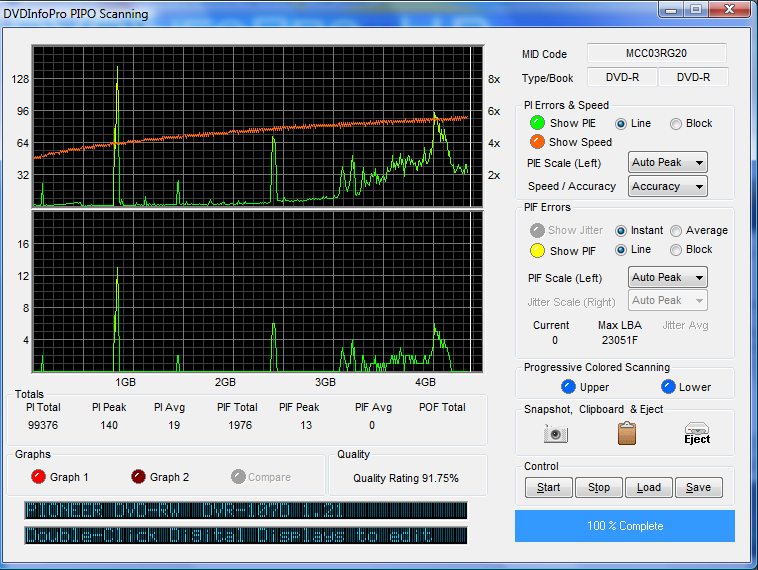
I find it curious how the myth about burn speed matters still exists. That came about back in the PSX days before buffer underrun existed and there truly is no point in bastardizing your burn speed. Want proof? Here's a copy of Super Paper Mario burned at 24x on a Lite-On with an iso mounted over a network.
dotdotdot.png


holy shit look at that!
 
sampson said:
I find it curious how the myth about burn speed matters still exists. That came about back in the PSX days before buffer underrun existed and there truly is no point in bastardizing your burn speed. Want proof? Here's a copy of Super Paper Mario burned at 24x on a Lite-On with an iso mounted over a network.

holy shit look at that!
Holy people. Burn speed and burn quality are TWO indepependant attributes.

They are CORRELATED, but not always in the same direction.

As such, TEST your burned discs for QUALITY and determine which speed is best (if you're above 90%, don't bother testing each speed, just be happy with the quality burn you got at whatever speed you used). Its even in the FAQs
http://wiki.gbatemp.net/wiki/index.php/Hac...ing_Information

Refrain from using the logic "it worked for me so it must work for everyone else" ... just because you can burn a disc at 96X and get a quality burn does not mean everybody else can too. All DVD burners are NOT created equal.
 
-Unknown- said:
sampson said:
I find it curious how the myth about burn speed matters still exists. That came about back in the PSX days before buffer underrun existed and there truly is no point in bastardizing your burn speed. Want proof? Here's a copy of Super Paper Mario burned at 24x on a Lite-On with an iso mounted over a network.

holy shit look at that!
Holy people. Burn speed and burn quality are TWO indepependant attributes.

They are CORRELATED, but not always in the same direction.

As such, TEST your burned discs for QUALITY and determine which speed is best (if you're above 90%, don't bother testing each speed, just be happy with the quality burn you got at whatever speed you used). Its even in the FAQs
http://wiki.gbatemp.net/wiki/index.php/Hac...ing_Information

Refrain from using the logic "it worked for me so it must work for everyone else" ... just because you can burn a disc at 96X and get a quality burn does not mean everybody else can too. All DVD burners are NOT created equal.


So long as you buy decent hardware your burn quality shouldn't be affected. I can't even count the number of times the buffer went to 0% while burning that image. I've burnt all my games over a network mounted drive with this burner and all are rating above 90%. Yes, it will vary. It depends how much crap you've burned on a drive and the quality of the drive you got in the first place.
 

Site & Scene News

Popular threads in this forum