Homebrew Custom Theme Thread

No but I haven't been able to find separately with the proper .DLLs
You can find it on "that other site not allowed to name" in Other Nintendo 3DS Downloads section. :) Once it's approved that is. I don't have 50 posts yet to remove that annoying "mod has to approve post" thing yet. :(
Edit: It's approved now, you can find at that place and section above. ^^^
 
Last edited by Shadowtrance,
I had tried to create one but always got error, image is not in value of 2, and tried everything and didnt get around it.
 
I had tried to create one but always got error, image is not in value of 2, and tried everything and didnt get around it.
That's a pretty simple error really, you image isn't to the power of 2. eg: 1024 x 256, is divisible by 2, if it isn't divisible by 2 either in width or height you will get that error.
 
I had tried to create one but always got error, image is not in value of 2, and tried everything and didnt get around it.
Image size is different for each screen and type of scrolling. For a still top image the image is like 512x something (don't remember off hand) but it only shows 412x240. So you have whit space to the right and bottom of the image.

Edit. Yata+ has all the image size requirements.
 
Image size is different for each screen and type of scrolling. For a still top image the image is like 512x something (don't remember off hand) but it only shows 412x240. So you have whit space to the right and bottom of the image.

Edit. Yata+ has all the image size requirements.
Ohhh got it now. And since this methid (via home brew channel) requires a premium theme to be installed, if I install this theme, it doesnt remove the sound of the already installed premium theme, how can I do this?
 
Ohhh got it now. And since this methid (via home brew channel) requires a premium theme to be installed, if I install this theme, it doesnt remove the sound of the already installed premium theme, how can I do this?
You don't need a premium theme anymore. You can set default or a color. If a theme has bgm it will replace what, if anything, is there.
 
He didn't swap the red/blue channel values :lol:

Not really sure what you mean. Could you explain? :P

I'm using gimp, pretty much i've only grasped the very basics like scaling the images down, guides, ect. Pretty much making the images fit.
Folders show up normally on the computer, when installed on the 3ds the buttons change from red to blue though.

Edit: Think I found my answer.
 
Not really sure what you mean. Could you explain? :P

I'm using gimp, pretty much i've only grasped the very basics like scaling the images down, guides, ect. Pretty much making the images fit.
Folders show up normally on the computer, when installed on the 3ds the buttons change from red to blue though.
That's because the red and blue channels are swapped on the 3ds, so instead of RGB like we're probably used to, it's BGR instead on 3ds.
Although i thought that was something that was fixed in yata or something and we didn't have to manually do it anymore, or I'm just remembering wrong.
 
Not really sure what you mean. Could you explain? :P

I'm using gimp, pretty much i've only grasped the very basics like scaling the images down, guides, ect. Pretty much making the images fit.
Folders show up normally on the computer, when installed on the 3ds the buttons change from red to blue though.
Click the foreground color on your tool window. It will bring up the color picker. To the right you will see number next to red, green, blue. Also hue and two others but you don't need those. If you sample the color of the folder button then swap the numbers for blue and red. This is the color those buttons need to be to display corectly. They will look blue on your computer.
 
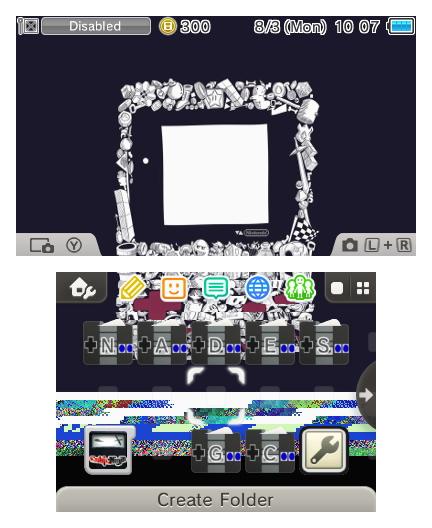
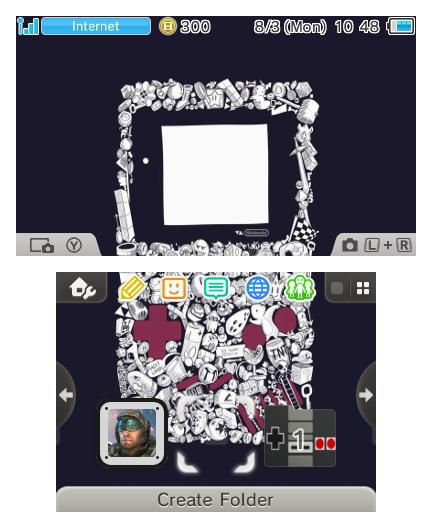
So far i'm getting this:

CLf_dcLUkAA2VhY.jpg

The change in button color may have to do with one of the color settings in the theme(?) IDK
Not sure why the bottom image flipped out. -_-

Edit: NEVERMIND! Had flipbook checked for bottom screen..
Edit(Again): Fixed bottom screen:
CLgB4GQUwAAGblZ.jpg
You should use the newest version of YATA+. It auto-swaps the red and blue channels.
 
CLgIuAGUAAAZ_w6.jpg:large

http://www.filedropper.com/bodylz_2

Haven't touched the borders yet. So far i've done a shitty job making my own, but i'll give it a shot. The above is the body_LZ for what's pictured.

Edit:
That's because the red and blue channels are swapped on the 3ds, so instead of RGB like we're probably used to, it's BGR instead on 3ds.
Although i thought that was something that was fixed in yata or something and we didn't have to manually do it anymore, or I'm just remembering wrong.

Good to know.
Got my answer hint from @WeedZ1985 & https://gbatemp.net/threads/release...a-3ds-theme-editor.393355/page-4#post-5591066 :P

Edit(Yet again):
You should use the newest version of YATA+. It auto-swaps the red and blue channels.

Alright, good to know. I'm using Yata+ atm

Hey.. What do you know.. Another EDIT!:
Idk if i'm going to attempt the border icon, since i'm pretty clueless with that. >_>
 
Last edited by usernametaken,
  • Like
Reactions: KingVamp and Pecrow
For real? And I've been doing this manually with Photoshop this whole goddamn time? lol
Option: Enable use of BGM under Theme Settings, I assume this is the option he spoke of.

--------------------- MERGED ---------------------------

CLgIuAGUAAAZ_w6.jpg:large

http://www.filedropper.com/bodylz

Haven't touched the borders yet. So far i've done a shitty job making my own, but i'll give it a shot. The above is the body_LZ for what's pictured.

Edit:


Good to know.
Got my answer hint from @WeedZ1985 & https://gbatemp.net/threads/release...a-3ds-theme-editor.393355/page-4#post-5591066 :P

Edit(Yet again):


Alright, good to know. I'm using Yata+ atm

Hey.. What do you know.. Another EDIT!:
Idk if i'm going to attempt the border icon, since i'm pretty clueless with that. >_>

THis is beautiful ! THank you !!!!!!
 
No problem, sorry I don't know what i'm doing in regards to the borders though! :P

Ok, Yata+ 1.1 is 10x better than the previous.
I wasn't prepared for my Isaac theme to automatically load & play this though..
 

Site & Scene News

Popular threads in this forum