Homebrew Custom Theme Thread

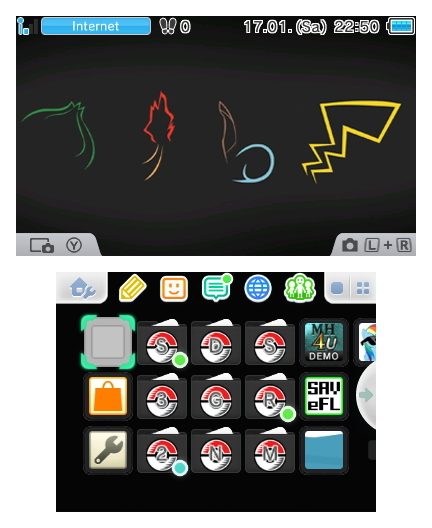
Pokémon Simple Theme with the main theme from season one in 8bit style.
Hope you enjoy.

hni_0088djs01.jpg


Pokémon Simple: https://www.dropbox.com/s/tcg4aizuhzp6htg/Pokémon Simple.rar?dl=0
 
Could anyone help me out? So, I'm not having any luck. I've put a body_LZ.bin and bgm.bcstm in the root of my SD card (as a Gateway user) and followed the instructions in the ladder half of this video: (yes, I'm that much of a scrub that I needed a video, lol.) and on reboot I go back to the default theme. Trying to switch back to the theme I was using when I followed the instructions just gives me the theme as it should be. Are there different filenames in version 1.1 or something?
 
Could anyone help me out? So, I'm not having any luck. I've put a body_LZ.bin and bgm.bcstm in the root of my SD card (as a Gateway user) and followed the instructions in the ladder half of this video: (yes, I'm that much of a scrub that I needed a video, lol.) and on reboot I go back to the default theme. Trying to switch back to the theme I was using when I followed the instructions just gives me the theme as it should be. Are there different filenames in version 1.1 or something?


Use one not standard Theme first before adding your own, the simple colored one's are standard. (You can install one per cia, buying one might remove it everytime something connects to eshop if sysnand and emunand are linked.)
 
  • Like
Reactions: Nepeta
I found a pretty annoying problem with EveryFileExplorer's theme editor. I had already gone through and spent a lot of time in a hex editor changing the main theme colors (all of them), and I realized that EveryFileExplorer completely overwrites those parts of the theme with the default system colors. It slightly corrupts the themes too, and I had to go in and replace the header of my theme with the original header just to get it to load up. This is problematic, because throwing the theme into EFE and exporting it is the only way I can change the scroll type of either screen - if I change the scroll type to anything out-of-bounds from the image in the theme (going from no scroll to normal/slow scroll), the normal Theme Editor completely freaks out and just crashes, while EFE opens the modified scroll types just fine. That being said, I can change the colors of the theme all day long, but only if I don't change the scroll type either.

You may be thinking, "well, why not change the theme colors of the theme EFE exports?" Well, I'd love to, but each of the offsets to the RGB color blocks get replaced with either 0xFFFFFF or 0x000000, and those aren't valid offsets at all.

If anyone knows how I can change the scroll type without completely messing up the colors, your help is very much appreciated.

I was using the LZ11.bat to decrypt/encrypt the .bin files, and changing the RGB values as instructed in the 3dbrew, and I can only get black screens when I test to see if it works. I even copy and pasted RGB values from one theme to another to test this out and still only black screens. Either I'm not doing something right or there is something else going on when the file is re-encrypted by the LZ11.bat. I know I'm coping the RGB values correctly, I don't know if there is some kind of special file size checking security that the 3ds is doing on the pictures and bombing if its not exact. I haven't been able to change the color's at all in a modded theme. I really wish someone would enlighten us with the instructions on now to properly change the RGB values without blowing up the theme.
 
Sorry, just fixed the link, thanks <: Hyperlink was broken
Contents: body_LZ.bin, bgm.bcstm
SM64 Backwards longjump theme
http://puu.sh/eI6Yx/3fd6f2c980.rar


14e0cfe63e.gif

Thanks :)

Edit:By the way don't know where you got the music from but WTF, Wicked!!! :wink: This theme is proper cool, check it out if you already have not :)
 
  • Like
Reactions: TUWieZ
Thanks :)

Edit:By the way don't know where you got the music from but WTF, Wicked!!! :wink: This theme is proper cool, check it out if you already have not :)

Thanks! :) I was pretty proud of how the audio loop came out lol

BGM
 
Can someone who've made audio loops before help me make a loop out of a track? It's from a VGM OST and it's meant to be looped originally.
I can't figure out where I should loop exactly.
 
Can someone who've made audio loops before help me make a loop out of a track? It's from a VGM OST and it's meant to be looped originally.
I can't figure out where I should loop exactly.

I'll link a looped WAV/bctrm if you link the track
 
Are you using Gateway/Emunand for your themes or using CFW?

GATEWAY METHOD

If its Gateway your using. Just put both files (bgm.bcstm/body_LZ) on the route of your sd-card, boot up emunand then trigger a proper Nintendo theme first, not a default theme, then boot into your Home Extdatatool.cia icon/banner icon, (if you have not installed it yet, install your Home Extdata.cia file with the DevMenu make sure you have that file as well on the route of your sd-card at the same time as the others), then in the Home extdata screen click on the top one first, Copy extdata SaveData.dat to sd, then next click on Enable Theme-cache and last click on Copy Theme cache from sd to extdata and then just reboot your 3DS the theme and the music should both work in emunand soon as you boot back into it.

HOMEBREW METHOD

If your using the other way, Homebrew just put the whole 3DS folder into the route of your sd card put both theme files into your Home Extdata folder and boot Home extdata from Homebrew on your 3DS and repeat the same steps as above. :)
worked like a charm, perfect simple tutorial. Rep+
 

Site & Scene News

Popular threads in this forum