Tutorial  Updated

Create FBI themes

You might've not known this, but FBI has a theme feature. It loads them from /fbi/theme.

Here's how you can make your own themes:
  • Download the FBI repo from Github. ("Clone or download" -> "Download ZIP")
  • Make a seperate folder for your theme, and put the contents of the "romfs" folder in the ZIP inside the folder you've just created. You can dismiss the rest of the ZIP.
  • Edit the images. Make you you keep them in the PNG format and don't resize them.
  • The text colors are stored in the textcolor.cfg file, they're formatted as hexadecimal ARGB (Alpha, Red, Green, Blue). Alpha "FF" means full opacity, so you would probably want to keep that.
  • Done!
You can zip up your folder to share your theme, and install it by putting the contents in the "/fbi/theme" folder (create it if it doesn't exist), and your theme will be in effect the next time you boot up FBI.

Here's a theme I've done myself:

Download (this is an edit of @phoen1x74's https://gbatemp.net/threads/re-release-dark-fbi-theme.455878/ )

top_0001.png
.eJwNyFEOgyAMANC7cABaG8DqZRaGBE3UEtp9Lbv7TN7X-7rPON3qdrOuK8B2aJGxeTUZuVXfRNpZcz_UF7kgm-WyX_U2BUqE_OCJMYXIvDyVIvGcFuQYcKZA8BZ7IeLk-93c7w8jLyJB.KtdPAx4trHv-IluG5R8hrowkq_A


-Erman
 
Last edited by erman1337,
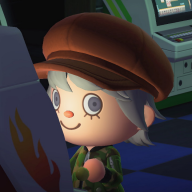
Here is the one I made for my girlfriends N3DS. The uploaded version has white text, not black like in the preview. "Like" it if you do actually like it and I might make more Animal Crossing themes.
 

Attachments

well when you preview the themes in the fbi theme previewer the low battery icon and the charging icon have white instead of transparency around them
 
well when you preview the themes in the fbi theme previewer the low battery icon and the charging icon have white instead of transparency around them
I see that now. I edited them in paint and it must have made the alpha layer white. Thanks for catching that, I'll have to reupload after I fix them.
Edit: I am back with the corrections, here they both are. Also anybody wanting permission to use parts in your theme, like the battery icons, feel free. I fixed the other links in my older posts to keep the forum clean.
 

Attachments

Last edited by elBenyo,
you should really use gimp or paint.net more often
Those icons were actually the first things I made a few days before I could boil down the themes I wanted. As of yesterday I'm back on Gimp permanently, I love how like photoshop you can open a few images at once and work on them all at the same time. Does Paint.NET do that or is it a single image editor like MS Paint?
 
I made that second gimp template pixel perfect well maybe except for the shadow around the meta info box
 
  • Like
Reactions: elBenyo
Where's a good site to learn how to use gimp? I want to make my own fbi theme but I can't quite get a grasp on using this program.
 

Site & Scene News

Popular threads in this forum