
ROM Hack RELEASE Bayonetta 1 save editor

  • Thread starter Thread starter Type_O_Dev
  • Start date Start date
  • Views Views 37,647
  • Replies Replies 54
  • Likes Likes 8

Type_O_Dev

Developer
Developer
Joined
Dec 12, 2017
Messages
683
Reaction score
418
Trophies
0
XP
1,540
Country
United States
Use with your save00 (no checksum)
Max Halos = 99999999 Max items = 99
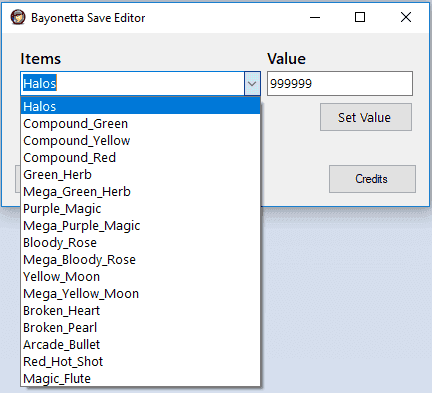
bayo1b.png


Set Values then Save

  1. For items you don't have you will need to concoct them
  2. Save and Export
  3. Then Edit
Game will now list all items edited​

github release

For anyone interested here is the json for EdiZon, This will allow you to edit on console
 

Attachments

Last edited by Type_O_Dev,
Thank you for the editor! Unforunately, I think there may be a discrepancy between data00 and data01. While in game it says my Halo count is 115107, my data01 file actually shows 198867. So when I used this editor to modify my data01 file, nothing changed in-game. Do you think we may need to be modifying data00 instead of data01?

EDIT:

Yeah, it's data00 instead of data01 that needs to be edited. I edited that file instead and it worked. Thanks bro!
 
Last edited by TrunksSSJ23,
  • Like
Reactions: Type_O_Dev
Data00 looks like save from the chapter selection screen.
Data01 is the auto save in the chapter itself.

At least that's how mine is.
 
Thank you for the editor! Unforunately, I think there may be a discrepancy between data00 and data01. While in game it says my Halo count is 115107, my data01 file actually shows 198867. So when I used this editor to modify my data01 file, nothing changed in-game. Do you think we may need to be modifying data00 instead of data01?

EDIT:

Yeah, it's data00 instead of data01 that needs to be edited. I edited that file instead and it worked. Thanks bro!
Data00 looks like save from the chapter selection screen.
Data01 is the auto save in the chapter itself.

At least that's how mine is.

New file uploaded in OP
 
Hang on... I got mixed up... I feel silly.

data00 is my auto save
data01 is the chapter save

Maybe just let the user select whichever save they want?

Also feedback on the updated version of the editor is that autosave edit of halo is working. Chapter save edit is not showing the edited value.
 
  • Like
Reactions: Type_O_Dev
Hang on... I got mixed up... I feel silly.

data00 is my auto save
data01 is the chapter save

Maybe just let the user select whichever save they want?

Also feedback on the updated version of the editor is that autosave edit of halo is working. Chapter save edit is not showing the edited value.

just click open then select all files to pick what file you need. working on adding more offsets now
 
Correction about the data01 edit. It's still showing corrupt data in the save list after modifying the halo. (I didn't click set value in the updated editor)

Also I followed your method to open other files and that part is at least working.
 
Yes the offsets are dif but struct sim

So what sale file is working

--------------------- MERGED ---------------------------

Correction about the data01 edit. It's still showing corrupt data in the save list after modifying the halo. (I didn't click set value in the updated editor)

Also I followed your method to open other files and that part is at least working.

try this i also added to OP
 
Yeah editing data01 corrupted my file, however editing data00 worked. But yeah, data00 seems to be the autosave file and data01 is the chapter save file.
 
It worked! And it no longer corrupts the main save.
I was also able to run it on Mac via WineBottler by using the.Net 4.5 Wine trick
 
  • Like
Reactions: Type_O_Dev

Site & Scene News

Popular threads in this forum