Android Alright. How do I do this?

  • Thread starter Thread starter Devin
  • Start date Start date
  • Views Views 2,097
  • Replies Replies 11

Devin

"Local Hardware Wizard"
Member
Joined
Aug 17, 2009
Messages
5,965
Solutions
5
Reaction score
2,524
Trophies
2
Age
31
Location
The Nexus
XP
4,661
Country
United States
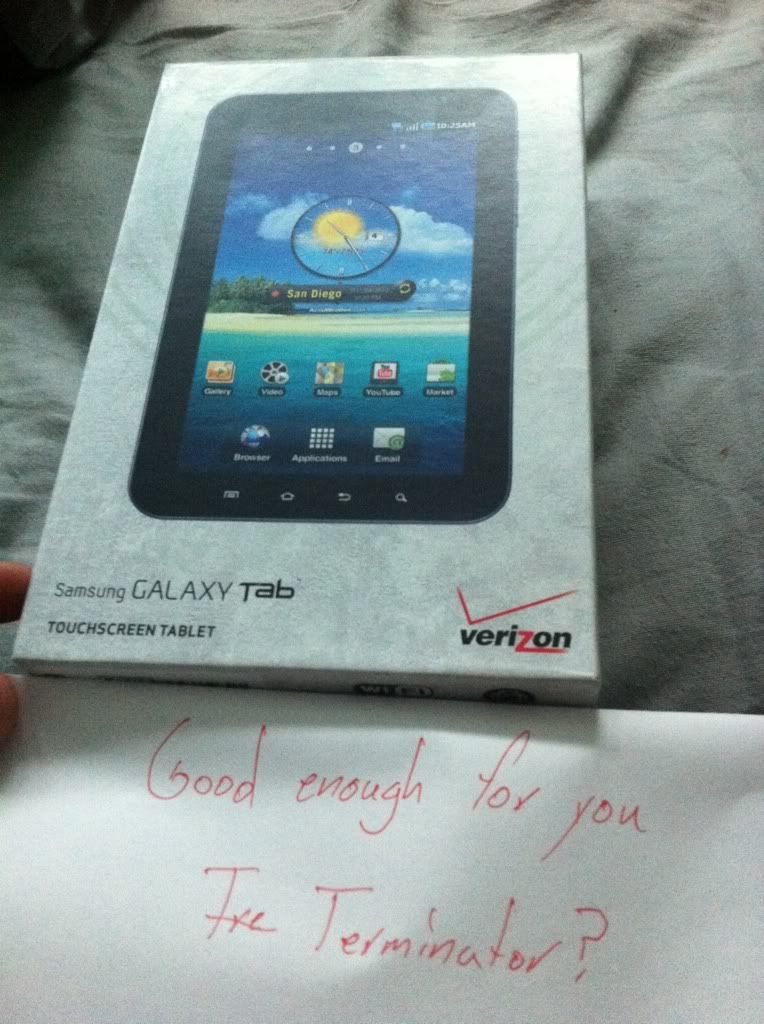
Just went, and got the Samsung Galaxy Tablet from Verizon. I'm clueless on how to jailbreak it. Any help, or insight? Thanks.

I'm typically hoping there's something like Cydia for it, but what are the pros of "rooting" this device?

 
I have a samsung galaxy tab, well it is unlocked if anything , is verizon CDMA or GSM? If it is GSM, I used this to root it, here.

After rooting , Well you can install all sort of root only apps, if Verizon previously blocked you from tether, now you can tether freely using your phone data plan, I get a bit of performance increase, as the link up there gives you this application to do all sort of tweaks
 
Verizon is CDMA, so DONT use the link above.

Here's a method to root, but not owning a tab I cant verify if it still works with the most recent update:
Galaxy Tab Root on XDA

If that doesnt work, ask in the Galaxy Tab Q&A section on that forum. They're pretty much the go-to place for Android devices.

As for why you should root, there are many things that can only be done once you've rooted. Some examples are take screenshots, tether without a tethering plan (assuming your carrier enforces one and doesnt check alternate ways), and best of all install custom ROMs. ROMs are basically complete firmware replacements that offer functionality or UIs not present in the stock firmware. If you do flash one of these, make sure you read enough that you know what your doing and DO NOT flash a GSM rom or you will brick.

There is no application thats directly comparable to Cydia, but Google doesnt care if you're rooted so you can find root-only apps in the standard Android Market. Alternatively, you can sideload them from a PC.
 
Jotokun said:
As for why you should root, there are many things that can only be done once you've rooted. Some examples are take screenshots, tether without a tethering plan (assuming your carrier enforces one and doesnt check alternate ways), and best of all install custom ROMs. ROMs are basically complete firmware replacements that offer functionality or UIs not present in the stock firmware. If you do flash one of these, make sure you read enough that you know what your doing and DO NOT flash a GSM rom or you will brick.

There is no application thats directly comparable to Cydia, but Google doesnt care if you're rooted so you can find root-only apps in the standard Android Market. Alternatively, you can sideload them from a PC.
Actually, if it's a Galaxy tablet, chances are there's a built-in screenshot capability anyway. My S II takes a picture by holding Home+Power, but I think on the Tab there was a separate screenshot button on-screen on the bottom row with the Menu/Home/Back icons.
But yes, like Jotokun already said, apps that need a root can also be available on the Android Market itself, and whether rooted or unrooted, there's an option to install APKs from any source in Settings > Applications > Unknown sources.
I've gathered that AT&T disabled this in their branded devices, but if you're on Verizon that's probably not an issue. I have no experience with US carriers, living in the UK.
 
AT&T somewhat recently restored the unknown sources ability, mainly because of the amazon app store

@Devin Samsung Galaxy Tablet isn't specific enough, which one?

There isn't Cydia, you can find pretty much everything on the android market
 
0f8f6c4c.jpg

No, seriously. I can't get anything except that off the box.
 
Devin said:
0f8f6c4c.jpg

No, seriously. I can't get anything except that off the box.

He asked because there are several Galaxy Tabs out there. The one you have is the Galaxy Tab 7 (for 7" screen), but there's also a drastically different 10.1 inch model (called the Galaxy Tab 10). Its unfortunet but most people just refer to it as the Galaxy Tab, so it can be difficult to tell which one your talking about without context.
 
Terminator02 said:
AT&T somewhat recently restored the unknown sources ability, mainly because of the amazon app store

@Devin Samsung Galaxy Tablet isn't specific enough, which one?

There isn't Cydia, you can find pretty much everything on the android market
I remember reading that AT&T were going to restore that capability, but I didn't know if that was still a pending change or if they'd done it already.
 
ProtoKun7 said:
Terminator02 said:
AT&T somewhat recently restored the unknown sources ability, mainly because of the amazon app store

@Devin Samsung Galaxy Tablet isn't specific enough, which one?

There isn't Cydia, you can find pretty much everything on the android market
I remember reading that AT&T were going to restore that capability, but I didn't know if that was still a pending change or if they'd done it already.

They've already pushed software updates for a good portion of their phones that enables the option. Not all of them though.
 
Rooting basically gives you administrative access to your device. There are many pros and cons on why you should and shouldn't, but I would recommend you do. Custom ROMs are the one thing you should look into though, I have an EVO 4g which I recently rooted and flashed a custom ROM and it and it runs 50% faster than before! Some of the more popular ROMs are Synergy, Cyanogen mod, some others whose names I forget.


If you need any help with rooting or anything I found this site to be quite helpful when I had an old Android tablet. I believe it still has a Galaxy Tab section so you should be all good there.

Hope this helps!
tongue.gif


EDIT: Actually the tablet site I mentioned apparently decided to create a whole different forum for the Galaxy Tab. So go here instead if you want more in depth information.

EDIT2: Riight, nice catch Terminator.
 

Site & Scene News

Popular threads in this forum