I've always strongly disliked the bloated default USBLoaderGX menu theme and have wanted something closer to stock for a while so I made it. Given that you lose out on a lot of useful features & stability trying to use the stock Wii Menu for launching titles or honestly any other loader, I decided to painstakingly recreate all of the Wii Menu assets from Dolphin's texture & audio dumping features and bundle them into a theme that looks much closer to the Stock Wii Menu, while still retaining all functionality that I think most would find useful (parental locking has been removed  ). Below is a set of screenshots comparing my custom themes to the vanilla Wii Menu & Default USBLoaderGX Theme. Not sure if anyone will care about this project, but I had a lot of fun making it.
 I'm also sadly a bit of a font noob so I wasn't able to recreate the Wii Menu's clock 1:1 but I found one that was close enough for me and tweaked it to match the Stock's as best as I could. If anyone skilled with making custom fonts feels like it, I think a 1:1 of the original menu's font would really wrap this up perfectly. (I became a font wizard and made the font, 1/13/2026) Lastly, due to limitations in how USBLoaderGX displays themes, I had to make 2 separate themes, one for 4:3 displays and one for Widescreen 16:9 displays, both included in the download.
Some info on how to use it:
Make sure to read the included readme to adjust you settings to get the most accurate experience.
Enjoy! - jw
Download:
https://gbatemp.net/download/accurate-wii-menu-usbloader-gx-theme.38994/download
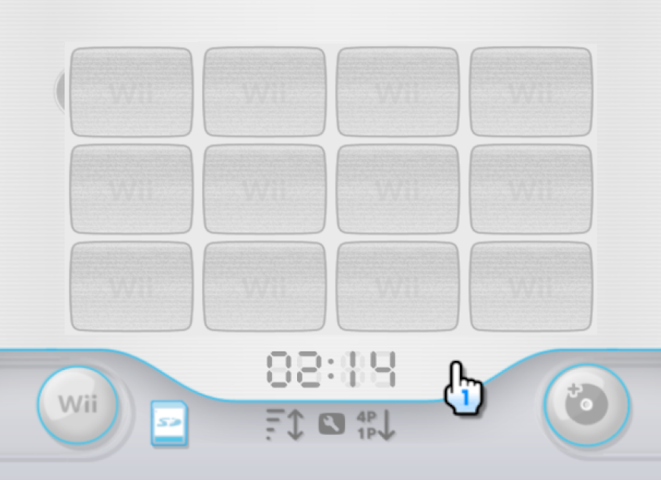
Screenshot from console:
Comparison Chart:
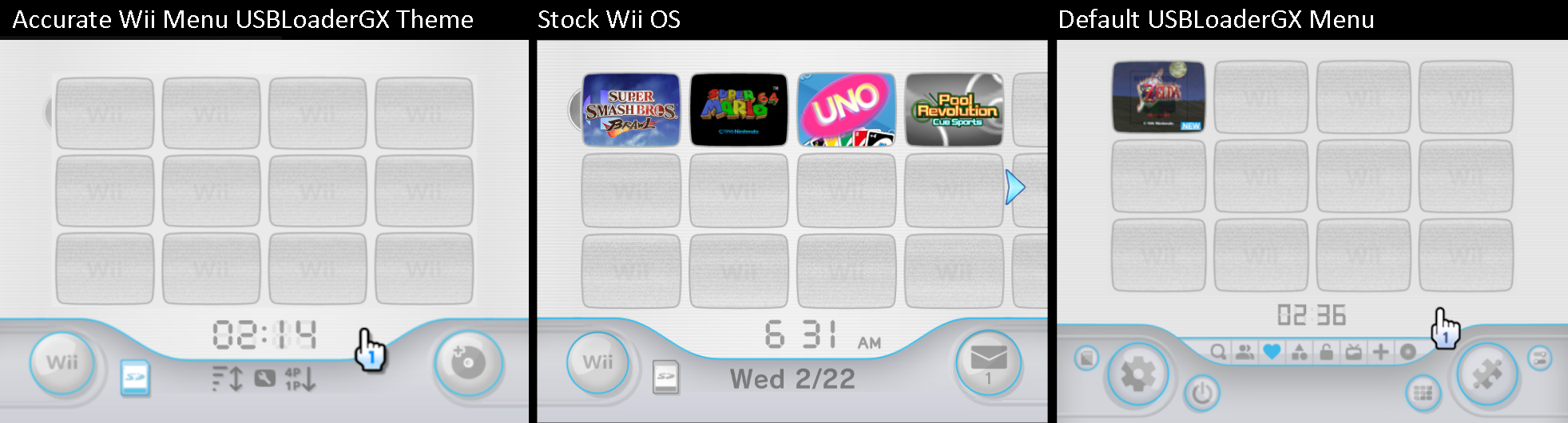
). Below is a set of screenshots comparing my custom themes to the vanilla Wii Menu & Default USBLoaderGX Theme. Not sure if anyone will care about this project, but I had a lot of fun making it. Some info on how to use it:
- Click the DVD icon on the top left to the left of the first channel to load from the disc drive. I don't personally ever use the feature but thought it was a necessary inclusion and a clever place to put it.
- The large Wii button on the bottom left will now take you to the USBLoaderGX settings, like the stock menu.
- The SD card button will now take you to the Homebrew menu, similar to the functionality of the Wii Menu, Clicking the clock will now refresh or disable (depending on your USBLGX version) the SD Card as I don't think this is a very necessary feature to have a clear dedicated button for.
- The three buttons below the clock taking the place of the stock menu's Day of the week & Date text allow you to sort the games displayed. They should all three be pretty self explanatory and are just remappings of the existing USBLoaderGX sorting options.
Make sure to read the included readme to adjust you settings to get the most accurate experience.
Enjoy! - jw
Place the folder "Accurate Wii Menu" and "AccurateWiiMenu.them" file in the below directory on your storage device:
\apps\usbloader_gx\theme\
create this theme folder if it doesn't already exist.
If using the widescreen variant of the theme, place the folder "Accurate Wii Menu Widescreen" and "AccurateWiiMenuWidescreen.them" file in the same directory.
Adjust your USBLoaderGX settings as shown below for the full Accurate Wii Menu experience (click the Wii button on bottom left of the menu to enter the USBLoaderGX settings)
Under "GUI Settings" change the following:
Disc Artwork Download: Original/Custom > Original
Screensaver: 10 min > OFF
Show Play Count: ON > OFF
Show Free Space: ON > OFF
Show Game Count: ON > OFF
Home Menu: Default > Full Menu ( this one isn't that important but I find Full Menu to be the most useful)
Use System Font: This is ON by default, but ensure it is set to ON for an authentic look.
Virtual Pointer Speed: 0.18 > 0.2 or 0.21 (the default 0.18 is slower than the stock wii menu)
Adjust Overscan: Adjust this until the sides & bottom of the main menu looks right. By default, USBloader GX's overscan does not match the proportions of the stock menu.
X=0, Y=-8 for 4:3 and X=-16, Y=-8 for 16:9 worked well for me on a LCD display.
Under "Sound" change the following:
Background Music: Click on this setting option and point it to the file "bg_music.ogg"
on your storage device in: \apps\usbloader_gx\theme\Accurate Wii Menu\Menu Music\bg_music.ogg
Enjoy!
-jw
CHANGELOG:
V1.2.1 (1/18/2026) :
* Encoded the background music as an .ogg (was .wav) which reduces memory usage & fixes audio dropouts.
* Minor placement corrections on the clock, it should appear perfectly centered now.
* Changelog corrections & updates.
V1.2 (1/13/2026) :
* Created a custom font for the clock that matches the stock Wii clock MUCH closer.
* A few really small optimizations/improvements.
V1.1 :
* Improved readme
* slightly improved the "0", "4" and "7" on the clock font to better match the stock menu (still not perfect though)
* Fixed the graphic for the "number of players" sort mode to display the proper sort direction. V1 showed 1P>4P but USBLoaderGX actually sorts 4P>1P.
* Greatly improved the widescreen variant of the theme so all pointers and loader icons are the correct proportions. Also made the SD card icon a bit smaller (only for the widescreen variant) to match the stock menu better.
* Made a few other small tweaks & fixes to better mimic the look of the Wii Menu overall.
* Added theme previews for the USBLoaderGX theme picker menu.
V1.0 :
Initial Release
\apps\usbloader_gx\theme\
create this theme folder if it doesn't already exist.
If using the widescreen variant of the theme, place the folder "Accurate Wii Menu Widescreen" and "AccurateWiiMenuWidescreen.them" file in the same directory.
Adjust your USBLoaderGX settings as shown below for the full Accurate Wii Menu experience (click the Wii button on bottom left of the menu to enter the USBLoaderGX settings)
Under "GUI Settings" change the following:
Disc Artwork Download: Original/Custom > Original
Screensaver: 10 min > OFF
Show Play Count: ON > OFF
Show Free Space: ON > OFF
Show Game Count: ON > OFF
Home Menu: Default > Full Menu ( this one isn't that important but I find Full Menu to be the most useful)
Use System Font: This is ON by default, but ensure it is set to ON for an authentic look.
Virtual Pointer Speed: 0.18 > 0.2 or 0.21 (the default 0.18 is slower than the stock wii menu)
Adjust Overscan: Adjust this until the sides & bottom of the main menu looks right. By default, USBloader GX's overscan does not match the proportions of the stock menu.
X=0, Y=-8 for 4:3 and X=-16, Y=-8 for 16:9 worked well for me on a LCD display.
Under "Sound" change the following:
Background Music: Click on this setting option and point it to the file "bg_music.ogg"
on your storage device in: \apps\usbloader_gx\theme\Accurate Wii Menu\Menu Music\bg_music.ogg
Enjoy!
-jw
CHANGELOG:
V1.2.1 (1/18/2026) :
* Encoded the background music as an .ogg (was .wav) which reduces memory usage & fixes audio dropouts.
* Minor placement corrections on the clock, it should appear perfectly centered now.
* Changelog corrections & updates.
V1.2 (1/13/2026) :
* Created a custom font for the clock that matches the stock Wii clock MUCH closer.
* A few really small optimizations/improvements.
V1.1 :
* Improved readme
* slightly improved the "0", "4" and "7" on the clock font to better match the stock menu (still not perfect though)
* Fixed the graphic for the "number of players" sort mode to display the proper sort direction. V1 showed 1P>4P but USBLoaderGX actually sorts 4P>1P.
* Greatly improved the widescreen variant of the theme so all pointers and loader icons are the correct proportions. Also made the SD card icon a bit smaller (only for the widescreen variant) to match the stock menu better.
* Made a few other small tweaks & fixes to better mimic the look of the Wii Menu overall.
* Added theme previews for the USBLoaderGX theme picker menu.
V1.0 :
Initial Release
Download:
https://gbatemp.net/download/accurate-wii-menu-usbloader-gx-theme.38994/download
Screenshot from console:
Comparison Chart:
Last edited by jwmu,