
Hello,
When I'm launching Enter the gungeon, there's a loading screen and the console is searching to see if the game is compatible with cloud saves, tho I really don't care because I use Incognito and I'm not connected to Nintendo servers.
Is there a way to bypass this verification ? It's kinda annoying because it does that even when I just pause the game and get into the home menu.
I've seen that apparently I could disable it in the settings but I need to go online for that, so it's not a solution.
Thanks a lot
Here's a screenshot of the error, it's in french tho but maybe you'll see what I mean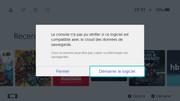
When I'm launching Enter the gungeon, there's a loading screen and the console is searching to see if the game is compatible with cloud saves, tho I really don't care because I use Incognito and I'm not connected to Nintendo servers.
Is there a way to bypass this verification ? It's kinda annoying because it does that even when I just pause the game and get into the home menu.
I've seen that apparently I could disable it in the settings but I need to go online for that, so it's not a solution.
Thanks a lot
Here's a screenshot of the error, it's in french tho but maybe you'll see what I mean