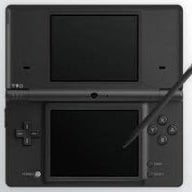
Hardware 3-D 3DS Pic

superkidmax

Well-Known Member
Newcomer
Joined
Sep 29, 2010
Messages
79
Reaction score
2
Trophies
0
Age
28
Location
New Jersey, USA
XP
194
Country
United States
I snipped a picture from the Nintendo website and edited in paint to 3D-ify it. To view, cross your eyes until the 2 3DSs overlap and wait for the image to clear. The 3DS will appear to pop out.
This makes me feel like my screen is a window and i can reach in and grab the 3DS.... if only I had one
sad.gif

well, here you go.
3-D3DS.png


now isn't that great!
edit: WOAH, since when did GBAtemp get a new photo viewer? o.0
 
Nice idea, but I think you may have missed a step in your conversion process.
This appears to be two identical images, which when cross-eye viewed result in just a flat image.
 
spiritofcat said:
Nice idea, but I think you may have missed a step in your conversion process.
This appears to be two identical images, which when cross-eye viewed result in just a flat image.
+1

I suspect that a 3D Fuji camera will be necessary to do this correctly. Two 3DS's would also be possible, but the image would be low-res and grainy.
 
superkidmax said:
Well, the stylus (sort of) pops out a little. I just did this in 5 seconds in MS Paint, so thats why its so noobish.
What did you actually do in those 5 seconds in MS Paint? Did you edit either of the images in any way?

Snailface said:
QUOTE(spiritofcat @ Mar 30 2011, 03:54 PM) Nice idea, but I think you may have missed a step in your conversion process.
This appears to be two identical images, which when cross-eye viewed result in just a flat image.
+1

I suspect that a 3D Fuji camera will be necessary to do this correctly. Two 3DS's would also be possible, but the image would be low-res and grainy.
There are ways of making a 3D stereo image from a single picture like this in Photoshop or GIMP with the use of a displacement map but it generally doesn't look as good as a real 3D photo.
 
spiritofcat said:
There are ways of making a 3D stereo image from a single picture like this in Photoshop or GIMP with the use of a displacement map but it generally doesn't look as good as a real 3D photo.
I made this in GIMP earlier. I didn't use displacement, just shifted the stuff over a bit. It's a really simple picture so it was a simple edit. If it helps at all you have to shift stuff over ALLOT to get a 3D effect, not just a little. If you don't move it enough you get an almost nonexistent effect.

The wobble shows just how far apart stuff needs to be.
 
superkidmax said:
i meant edit by doubling it.
Yeah, just doubling it isn't going to make it 3D. You actually have to change the perspective so that each image seems to look at the object from a different angle.
 

Site & Scene News

Popular threads in this forum