Hardware 200GB missing from my HDD

  • Thread starter Thread starter mythical77
  • Start date Start date
  • Views Views 3,496
  • Replies Replies 12
Check if Windows sees each partition, instructions here

If you have any data on the WBFS partition, this may be of use

I'm assuming you formatted 200GB of your HDD as WBFS. Either format the partition as FAT32 or NTFS, or convert it, Windows can't see WBFS partitions, and it's also been deprecated since a while ago. Most loaders now support FAT32 and NTFS. As for DIOS MIOS, I think you need to format it to FAT32, not WBFS.
 
a) WBFS is useless for both GC loaders, FAT is what you need

b) let me guess you have a 2TB drive and windows reports ~1.819 TB (thats 2 * (1000/1024)**4 btw)
then thats because windows is lying about the drive size
 
Check if Windows sees each partition, instructions here

If you have any data on the WBFS partition, this may be of use

I'm assuming you formatted 200GB of your HDD as WBFS. Either format the partition as FAT32 or NTFS, or convert it, Windows can't see WBFS partitions, and it's also been deprecated since a while ago. Most loaders now support FAT32 and NTFS. As for DIOS MIOS, I think you need to format it to FAT32, not WBFS.
My HDD was WBFS originally, and I didn't format it to FAT32/NTFS before going into disk management and "deleting the volume"; after that the 200GB was lost to me. Disk management displays the 300GB as 100%. I'll try your second link, see what happens.
 
a) WBFS is useless for both GC loaders, FAT is what you need

b) let me guess you have a 2TB drive and windows reports ~1.819 TB (thats 2 * (1000/1024)**4 btw)
then thats because windows is lying about the drive size
What I meant was I was going to partition my WBFS drive so I could format the second partition into FAT32, but I guess I messed something up along the way.
I've got a 500GB HDD and 200GB is missing. Disk management claims that 300GB is 100%.
 
My HDD was WBFS originally, and I didn't format it to FAT32/NTFS before going into disk management and "deleting the volume"; after that the 200GB was lost to me. Disk management displays the 300GB as 100%. I'll try your second link, see what happens.


You might want to boot gParted and check out your volumes. The 200GB missing is probably just an improperly formatted partition, the py script will convert your WBFS partition into FAT32 for current loaders.
 
You might want to boot gParted and check out your volumes. The 200GB missing is probably just an improperly formatted partition, the py script will convert your WBFS partition into FAT32 for current loaders.
Alright. I'll try that. Thanks.
 
You might want to boot gParted and check out your volumes. The 200GB missing is probably just an improperly formatted partition, the py script will convert your WBFS partition into FAT32 for current loaders.
Nope. 200GB still missing.
 
I stole 200 GB for my crazy cat lady picture collection.... Sorry the 14 3TB drives I own ran out of space. hehehe

On a non joking note, you might try reformating and starting from scratch. Sounds like something got fudged up.
 
Nope. 200GB still missing.

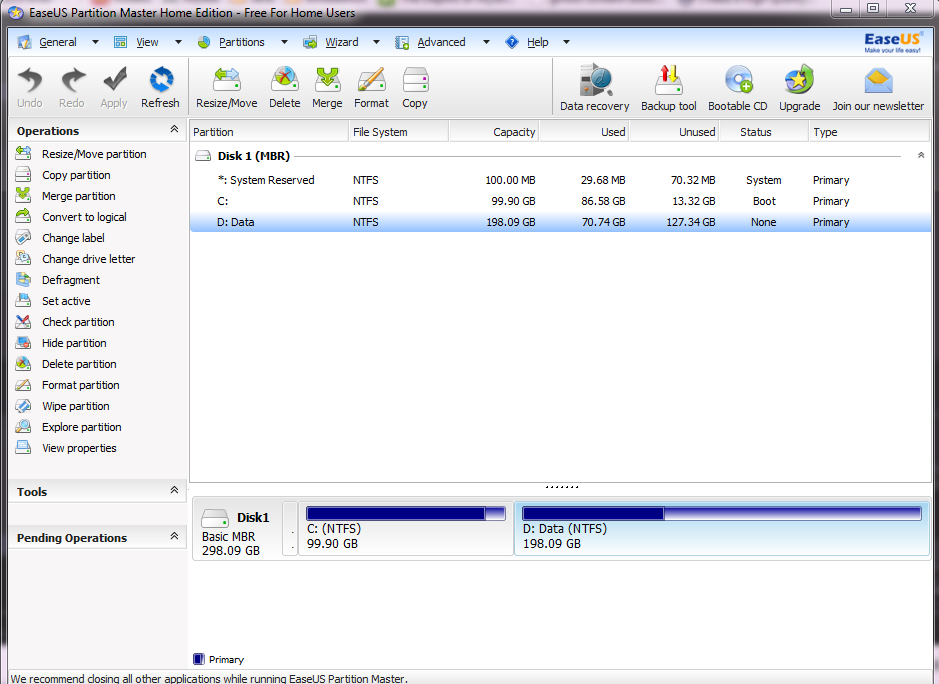
Install and run this program, select "Partition Manager", point it to your drive, post a screenshot.

Normally I wouldn't advocate the use of an app to do this, opting to use GParted or Window's own partition features, but I assume this is easier to do.

77642289e60f0ef685a679f583b169e5.png
 

Site & Scene News

Popular threads in this forum