How to try and make the Tomodachi Collection Text to Speech engine say stuff

You'll need:
* Rom of Tomodachi Collection (https://dumping.guide/carts/nintendo/ds)
* Some kind of BMG editor (MSBT Editor)
* TinkeDSi (https://github.com/Wokann/TinkeDSi/tree/DownloadPlay-Signature) or this program that only runs on mac http://github.com/quatric/nintoolbox/releases/latest/
* https://talkmodachi.dylanpdx.io/ with the settings set to Japan (TC)


If you open up one of the BMG files that has dialogue like tmd_talk, there's text in quotes 「」and there's text under it that's all one line. That's the TTS part (the one I highlighted)
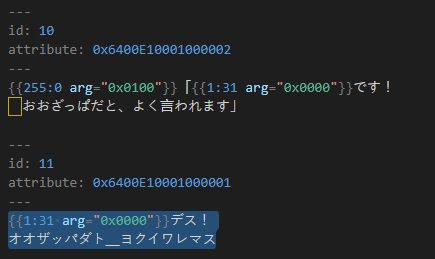
1789930445403.png

It's easy to alter, but there's a catch:
Miis only speak in Katakana. (Katakana is a part of the Japanese alphabet, along with Hiragana and Kanji)

Fortunately, there's some kind of solution to this:

You'll need to turn your text into Katakana syllables that sound like your language to ensure everything works.
For English, I looked up a website that turns English syllables to Katakana: https://www.sljfaq.org/cgi/e2k.cgi
https://www.katakanaconverter.com/english-name/
Despite using the website at first, I've had success telling AI this prompt:

Change the English text in the text box into Japanese katakana that sounds like English vowels. No spaces. When transcribing the word so, do not use "ソ" Use the following for punctuation:?! .、:

... then I added the line I need to translate below. ChatGPT keeps repeating a syllable in some sentences so I have to guess and take that out.

You also have to edit your sentence for punctuation. Here's a handy chart of things to copypaste:
??— question mark
! — exclamation mark
. — period or full stop
_ — underscore/...
, comma1
、 comma2
| pipe thing

You can test your speech if it sounds good enough by visiting this website: https://talkmodachi.dylanpdx.io/
Click on "More Settings" and select the option with the Japanese flag. Now you can test the Mii's speech.

Finally, you can copypaste that finished line back into the BMG file. Just don't overwrite stuff like {{1:31 arg="0x0000"}} since that will be said in-game.

And now you have stuff like this:
 
  • Love
  • Wow
Reactions: NitroShell and k66
You'll need:
* Rom of Tomodachi Collection (https://dumping.guide/carts/nintendo/ds)
* Some kind of BMG editor (MSBT Editor)
* TinkeDSi (https://github.com/Wokann/TinkeDSi/tree/DownloadPlay-Signature) or this program that only runs on mac http://github.com/quatric/nintoolbox/releases/latest/
* https://talkmodachi.dylanpdx.io/ with the settings set to Japan (TC)


If you open up one of the BMG files that has dialogue like tmd_talk, there's text in quotes 「」and there's text under it that's all one line. That's the TTS part (the one I highlighted)View attachment 591694
It's easy to alter, but there's a catch:
Miis only speak in Katakana. (Katakana is a part of the Japanese alphabet, along with Hiragana and Kanji)

Fortunately, there's some kind of solution to this:

You'll need to turn your text into Katakana syllables that sound like your language to ensure everything works.
For English, I looked up a website that turns English syllables to Katakana: https://www.sljfaq.org/cgi/e2k.cgi
https://www.katakanaconverter.com/english-name/
Despite using the website at first, I've had success telling AI this prompt:

Change the English text in the text box into Japanese katakana that sounds like English vowels. No spaces. When transcribing the word so, do not use "ソ" Use the following for punctuation:?! .、:

... then I added the line I need to translate below. ChatGPT keeps repeating a syllable in some sentences so I have to guess and take that out.

You also have to edit your sentence for punctuation. Here's a handy chart of things to copypaste:
??— question mark
! — exclamation mark
. — period or full stop
_ — underscore/...
, comma1
、 comma2
| pipe thing

You can test your speech if it sounds good enough by visiting this website: https://talkmodachi.dylanpdx.io/
Click on "More Settings" and select the option with the Japanese flag. Now you can test the Mii's speech.

Finally, you can copypaste that finished line back into the BMG file. Just don't overwrite stuff like {{1:31 arg="0x0000"}} since that will be said in-game.

And now you have stuff like this:
View attachment 591696
My name is sounded as "Ramadan" in Japanese Katakana apparently. Guess I'm Islamic now LMAO. then Gemeni says it sounds more like "raandan" so I guess it's "raandan" and not "Ramadan" that was just a mistake of google translate LMAO
Also NitroShell is "Nitoraosheru"

 
My name is sounded as "Ramadan" in Japanese Katakana apparently. Guess I'm Islamic now LMAO. then Gemeni says it sounds more like "raandan" so I guess it's "raandan" and not "Ramadan" that was just a mistake of google translate LMAO
Also NitroShell is "Nitoraosheru"

View attachment 594271
ナイトロシェル
 
That's way better!
Can you understand the recording that OP sent? My English is bad, I can't understand.
The English converted from Katakana seems like Japanese-style English.
Turning it into Japanese-style English makes it even harder to understand.
 
  • Like
Reactions: NitroShell
Can you understand the recording that OP sent? My English is bad, I can't understand.
The English converted from Katakana seems like Japanese-style English.
Turning it into Japanese-style English makes it even harder to understand.
It says "Do you have any games on your phone?"
 
  • Haha
  • Wow
Reactions: ChibiMofo and k66
It says "Do you have any games on your phone?"
AI-generated pronunciation sounds better than the katakanaconverter website.

I say: "Do you have any games on your phone?" 转换成日文的片假名的发音(convert to Japanese katakana pronunciation)
AI:
ドゥー ユー ハヴ エニー ゲームズ オン ユア フォーン?
Or ドゥヤ ハヴ エニー ゲームズ オン ユア フォーン?

I made a few changes:
ドゥユーハブエニーゲームズオンユアフォン
ドゥ(do)ユー(u)ハブ(hav)エニー(any)ゲームズ(games)オン(on)ユア(ur)フォン(phone)

ドゥユーハブエニーゲームズオンユアフォン? —question mark, punctuation has differences in tone

.
But this sounds completely different from the recording OP posted :huh: , and it seems like you didn't understand that recording either.
 
Last edited by k66,
i tried to patch the file using rom patcher js but deSmuME (i know, i don't own an actual ds) says it has "Nothing to Load!"
Try using this website, it worked well for me.
https://kotcrab.github.io/xdelta-wasm/

Going to attach the readme I added just in case:

The .xdelta file is a way to store rom hacks. It just works.
You need the original file and a Xdelta patcher. One xdelta patcher is https://kotcrab.github.io/xdelta-wasm/. Look up xdelta patcher for other programs like that.

I have no idea if this works with AP patches or not. If you're alarmed, run an AP patcher after applying these patches.

The one titled "original 1.1.xdelta" requires an unmodified .NDS rom of Tomodachi Collection for the Nintendo DS that's currently worth 7-16 american bucks on eBay.

If something says "XDelta file not compatible" or the game crashes when you boot it, you likely have the 1.0 copy. Look at step zero.

"Where can I get it if I can't buy it?" Use a search engine.

"jjjewel.xdelta" is for users who already have jjjewel's 0.80 patch applied to a rom/a .nds file that has something among the lines of "tomodachi collection english patch"

This is how you should set up your Xdelta patches:

(step 0, if you have a 1.0 copy)
IN: original 1.0 .nds

PATCH: 1.0 to 1.1 .xdelta

OUT: original 1.1 .nds

(step 1: original game)
IN: original 1.1 .nds
PATCH: original 1.1.xdelta
OUT: new file just don't name it original 1.1.nds

(step 1: jjjewel's game)
This rom should be in English and is easy to identify.
Boot up the rom. If it says "Please set up the time." on the bottom screen or if it says "DO NOT SELL OR RENT" on the bottom right corner of the top screen, you have the English patch.

I'm busy right now so I won't reply right away, but hopefully this helps!
 
Try using this website, it worked well for me.
https://kotcrab.github.io/xdelta-wasm/

Going to attach the readme I added just in case:

The .xdelta file is a way to store rom hacks. It just works.
You need the original file and a Xdelta patcher. One xdelta patcher is https://kotcrab.github.io/xdelta-wasm/. Look up xdelta patcher for other programs like that.

I have no idea if this works with AP patches or not. If you're alarmed, run an AP patcher after applying these patches.

The one titled "original 1.1.xdelta" requires an unmodified .NDS rom of Tomodachi Collection for the Nintendo DS that's currently worth 7-16 american bucks on eBay.

If something says "XDelta file not compatible" or the game crashes when you boot it, you likely have the 1.0 copy. Look at step zero.

"Where can I get it if I can't buy it?" Use a search engine.

"jjjewel.xdelta" is for users who already have jjjewel's 0.80 patch applied to a rom/a .nds file that has something among the lines of "tomodachi collection english patch"

This is how you should set up your Xdelta patches:

(step 0, if you have a 1.0 copy)
IN: original 1.0 .nds

PATCH: 1.0 to 1.1 .xdelta

OUT: original 1.1 .nds

(step 1: original game)
IN: original 1.1 .nds
PATCH: original 1.1.xdelta
OUT: new file just don't name it original 1.1.nds

(step 1: jjjewel's game)
This rom should be in English and is easy to identify.
Boot up the rom. If it says "Please set up the time." on the bottom screen or if it says "DO NOT SELL OR RENT" on the bottom right corner of the top screen, you have the English patch.

I'm busy right now so I won't reply right away, but hopefully this helps!
it says the file's too short (using the github file btw) Edit: I didn't read the spoiler thingy because I can get a little impatient sometimes. Edit 2: I don't know how to do all of this and the files I tried to load are not cooperating with me. If you have the time, can you explain it in simpler British Science Fiction T.V. terms on how to make everything work? tl;dr: as the main character in bomb defusal squad movies, "Could you say that in English, please?" (i'm just quoting that trope.)
 
Last edited by questionman,
Can you explain it in simpler British Science Fiction T.V. terms on how to make everything work?
Someone invented a gun that makes people speak English! It's called the "1.1" ray gun. You shoot it at a Japanese book and now it's mostly English!

Sometimes it doesn't work completely and you have to shoot a green gun that upgrades* the book to work with the 1.1 gun. The green gun is titled "1.0 to 1.1."

*not a cyber upgrade
 
Someone invented a gun that makes people speak English! It's called the "1.1" ray gun. You shoot it at a Japanese book and now it's mostly English!

Sometimes it doesn't work completely and you have to shoot a green gun that upgrades* the book to work with the 1.1 gun. The green gun is titled "1.0 to 1.1."

*not a cyber upgrade
It's still too confusing! Explain like i'm a 5 yr old or just make a rom with all the stuff included with it. Essentially, Make a hassle-free No Tears version for babies who are used to applying a patch and it working in a [TOTALLY LEGAL GAMES CONSOLE] almost every 1st time you boot it up!
 

Site & Scene News

New Hot Discussed User Submitted