Homebrew DS(i) NOOB PARADISE - Ask questions here

  • Thread starter Thread starter RocketRobz
  • Start date Start date
  • Views Views 235,397
  • Replies Replies 1,743
  • Likes Likes 21
Are you sure this is the file from the original faulty NAND?
title.tmd (192KB, with Unlaunch installed) is not read-only, it should be read-only.
title.tmd doesn't know why the read-only attribute was removed.

I am certain that is the original backup before I did anything to this motherboard. I do have three other consoles (I just discovered another one in the junk lot I was working through) that we can verify, as they all have the same problem.

It is indeed this problem, I verified it using the emulator.
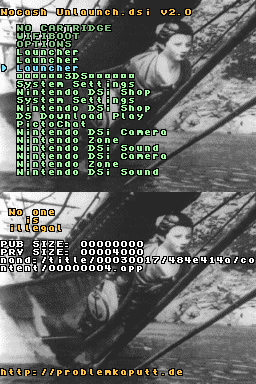
20260307a1.png

Normal situation:
title.tmd (192KB, with Unlaunch installed) is read-only:
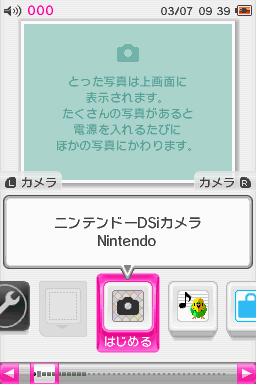
20260307a2.png


title.tmd (192KB, with Unlaunch installed) is not read-only:
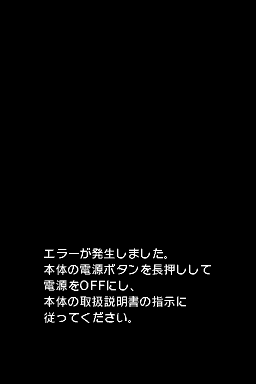
20260307a3.png
Oh wow, would you look at that.

Solution:
You only need to set it (title.tmd, 192KB) to read-only.

Or set
title.tmd not read-only, manual delete Unlaunch of this file (keeping only the first 520 bytes of title.tmd).

Or reinstall the Launcher using TDT, which will reinstall all files including
title.tmd. :arrow: #1686

I am thinking that reinstalling the launcher is the easiest route. I will have to look into that with the other motherboards I have and make some resources for myself in the chance that I come across this again.

@KIlly728
If I had asked you to upload the 00030017 folder from the start, it might have been solved in 2 seconds:rofl: .

Ahh, where is the fun in that :D

But several of your DSi have the same problem, so I have to suspect that there is a bug in the DSi Language Patcher...

I have had no problem using the language patcher on a couple of my personal consoles, and without knowing the history of these motherboards that I have, or what was done to them, I really don't know what I could report to the creator of the language patcher. That's assuming they are even active anymore.
 
  • Like
Reactions: k66
I have had no problem using the language patcher on a couple of my personal consoles, and without knowing the history of these motherboards that I have, or what was done to them, I really don't know what I could report to the creator of the language patcher. That's assuming they are even active anymore.

I made a mistake, this is not just a read-only issue.
Your title.tmd file itself also seems to have a problem.
(the emulator screen above is using my title.tmd file.) The solution has been updated.

This may be caused by a bug in the DSi Language Patch.
Or a problem occurred while installing/uninstalling Unlaunch.
 
Last edited by k66,
Try chainloading ntrboot --> gm9i --> safenandmanager.

That worked much better. My NAND backup had the right file name this time.

I cleared the Launcher out of the NAND, and I suppose this motherboard is fixed. It opens all of the apps, and I don't notice anything wrong.

I didn't see any American or Non-Japanese or all-region titles in any of the folders within the Title directory of the NAND.

I'll work on the other motherboards later and report back if I run into any issues.

Thank you two for the help.
 
  • Like
Reactions: rvtr
@KIlly728
The first 520 bytes of the file(title.tmd, 192KB) you sent me are intact, you just need to reinstall Unlaunch (Original Unlaunch).
DSi Unlaunch → TWiLightMenu++(Launcher Patchets: Default or Full) → install Unlaunch
If Launcher Patches: Off, it may cause the original system Launcher to "An error has occurred".

If you unclear whether the TMD file is intact, it is recommended:
Reinstall the Launcher using TDT, which will reinstall all files including title.tmd.
 
Last edited by k66,
  • Like
Reactions: KIlly728
quick question (FEW)
i have aninmal cross (latest update/version) on swtich 1 how to do i use ammibos in this game?
also whats the app that lets you load ammibos ? name of app? how do i activate it within the game and choose the ammibo ?
 
@KIlly728
The first 520 bytes of the file(title.tmd, 192KB) you sent me are intact, you just need to reinstall Unlaunch (Original Unlaunch).
DSi Unlaunch → TWiLightMenu++(Launcher Patchets: Default or Full) → install Unlaunch
If Launcher Patches: Off, it may cause the original system Launcher to "An error has occurred".

Although removing Unlaunch seemed to be a side effect of reinstalling the launcher, do I need to reinstall Unlaunch?

My intention with these motherboards is to sell them, and adding variables like Unlaunch introduces liability I don't want to deal with if I don't have to. Having the motherboards returned to stock would be the best outcome for me.

If you unclear whether the TMD file is intact, it is recommended:
Reinstall the Launcher using TDT, which will reinstall all files including title.tmd.

Would you be interested in seeing the other 00030017 Folder directories from these other motherboards that have a similar issue to confirm your findings?
Post automatically merged:

quick question (FEW)
i have aninmal cross (latest update/version) on swtich 1 how to do i use ammibos in this game?
also whats the app that lets you load ammibos ? name of app? how do i activate it within the game and choose the ammibo ?

This forum is for the Nintendo DS and Nintendo DSi line of consoles. So we might not be able to help you as easily as the folks over on the Switch forum.

I would recommend reposting the question in SWITCH NOOB PARADISE - Ask questions here. They should have your answer.
 
Although removing Unlaunch seemed to be a side effect of reinstalling the launcher, do I need to reinstall Unlaunch?

My intention with these motherboards is to sell them, and adding variables like Unlaunch introduces liability I don't want to deal with if I don't have to. Having the motherboards returned to stock would be the best outcome for me.
After installing the Launcher using TDT, it will be in a completely new state, and you can install Unlaunch.

DSi Exploit → TWiLightMenu++(Launcher Patchets: Default or Full) → install Original Unlaunch
(If installing Unlaunch gives a 'mismatch in FAT copies' error, use any exploit to launch TWiLightMenu++, open NTM (NandTitleManager) to 'Fix FAT copy mismatch'.)

Or install 'safe' Unlaunch

Would you be interested in seeing the other 00030017 Folder directories from these other motherboards that have a similar issue to confirm your findings?
Can you upload them (00030017 Folder) here?
(I don't know if it was when you were copying the 00030017 folder, perhaps the computer removed the read-only attribute from title.tmd.)
It's best to upload the entire NAND, Can you upload the original faulty NANDs(compressed as a zip) to Gofile?
.
I found that if the original system Launcher is v1024(DSi system version 1.4.2J/U/E, 1.4.3C),
setting TWiLightMenu++'s Unlaunch Launcher Patches: Off ,
after installing Unlaunch (Original Unlaunch), will cause Launcher "An error has occurred".
 
Last edited by k66,
  • Like
Reactions: k66
After installing the Launcher using TDT, it will be in a completely new state, and you can install Unlaunch.
Perfect. I think I will leave them in this clean state, so I am not doing more write cycles to the NAND than what is necessary to repair the launcher. If another user wants to install Unlaunch, they can.
Can you upload them (00030017 Folder) here?
(I don't know if it was when you were copying the 00030017 folder, perhaps the computer removed the read-only attribute from title.tmd.)
It's best to upload the entire NAND, Can you upload the original faulty NANDs(compressed as a zip) to Gofile?

I'll get you a zip with the 4 problem NAND files in it. Thinking about it, I may have originally sent you the different00030017 file from the one I was working on, but looking at the screenshots you had of it in the emulator, it was the console with 3 launchers where only one of the launchers worked. The original Japanese Launcher spat out an error.

I have performed a couple of move operations in Windows 11, if that makes any difference:

  • I moved them from the SD card where the backup was made to an internal file directory on my PC where I stored the backups to make copies of.
  • I then zipped them, moved them into a Compressed NAND folder, and then zipped and uploaded them to GoFile. (Probably didn't need to individually zip the NAND files, but oh well).
The Link to the files: https://gofile.io/d/WuObYu

@KIlly728 if you do this, mind if I add them to here?
https://nands.randommeaninglesscharacters.com/

Problem NANDs are especially great to have as a reference.

If you have a use for these NANDs, than I am happy to provide them. Heads up, though, they are not cleaned out, so there may still be personal information from the previous users (photos and such), so be aware of that.
 
  • Like
Reactions: rvtr and k66
@KIlly728
These NANDs are all v1.4.2 J (Launcher: 00000004.app, v1024)
Launcher’s title.tmd(192KB, with Unlaunch installed) is all read-only, so it’s not an issue of read-only attributes.
.
DT304D03... NAND can be restored to normal by reinstalling Unlaunch(original Unlaunch).
Three of the NANDs(DT375732...), when installing the original Unlaunch, it will display 'Mounting eMMC drive, YOU HAVE DISCOVERED UNKNOWN EMMC CID/CSD'.(Not sure if it's a bug of the emulator.)
These issues may all be caused by Unlaunch, Unlaunch may not work properly on DSi v1.4.2.
20260308d7.png

.
Solution for your faulty NANDs:
Reinstall the Launcher using TDT, which will reinstall all Launcher files including title.tmd.
(Your NANDs v1.4.2 J , Launcher: 00000004.app, v1024 )


Install Unlaunch:
After installing the Launcher, System Update, will be upgraded to 1.4.5J, then install 'safe' Unlaunch.
 
Last edited by k66,
  • Like
Reactions: KIlly728
Hi everyone,
I'm having a problem with my Nintendo DSi XL, which I had previously modded with Twilight Menu++. At first, everything was working perfectly: games launched without any issues and all functions were normal. The problem started when I was updating some settings within Twilight Menu++ and I accidentally disabled the Wi-Fi card. Immediately after that, I tried to re-enable it, but ever since then, the device no longer boots correctly. When I turn it on, I get an 0000FEFE error, with the top screen black and the bottom screen white.
I believe the issue isn't the Wi-Fi card itself, but something related to the internal NAND, likely corrupted or damaged by the setting change. I really want to avoid using extreme methods like hardmods for recovery. I've heard about ntrboot as a potential alternative boot solution, and I would like to know if it could help me recover the NAND and get the system running again without losing everything.
Does anyone have experience with this specific issue or any suggestions on how to proceed? Any advice would be greatly appreciated. Thanks in advance!
 
I get an 0000FEFE error, with the top screen black and the bottom screen white.
I believe the issue isn't the Wi-Fi card itself,
Have you tried reseat the Wi-Fi board? Maybe the Wi-Fi board has a poor connection.
Or replace a Wi-Fi board.
If replacing the Wi-Fi board doesn't help, there might be a cold solder joint on a chip on the motherboard.
 
  • Like
Reactions: Greninji88
Pokemon Emerald is known to work. Is this a ROM hack of the game?
Nope, it's normal. I'll get another ROM and let you know.


EDIT: Yep, all good now! Just got a new ROM and works perfectly. Thank you.
 
Last edited by Greninji88,
It is very common to get a (gbarunner2) white screen when directly opening a GBA ROM in TwilightMenu++.
According to my tests, sometimes some games(e.g. iQue Super Mario Advance 3) will have bugs if started directly.
You can click screen 'quit to rom browse', and then select the GBA rom from the folder.
.
I usually copy GBARunner2_arm7dldi_dsi.nds to the SDcard root, and start gbarunner2 from there.
 
Last edited by k66,
  • Like
Reactions: Greninji88
I got a small question:

So I recently acquired a Dsi. I'm used to playing DS games on my 3DS and older DS's through a flashcard.

So I'm reading up on this twilight menu. But one thing seems unclear.

I find these rom dumps of games that say (Dsi optimised). But I also read these don't work in twilight menu? Is this correct? So do I need to use romdumps that don't say the 'Dsi optimised' in their file name? Or are they fine to use?
 
  • Like
Reactions: Greninji88
I got a small question:

So I recently acquired a Dsi. I'm used to playing DS games on my 3DS and older DS's through a flashcard.

So I'm reading up on this twilight menu. But one thing seems unclear.

I find these rom dumps of games that say (Dsi optimised). But I also read these don't work in twilight menu? Is this correct? So do I need to use romdumps that don't say the 'Dsi optimised' in their file name? Or are they fine to use?
They'll be fine to use :), just won't have the small enhanced features
 
  • Like
Reactions: vree
Last edited by k66,
  • Like
Reactions: vree and Greninji88

Site & Scene News

Popular threads in this forum