- Joined
- May 1, 2023
- Messages
- 177
- Reaction score
- 368
- Trophies
- 0
- Location
- CA
- Website
- github.com
- XP
- 1,327
- Country

UltraGB Overlay






A Game Boy / Game Boy Color emulator overlay for the Nintendo Switch, built on libultrahand.
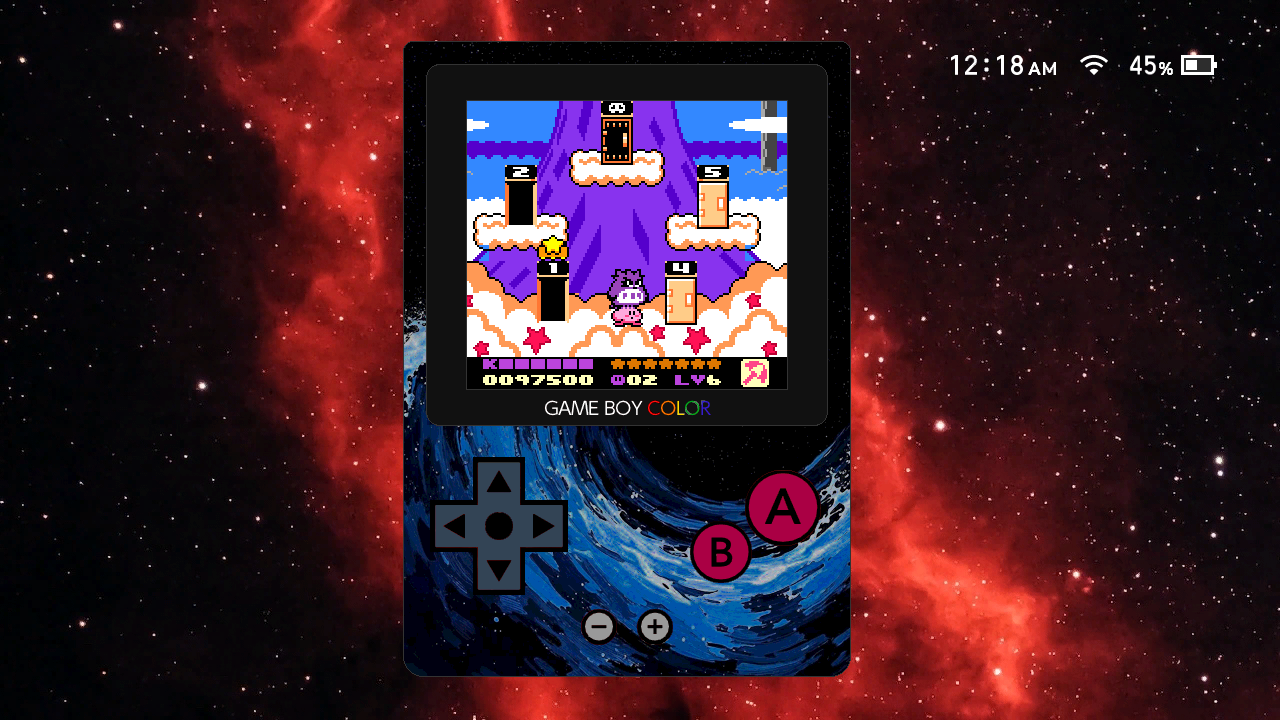
Play GB and GBC games on top of any running application.
Features
Emulation
Display Modes
Overlay mode: emulator drawn inside the standard Ultrahand overlay panel (448x720 framebuffer) alongside the UltraGB menu chrome.
Fixed overlay (default): overlay panel is anchored to the left edge of the screen, identical to all other Ultrahand overlays.
Free overlay: overlay panel floats freely anywhere on screen. Repositionable by touch hold (≈1 s) on the game screen or KEY_PLUS hold (1 s) + left stick. Position is saved between sessions.
Windowed mode: framebuffer-accurate floating window placed anywhere on screen with no UI chrome.
Palette Modes
Cycled per game from the per-game settings screen. All modes work for both DMG and CGB games.
LCD Grid Effect
Simulates the dark inter-pixel gap of a real Game Boy Color LCD by dimming the last row and column of each scaled source pixel block to approximately 12.5% brightness. Applies in both overlay and windowed modes; automatically invisible at windowed 1x.
Virtual On-Screen Controls (Overlay Mode)
D-pad, A, B, Start, and Select are drawn below the game screen and mapped to touch input each frame.
Audio
Themes and Wallpapers
The overlay UI chrome (background, button colours, border) is fully themeable via
A wallpaper (448x720
and is displayed behind the game screen when expanded memory permits.
Default (pass-through) wallpaper mode
Shows the current Ultrahand UI wallpaper behind the overlay.
Controls
Overlay Mode (In-Game)
Free overlay only:
Windowed Mode (In-Game)
ROM Selector
Save System
Per-Game Settings
Press Y on any ROM in the selector to open its settings screen.
Settings
Volume
Display
Miscellaneous
Overlay Submenu
Windowed Submenu
Quick Combo / Quick Launch
Assigning a combo in Settings registers it system-wide and deconflicts it from other overlays and packages automatically. When triggered, the overlay launches straight into the last played ROM, bypassing the selector. The launch combo then closes the overlay entirely rather than returning to the menu.
Memory Tiers
ROMs that exceed the current tier's playable size are shown in the selector with a warning colour and cannot be launched.
Requirements
Installation
The ROM directory defaults to
(
Building
Requirements: devkitPro with
Output:
The build targets C++26, ARMv8-A with SIMD/CRC/crypto extensions tuned for Cortex-A57, full LTO with 6 parallel LTRANS jobs, and links against
File Layout
Credits
Contributing
Contributions are welcome! If you have any ideas, suggestions, or bug reports, please raise an issue, submit a pull request, or reach out to me directly on GBATemp.


License
This project is licensed and distributed under GPLv2.
A Game Boy / Game Boy Color emulator overlay for the Nintendo Switch, built on libultrahand.
Play GB and GBC games on top of any running application.
Features
Emulation
- Full Game Boy (DMG) and Game Boy Color (GBC/CGB) emulation via an expanded fork of Walnut-CGB (a fork of Peanut-GB)
- Supports ROM-only, MBC1, MBC2, MBC3 (with RTC), and MBC5 (including rumble) cartridge types
- Accurate 59.73 Hz Game Boy clock rate, decoupled from the display vsync
- LCD ghosting / frame blending: per-game 50/50 blend of consecutive frames to reproduce phosphor persistence intended for flickering transparency effects
- Fast-forward (4x) via ZR double-click-hold; audio pauses during fast-forward and resumes cleanly on release
- No Sprite Limit: per-game toggle that lifts the 10-sprites-per-scanline hardware cap so flickering transparency effects show all sprites every frame
Display Modes
Overlay mode: emulator drawn inside the standard Ultrahand overlay panel (448x720 framebuffer) alongside the UltraGB menu chrome.
- 2x pixel-perfect: 320x288 viewport with integer scale and letterboxing
Fixed overlay (default): overlay panel is anchored to the left edge of the screen, identical to all other Ultrahand overlays.
Free overlay: overlay panel floats freely anywhere on screen. Repositionable by touch hold (≈1 s) on the game screen or KEY_PLUS hold (1 s) + left stick. Position is saved between sessions.
Windowed mode: framebuffer-accurate floating window placed anywhere on screen with no UI chrome.
- Integer scales: 1x through 6x (scale range is heap- and mode-gated; see Requirements)
- Repositionable by touch hold (≈1 s) or KEY_PLUS hold (2 s) + left stick
- R3 / L3 click to step scale up / down in-game (relaunches at new scale)
- Position and scale saved to
config.ini
Palette Modes
Cycled per game from the per-game settings screen. All modes work for both DMG and CGB games.
- GBC (default): CGB games use hardware color. DMG games receive the real GBC boot ROM title-based colorization (per-game lookup from hardware-verified palette database); unrecognised or unlicensed games fall back to greyscale.
- DMG: Classic four-shade green Game Boy LCD tint.
- Native: True greyscale: raw luminance values, no tint.
LCD Grid Effect
Simulates the dark inter-pixel gap of a real Game Boy Color LCD by dimming the last row and column of each scaled source pixel block to approximately 12.5% brightness. Applies in both overlay and windowed modes; automatically invisible at windowed 1x.
Virtual On-Screen Controls (Overlay Mode)
D-pad, A, B, Start, and Select are drawn below the game screen and mapped to touch input each frame.
Audio
- Game Boy volume: global GB audio output level (0–100)
- Active Title volume: per-process master volume of the running background Switch title, controlled independently and restored automatically when the overlay closes
- Audio Balance: per-game GB audio trim (−150% … 0% … +150%) stored in the per-game settings
Themes and Wallpapers
The overlay UI chrome (background, button colours, border) is fully themeable via
.ini files placed in:sdmc:/config/ultragb/ovl_themes/A wallpaper (448x720
.rgba format) can be selected from:sdmc:/config/ultragb/ovl_wallpapers/and is displayed behind the game screen when expanded memory permits.
Default (pass-through) wallpaper mode
Shows the current Ultrahand UI wallpaper behind the overlay.
Controls
Overlay Mode (In-Game)
- A → GB A
- B → GB B
- X / + → GB Start
- Y / − → GB Select
- D-Pad → GB D-Pad
- Touch (virtual buttons) → GB D-Pad / A / B / Start / Select
- ZR double-click-hold → Fast-forward (4x)
- ZL double-click, then hold (≈0.5 s) → Toggle controller pass-through to background app
- R3 click (solo) → Switch to free overlay mode
- L3 click (solo) → Switch to fixed overlay mode
- Launch combo → Return to ROM selector (normal) / close overlay (quick-launch or direct mode)
Free overlay only:
- Touch hold on game screen (≈1 s) → Enter drag mode: move overlay, release to save position
- KEY_PLUS hold (1 s) + left stick → Joystick reposition mode
Windowed Mode (In-Game)
- A → GB A
- B → GB B
- X / + → GB Start
- Y / − → GB Select
- D-Pad → GB D-Pad
- ZR double-click-hold → Fast-forward (4x)
- ZL double-click, then hold (≈0.5 s) → Toggle controller pass-through to background app
- Touch hold inside window (≈1 s) → Enter drag mode: move window, release to save position
- KEY_PLUS hold (2 s) + left stick → Joystick reposition mode
- R3 click (solo) → Step scale up (1x → 2x → … → max)
- L3 click (solo) → Step scale down
- Launch combo → Return to UltraGB menu / close overlay (quick-exit mode)
ROM Selector
- A → Launch ROM
- Y → Open per-game settings
- Right / Configure footer → Go to Configure page
- Left / Games footer → Return to ROM list (from Settings)
- B → Close overlay
Save System
- Battery saves (SRAM): written on ROM unload; stored at
sdmc:/config/ultragb/saves/internal/ - Quick-resume state: full CPU/PPU/APU snapshot saved automatically when the overlay closes; restored on next launch; stored at
sdmc:/config/ultragb/states/internal/ - User save states: 10 manual slots per game; stored at
sdmc:/config/ultragb/states/ - SRAM backup slots: 10 manual SRAM backup slots per game, independent of save states
Per-Game Settings
Press Y on any ROM in the selector to open its settings screen.
- Save States → 10 named slots: save, load, or delete any slot
- Save Data → 10 SRAM backup slots: manual snapshots of battery save data
- Reset → Cold boot the game (deletes the quick-resume state)
- Palette Mode → Cycle GBC → DMG → Native; applied live without restarting
- No Sprite Limit → Lift the 10-sprites-per-scanline hardware cap; on by default
- LCD Ghosting → Enable 50/50 frame blending for accurate flicker reproduction
- Audio Balance → Per-game GB volume trim from −150% to +150%; press Y while focused to reset to 0%
Settings
Volume
- Game Boy → GB audio output level (0–100); tap the speaker icon or press Y when focused to mute/unmute
- Active Title → Background Switch title volume (0–100); tap the speaker icon or press Y when focused to mute/unmute; reverts to pre-game level on overlay close
Display
- Mode → Toggle between Overlay and Windowed; takes effect on next ROM launch
- LCD Grid → Enable/disable the LCD inter-pixel gap simulation
- Overlay → Submenu: Position (Fixed / Free) and Theme
- Windowed → Submenu: Scale (1x–6x, heap-gated) and Docked Resolution (720p / 1080p)
Miscellaneous
- Quick Combo → Assign a button combo to launch directly to the last played ROM from anywhere
- Boot Paused → Start the emulator with the game paused on launch
- Boot Cold → Always cold-boot the game on launch (skips quick-resume state restore)
- Button Haptics → Enable/disable rumble feedback on controller button presses
- Touch Haptics → Enable/disable rumble feedback on screen touch (virtual buttons, drag reposition)
Overlay Submenu
- Position → Fixed (anchored left edge) or Free (repositionable floating panel)
- Theme → Select a UI theme from
sdmc:/config/ultragb/ovl_themes/;defaultalways available - Wallpaper → Select a background wallpaper from
sdmc:/config/ultragb/ovl_wallpapers/(requires 6 MB+ heap);defaultpass-through mode shows the current Ultrahand UI wallpaper
Windowed Submenu
- Scale → Cycle 1x → 2x → … → max; capped by available heap and ROM size
- Docked Resolution → 720p (default, 1.5x VI layer) or 1080p (pixel-perfect, 1:1 VI layer); takes effect on next windowed launch
Quick Combo / Quick Launch
Assigning a combo in Settings registers it system-wide and deconflicts it from other overlays and packages automatically. When triggered, the overlay launches straight into the last played ROM, bypassing the selector. The launch combo then closes the overlay entirely rather than returning to the menu.
Memory Tiers
- 4 MB
- Windowed max scale: 3x
- In-game wallpaper: No
- LCD Ghosting: No
- Screenshots: Yes
- 6 MB
- Windowed max scale: 4x (5x when docked + 1080p)
- In-game wallpaper: Yes
- LCD Ghosting: ROMs under 2 MB only
- Screenshots: Disabled at 5x for ROMs ≥ 2 MB
- 8 MB
- Windowed max scale: 5x (6x when docked + 1080p + ROM under 4 MB)
- In-game wallpaper: Yes
- LCD Ghosting: ROMs under 4 MB only
- Screenshots: Disabled at 5x for ROMs ≥ 4 MB
- 10 MB+
- Windowed max scale: 5x (6x when docked + 1080p)
- In-game wallpaper: Yes
- LCD Ghosting: All ROMs
- Screenshots: Yes
ROMs that exceed the current tier's playable size are shown in the selector with a warning colour and cannot be launched.
Requirements
- Nintendo Switch with Atmosphère custom firmware
- Ultrahand Overlay and nx-ovlloader v2.0.0 installed
- ROMs in
.gbor.gbcformat placed anywhere accessible on the SD card
Installation
- Download the latest
ultragb.ovlfrom Releases - Copy it to
sdmc:/switch/.overlays/ - Launch via Ultrahand
The ROM directory defaults to
sdmc:/roms/gb/ and can be changed in:sdmc:/config/ultragb/config.ini(
rom_dir key)Building
Requirements: devkitPro with
devkitARM, libnx, and the libultrahand library.
Code:
export DEVKITPRO=/opt/devkitpro
make -j6
Output:
ultragb.ovlThe build targets C++26, ARMv8-A with SIMD/CRC/crypto extensions tuned for Cortex-A57, full LTO with 6 parallel LTRANS jobs, and links against
libcurl, mbedtls, and libnx.File Layout
Code:
sdmc:/
├── switch/
│   └── .overlays/
│       └── ultragb.ovl
├── config/
│   └── ultragb/
│       ├── config.ini              ← global settings (rom_dir, volume, scale, etc.)
│       ├── ovl_theme.ini           ← active overlay theme (copied from ovl_themes/ on select)
│       ├── ovl_wallpaper.rgba      ← active overlay wallpaper (copied from ovl_wallpapers/ on select)
│       ├── ovl_themes/             ← user-provided .ini theme files
│       ├── ovl_wallpapers/         ← user-provided .rgba wallpaper files
│       ├── saves/
│       │   └── internal/           ← pre-set SRAM battery saves
│       │   └── <game>/             ← user save-data slots
│       ├── states/
│       │   ├── internal/           ← quick-resume state (one per game, auto-managed)
│       │   └── <game>/             ← user save-state slots
│       └── settings/
│           └── <game>.ini          ← per-game settings (palette, ghosting, audio balance, etc.)
└── roms/
    └── gb/                         ← pre-set GB/GBC roms directory (.gb / .gbc only)
Credits
- ppkantorski
- Mr-PauI
- Walnut-CGB (GBC core, CGB palette system, dual-fetch optimisations)
- deltabeard
- Peanut-GB (original GB core)
- libretro
- Gambatte (palette tables from
gbcpalettes.hused ingb_core.h)
- Gambatte (palette tables from
- LIJI32
- SameBoy (portions used for reference in correcting Walnut-CGB)
Contributing
Contributions are welcome! If you have any ideas, suggestions, or bug reports, please raise an issue, submit a pull request, or reach out to me directly on GBATemp.
License
This project is licensed and distributed under GPLv2.
Last edited by ppkantorski,