Building Atmosphère on Windows using MSYS2

Sometimes you need to build the binaries for Atmosphère, or you want to change something on the source code, for building your starting point should be: https://github.com/Atmosphere-NX/Atmosphere/blob/master/docs/building.md
On that document you can read:
Building Atmosphère is a very straightforward process that relies almost exclusively on tools provided by the devkitPro organization.​
Dependencies:
  • devkitA64
  • devkitARM
  • Python 2 (Python 3 may work as well, but this is not guaranteed)
  • LZ4
  • PyCryptodome (optional)
  • Hactool
Setup a DevKitPro environment: (https://devkitpro.org/wiki/Getting_Started)
Install the following packages via (dkp-)pacman:​
  • switch-dev
  • switch-glm
  • switch-libjpeg-turbo
  • devkitARM
  • devkitarm-rules
  • hactool
Install the following library via python's package manager pip, required by exosphere:​
  • lz4
Finally, clone the Atmosphère repository and run make under its root directory.​

That instructions are a little plain for we the noobs.

First you need Install a MSYS environment:
The latest instructions for install the MSYS environment are on https://gbatemp.net/threads/install-msys-environment.652234/ if you don't have one working, use them.

After you have the MSYS environment working you need to install DevKitPro
For that you can follow the instructions on the tutorial https://gbatemp.net/threads/setup-a-devkitpro-environment-on-windows.652238/

Now you can install DevKitPro packages:

You Need base DevKitPro packages:
Bash:
pacman -S --noconfirm switch-dev devkitA64 dkp-toolchain-vars libnx switch-tools switch-mesa switch-libdrm_nouveau switch-sdl2

And the Atmosphère prerequisites
Bash:
Pacman -Sy --noconfirm devkitA64 devkitARM devkitarm-rules hactool mingw-w64-x86_64-python mingw-w64-x86_64-python-lz4 mingw-w64-x86_64-python-pycryptodome switch-dev switch-glm switch-libjpeg-turbo mingw-w64-x86_64-python-pip

I had to add zip package because even if wasn't explicit indicated on the build page, the code needs it.

You also will need the packages git make lz4 for all to work, use the command:

Bash:
Pacman -Sy --noconfirm zip git make lz4


All packages on a combined command:​

Bash:
pacman -S --noconfirm switch-dev devkitA64 dkp-toolchain-vars libnx switch-tools switch-mesa switch-libdrm_nouveau switch-sdl2 devkitA64 devkitARM devkitarm-rules hactool mingw-w64-x86_64-python mingw-w64-x86_64-python-lz4 mingw-w64-x86_64-python-pycryptodome switch-dev switch-glm switch-libjpeg-turbo mingw-w64-x86_64-python-pip zip git make lz4


The package hactool need you to copy your own prod.keys file on $HOME/.switch folder. (c:\msys64\home\USERNAME\.switch if you use the default installation folder)


LibNX Dependency
Atmosphère depends heavily on LibNX, generally when a major version of firmware is released or great changes on the code are made, changes to LibNX are also made.
The Atmosphère team works on their own repo of LibNX (https://github.com/Atmosphere-NX/libnx) and forward Pull Request to official SwitchBrew LibNX repo (https://github.com/switchbrew/libnx).


So ONLY if there are changes on LibNX repository, no yet committed to DevKitPro release, you need to build it and install on your setup.
If you haven't done already, setup the environment variables
You can test it running the command
export
You should have this:
Bash:
export DEVKITPRO=/opt/devkitpro
export DEVKITARM=${DEVKITPRO}/devkitARM
export DEVKITPPC=${DEVKITPRO}/devkitPPC
export PATH=${DEVKITPRO}/tools/bin:$PATH


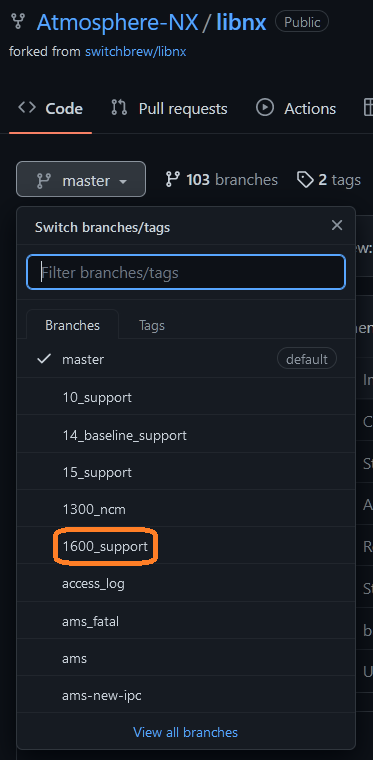
Then go to the Atmosphere-NX/LibNX repo and look what is the new branch for the current firmware, by example, for Firmware 16.0.0 the branch name is "1600_Support"
1677718224337.png

Then go to your MSYS MinGW64 window and clone the Atmosphere-NX/LibNX repo

Bash:
cd ~
git clone --recursive https://github.com/Atmosphere-NX/libnx.git
cd libnx

And checkout the needed branch:

Bash:
git checkout 1600_support

Then build and install the new LibNX libraries

Bash:
make install -j$(nproc)

Now you can build Atmosphère with latest LibNX code; remember if you update the pacman LibNX package the changes get reversed and you need to build LibNX again.

Now is time to build the binaries
Clone the repository:
Bash:
cd ~
git clone --recursive https://github.com/Atmosphere-NX/Atmosphere

Go to new created Atmosphère folder
Bash:
cd Atmosphere

Be sure you have defined the environment variables for DevKitPro
You can test it running the command
export
You should have this:
Bash:
export DEVKITPRO=/opt/devkitpro
export DEVKITARM=${DEVKITPRO}/devkitARM
export DEVKITPPC=${DEVKITPRO}/devkitPPC
export PATH=${DEVKITPRO}/tools/bin:$PATH


COPY YOUR PROD.KEYS FILE TO THE .SWITCH FOLDER:

Copy prod.keys file on $HOME/.switch
Bash:
mkdir ~/.switch
cp "c:\YOUR\CURRENT\PATH\TO\KEYS\PROD.KEYS" ~/.switch/prod.keys

In the case of MSYS for using localhost paths you must use "" by example in my case I use the commands:
Bash:
mkdir ~/.switch
cp "z:\Emulation\NSwitch\keys\switch\prod.keys" ~/.switch/prod.keys

Obviously you also can copy the file manually on windows to the equivalent path to ~/.switch/ which by default is c:\msys\home\USERNAME\.switch Where c:\msys is the installation folder and USERNAME is the current name for the user.


Atmosphère is a Python 2 project, even when python 2 has been deprecated by almost 5 years now. some * insist on never update it so as far as that is going, you need to change some files in order to work on python 3, on the files:
  • Atmosphere\fusee\program\update_mtc_tables.py
  • Atmosphere\fusee\program\update_sdram_params.py
The function XRANGE must to be changed to RANGE, edit the files and change xrange( to range( save the files and continue.

And now you are ready to start the building process:
Bash:
make -j$(nproc)

I do use the "-j$(nproc)" parameter to "bleed" all the available CPU to run the compiler, without that the whole process could take up to 1 hour.

Also Note:, if you use make -j is possible a Error 2 can be generated, run make again without parameters. The process will continue where failed, since the two latest versions of DevKitPro using the -j parameters is not synced and the make process can fail by timeouts.


I want to thank a lot to @binkinator and @godreborn for all the help and inspiration to make this guide, and want to ask you for help improving this guide.

Also special thanks to @godreborn for been a support of the users replies and suggestions to the OP.

Remember, as you are getting a new set of binaries, you need new set of sigpatches if you use it. So the great tool from @mrdude comes in hand, the latest release can be downloaded from: https://github.com/mrdude2478/IPS_Patch_Creator/releases/; you use the program to generate a new set of patches for your recently build package3 file.


Latest IPS Patch Creator:
https://gbatemp.net/download/ips-patch-creator-1-5-9.38850/


-Edited: add sigpatches step and clean up a little-
-Edit 2, add LibNX build-
 

Attachments

  • 1695782853186.png
    1695782853186.png
    62.7 KB · Views: 216
  • 1695782902542.png
    1695782902542.png
    6.4 KB · Views: 206
  • Sigpatch-IPS-Creator_1.5.7_Yandex.png
    Sigpatch-IPS-Creator_1.5.7_Yandex.png
    3.3 KB · Views: 136
Last edited by impeeza,
On my tests, do not change the files give me no visible error, but the Package3 is different on some bytes.

Hope someone can take a look at the two extra files so that nothing is missing when compiling that could possibly cause problems even if they're unseen problems.
 
  • Like
Reactions: impeeza
That was for new gcc compatibility but as finally SciresM provides the result bins in the source, the python script does... nothing...


Well, you had to launch the script before make...
 
  • Love
Reactions: impeeza
LibNX Dependency
Atmosphère depends heavily on LibNX, generally when a major version of firmware is released or great changes on the code are made, changes to LibNX are also made.
The Atmosphère team works on their own repo of LibNX (https://github.com/Atmosphere-NX/libnx) and forward Pull Request to official SwitchBrew LibNX repo (https://github.com/switchbrew/libnx).


So ONLY if there are changes on LibNX repository, no yet committed to DevKitPro release, you need to build it and install on your setup.

How do we know if changes on LibNX have been committed to the DevKitPro release?

Also, is there any disadvantage or problem if a person built and installed using

Master branch of https://github.com/switchbrew/libnx
vs
20_support branch of https://github.com/Atmosphere-NX/libnx
 
How do we know if changes on LibNX have been committed to the DevKitPro release?

Also, is there any disadvantage or problem if a person built and installed using

Master branch of https://github.com/switchbrew/libnx
vs
20_support branch of https://github.com/Atmosphere-NX/libnx
It is more a detective work, me personally I go to repos https://github.com/switchbrew/libnx & https://github.com/Atmosphere-NX/libnx then search for new branches:

1752598318901.png


Pullrequests:
1752598394985.png


And commits:
1752598437238.png

Then analyze if new code are added.

and if some code is new use THAT repo combining the branch, PR or commit to the local code to build a new LibNX version. if none is new just use latest release.
 
It is more a detective work, me personally I go to repos https://github.com/switchbrew/libnx & https://github.com/Atmosphere-NX/libnx then search for new branches:

View attachment 516738


Pullrequests:
View attachment 516739


And commits:
View attachment 516740
Then analyze if new code are added.

and if some code is new use THAT repo combining the branch, PR or commit to the local code to build a new LibNX version. if none is new just use latest release.

Thank you. Still a bit confusing with some terminology. "combining the branch, PR or commit to the local code to build a new LibNX version". This I am uncertain of the wording and what it all means. I don't know how to combine branches or understand what "PR or commit to the local code" means. When I use git command it tells me folder is not empty and I cannot clone any branch unless i first empty the folder C:\msys64\home\username\Atmosphere but then I am able to compile just fine.

But why combine? Can't just use clean version of Master branch from https://github.com/switchbrew/libnx? As it appears to include all changes from https://github.com/Atmosphere-NX/libnx/ and also several more changes.

https://github.com/Atmosphere-NX/libnx/tree/20_support - Updated 2 months ago
https://github.com/switchbrew/libnx (master branch) - Updated 3 days ago

So use https://github.com/switchbrew/libnx? Always use version with most recent updates?
 
Thank you. Still a bit confusing with some terminology. "combining the branch, PR or commit to the local code to build a new LibNX version". This I am uncertain of the wording and what it all means. I don't know how to combine branches or understand what "PR or commit to the local code" means. When I use git command it tells me folder is not empty and I cannot clone any branch unless i first empty the folder C:\msys64\home\username\Atmosphere but then I am able to compile just fine.

But why combine? Can't just use clean version of Master branch from https://github.com/switchbrew/libnx? As it appears to include all changes from https://github.com/Atmosphere-NX/libnx/ and also several more changes.

https://github.com/Atmosphere-NX/libnx/tree/20_support - Updated 2 months ago
https://github.com/switchbrew/libnx (master branch) - Updated 3 days ago

So use https://github.com/switchbrew/libnx? Always use version with most recent updates?
Hello there,

You are right that terms are the most hard thing to learn for me.

GitHub is a repository of code, with change management. that means each change on the code is tracked and need a process of aproval to get on the release versions.

Also you can create alternative copies of the code to test things and do not mess with principal one, that copies are called branchs.

When somebody make a change on the code that changes are proposed for review before they can be commited to the main code. That process is called PR (Pull Request).

When new code on Atmosphère is created, sometimes programmers need to also upgrade LibNX, and then is when a branch or a PR is created, and you need that changes on LibNX on your local environment in order to be able to build latest code of Atmosphère. Sometimes there is no change on LibNX and you need no to build any LibNX.


For build a branch of a github repository you can:

Clone the branch, by the command:
git clone --recursive hhttps://github.com/switchbrew/libnx /b BRANCHNAME

this way you download that branch. Or also if you already had coned the repository you can run the command:
git checkout BRANCHNAME
This change the local files to match the ones on the BRANCNAME.


In order to apply locally a PR to the local copy of the repository you run the commands:
Bash:
git fetch origin pull/PRNUMBER/head
git checkout -b LOCALPRNAME FETCH_HEAD
this way you create a local branch called LOCALPRNAME which have the current code plus the PRNumber applied.


And so on. I had to read a lot to learn that commands.
 
  • Love
Reactions: Earthshine
Hello there,

You are right that terms are the most hard thing to learn for me.

GitHub is a repository of code, with change management. that means each change on the code is tracked and need a process of aproval to get on the release versions.

Also you can create alternative copies of the code to test things and do not mess with principal one, that copies are called branchs.

When somebody make a change on the code that changes are proposed for review before they can be commited to the main code. That process is called PR (Pull Request).

When new code on Atmosphère is created, sometimes programmers need to also upgrade LibNX, and then is when a branch or a PR is created, and you need that changes on LibNX on your local environment in order to be able to build latest code of Atmosphère. Sometimes there is no change on LibNX and you need no to build any LibNX.


For build a branch of a github repository you can:

Clone the branch, by the command:
git clone --recursive hhttps://github.com/switchbrew/libnx /b BRANCHNAME

this way you download that branch. Or also if you already had coned the repository you can run the command:
git checkout BRANCHNAME
This change the local files to match the ones on the BRANCNAME.


In order to apply locally a PR to the local copy of the repository you run the commands:
Bash:
git fetch origin pull/PRNUMBER/head
git checkout -b LOCALPRNAME FETCH_HEAD
this way you create a local branch called LOCALPRNAME which have the current code plus the PRNumber applied.


And so on. I had to read a lot to learn that commands.

Thanks for all of that. it helps a lot. The only question I have left is, any benefit or disadvantages over using one or the other since switchbrew git is more recently updated? Or should always use the latest appropriate branch from Atmosphere-NX git?

https://github.com/Atmosphere-NX/libnx/tree/20_support - Updated 2 months ago
https://github.com/switchbrew/libnx (master branch) - Updated 3 days ago
 
Thanks for all of that. it helps a lot. The only question I have left is, any benefit or disadvantages over using one or the other since switchbrew git is more recently updated? Or should always use the latest appropriate branch from Atmosphere-NX git?

https://github.com/Atmosphere-NX/libnx/tree/20_support - Updated 2 months ago
https://github.com/switchbrew/libnx (master branch) - Updated 3 days ago
There is no adventages on one or other, The Atmosphere-NX/LibNX repo is used internally by Atmosphère coders group to test changes before submit them to the official SwitchBrew/LibNX repo. so sometimes the later one have most recent changes about Atmosphère.
 
  • Like
Reactions: Earthshine
Hello,
I entered these values, but when I run make -j$(nproc), I get this error after a while.
Is the size of the image I created with logo.dat.h incorrect?
1755608138763.png

1755608168632.png
 
Hello,
I entered these values, but when I run make -j$(nproc), I get this error after a while.
Is the size of the image I created with logo.dat.h incorrect?
View attachment 522972
View attachment 522973

Can't that be done just by adding some bootlogo lines in hekate_ipl.ini?
https://github.com/CTCaer/hekate/blob/master/README_BOOTLOGO.md

Or maybe it's a different screen you're trying to replace?

Perhaps this video could help? It's not in English but you can still see what is going on.
https://odysee.com/@sthetixofficial:9/nintendo-switch-custom-boot-logo:0?src=embed

There is also this from the op in this topic. Could just be that? Can always try compiling again without the extra params to see what happens. I get an error 2 message when I try to compile using the extra params even if I make no changes to the code.

"Also Note:, if you use make -j is possible a Error 2 can be generated, run make again without parameters. The process will continue where failed, since the two latest versions of DevKitPro using the -j parameters is not synced and the make process can fail by timeouts."
 
Last edited by Earthshine,
  • Like
Reactions: GoodmanBCN
Can't that be done just by adding some bootlogo lines in hekate_ipl.ini?
https://github.com/CTCaer/hekate/blob/master/README_BOOTLOGO.md

Or maybe it's a different screen you're trying to replace?

Perhaps this video could help? It's not in English but you can still see what is going on.
https://odysee.com/@sthetixofficial:9/nintendo-switch-custom-boot-logo:0?src=embed

There is also this from the op in this topic. Could just be that? Can always try compiling again without the extra params to see what happens. I get an error 2 message when I try to compile using the extra params even if I make no changes to the code.

"Also Note:, if you use make -j is possible a Error 2 can be generated, run make again without parameters. The process will continue where failed, since the two latest versions of DevKitPro using the -j parameters is not synced and the make process can fail by timeouts."
I want change the atmosphere logo (white triangle) (SEPT LOGO or Splash Logo?)
Without parameters give me the same error:
1755613768476.png
 
Last edited by GoodmanBCN,
Incorrect size
how can know what is the correct size for the new image?
In the file boot_splash_screen_notext I need put this sizes??
1755616179297.png

Post automatically merged:

I want change the atmosphere logo (white triangle) (SEPT LOGO or Splash Logo?)
Without parameters give me the same error:
View attachment 522977
Post automatically merged:

how can know what is the correct size for the new image?
In the file boot_splash_screen_notext I need put this sizes??
1755616179297.png

Post automatically merged:
Done!!
Tonight I will try to center it correctly and I will change the last logo for one that I saw around here.
My wife is going to kill me if I'm one more minute in front of the computer on a Holiday day... 😅
Thank you for your help @impeeza
 
Last edited by GoodmanBCN,
Can't that be done just by adding some bootlogo lines in hekate_ipl.ini?
https://github.com/CTCaer/hekate/blob/master/README_BOOTLOGO.md

Or maybe it's a different screen you're trying to replace?

Perhaps this video could help? It's not in English but you can still see what is going on.
https://odysee.com/@sthetixofficial:9/nintendo-switch-custom-boot-logo:0?src=embed

There is also this from the op in this topic. Could just be that? Can always try compiling again without the extra params to see what happens. I get an error 2 message when I try to compile using the extra params even if I make no changes to the code.

"Also Note:, if you use make -j is possible a Error 2 can be generated, run make again without parameters. The process will continue where failed, since the two latest versions of DevKitPro using the -j parameters is not synced and the make process can fail by timeouts."
Hello there, on the console boot there are some images displayed:

  • Bootloader Logo (seems this is NOT the sept logo), lets call it «the atmosphère's triangle», Some bootloaders can show loading pictures, by example Argon and Argon NX can show a file called bootlogo.bmp, Hekate can show a file set up on Hekate_ipl.ini file.
  • Sept Logo, is displayed when fusee initialize the graphical screen, is hardcoded on the Package3 binary. only can be changed by building a new atmosphère from source code, by changing the file \stratosphere\boot\source\boot_splash_screen_notext.inc . Also is displayed when using PKG3 method.
    1755624858198.png

  • Splash, is displayed by atmosphère when Package3 is full loaded, this image can be changed on a existing package3 file using the script /utilities/insert_splash_screen.py of the source code or building a new package3 from code by changing the file /img/splash.bin. This image is not shown when using Hekate PKG3 loading method.
    1755624884947.png
  • Boot Logo, is displayed by original firmware once the screen is full initialized. Can be changed by IPS patches, you can generate that set of patches using the instructions on thread https://gbatemp.net/threads/custom-boot-logo-for-switch.569031/ also there is a big collection of premade patches on the post https://gbatemp.net/threads/custom-boot-logo-for-switch.569031/post-10662039
    1755624907318.webp

A sample of each logo is shown on https://gbatemp.net/threads/custom-boot-logo-for-switch.569031/post-10439867

More information on the threads:

https://gbatemp.net/threads/remove-atmosphere-splash-screen.629387/post-10626979

https://gbatemp.net/threads/remove-atmosphere-splash-screen.629387/post-10113987

https://gbatemp.net/threads/custom-boot-logo-for-switch.569031/post-10711678

https://gbatemp.net/threads/custom-boot-logo-for-switch.569031/
 
Last edited by impeeza,
Hello there, on the console boot there are some images displayed:

  • Bootloader Logo, Some bootloaders can show loading pictures, by example Argon and Argon NX can show a file called bootlogo.bmp, Hekate can show a file set up on Hekate_ipl.ini file.
  • Sept Logo, is displayed when fusee initialize the graphical screen, is hardcoded on the Package3 binary. only can be changed by building a new atmosphère from source code, by changing the file \stratosphere\boot\source\boot_splash_screen_notext.inc . Also is displayed when using PKG3 method
  • Splash, is displayed by atmosphère when Package3 is full loaded, this image can be changed on a existing package3 file using the script /utilities/insert_splash_screen.py of the source code or building a new package3 from code by changing the file /img/splash.bin. This image is not shown when using Hekate PKG3 loading method.
  • Boot Logo, is displayed by original firmware once the screen is full initialized. Can be changed by IPS patches, you can generate that set of patches using the instructions on thread https://gbatemp.net/threads/custom-boot-logo-for-switch.569031/ also there is a big collection of premade patches on the post https://gbatemp.net/threads/custom-boot-logo-for-switch.569031/post-10662039

A sample of each logo is shown on https://gbatemp.net/threads/custom-boot-logo-for-switch.569031/post-10439867

More information on the threads:

https://gbatemp.net/threads/remove-atmosphere-splash-screen.629387/post-10626979

https://gbatemp.net/threads/remove-atmosphere-splash-screen.629387/post-10113987

https://gbatemp.net/threads/custom-boot-logo-for-switch.569031/post-10711678

https://gbatemp.net/threads/custom-boot-logo-for-switch.569031/
I have little knowledge of these topics, but I had a great time and learned a lot about building Atmosphere and changing the logos!!
 
  • Love
Reactions: impeeza
Hello there, on the console boot there are some images displayed:
  • Splash, is displayed by atmosphère when Package3 is full loaded, this image can be changed on a existing package3 file using the script /utilities/insert_splash_screen.py of the source code or building a new package3 from code by changing the file /img/splash.bin. This image is not shown when using Hekate PKG3 loading method.

Thanks for that info. I was just trying to use the instructions on atmos git:

## Adding a Custom Boot Splashscreen
Atmosphère provides its own default splashscreen which is displayed at boot time. However, this can be replaced at will.

Boot splash screens must be 1280x720 resolution.

A script can be found inside the source tree (`/utilities/insert_splash_screen.py`) for inserting a custom splash screen into a release binary.

To do so, execute the following command on the script:
`python insert_splash_screen.py <path to your splash screen image> <path to /atmosphere/package3 on your SD card>`


But when I enter the command I just get the error:
ModuleNotFoundError: No module named 'PIL'

I have tried every which way I can think of to install pil or pillow. When I cmd to see if it's actually installed it tells me it is along with the version number. But when I enter the command above it still says pil is not installed. I found this info on another forum and I think it is the same problem.

I used to have Pillow installed and it worked well. But today when I was doing something, it started to give me this error "ModuleNotFoundError: No module named 'PIL'". I tried all the methods in this subject, but the problem was still there.

So I went to Pillow website trying to use the official installation guide. After I enter "python3 -m pip install --upgrade pip", system told me I don't have pip installed. Then I realized the python it referred to is the one in my mingw64 library (C:\msys64\mingw64\bin), as I installed it yesterday for C++ compilation and it was added to my system environment path.

After removing the mingw64 bin library from system environment and re-installing Pillow, "from PIL import image" works perfectly.

My problem is that I do not see anything to change in my system environments. There is nothing there that mentions my mingw64 directory whatsoever & the only references to Python are:

C:\Users\xxxxx\AppData\Local\Programs\Python\Python313\Scripts\
C:\Users\xxxxx\AppData\Local\Programs\Python\Python313\

But.... I guess it all doesn't matter anyway since I use pkg3=atmosphere/package3? It will not even show anyway, correct? Now, what are the commands for windows cmd or mingw64 to remove this pil/pillow junk I installed?
 
You need to install the python module PIL which is called pillow, use the command

pip install pillow

and the script will work.

I did use that exact command. That was the very first one I used. Re-read my last comment. Another person said the same thing happened to them and found that having a mingw64 installation was causing this problem due to system environmental paths. But... I don't have any mingw64 anything in my paths.

If I reenter the command I get:
C:\Windows\System32>pip install pillow
Requirement already satisfied: pillow in c:\users\xxxxx\appdata\local\programs\python\python313\lib\site-packages (11.2.1)

But then when I run the command to change the splash I still get the error:
ModuleNotFoundError: No module named 'PIL'

Specifically:

xxxxx@TOWER-PC MINGW64 ~/atmosphere/utilities
# python insert_splash_screen.py D:/slpash.png C:/atmosphere/package3
Traceback (most recent call last):
File "C:/msys64/home/xxxxx/atmosphere/utilities/insert_splash_screen.py", line 1, in <module>
from PIL import Image
ModuleNotFoundError: No module named 'PIL'
 
Last edited by Earthshine,
I did use that exact command. That was the very first one I used. Re-read my last comment. Another person said the same thing happened to them and found that having a mingw64 installation was causing this problem due to system environmental paths. But... I don't have any mingw64 anything in my paths.

If I reenter the command I get:
C:\Windows\System32>pip install pillow
Requirement already satisfied: pillow in c:\users\xxxxx\appdata\local\programs\python\python313\lib\site-packages (11.2.1)

But then when I run the command to change the splash I still get the error:
ModuleNotFoundError: No module named 'PIL'
MSYS is a container environment, MSYS did not alter Windows environment.

BUY if you run the python INSIDE MSYS you need to install the packages with other commands.

by example on MinGW64 Pillow is installed by

pacman -S mingw-w64-x86_64-python-pillow

that will works ONLY INSIDE MINGW64 if you install it on MSYS and go to windows commandline WILL BE NO PILLOW on the windows python.
 

Site & Scene News

Popular threads in this forum