Hacking Anyone still interested in an Aero Moonshell2 theme?

  • Thread starter Thread starter twiztidsinz
  • Start date Start date
  • Views Views 4,180
  • Replies Replies 13

twiztidsinz

Taiju Yamada Fan
Member
Joined
Dec 23, 2008
Messages
4,979
Solutions
8
Reaction score
18
Trophies
1
Website
Visit site
XP
232
Country
United States
I've been working on an Aero theme for Moonshell2 since SE7EN is still v0.7, and the rumored v2.0 seems to have disappeared.
The theme is "done enough" for me, but still has some unskinned elements still and lacks any polish that should be on a theme.

If there is interest in this, I'll work on finishing it up and then release it.
If for some reason I cannot finish, I will upload all the images (and PSDs) to make the skin so that someone can finish.

Newest version includes the source files + app needed to build the skin.


Here's the final release: Aero Ultimate v0.11
http://filetrip.net/g25122980-Aero-Ultimat...Moonshell2.html


Set Up screen:
AeroUltimate-Setup.png

File Browser showing all icons and the Application Launcher:
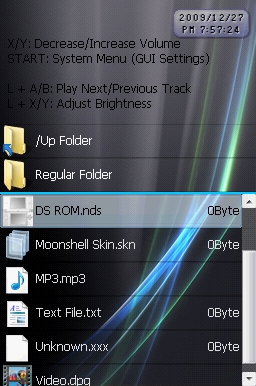
AeroUltimate-FileBrowser.png
.
AeroUltimate-Launcher.png
Note: The NDS icon is for Games that do not have an icon, or have an icon Moonshell cannot read.

Default, Digital and Extra clocks:
AeroUltimate-ClockStandard.png
AeroUltimate-ClockDigital.png
AeroUltimate-ClockExtra.png
Clocks are a tad lighter when looking at the DS... the Extra clock looks very nice and is easy to read.


TODO List:
  • Fix calender colors on all clocks
  • Skin various menu backgrounds
  • Media Player
  • Various editor backgrounds
  • Skin Accessory/Application screen
  • Better name/style for Acc/App screen
  • Days on the digital clock
 
looking good might wanna make one for m3 sakura too?
tongue.gif

nah im kidding m3 has about 10 aero themes
yeah its good i think you should:
1 unified theme like not blue on the setting,black in the menu one color all round will llook great(Or supply us with different wallpapers to use with it)
Remove instructions on top
make the start button menu look like a window opened
Get an aero scrollbar
otherwise good job
wink.gif
 
Rockstar said:
looking good might wanna make one for m3 sakura too?
tongue.gif

nah im kidding m3 has about 10 aero themesIs there an app that makes Sakura themes?
I looked for one a bit the other day but didn't find one.

Rockstar said:
yeah its good i think you should:
1 unified theme like not blue on the setting,black in the menu one color all round will llook great(Or supply us with different wallpapers to use with it)Well... The Ultimate Strands (black gray streak and blue and green strands) wallpaper didn't look too great on the opening screen IMO.
Plus the blue "shine" wallpaper on the bottom is the Windows 7 Install background. I just flipped it upside down for the top to make it look like the glow is coming from one point.
You should also only see the Set Up window once.
biggrin.gif

As for distributing wallpapers, I can do that...

Rockstar said:
Remove instructions on topDo you know how to do this?
From what I'm to understand, it's in the Language file.
I haven't dug too deep in the skin's ini file, so it's possible I missed it.

QUOTE(Rockstar @ Dec 19 2009, 01:31 AM) make the start button menu look like a window opened
I was thinking of turning the top band into a Menu Bar... I could add a Window around it.
File | Applications | Favorites
Maybe "History" or "Recent" instead of Favorites.

QUOTE(Rockstar @ Dec 19 2009, 01:31 AM)
Get an aero scrollbar
The "Aero" scrollbar is rather plain silver/gray and non-transparent.
I have one made, but I switched back because of a scroll bar bug (that I have since fixed).
I will probably put the "Aero" one back in the next time I build the skin.
 
Yeah... I've been slowly poking at it.
Been kinda busy with family stuff and dreading skinning the Media Player portion of Moonshell
tongue.gif
 
xD Lame idea just popped up. Someone should make a windows error skin, but anyways the skin looks pretty amazing.
I think maybe the NDS Rom and movie icons could be a little smaller to match the other icons (they look like they are using the whole size while the other icons aren't). The setup screen looks slightly empty (but that is probably just me, too used to seeing that slim bar around the lower options). Somehow the minimize/maximize/close bar on the Application Launcher looks misplaced (probably because it is added more for an opened window look than for anything else).
 
New and Final version... v0.11
Not much has changed (some minor fixes), but includes the source and PSD files I used.
 
Hey, I'm working on my own skin too but I've a problem: How can I make the white parts invisible?
Hope someone understand me and knows the answer
wacko.gif
 
798-Icebird said:
Hey, I'm working on my own skin too but I've a problem: How can I make the white parts invisible?
Hope someone understand me and knows the answer
wacko.gif
What white parts?

If you hold the select button Moonshell will take a screenshot of what's shown.
 
No that is not what I mean.
I have made pictures for the media player. But to come on the resolution, I have white parts on the sides.
When I make a skin of that, I got that white parts still in my skin. This is the same by icons for music etc.
How to make that white invisible so I got the background color there?
 
798-Icebird said:
No that is not what I mean.
I have made pictures for the media player. But to come on the resolution, I have white parts on the sides.
When I make a skin of that, I got that white parts still in my skin. This is the same by icons for music etc.
How to make that white invisible so I got the background color there?
I think I know your problem. Depending on how it was saved as well as what image editor you used, the transparency may have not been saved. MSPaint for one can't save transparencies. If you have Gimp or another decent image editor, you can just add an alpha channel (allow the image to use transparency on the current image layer) and then just delete the white spaces that you don't want and save the image (.png and .gif formats support transparency, although MS2 uses only .png and .bmp) with the transparency and it should turn out correctly.
 
jurassicplayer said:
798-Icebird said:
No that is not what I mean.
I have made pictures for the media player. But to come on the resolution, I have white parts on the sides.
When I make a skin of that, I got that white parts still in my skin. This is the same by icons for music etc.
How to make that white invisible so I got the background color there?
I think I know your problem. Depending on how it was saved as well as what image editor you used, the transparency may have not been saved. MSPaint for one can't save transparencies. If you have Gimp or another decent image editor, you can just add an alpha channel (allow the image to use transparency on the current image layer) and then just delete the white spaces that you don't want and save the image (.png and .gif formats support transparency, although MS2 uses only .png and .bmp) with the transparency and it should turn out correctly.

Thanx I gonna try that gimp
bow.gif
 

Site & Scene News

Popular threads in this forum