DSision2 install tutorial
Many people seem to have problems installing DSision2 on the DS to boot games with it. I finally figured out what to do and wanted to help people who cant boot games with DSision2.
Needed Files
DSTT kernel
Latest YSMenu
DSision2
Step 1
Download the DSTT kernel and the latest YSMenu version and place them in the same folder and unzip them.
Step 2
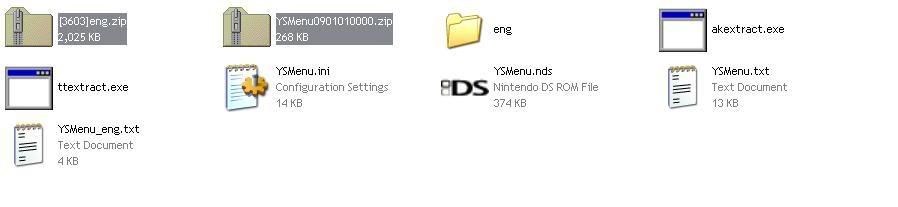
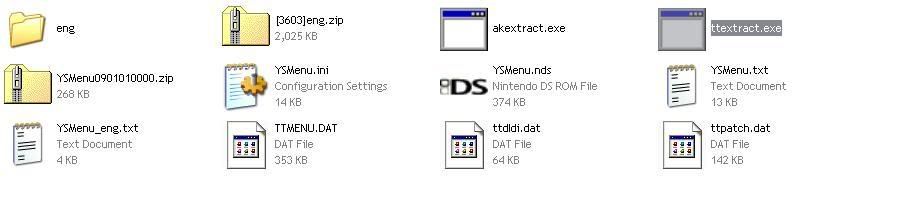
Go into the "eng" folder and copy the TTMENU.DAT to the folder where all the YSMenu contents are [akextract.exe, ttextract.exe, YSMenu.ini, (etc.)]. Run the ttextract.exe and it should make two files called ttpatch.dat and ttdldi.dat.
Step 3
Go to the root of your card and now transfer the following files into it:
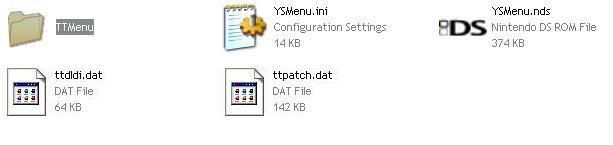
- YSMenu.ini
- YSMenu.nds
- ttpatch.dat
- ttdldi.dat

Step 4
Go back into the "eng" folder and copy and paste the "TTMenu" folder to the root of your card.
Step 5
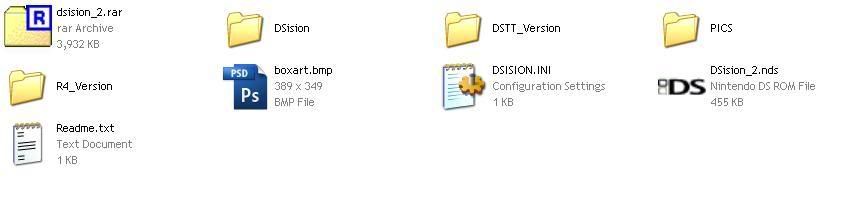
Download the DSision2 file and unzip the contents.
Step 6
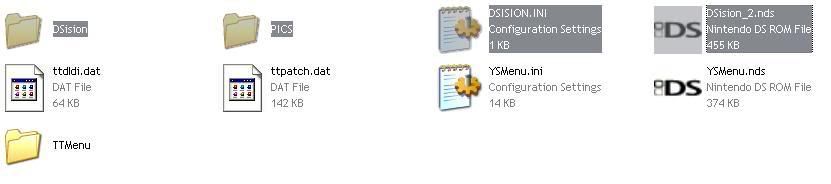
Copy the following to the root of the card:
- DSision [folder]
- PICS [folder]
- DSISION.INI
- DSision_2.nds
Step 7
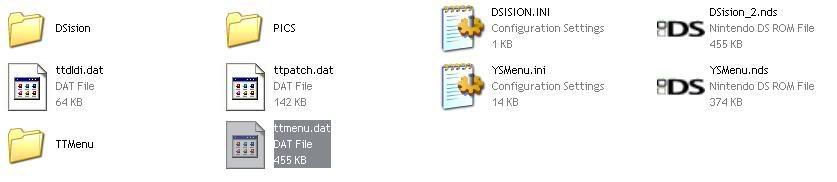
Go back to the folder where you unzipped all the contents of DSision2. Now go into the DSTT_Version folder and transfer the ttmenu.dat to the root of your card
---
There! You're finally finished!. Enjoy using DSision2!
Not sure if I forgot a step so.. yeah >__< Also not really sure if this is the same with the R4 but im guessing it's somewhat similar
Many people seem to have problems installing DSision2 on the DS to boot games with it. I finally figured out what to do and wanted to help people who cant boot games with DSision2.
Needed Files
DSTT kernel
Latest YSMenu
DSision2
Step 1
Download the DSTT kernel and the latest YSMenu version and place them in the same folder and unzip them.
Step 2
Go into the "eng" folder and copy the TTMENU.DAT to the folder where all the YSMenu contents are [akextract.exe, ttextract.exe, YSMenu.ini, (etc.)]. Run the ttextract.exe and it should make two files called ttpatch.dat and ttdldi.dat.
Step 3
Go to the root of your card and now transfer the following files into it:
- YSMenu.ini
- YSMenu.nds
- ttpatch.dat
- ttdldi.dat
Step 4
Go back into the "eng" folder and copy and paste the "TTMenu" folder to the root of your card.
Step 5
Download the DSision2 file and unzip the contents.
Step 6
Copy the following to the root of the card:
- DSision [folder]
- PICS [folder]
- DSISION.INI
- DSision_2.nds
Step 7
Go back to the folder where you unzipped all the contents of DSision2. Now go into the DSTT_Version folder and transfer the ttmenu.dat to the root of your card
---
There! You're finally finished!. Enjoy using DSision2!
Not sure if I forgot a step so.. yeah >__< Also not really sure if this is the same with the R4 but im guessing it's somewhat similar