Hacking Atmosphere-NX - Custom Firmware in development by SciresM

  • Thread starter Thread starter Waze0613
  • Start date Start date
  • Views Views 2,779,595
  • Replies Replies 9,372
  • Likes Likes 93
I updated to 12.0.1 tonight, and now Atmosphere or Hekate won't boot. I can boot to RCM and try to flash either payload and neither one will boot past a black screen.

It's doing this on 2 SD cards btw. One SD has all my normal files, and the other SD is blank except for a fresh copy of Atmosphere.

Any ideas?

Did you update both Hekate and Atmosphere?
 
I updated to 12.0.1 tonight, and now Atmosphere or Hekate won't boot. I can boot to RCM and try to flash either payload and neither one will boot past a black screen.

It's doing this on 2 SD cards btw. One SD has all my normal files, and the other SD is blank except for a fresh copy of Atmosphere.

Any ideas?
Did you have a chipped console and if so did you use choidujourNX instead of daybreak
 
Did you have a chipped console and if so did you use choidujourNX instead of daybreak

Yes I updated both atmosphere and hekate.

And I updated through Nintendo's official update (my console is banned but I can still get system updates). ChoidujurNX kept crashing so I couldn't use it like I normally do.

I was able to boot and load Atmosphere when I was still on 11.x, but it's like my Switch isn't recognizing that I'm attempting to push a payload anymore, through my phone or PC.
 
Yes I updated both atmosphere and hekate.

And I updated through Nintendo's official update (my console is banned but I can still get system updates). ChoidujurNX kept crashing so I couldn't use it like I normally do.

I was able to boot and load Atmosphere when I was still on 11.x, but it's like my Switch isn't recognizing that I'm attempting to push a payload anymore, through my phone or PC.
ChoidujurNX need to be updated for the new firmware/atmosphère. By now you should use atmosphère's daybreak for installing updates
 
Is there some kind of SD card compatibility list with emuNAND and Atmosphere?

I also have black screen issue after nintendo/swtich logo...

I have/had SX OS on my switch and I've decided to switch to Atmosphere. So to make things as clean as I can I restored my NAND backup from when I got my switch. It's 7.0.1, sysNAND is still at this version, I used emuNAND so fuses are still untouched from 7.0.1 (which was my the reason to go SX route). Everything works after restore.

So i reformat my SD with SX OS (Kingston Canvas React 256GB), went through the paces of creating hidden parition, used hekate 5.5.5 to transfer sysNAND to emuNAND, unpacked Atmosphere 0.19.2 to SD card (tried FAT32 and exFAT, switch can use both of them) but after I tried starting Atmosphere, I end up at black screen after startup.

To cut story short, I tried multiple tutorials and tools to make this, but it always ends with black screen after nintendo/switch logo. Last one I tried was https://switch.homebrew.guide/emummc/emummc.html

After few hours of unsuccessful tinkering as desperate move I tried Samsung EVO 128GB card I had and same procedure that failed with Kingston card worked without issues on first try. Tried again same steps with Kingston and nada. Not working... So it seems it has problems with Kingston card... Haven't tried with sysNAND, I wanted to keep that clean, although I don't go online with it.

*edit*

I couldn't sleep (it's 2:30 AM where I am :blink:) and have just tried this Kingston card emuNAND in file, not hidden partition, and it works! I also used emuNAND in file with SX OS, actually never tried it with partition, to be able to back it up easier.
Is this something widely known?

 
Last edited by Solo761,
Is there some kind of SD card compatibility list with emuNAND and Atmosphere?

I also have black screen issue after nintendo/swtich logo...

I have/had SX OS on my switch and I've decided to switch to Atmosphere. So to make things as clean as I can I restored my NAND backup from when I got my switch. It's 7.0.1, sysNAND is still at this version, I used emuNAND so fuses are still untouched from 7.0.1 (which was my the reason to go SX route). Everything works after restore.

So i reformat my SD with SX OS (Kingston Canvas React 256GB), went through the paces of creating hidden parition, used hekate 5.5.5 to transfer sysNAND to emuNAND, unpacked Atmosphere 0.19.2 to SD card (tried FAT32 and exFAT, switch can use both of them) but after I tried starting Atmosphere, I end up at black screen after startup.

To cut story short, I tried multiple tutorials and tools to make this, but it always ends with black screen after nintendo/switch logo. Last one I tried was https://switch.homebrew.guide/emummc/emummc.html

After few hours of unsuccessful tinkering as desperate move I tried Samsung EVO 128GB card I had and same procedure that failed with Kingston card worked without issues on first try. Tried again same steps with Kingston and nada. Not working... So it seems it has problems with Kingston card... Haven't tried with sysNAND, I wanted to keep that clean, although I don't go online with it.

*edit*

I couldn't sleep (it's 2:30 AM where I am :blink:) and have just tried this Kingston card emuNAND in file, not hidden partition, and it works! I also used emuNAND in file with SX OS, actually never tried it with partition, to be able to back it up easier.
Is this something widely known?


There is not a Black list of SD Cards perse, but in a previous version of Atmosphère was an issue where a model of SD cards generate a error on emuMMC, you should open a Issue on the GitHub for Atomosphère https://github.com/Atmosphere-NX/Atmosphere/issues giving all information about the SD Card and if someone could get the idea why the SD do not work make the correction on the code.
 
  • Like
Reactions: Solo761
Is there some kind of SD card compatibility list with emuNAND and Atmosphere?

I also have black screen issue after nintendo/swtich logo...

I have/had SX OS on my switch and I've decided to switch to Atmosphere. So to make things as clean as I can I restored my NAND backup from when I got my switch. It's 7.0.1, sysNAND is still at this version, I used emuNAND so fuses are still untouched from 7.0.1 (which was my the reason to go SX route). Everything works after restore.

So i reformat my SD with SX OS (Kingston Canvas React 256GB), went through the paces of creating hidden parition, used hekate 5.5.5 to transfer sysNAND to emuNAND, unpacked Atmosphere 0.19.2 to SD card (tried FAT32 and exFAT, switch can use both of them) but after I tried starting Atmosphere, I end up at black screen after startup.

To cut story short, I tried multiple tutorials and tools to make this, but it always ends with black screen after nintendo/switch logo. Last one I tried was https://switch.homebrew.guide/emummc/emummc.html

After few hours of unsuccessful tinkering as desperate move I tried Samsung EVO 128GB card I had and same procedure that failed with Kingston card worked without issues on first try. Tried again same steps with Kingston and nada. Not working... So it seems it has problems with Kingston card... Haven't tried with sysNAND, I wanted to keep that clean, although I don't go online with it.

*edit*

I couldn't sleep (it's 2:30 AM where I am :blink:) and have just tried this Kingston card emuNAND in file, not hidden partition, and it works! I also used emuNAND in file with SX OS, actually never tried it with partition, to be able to back it up easier.
Is this something widely known?

You want to test your card first before proceeding though if you got a bootleg card that would explain it, always test your SD card when you get them with H2testw for windows or F3X for mac.
 
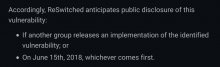
the joke is that series M was going to release something on June 15th, but they missed the deadline by miles. So whenever someone asks for an eta its just June 15th

Pretty sure june15 was the fusee-gelee release date and not atmospheres release and everyone got confused and thought it was
 
Reference was to June 15th 2019, when Atmosphere 0.9.0 was released providing support for emuNAND.
oh, yeah:

upload_2021-5-4_23-2-38.png
 

Attachments

  • IMG_20210505_032231.jpg
    IMG_20210505_032231.jpg
    59 KB · Views: 140
Last edited by impeeza,

Site & Scene News

Popular threads in this forum