SysDVR - Stream gameplay directly to a pc

SysDVR
Stream/record gameplay to a PC via USB or network.
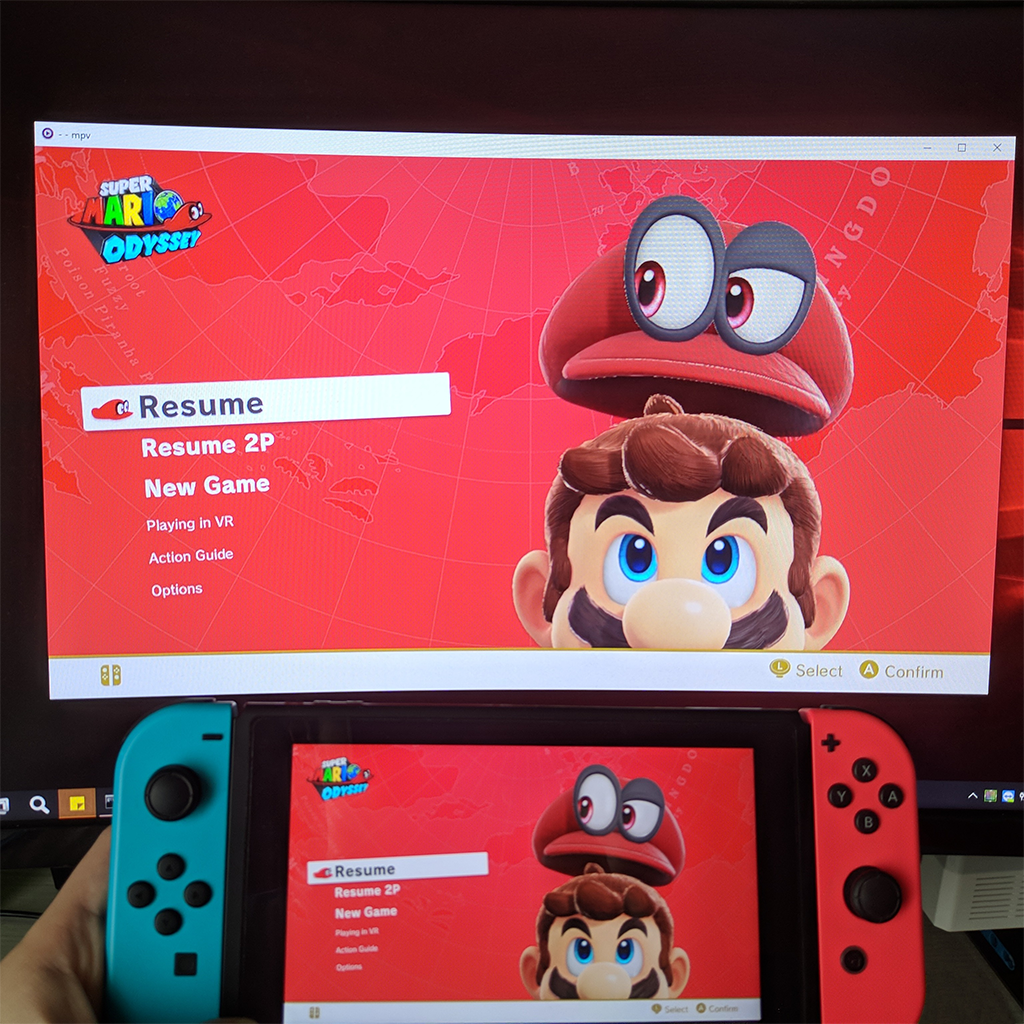
upload_2019-10-21_9-21-20.png

Update: Version 5.0 has been released with low latency streaming, be sure to check it out on github.

This is an experimental sysmodule that allows capturing the running game output on a pc.
As this uses switch's built-in game recording feature it has the same limitations: 720p@30fps and only works on the games that enable it, but by sending the video to another device there's no time limit to the recording.

There are two modes: USB and Network, both work fine but USB is slightly better, at least compared to wifi, didn't try with a LAN adapter.
Players like mpv or vlc can play the stream directly so you can use any screen recording applications but it's also possible to write the stream directly to a file.
To use the USB version you need the UsbStream program you'll find on the github page, it's built using .NET 5 and works on both windows and linux, haven't tried mac but in theory it should work too.

You can see it in action in the two teasers i posted while working on it:

As you can see it's not meant for remote play, but it can work as a basic capture card, audio output is uncompressed so it can be useful for ripping OSTs .

Download and wall of text guide on github: https://github.com/exelix11/SysDVR/
To get notified of updates you can follow this thread or join my new discord server (i also have a twitter account where occasionally post development updates).

Please make sure to read the full readme before reporting issues as it explains the most common problems you may encounter.
 
Last edited by exelix11,
Thanks great to know! Seriously impressed.

Upscaled the 720p source with Lanczos filtering, applied a bit of sharpness, and the end result was great. I did end up having to switch to RTSP over TCP instead of UDP, since I was getting very minor corruption from time to time, but TCP seems to handle the error correction just fine. (presumably just WiFi issues)

Not to advertise, but here's a VOD of a livestream of Animal Crossing I did using it. Feel free to skim through it and see what a great job your work did :) honestly, it may not be capture card quality, but it's pretty close.

Thanks again for the hard work, having the RTSP source coming right from the switch without any MITM is crazy cool.
How do you connect with OBS? Which settings do you have to have in SysDVR client/settings?
 
How do you connect with OBS? Which settings do you have to have in SysDVR client/settings?

I don't use the SysDVR client - I'm connecting straight to the RTSP source provided by the module running on the Switch (which is a cool new feature in the latest version).

In OBS you simply add a "Media Source", uncheck "Local" and put the RTSP address into the box (rtsp://switchip:6666/). Simply press "OK" and your source should now be working assuming you put the correct IP and your switch is properly connected.

Alternatively, since SysDVR was designed around MPV, you can just connect using MPV like usual and then capture the video output from MPV using OBS.

VLC appears to be the only player I haven't been able to get the RTSP source working with, but every other client appears to work fine.

The only specific setting I'm using in relation to the RTSP stream is using TCP instead of UDP, which appears to work better for my network.

Pretty sure this post is the most I've ever said RTSP in my life.
 
I don't use the SysDVR client - I'm connecting straight to the RTSP source provided by the module running on the Switch (which is a cool new feature in the latest version).

In OBS you simply add a "Media Source", uncheck "Local" and put the RTSP address into the box (rtsp://switchip:6666/). Simply press "OK" and your source should now be working assuming you put the correct IP and your switch is properly connected.

Alternatively, since SysDVR was designed around MPV, you can just connect using MPV like usual and then capture the video output from MPV using OBS.

VLC appears to be the only player I haven't been able to get the RTSP source working with, but every other client appears to work fine.

The only specific setting I'm using in relation to the RTSP stream is using TCP instead of UDP, which appears to work better for my network.

Pretty sure this post is the most I've ever said RTSP in my life.
So I'm assuming in your SysDRV confing (the homebrew nro) you have the RTSP mode right? I tried all you have said but I had no luck... the only mode working for me is TCP bridge...
 
Last edited by Txustra,
So I'm assuming in your SysDRV confing (the homebrew nro) you have the RTSP mode right? I tried all you have said but I had no luck... the only mode working for me is TCP bridge...
Edit your launch commands to not include mpv. Launching SysDVR-Client it will create its own stream. After launching it, you can point obs to rtsp://127.0.0.1:6666
 
This has been a little inconsistent to me. Half the time OBS won't the detect the rtsp media source, the other half it will stream either mute video or only the audio with a black screen.
I've been using @Puremin0rez method.
 
As explained in the readme, the usb port is busy with SysDVR and they can't access it. Next version which is coming very soon will have a configuration homebrew to temprairly stop it to launch other apps that require it.
I have installed the "SysDVR-USB-Only" on my switch, the streaming is work, thanks!
 
Last edited by jasonhk,
I've been having similar issues as @delta nite in OBS. I can get game video just fine but no audio. In MPV, everything works fine, but something seems to be going wrong with OBS. I haven't forced TCP or anything in OBS.
 
Is there a way to have two streams captured over the network at the same time? I don't mind about having two of everything running, but I'd love to be able to have two captures running at once for a multi stream (like a friend and I speedrunning a game or doing different challenges in Pokemon at the same time).
 
Is there a way to have two streams captured over the network at the same time? I don't mind about having two of everything running, but I'd love to be able to have two captures running at once for a multi stream (like a friend and I speedrunning a game or doing different challenges in Pokemon at the same time).
Kinda, if you use RTSP mode from switch you can just connect to mulitple switches with different mpv instances. If you want to use different streaming modes you'll have to custom build the sysdvr-client app to use different ports as currently 6666 is hardcoded. May consider adding a custom port option in a future release
 
Kinda, if you use RTSP mode from switch you can just connect to mulitple switches with different mpv instances. If you want to use different streaming modes you'll have to custom build the sysdvr-client app to use different ports as currently 6666 is hardcoded. May consider adding a custom port option in a future release

I'm using TCP Bridge at the moment but will look into which of the ways will work best for me. A custom port option would be awesome. Fantastic module though!

I really appreciate the response so thanks!
 
hello

anyway I can use this non-USB alongside a Lan Play (https://www.lan-play.com/install) setup? for example for lan play my switch IP is now 10.13.39.254 and the gateway used is 10.13.37.1. been testing out Animal Crossing lan play servers and would like to record docked. I'm wired via ethernet so this should work well if I can figure out how. USB worked well for me at first but since I can't play docked, I can't use the ethernet adapter. If anyone could point me in the right direction I'd appreciate it! would it be smarter to ask the people over at a lan play thread?
 
Last edited by rishad,
hello

anyway I can use this non-USB alongside a Lan Play (https://www.lan-play.com/install) setup? for example for lan play my switch IP is now 10.13.39.254 and the gateway used is 10.13.37.1. been testing out Animal Crossing lan play servers and would like to record docked. I'm wired via ethernet so this should work well if I can figure out how. USB worked well for me at first but since I can't play docked, I can't use the ethernet adapter. If anyone could point me in the right direction I'd appreciate it! would it be smarter to ask the people over at a lan play thread?
I don't know how does lanplay work, last time i checked they had a custom server on pc that would capture and relay packets based on the IP address, now idk what would happen if you forced the pc in the same fake subnet so it could talk with the switch. I'd suggest trying the following:
First of all temporairly disable windows firewall cause it can interfere
1) try using lanplay normally and type the custom ip address in sysdvr client
if that doesn't work try
2) setting your pc ip address manually to 10.13.39.something so it's in the same subnet and trying again, don't change the gateway or else you won't connect to the internet anymore. (You may still not be able to connect due to the router not accepting the ip address)
If none of these work i'd suggest opening an issue on the lanplay github repo, i think they could easily add an exception for port 6666 which is the one that SysDVR uses.

UPDATE: https://github.com/spacemeowx2/switch-lan-play/issues/83
 
Last edited by exelix11,
  • Like
Reactions: rishad
2) setting your pc ip address manually to 10.13.39.something so it's in the same subnet and trying again, don't change the gateway or else you won't connect to the internet anymore. (You may still not be able to connect due to the router not accepting the ip address)
If none of these work i'd suggest opening an issue on the lanplay github repo, i think they could easily add an exception for port 6666 which is the one that SysDVR uses
this worked!!!! thanks so much!!!

edit: wait youre right my internet is gone now... LOL

love this community, spacemeowx2 helped me figure it out https://github.com/spacemeowx2/switch-lan-play/issues/83#issuecomment-606720297
 
Last edited by rishad,
  • Like
Reactions: exelix11
I have an issue with getting this to run. Whenever I attempt to connect with SysDVR, I get this error:

libusb: error [enumerate_hcd_root_hub] could not get child devinst for 'ROOT\USB\0000'
Device not found, did you configure the drivers properly ?

I've installed and reinstalled the 'libusb-win32 (v1.2.6.0)' driver in Zadig multiple times. The USB ID is '057E 3006' and the name of the device is called 'SysDVR (Nintendo Switch).
 

Site & Scene News

Popular threads in this forum