Experience Android on your Switch, with the first publicly released version of LineageOS 15.1
https___pbs.twimg.com_media_D9.jpg

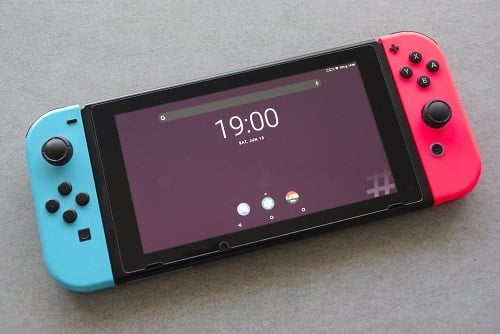
Being true to their promise, switchroot has released their highly anticipated method of bringing Android to your Nintendo Switch console. This marks the first public release of LineageOS 15.1, and is based on a build of Android that runs on the Nvidia Shield TV. By flashing the installation image to your micro SD card, you can use Android 8.1 Oreo on the Switch, in both handheld and docked mode. Some of the features include audio support, allowing the Joy-Cons to connect through bluetooth, offering CPU and GPU performance profiles, and more.

As this is a beta release, you should be aware that there are a few bugs. Some notable issues are that sleep mode battery life is lacking, certain apps have problems with being controlled with the Joy-Cons, the screenshot function is disabled, wifi can be spotty, and a few other quirks.

If you're interested in playing around with this release, you can follow the instructions below to get started, with the download links being available in the source.

LineageOS 15.1 for Nintendo Switch by switchroot. This is the first publicly available Android ROM for the Nintendo Switch. Based on the Nvidia Shield TV builds it brings a smooth and powerful Android experience to your Switch in both handheld and docked mode.
  1. Pick the image that corresponds to the size of your SD card. You can use an image that is smaller than your card. You’ll end up with the remaining space unused on your card.
  2. Write the image to your SD card with e.g. balenaEtcher Do not extract the image, Etcher can handle the compressed image just fine! WARNING: This will overwrite any contents on your card! The progress bar/percentage might go haywire in Etcher, but you can ignore that. The flashing will still work and Etcher will let you know when it’s done. It can take up to an hour depending on your SD card’s speed. Also make sure not to format any of the partitions when Windows prompts you to after flashing.
  3. Download GApps for Android 8.1. from OpenGApps, use ARM64. Put the file on the first partition of your new SD card
  4. If desired download the "Shield-ifier" zip and place it also on the SD card. This will make your Switch identify as Nvidia Shield TV and install the Nvidia app.
  5. Load hekate and boot to TWRP by holding VOL+ when you select the Android config.
  6. Flash GApps zip, optionally flash other zips
  7. Reboot to hekate and boot into Android
  8. Complete the inital setup. For the Nvidia app to work make sure to update it from Play Store!

:arrow: Source
 
So it requires FTP then? What App for the Android Side would be best?

Many file explorers have built in FTP functionality. To push XDA a bit more, MiXplorer is a commonly used file manager with FTP support


then i just remembered, that Mixplorer isn't on the google store i think

but to the original statement, most file managers will have ftp
 
Last edited by GBADWB,
Awesome. Will try after I get RetroArch Cores (not on the Switch Build) done.

By the way - MOGA Controller in XInput Mode works.
Street Fighter IV - Champion Edition [Works perfectly, and it does not even heat up the Device :D ]
 
I tried PUBG Mobile but I'm disappointed by the performance. Runs a *lot* worse than even my little iPhone SE. (this is with the 'quick' performance profile).

The experience overall using Android on Switch is laggy / not smooth, which surprises me given the low resolution and seemingly solid SoC. I'm not sure if this is the Switch being slow, running off an SD card, the port being unoptimized, or just Android being laggy in general.
 
Props to @GBADWB and @phillyrider807 for the help figuring out how to Connect to the Device via FTP. Just wish there was a faster method, but this should do for now. :(

Unfortunately, I am using EZ File Explorer, and using WinSCP. Keeps Disconnecting :(
 
Last edited by Smoker1,
The experience overall using Android on Switch is laggy / not smooth, which surprises me given the low resolution and seemingly solid SoC. I'm not sure if this is the Switch being slow, running off an SD card, the port being unoptimized, or just Android being laggy in general.

I get the feeling that the target res is always 1080 and its being downscaled for handheld use.
 
Has anybody been able to get dolphin to work? It installs but after the first boot up it crashes on every other boot up for me.

--------------------- MERGED ---------------------------

In other news I tried out drastic and it works perfectly.
 
I get the feeling that the target res is always 1080 and its being downscaled for handheld use.

What I mean is the Switch is pushing few pixels relative to 'hidpi' modern tablets and smartphones, so it should have a performance advantage.
 
Knight of the old republic won’t open. It just stays on this screen forever.
 

Attachments

  • 7937FEEF-E84A-4BE4-833E-979B3EED374A.jpeg
    7937FEEF-E84A-4BE4-833E-979B3EED374A.jpeg
    889.3 KB · Views: 133
  • Like
Reactions: lordelan
How do I Pair the Joycons in Handheld Mode?????

Go to settings, bluetooth. Pull the joycons out of the rails, use the sync button between the bumpers. The joycon lights will continue to move up and down even when its paired, look at the bluetooth settings for when the pairing is complete. Once synced they will remain so even if you slide them back into the rails, they always communicate wirelessly.
 
Go to settings, bluetooth. Pull the joycons out of the rails, use the sync button between the bumpers. The joycon lights will continue to move up and down even when its paired, look at the bluetooth settings for when the pairing is complete. Once synced they will remain so even if you slide them back into the rails, they always communicate wirelessly.
Works perfectly now. :D . Now just need to find a way to transfer Roms and Files without the FTP always Disconnecting :gun::switch:
 
I haven't read all the previous comments, but did anyone get the HD wii games running on the switch that were released in China on android.
 
Will there be a 256GB image by any chance? Some of us are starting to grow weary of the limitations of only having 128GB of storage...
 
  • Like
Reactions: Smoker1
This is really fun. I managed to get Moonlight running on it and tested Monster Hunter: World. Works perfectly. If there's any other games you want me to test, let me know!


Hey, can you check if Steam Link works too? I have AMD GPU and can't use Moonlight
 

Site & Scene News

Popular threads in this forum