Tutorial  Updated

Installing mods/hacks for Citra 3DS emulator

What you will need:

- 64-bit OS
- A decrypted .3ds file of the game you want to mod
- The mod you want to install
- 3DS to CIA by Katsu (python 2.7 required)
- 3dstool
- Citra 3DS Emulator (you won't need it to do the hacking, only to run the game afterwards)

How to install the mod:

0. Before you start, if you don't already have it, download Python 2.7 with the link provided and install it; also, if you use Windows you must add Python to the PATH Environmental Variable. (To check whether you need to do this last bit, type python in the command prompt and hit Enter: if you get the message ‘python’ is not recognized as an internal or external command, you need to add Python to PATH.)

<!> Since many people are asking me about Fire Emblem Fates, namely adding the Same-sex Marriage patch by @UnassumingVenusaur, I'll use it as an example.

1. Rename your .3ds to <filename_modified.3ds>. Extract the archives of both 3DS to CIA and 3dstool
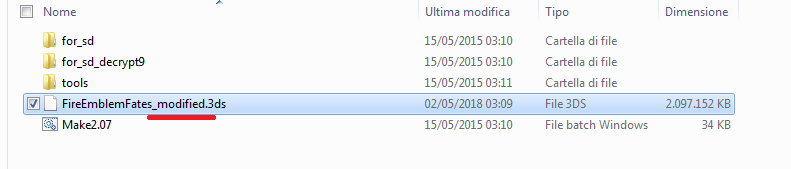
step1.png


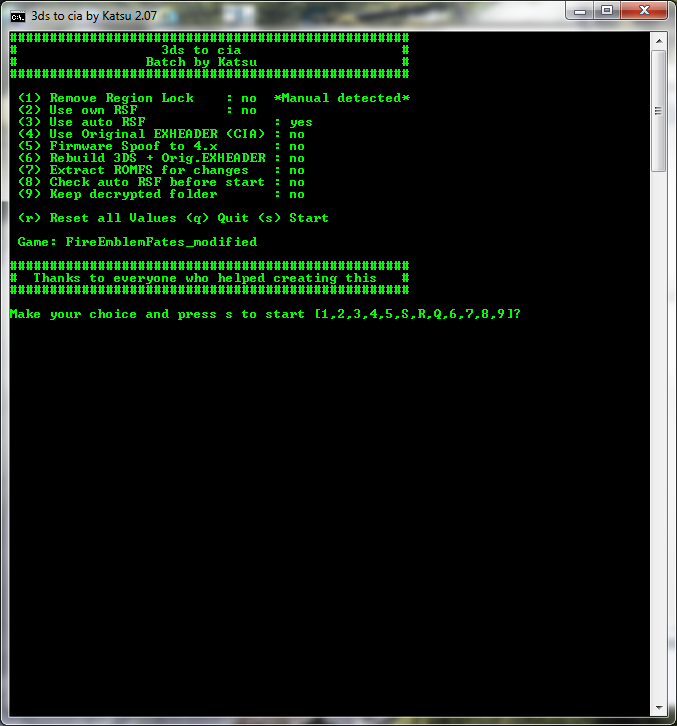
2. Drag and drop your .3ds on Make2.07.bat in the 3DS to CIA folder you've previously extracted.
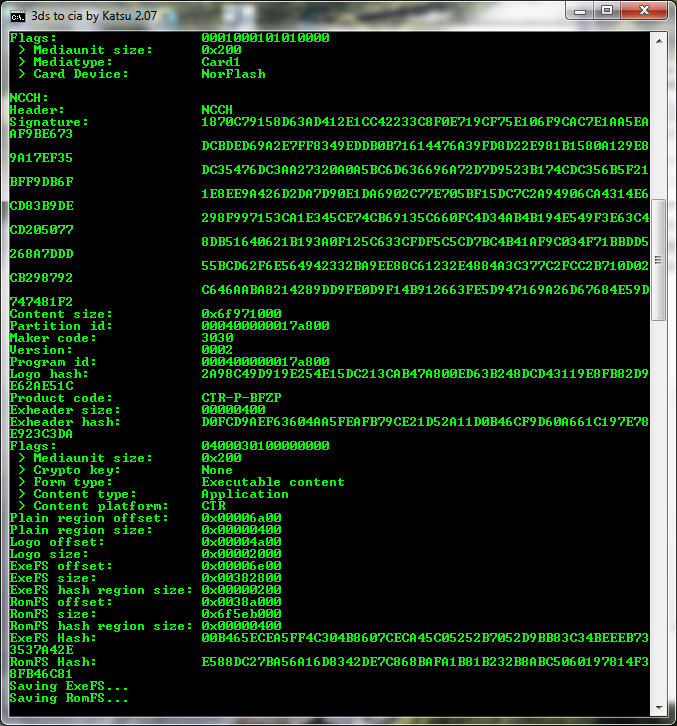
step2.png


Wait until you get this window:

step3.png


4. Leaving this command prompt (3ds_to_cia_2.07) open so you can later rebuild the game, go to the folder where the files have been extracted (don't move or delete the .3ds file which has been moved there) and copy the romfs file to the 3dstool directory which you've previously extracted.
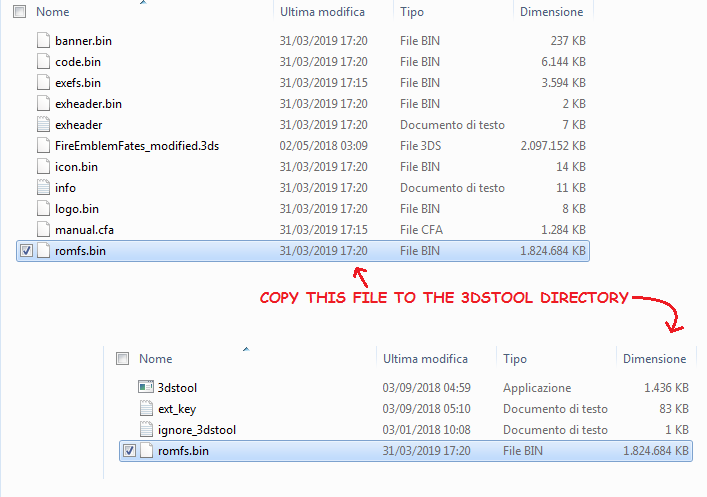
step4.png


5. To extract the romfs file, use the following command:

3dstool -xvtf romfs romfs.bin --romfs-dir romfs

If you're not familiar with using the command prompt, here is a quick walkthrough:

+++++++

To open the command prompt, go to Start and type "cmd" and open the program that comes up.
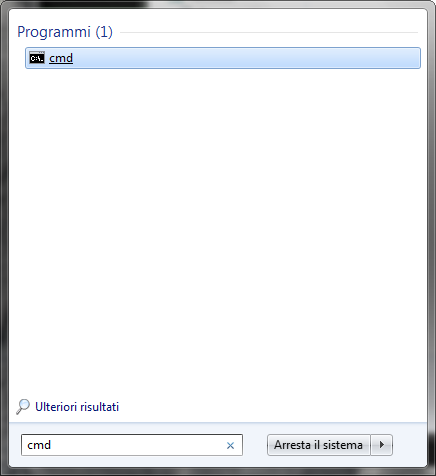
step5.png


You'll get a black window. Type this in (including the first space): cd "path to the 3dstool folder on your computer goes here"
Hit Enter, and you should get a string with the path to the 3dstool folder.
For instance, on my pc, I type:

C:\Users\Username> cd "C:\Giochi\Nintendo3DS\3ds hacking tools\3dstool"

And I get:

C:\Giochi\Nintendo3DS\3ds hacking tools\3dstool>

To extract the romfs file, use the command:

3dstool -xvtf romfs romfs.bin --romfs-dir romfs

Following the example above, it'll look like this:
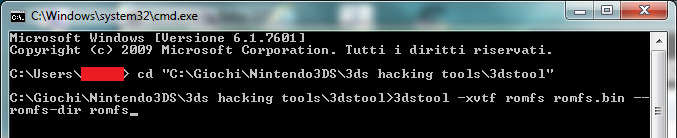
step6.png


To use the command, after you've copy-pasted 3dstool -xvtf romfs romfs.bin --romfs-dir romfs, hit Enter.
Wait until 3dstool is done extracting the romfs.bin file. You'll know when it stops and the same string with the path to the 3dstool folder appears.

step7.png


+++++++

6. Keeping the console open so you can later rebuild the romfs file, delete the file you've extracted and go to the folder which contains the extracted files.

step8.png


7. Depending on the mod, you'll now have to follow the instructions provided by the modder themselves, but generally you'll have to copy and paste the files provided by the modder (usually replacing the original ones). Modders often provide different folders for HANS, Luma and NTR CFW but the files inside are the same. Just use the HANS ones if you don't know which ones to choose, and remember to use the ones for your region (USA/EUR/JP)!

In the case of FEF, copy the contents of the HANS version>Your region folder, and paste them in the romfs folder:
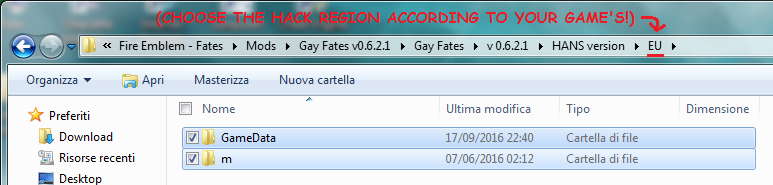
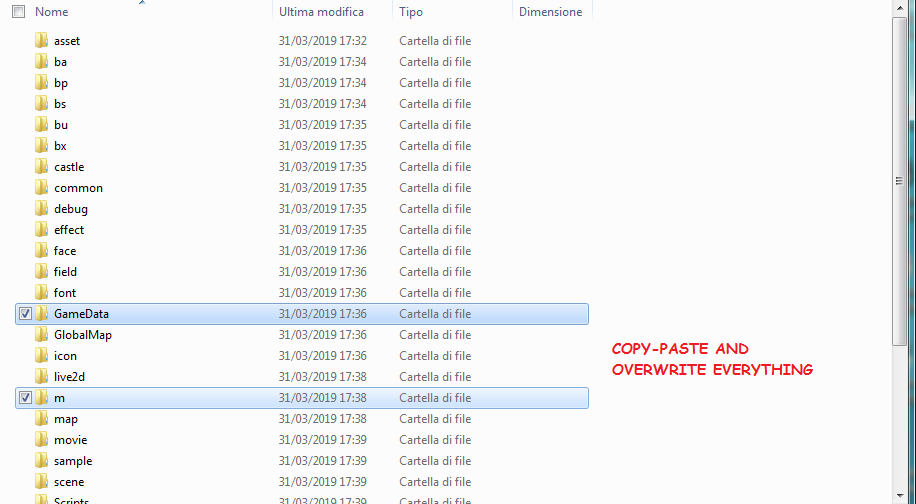
step9.png


step10.png


8. Having applied the mod/hack, go back to the command prompt and use the following command to rebuild the romfs file:

3dstool -cvtf romfs romfs.bin --romfs-dir romfs

step11.png


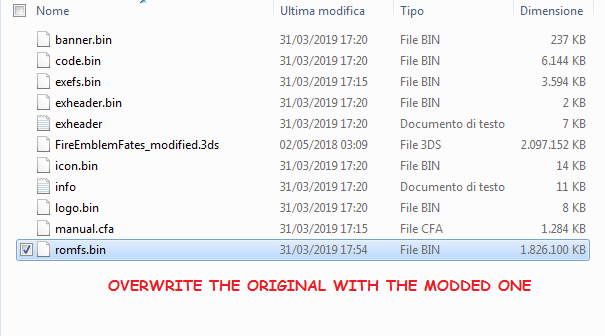
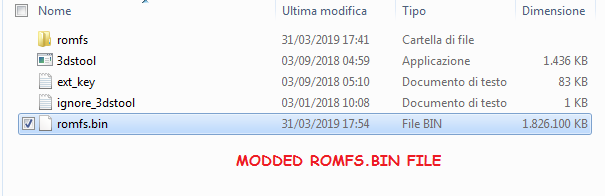
9. Replace the modified romfs file with the one in the extracted folder.
step12.png
step13.png


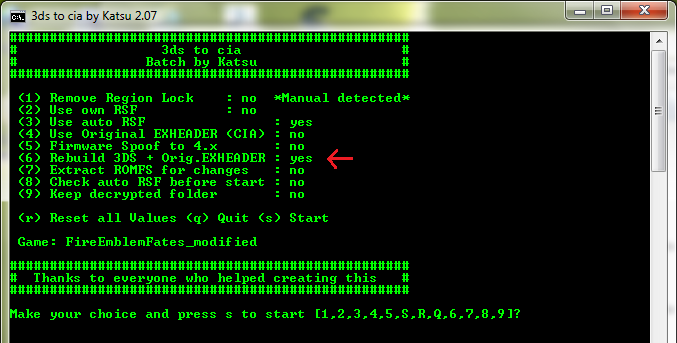
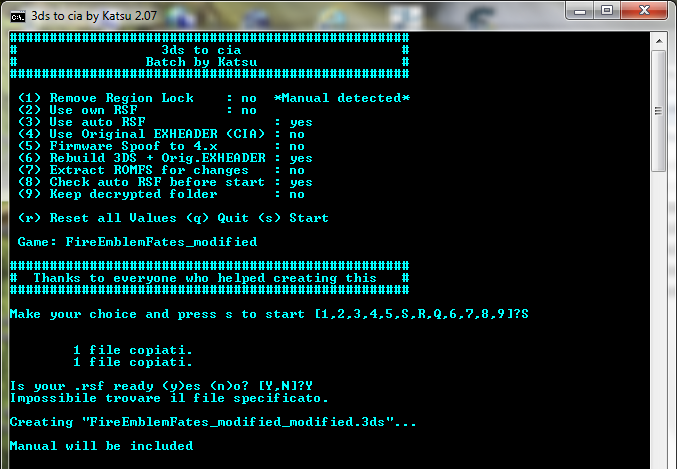
10. Go back to the 3ds_to_cia_2.07 window from step 3, press 6 (Rebuild 3DS) and then s to start
step14.png


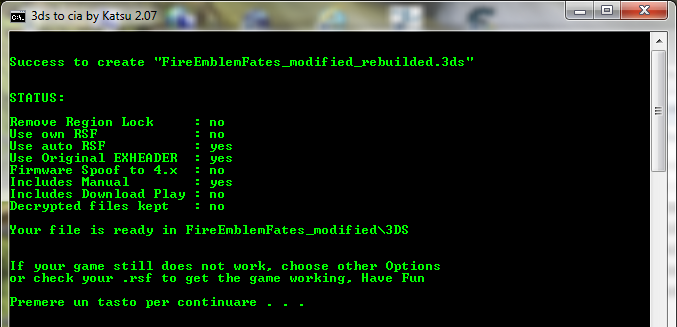
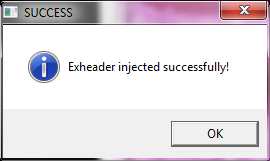
Wait until the rebuilding is done. (The process is pretty long and heavy, you likely won't be able to do anything else in the meantime.)
step15.png


step16.png


step17.png


You should get two folders with your original file and the modded one respectively. Done!
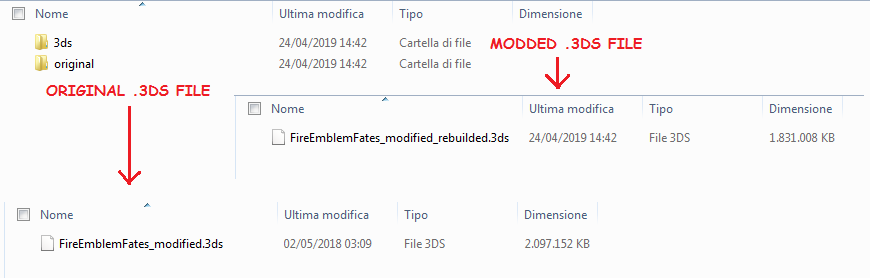
step18.png


POSSIBLE ERRORS

An issue people who use Windows 10 have run into is the batch file (3ds to cia; step 2) not running at all (opening and closing right after). This may be caused by encoding.
If you've got notepad++ (or if you don't, you can find it among the 3ds to cia "tools": 3ds_to_cia_v2.07\tools\n++), you can open the batch file for editing with it and check "Encoding". If anything else besides UTF-8 (or ANSI) is selected, you should select UTF-8 (without BOM) and save the file.

Most errors occur when rebuilding the .3ds file (step 10), and they're mostly related to the rsfgen.py script and Python by extension.
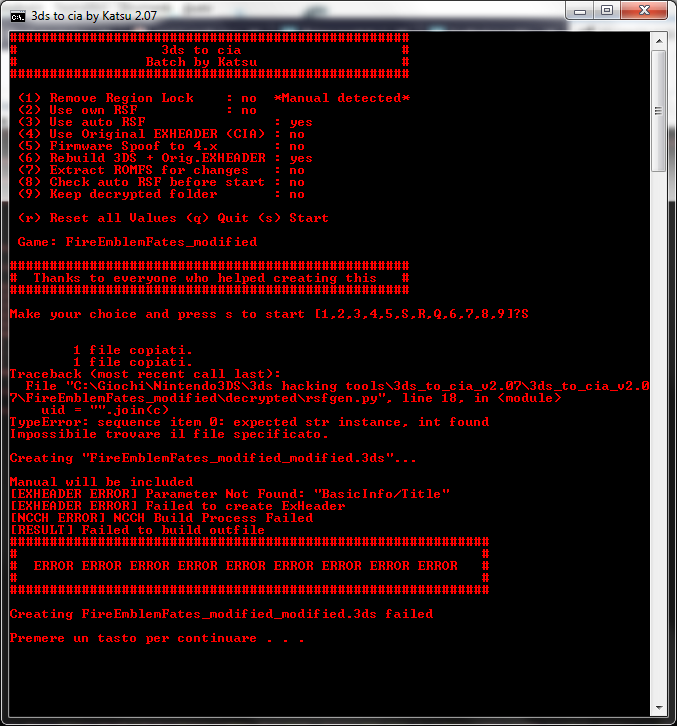
error.png

If you get this error up here, it means you have Python 3.5 installed, and it's being used to run the script instead of Python 2.7

Other instances:
- You don't have Python installed
- Python is installed in a partition where the system can't find it: install python in the same partition where your OS is!
- [Windows] Python's directory hasn't been added to the PATH e.v. (see Step 0)
- Python is not selected as the program to open .py files. If this happens, Pythonw.exe might have been selected to open .py files, while it should be Python.exe. In this case a white window with the script will appear, and once you close it, you'll get the fateful ERROR. You'll have to change the default program to open .py files to the correct one.

error pythonw.png

(If you see this the default program used to open .py files is pythonw.exe, you need to change it to python.exe)

In case you experience any other issues, tell me and I'll help you out!

-------

If you have any questions, feel free to ask!

Credits go to the creators of Citra, 3DS to CIA and 3dstool. Thank you!
 
Last edited by FriendlyHacker,
thank you!
its python ^^

Okay, that's perfect! As long as it's python.exe and not pythonw.exe, it's how it should be.
I have only one last idea about the issue... It's related to the name of the .3ds file. In the screenshot you've posted (honestly thank you for doing that), for some reason the file it's trying to create is called "FireEmblemAwakening_modified.3ds_modified.3ds" instead of "FireEmblemAwakening_modified_modified.3ds" which is... strange. It may be what causes the error, but it's an error in itself. I'll see if I can figure out why it does that.
 
  • Like
Reactions: takimei
Okay, that's perfect! As long as it's python.exe and not pythonw.exe, it's how it should be.
I have only one last idea about the issue... It's related to the name of the .3ds file. In the screenshot you've posted (honestly thank you for doing that), for some reason the file it's trying to create is called "FireEmblemAwakening_modified.3ds_modified.3ds" instead of "FireEmblemAwakening_modified_modified.3ds" which is... strange. It may be what causes the error, but it's an error in itself. I'll see if I can figure out why it does that.

thank u so very much for looking into this issue!!! :)

edit: HEY I REDID THE WHOLE THING AND THIS TIME IT ACTUALLY WORKED?? i DONT KNOW... HOW..... BUT... IT DID AND ... i just wanna thank u SO much for the help i really do appreciate it!!!! <33
 
Last edited by takimei,
  • Like
Reactions: FriendlyHacker
thank u so very much for looking into this issue!!! :)

Okay, so I've been reading the batch file and it's pretty straighforward in that it simply adds "_modified" to the game's name at one point (after which it changes it to "gamename_rebuilded"), but this happens after the rsfgen script has been used (or is supposed to have been used). Which brings us back to python and the rsfgen.py script.
I have to do some more checking, sorry it's taking forever! ^ ^;
 
Last edited by FriendlyHacker,
  • Like
Reactions: takimei
thank u so very much for looking into this issue!!! :)

edit: HEY I REDID THE WHOLE THING AND THIS TIME IT ACTUALLY WORKED?? i DONT KNOW... HOW..... BUT... IT DID AND ... i just wanna thank u SO much for the help i really do appreciate it!!!! <33

Oh hey I somehow didn't notice your edit! You're welcome, I'm really glad it works for you, haha! ^_^
 
Hi, when I drag and drop my .3ds file onto the Make2.07 file, this pops up.
upload_2019-5-12_3-50-4.png


Any ideas? I know when I was installing either python or 3ds to cia some file got removed by my anti-virus... anyways, I'm at a loss here. I'm a complete noob at this stuff, any help would be appreciated!

--------------------- MERGED ---------------------------

Hi, when I drag and drop my .3ds file onto the Make2.07 file, this pops up.
upload_2019-5-12_3-50-4.png


Any ideas? I know when I was installing either python or 3ds to cia some file got removed by my anti-virus... anyways, I'm at a loss here. I'm a complete noob at this stuff, any help would be appreciated!

Alright, I decided to extract the files from the 3ds to cia zip file, move my .3ds file into the folder and drag it onto the Make2.07 file again, and this time this showed up:
upload_2019-5-12_3-56-22.png

Might I inquire what "XORPADS" is...? And I did rename my file to FireEmblemAwakening_modified.3ds before dragging it onto Make2.07.

--------------------- MERGED ---------------------------

Hi, when I drag and drop my .3ds file onto the Make2.07 file, this pops up.
upload_2019-5-12_3-50-4.png


Any ideas? I know when I was installing either python or 3ds to cia some file got removed by my anti-virus... anyways, I'm at a loss here. I'm a complete noob at this stuff, any help would be appreciated!

--------------------- MERGED ---------------------------


Alright, I decided to extract the files from the 3ds to cia zip file, move my .3ds file into the folder and drag it onto the Make2.07 file again, and this time this showed up:
upload_2019-5-12_3-56-22.png

Might I inquire what "XORPADS" is...? And I did rename my file to FireEmblemAwakening_modified.3ds before dragging it onto Make2.07.

NEVERMIND, I figured what I'd done wrong, I'd delete this needlessly long reply thread but I don't know how. Apologies... Also, it was something called ExInjector.exe that keeps getting removed by my anti-virus, may I inquire whether that'd affect the installment of mods?
 
Hi, regarding step 9, do you mean I copy and paste the modified romf.bin file into the original and allow to replace when the option pops up or...? Also, I'm really confused by "original file" and "modded file" since they're both "romfs.bin".

--------------------- MERGED ---------------------------

Hi, regarding step 9, do you mean I copy and paste the modified romf.bin file into the original and allow to replace when the option pops up or...? Also, I'm really confused by "original file" and "modded file" since they're both "romfs.bin".

What do you mean by the "extracted file"? Do you mean the one in 3dstool or the decrypted file?

--------------------- MERGED ---------------------------

Hi, regarding step 9, do you mean I copy and paste the modified romf.bin file into the original and allow to replace when the option pops up or...? Also, I'm really confused by "original file" and "modded file" since they're both "romfs.bin".

--------------------- MERGED ---------------------------


What do you mean by the "extracted file"? Do you mean the one in 3dstool or the decrypted file?
You said "replace the modified file with the one in the extracted folder", but in the screenshots you said "rewrite the original one with the modified one", which I'm really puzzled by and would like to seek clarification... Also, by "rewrite", do I copy and paste the file or cut and paste it??

Apologies for the long-windedness once again...
 
Hi, regarding step 9, do you mean I copy and paste the modified romf.bin file into the original and allow to replace when the option pops up or...? Also, I'm really confused by "original file" and "modded file" since they're both "romfs.bin".

--------------------- MERGED ---------------------------


What do you mean by the "extracted file"? Do you mean the one in 3dstool or the decrypted file?

--------------------- MERGED ---------------------------


You said "replace the modified file with the one in the extracted folder", but in the screenshots you said "rewrite the original one with the modified one", which I'm really puzzled by and would like to seek clarification... Also, by "rewrite", do I copy and paste the file or cut and paste it??

Apologies for the long-windedness once again...

I'm sorry for the late reply!
So, once you've created the new, hacked romfs.bin file using 3dstool, cut and paste it into the directory where all the other extracted files are (that is, banner.bin, code.bin, exefs.bin, etc), overwriting the original romfs.bin. In the screenshot I posted, the old file has already been replaced by the new, modded one, that's why the size is the same (as in the screenshot of the 3dstool directory).

--------------------- MERGED ---------------------------

Hi, when I drag and drop my .3ds file onto the Make2.07 file, this pops up.
View attachment 166712

Any ideas? I know when I was installing either python or 3ds to cia some file got removed by my anti-virus... anyways, I'm at a loss here. I'm a complete noob at this stuff, any help would be appreciated!

--------------------- MERGED ---------------------------


Alright, I decided to extract the files from the 3ds to cia zip file, move my .3ds file into the folder and drag it onto the Make2.07 file again, and this time this showed up:
View attachment 166713
Might I inquire what "XORPADS" is...? And I did rename my file to FireEmblemAwakening_modified.3ds before dragging it onto Make2.07.

--------------------- MERGED ---------------------------


NEVERMIND, I figured what I'd done wrong, I'd delete this needlessly long reply thread but I don't know how. Apologies... Also, it was something called ExInjector.exe that keeps getting removed by my anti-virus, may I inquire whether that'd affect the installment of mods?

Also, you have to whitelist ExInjector.exe in the settings of your antivirus (basically, don't let your antivirus take ExInjector.exe away) otherwise step 10 won't work for you.
 
Last edited by FriendlyHacker,
I'm sorry for the late reply!
So, once you've created the new, hacked romfs.bin file using 3dstool, cut and paste it into the directory where all the other extracted files are (that is, banner.bin, code.bin, exefs.bin, etc), overwriting the original romfs.bin. In the screenshot I posted, the old file has already been replaced by the new, modded one, that's why the size is the same (as in the screenshot of the 3dstool directory).

--------------------- MERGED ---------------------------


Also, you have to whitelist ExInjector.exe in the settings of your antivirus (basically, don't let your antivirus take ExInjector.exe away) otherwise step 10 won't work for you.

Thank you for your help! It works now. :)

Question, in FE Awakening for the children of two same gender parents to show up as siblings apparently one would have to do some "quick save editing". Might I inquire what that means and do I follow the exact same steps I used to install this mod into the Citra Emulator to do whatever "quick save editing" is?

According to UnassumingVenusaur's guide (for the "quick save editing") I'd need a SD card and sdvt. So is it possible to do it for the Citra Emulator since I do not have a SD card?

Thanks for your help as always, I seriously have tremendous respect for you as I have no knowledge whatsoever pertaining to this field.
 
  • Like
Reactions: FriendlyHacker
Thank you for your help! It works now. :)

Question, in FE Awakening for the children of two same gender parents to show up as siblings apparently one would have to do some "quick save editing". Might I inquire what that means and do I follow the exact same steps I used to install this mod into the Citra Emulator to do whatever "quick save editing" is?

According to UnassumingVenusaur's guide (for the "quick save editing") I'd need a SD card and sdvt. So is it possible to do it for the Citra Emulator since I do not have a SD card?

Thanks for your help as always, I seriously have tremendous respect for you as I have no knowledge whatsoever pertaining to this field.

Hey there! Thanks for the kind words! You're very welcome, I'm glad it works for you! ^_^
As for the save editing needed so the children are recognized as siblings, you don't need either of those things. You can find the save files you need to edit on your pc!
In my case, they're here:

C:\Users\User\AppData\Roaming\Citra\sdmc\Nintendo 3DS\00000000000000000000000000000000\00000000000000000000000000000000\title\00040000\0009f100\data\00000001

So you only need HxD, a handy program for hex editing. All you have to do is make a backup of your save files and then follow steps 4 to 7 of UnassumingVenusaur's guide.

EDIT: You also need FEAST for decompressing the save file prior to modding it and compress it again after. Sorry for not mentioning this earlier!
 
Last edited by FriendlyHacker,
Hey there! Thanks for the kind words! You're very welcome, I'm glad it works for you! ^_^
As for the save editing needed so the children are recognized as siblings, you don't need either of those things. You can find the save files you need to edit on your pc!
In my case, they're here:

C:\Users\User\AppData\Roaming\Citra\sdmc\Nintendo 3DS\00000000000000000000000000000000\00000000000000000000000000000000\title\00040000\0009f100\data\00000001

So you only need HxD, a handy program for hex editing. All you have to do is make a backup of your save files and then follow steps 4 to 7 of UnassumingVenusaur's guide.
Thank you so much! You make it sound so simple. :)

Before I start, pardon my paranoid self, but do I have to "back up" my files? And if I do, which ones? I've read on people saying they had to "dump" (?) their files or something along those lines, but it may just be me mixing up two issues that lie on opposite ends of a spectrum. If I were to "back up" my files, do I merely need to copy and paste everything? Though I'm doubtful that wouldn't mess up my game, given there would be two "Chapter1"s and whatnot.

--------------------- MERGED ---------------------------

Thank you so much! You make it sound so simple. :)

Before I start, pardon my paranoid self, but do I have to "back up" my files? And if I do, which ones? I've read on people saying they had to "dump" (?) their files or something along those lines, but it may just be me mixing up two issues that lie on opposite ends of a spectrum. If I were to "back up" my files, do I merely need to copy and paste everything? Though I'm doubtful that wouldn't mess up my game, given there would be two "Chapter1"s and whatnot.
Erm nevermind, I completely missed the part where you mentioned backing up. Apologies... "-_-

But I'm still uncertain as to how to "back up" my files, so it'd be great if I could seek your guidance regarding that. :) Thank you!
 
Thank you so much! You make it sound so simple. :)

Before I start, pardon my paranoid self, but do I have to "back up" my files? And if I do, which ones? I've read on people saying they had to "dump" (?) their files or something along those lines, but it may just be me mixing up two issues that lie on opposite ends of a spectrum. If I were to "back up" my files, do I merely need to copy and paste everything? Though I'm doubtful that wouldn't mess up my game, given there would be two "Chapter1"s and whatnot.

--------------------- MERGED ---------------------------


Erm nevermind, I completely missed the part where you mentioned backing up. Apologies... "-_-

But I'm still uncertain as to how to "back up" my files, so it'd be great if I could seek your guidance regarding that. :) Thank you!
Agh, nevermind again, I've discovered the presence of YouTube tutorials to help with this... Now all I need is an external hard drive so I'll have to wait 'til tomorrow to purchase one.

Thanks and sorry for being so dumb whoops.
 
Agh, nevermind again, I've discovered the presence of YouTube tutorials to help with this... Now all I need is an external hard drive so I'll have to wait 'til tomorrow to purchase one.

Thanks and sorry for being so dumb whoops.

Oh you don't need an external hard drive, just copy the save files (the contents of that directory) somewhere else before you do any editing, so that you have the original files in case something goes wrong :)
 
Oh you don't need an external hard drive, just copy the save files (the contents of that directory) somewhere else before you do any editing, so that you have the original files in case something goes wrong :)

Oh, I see; thanks for telling me this!

I'll have to return from school before I can get started though, and in the meantime I'd like to inquire whether it's possible to change Morgan's gender regardless of my Avatar's? I'm assuming there hopefully is a viable option and if there is it'd be great if you could point me in the right direction if you know how! :)

Thanks once more. :)
 
Oh, I see; thanks for telling me this!

I'll have to return from school before I can get started though, and in the meantime I'd like to inquire whether it's possible to change Morgan's gender regardless of my Avatar's? I'm assuming there hopefully is a viable option and if there is it'd be great if you could point me in the right direction if you know how! :)

Thanks once more. :)

Hi! It's really easy!
But before that, I forgot to mention that whenever you want to do hex editing, like when you're changing the parent ids to get sibling supports, you have to decompress the folder with your save files beforehand, and compress it again after.
After you've decompressed the 00000001 folder containing the "chapter", "global" and "map0" files (using FEAST), to change Morgan's gender you need to do more hex editing. Using HxD, search for 0727 (if your Morgan is male), or 0728 (if your Morgan is female) [In Hex-values].

For reference, the list of character ids:
00 Male My Unit/Male Avatar
01 Female My Unit/Female Avatar
02 Guest My Unit/Guest Avatar
03 Chrom
04 Liz/Lissa
05 Frederick
06 Viole/Virion
07 Soiree/Sully
08 Vaike
09 Sol/Stahl
0A Miriel
0B Callum/Kellam
0C Sumia
0D Ronku/Lon'qu
0E Richt/Ricken
0F Mariabelle/Maribelle
10 Velvet/Panne
11 Gaia/Gaius
12 Tiamo/Cordelia
13 Grego/Gregor
14 Nono/Nowi
15 Libera/Libra
16 Sariya/Tharja
17 Olivia
18 Serge/Cherche
19 Henry
1A Lucina
1B Sairi/Say'ri
1C Basilio
1D Flavia
1E Donny/Donnel
1F Anna
20 Wood/Owain
21 Azure/Inigo
22 Brady
23 Djelle/Kjelle
24 Cynthia
25 Serena/Severa
26 Jerome/Gerome
27 Male Mark/Morgan
28 Female Marc/Morgan
29 Chambray/Yarne
2A Loran/Laurent
2B Noire
2C Nn/Nah
2D Tiki
2E Gangrel
2F Valhart/Walhart
30 Emelina/Emmeryn
31 Lenha/Yen'fay
32 Inverse/Aversa
33 Paris/Priam
34 Marth_FE1
35 Dummy
36 Unpromoted_Monster
37 Promoted_Monster
38 Merchant
When you find it, switch the number to the other one.
Plus if your Morgan needs to have their class changed, the class id is after two 00, for instance Morgan F/Tactician F will be: 07 28 00 05

A list of class ids:
00 Lord M
01 Lord F
02 Great Lord M
03 Great Lord F
04 Tactician M
05 Tactician F
06 Grandmaster M
07 Grandmaster F
08 Cavalier M
09 Cavalier F
0A Knight M
0B Knight F
0C Paladin M
0D Paladin F
0E Great Knight M
0F Great Knight F
10 General M
11 General F
12 Barbarian
13 Fighter
14 Mercenary M
15 Mercenary F
16 Archer M
17 Archer F
18 Berserker
19 Warrior
1A Hero M
1B Hero F
1C Bow Knight M
1D Bow Knight F
1E Sniper M
1F Sniper F
20 Myrmidon M
21 Myrmidon F
22 Thief M
23 Thief F
24 Swordmaster M
25 Swordmaster F
26 Assassin M
27 Assassin F
28 Trickster M
29 Trickster F
2A Pegasus Knight
2B Falcoknight
2C Dark Flier
2D Wyvern Rider M
2E Wyvern Rider F
2F Wyvern Lord M
30 Wyvern Lord F
31 Griffon Rider M
32 Griffon Rider F
33 Troubadour
34 Priest
35 Cleric
36 Mage M
37 Mage F
38 Dark Mage M
39 Dark Mage F
3A Valkyrie
3B War Monk
3C War Cleric
3D Sage M
3E Sage F
3F Dark Knight M
40 Dark Knight F
41 Sorcerer M
42 Sorcerer F
43 Dancer
44 Manakete
45 Taguel M
46 Taguel F
47 Soldier
48 Villager
49 Merchant
4A Revenant
4B Entombed
4C Conqueror
4D Lodestar
4E Grima
4F Mirage
50 Dread Fighter
51 Bride
Alternatively you can do this last bit with Fire Editor by uploading your "Chapter" file there, editing your Morgan, saving and downloading the new file. (btw, the developer of Fire Editor suggests using Chrome).
After you're done editing, compress the file again.
UnassumingVenusaur has written some supports for hacked Morgans, even twin Morgans, but I don't think all of the possible parent combinations are covered, so there's that.

EDIT: Well... after actually trying it out... it doesn't work! XD When loading the save the game changes everything back. It's weird that you can have twin Morgans but changing the one Morgan's gender doesn't work. There's probably something I'm missing, I'll look into that.
 
Last edited by FriendlyHacker,
Hi, sorry to bother you, but I have a problem in step 5.
When I enter
C:\Users\Username> cd "D:\3DSHacking\3DSTool" (which is where I placed it) it just wouldn't do anything and show
C:\Users\Username> again.
Since I'm new to this kind of stuff I don't know what to do now and I hope you can help me out. :D
 
Hi! It's really easy!
But before that, I forgot to mention that whenever you want to do hex editing, like when you're changing the parent ids to get sibling supports, you have to decompress the folder with your save files beforehand, and compress it again after.
After you've decompressed the 00000001 folder containing the "chapter", "global" and "map0" files (using FEAST), to change Morgan's gender you need to do more hex editing. Using HxD, search for 0727 (if your Morgan is male), or 0728 (if your Morgan is female) [In Hex-values].

For reference, the list of character ids:
00 Male My Unit/Male Avatar
01 Female My Unit/Female Avatar
02 Guest My Unit/Guest Avatar
03 Chrom
04 Liz/Lissa
05 Frederick
06 Viole/Virion
07 Soiree/Sully
08 Vaike
09 Sol/Stahl
0A Miriel
0B Callum/Kellam
0C Sumia
0D Ronku/Lon'qu
0E Richt/Ricken
0F Mariabelle/Maribelle
10 Velvet/Panne
11 Gaia/Gaius
12 Tiamo/Cordelia
13 Grego/Gregor
14 Nono/Nowi
15 Libera/Libra
16 Sariya/Tharja
17 Olivia
18 Serge/Cherche
19 Henry
1A Lucina
1B Sairi/Say'ri
1C Basilio
1D Flavia
1E Donny/Donnel
1F Anna
20 Wood/Owain
21 Azure/Inigo
22 Brady
23 Djelle/Kjelle
24 Cynthia
25 Serena/Severa
26 Jerome/Gerome
27 Male Mark/Morgan
28 Female Marc/Morgan
29 Chambray/Yarne
2A Loran/Laurent
2B Noire
2C Nn/Nah
2D Tiki
2E Gangrel
2F Valhart/Walhart
30 Emelina/Emmeryn
31 Lenha/Yen'fay
32 Inverse/Aversa
33 Paris/Priam
34 Marth_FE1
35 Dummy
36 Unpromoted_Monster
37 Promoted_Monster
38 Merchant
When you find it, switch the number to the other one.
Plus if your Morgan needs to have their class changed, the class id is after two 00, for instance Morgan F/Tactician F will be: 07 28 00 05

A list of class ids:
00 Lord M
01 Lord F
02 Great Lord M
03 Great Lord F
04 Tactician M
05 Tactician F
06 Grandmaster M
07 Grandmaster F
08 Cavalier M
09 Cavalier F
0A Knight M
0B Knight F
0C Paladin M
0D Paladin F
0E Great Knight M
0F Great Knight F
10 General M
11 General F
12 Barbarian
13 Fighter
14 Mercenary M
15 Mercenary F
16 Archer M
17 Archer F
18 Berserker
19 Warrior
1A Hero M
1B Hero F
1C Bow Knight M
1D Bow Knight F
1E Sniper M
1F Sniper F
20 Myrmidon M
21 Myrmidon F
22 Thief M
23 Thief F
24 Swordmaster M
25 Swordmaster F
26 Assassin M
27 Assassin F
28 Trickster M
29 Trickster F
2A Pegasus Knight
2B Falcoknight
2C Dark Flier
2D Wyvern Rider M
2E Wyvern Rider F
2F Wyvern Lord M
30 Wyvern Lord F
31 Griffon Rider M
32 Griffon Rider F
33 Troubadour
34 Priest
35 Cleric
36 Mage M
37 Mage F
38 Dark Mage M
39 Dark Mage F
3A Valkyrie
3B War Monk
3C War Cleric
3D Sage M
3E Sage F
3F Dark Knight M
40 Dark Knight F
41 Sorcerer M
42 Sorcerer F
43 Dancer
44 Manakete
45 Taguel M
46 Taguel F
47 Soldier
48 Villager
49 Merchant
4A Revenant
4B Entombed
4C Conqueror
4D Lodestar
4E Grima
4F Mirage
50 Dread Fighter
51 Bride
Alternatively you can do this last bit with Fire Editor by uploading your "Chapter" file there, editing your Morgan, saving and downloading the new file. (btw, the developer of Fire Editor suggests using Chrome).
After you're done editing, compress the file again.
UnassumingVenusaur has written some supports for hacked Morgans, even twin Morgans, but I don't think all of the possible parent combinations are covered, so there's that.

EDIT: Well... after actually trying it out... it doesn't work! XD When loading the save the game changes everything back. It's weird that you can have twin Morgans but changing the one Morgan's gender doesn't work. There's probably something I'm missing, I'll look into that.
Hi! It's really easy!
But before that, I forgot to mention that whenever you want to do hex editing, like when you're changing the parent ids to get sibling supports, you have to decompress the folder with your save files beforehand, and compress it again after.
After you've decompressed the 00000001 folder containing the "chapter", "global" and "map0" files (using FEAST), to change Morgan's gender you need to do more hex editing. Using HxD, search for 0727 (if your Morgan is male), or 0728 (if your Morgan is female) [In Hex-values].

For reference, the list of character ids:
00 Male My Unit/Male Avatar
01 Female My Unit/Female Avatar
02 Guest My Unit/Guest Avatar
03 Chrom
04 Liz/Lissa
05 Frederick
06 Viole/Virion
07 Soiree/Sully
08 Vaike
09 Sol/Stahl
0A Miriel
0B Callum/Kellam
0C Sumia
0D Ronku/Lon'qu
0E Richt/Ricken
0F Mariabelle/Maribelle
10 Velvet/Panne
11 Gaia/Gaius
12 Tiamo/Cordelia
13 Grego/Gregor
14 Nono/Nowi
15 Libera/Libra
16 Sariya/Tharja
17 Olivia
18 Serge/Cherche
19 Henry
1A Lucina
1B Sairi/Say'ri
1C Basilio
1D Flavia
1E Donny/Donnel
1F Anna
20 Wood/Owain
21 Azure/Inigo
22 Brady
23 Djelle/Kjelle
24 Cynthia
25 Serena/Severa
26 Jerome/Gerome
27 Male Mark/Morgan
28 Female Marc/Morgan
29 Chambray/Yarne
2A Loran/Laurent
2B Noire
2C Nn/Nah
2D Tiki
2E Gangrel
2F Valhart/Walhart
30 Emelina/Emmeryn
31 Lenha/Yen'fay
32 Inverse/Aversa
33 Paris/Priam
34 Marth_FE1
35 Dummy
36 Unpromoted_Monster
37 Promoted_Monster
38 Merchant
When you find it, switch the number to the other one.
Plus if your Morgan needs to have their class changed, the class id is after two 00, for instance Morgan F/Tactician F will be: 07 28 00 05

A list of class ids:
00 Lord M
01 Lord F
02 Great Lord M
03 Great Lord F
04 Tactician M
05 Tactician F
06 Grandmaster M
07 Grandmaster F
08 Cavalier M
09 Cavalier F
0A Knight M
0B Knight F
0C Paladin M
0D Paladin F
0E Great Knight M
0F Great Knight F
10 General M
11 General F
12 Barbarian
13 Fighter
14 Mercenary M
15 Mercenary F
16 Archer M
17 Archer F
18 Berserker
19 Warrior
1A Hero M
1B Hero F
1C Bow Knight M
1D Bow Knight F
1E Sniper M
1F Sniper F
20 Myrmidon M
21 Myrmidon F
22 Thief M
23 Thief F
24 Swordmaster M
25 Swordmaster F
26 Assassin M
27 Assassin F
28 Trickster M
29 Trickster F
2A Pegasus Knight
2B Falcoknight
2C Dark Flier
2D Wyvern Rider M
2E Wyvern Rider F
2F Wyvern Lord M
30 Wyvern Lord F
31 Griffon Rider M
32 Griffon Rider F
33 Troubadour
34 Priest
35 Cleric
36 Mage M
37 Mage F
38 Dark Mage M
39 Dark Mage F
3A Valkyrie
3B War Monk
3C War Cleric
3D Sage M
3E Sage F
3F Dark Knight M
40 Dark Knight F
41 Sorcerer M
42 Sorcerer F
43 Dancer
44 Manakete
45 Taguel M
46 Taguel F
47 Soldier
48 Villager
49 Merchant
4A Revenant
4B Entombed
4C Conqueror
4D Lodestar
4E Grima
4F Mirage
50 Dread Fighter
51 Bride
Alternatively you can do this last bit with Fire Editor by uploading your "Chapter" file there, editing your Morgan, saving and downloading the new file. (btw, the developer of Fire Editor suggests using Chrome).
After you're done editing, compress the file again.
UnassumingVenusaur has written some supports for hacked Morgans, even twin Morgans, but I don't think all of the possible parent combinations are covered, so there's that.

EDIT: Well... after actually trying it out... it doesn't work! XD When loading the save the game changes everything back. It's weird that you can have twin Morgans but changing the one Morgan's gender doesn't work. There's probably something I'm missing, I'll look into that.
Hi, I opened the file in HxD and edited the values, albeit I'm uncertain whether I did so correctly. I had tried decompressing the 00000001 folder with FEAST, but whenever I selected "Open Compressed File" in the program, I'd be unable to find it, so I shifted it under Favourites. When I selected it, the program prompted me to browse for a folder again. I assumed it was because it was already decompressed as when I right-clicked on the file there were options to compress it. I edited the hex values in HxD before saving and closing the program. When I launched the game in Canary and pressed on Save File 1, it repeatedly sent me to the title screen... Any idea what could've went wrong? I do have a copied Chapter0 file under a new folder I created named "Fire Emblem Awakening Saves"...

After being unable to load my save file, I went into my files and under where there was originally only Chapter1 and Global, there is now an additional "Chapter0.bak". Do I have to delete the Chapter0 file...?

--------------------- MERGED ---------------------------

Hi, I opened the file in HxD and edited the values, albeit I'm uncertain whether I did so correctly. I had tried decompressing the 00000001 folder with FEAST, but whenever I selected "Open Compressed File" in the program, I'd be unable to find it, so I shifted it under Favourites. When I selected it, the program prompted me to browse for a folder again. I assumed it was because it was already decompressed as when I right-clicked on the file there were options to compress it. I edited the hex values in HxD before saving and closing the program. When I launched the game in Canary and pressed on Save File 1, it repeatedly sent me to the title screen... Any idea what could've went wrong? I do have a copied Chapter0 file under a new folder I created named "Fire Emblem Awakening Saves"...

After being unable to load my save file, I went into my files and under where there was originally only Chapter1 and Global, there is now an additional "Chapter0.bak". Do I have to delete the Chapter0 file...?
I'm not sure whether this matters or not, but I attempted this before Morgan had been introduced in my save file...

--------------------- MERGED ---------------------------

Hi, I opened the file in HxD and edited the values, albeit I'm uncertain whether I did so correctly. I had tried decompressing the 00000001 folder with FEAST, but whenever I selected "Open Compressed File" in the program, I'd be unable to find it, so I shifted it under Favourites. When I selected it, the program prompted me to browse for a folder again. I assumed it was because it was already decompressed as when I right-clicked on the file there were options to compress it. I edited the hex values in HxD before saving and closing the program. When I launched the game in Canary and pressed on Save File 1, it repeatedly sent me to the title screen... Any idea what could've went wrong? I do have a copied Chapter0 file under a new folder I created named "Fire Emblem Awakening Saves"...

After being unable to load my save file, I went into my files and under where there was originally only Chapter1 and Global, there is now an additional "Chapter0.bak". Do I have to delete the Chapter0 file...?

--------------------- MERGED ---------------------------


I'm not sure whether this matters or not, but I attempted this before Morgan had been introduced in my save file...
Oh, and also, in FEAST when I entered 03 (Chrom) under 00 (Robin) and 00 under 03, the values were red. In hindsight, that may have been indicative of an error, though I'm not sure what.
 
Found the solution for my own issue: The folder needs to be in C:\ otherwise it won't work. o_ô

Hi there! Sorry for not replying before! I suppose as long as it works, then it's fine, though there shouldn't be, in theory, a problem with the location of the folder. Oh well... Glad it works for you! :)

Hi, I opened the file in HxD and edited the values, albeit I'm uncertain whether I did so correctly. I had tried decompressing the 00000001 folder with FEAST, but whenever I selected "Open Compressed File" in the program, I'd be unable to find it, so I shifted it under Favourites. When I selected it, the program prompted me to browse for a folder again. I assumed it was because it was already decompressed as when I right-clicked on the file there were options to compress it. I edited the hex values in HxD before saving and closing the program. When I launched the game in Canary and pressed on Save File 1, it repeatedly sent me to the title screen... Any idea what could've went wrong? I do have a copied Chapter0 file under a new folder I created named "Fire Emblem Awakening Saves"...

After being unable to load my save file, I went into my files and under where there was originally only Chapter1 and Global, there is now an additional "Chapter0.bak". Do I have to delete the Chapter0 file...?

--------------------- MERGED ---------------------------


I'm not sure whether this matters or not, but I attempted this before Morgan had been introduced in my save file...

--------------------- MERGED ---------------------------


Oh, and also, in FEAST when I entered 03 (Chrom) under 00 (Robin) and 00 under 03, the values were red. In hindsight, that may have been indicative of an error, though I'm not sure what.

Hi, sorry for the late reply!
Ok, I'm not sure what you're trying to do, exactly, but you should know that you can't change Morgan's gender before you've recruited them in their Disowned by Time paralogue.
Anyway, using FEAST can be a bit tricky... you should make a copy of your save folder somewhere (like you did), then copy the folder on your desktop so it's easier to find with FEAST. Then run FEAST, press "Open Compressed Folder", select your 00000001 folder which you've copied on the desktop. After this, press "Save Decompressed Folder" and you'll get a folder named 00000001_dec which contains the decompressed files.
Open the Chapter file corresponding to the save slot you want to edit (Chapter0 = First save slot, Chapter1 = Second save slot, Chapter2 = Third save slot).
At this point, I don't know what changes you want to make, but here's an example of Morgan (F) and Lucina as Chrom and Robin (M)'s daughters (plus Inigo as a reference).

example.JPG


As you can see, there is always the same amount of numbers between the "father number", "mother number" and the next "character number" (it's 16 couples of numbers in both cases), so you can easily tell where the "father number" and "mother number" are for each child.
When you find the values you want changed, switch them (they'll turn red), and then press the save icon.

save.JPG


A bak (which stands for "backup", I guess) file of the same file you changed will be in the folder, you can delete it.
After you're done, go back to FEAST, press "Open Decompressed Folder", select the folder named 00000001_dec, then press "Save Compressed Folder". You'll get a folder named 00000001_cmp.
Copy the Chapter file you modded from this folder into the original one (C:\Users\User\AppData\Roaming\Citra\sdmc\Nintendo 3DS\00000000000000000000000000000000\00000000000000000000000000000000\title\00040000\0009f100\data\00000001) and overwrite it.
Aaand that's all! Switching Chrom and Robin in either Morgan's or Lucina's block will make it so the girls are recognized by the game as sisters! ^_^
 
Last edited by FriendlyHacker,
Hey, I was wondering if you could help. I'm having a bit of a problem in step 5, where you extract the romfs. I can open command prompt and navigate to the correct directory, but I can't get the command to work. It says "ERROR: the file type is mismatch". I've tried with both Windows Powershell, and Command prompt, both give the same answer (for powershell I put .\ before 3dstool).
The romfs.bin that I moved into the 3dstool folder is the same as the one extracted from the 3ds to cia v2.07. It's probably worth noting that I'm starting with a CIA file, and the 3ds to cia tool is giving a decrypted folder, and an original folder, where the decrypted shows everything, and the original shows just the .3ds. Thanks again.
 
Hello, first I would like to say thank you so much for the tutorial. I used it to install the same mod for Awakening and it worked just fine. However, today I have been trying to install the same mod you are installing for Fates in the tutorial with a bit of trouble. I've followed the tutorial step by step and done just about everything. Everytime it turns out just fine, but when I try to open the game in citra, it says that citra has stopped working. It doesn't just stop responding, it says it stops working and the only option is to close the program. The starts just fine before installing the mod, but once I install the mod, this error occurs everytime. At first I thought it was because I had installed DLC before installing the mod, but I redid this process with a clean copy of Fates and the problem still occurs. I do not know what to do.
 

Site & Scene News

Popular threads in this forum