WebUI - A web Interface for Lan-Play

Hello everyone, I'm here to share a project that I've been working on for a while, WebUI, a web interface for Lan-Play.
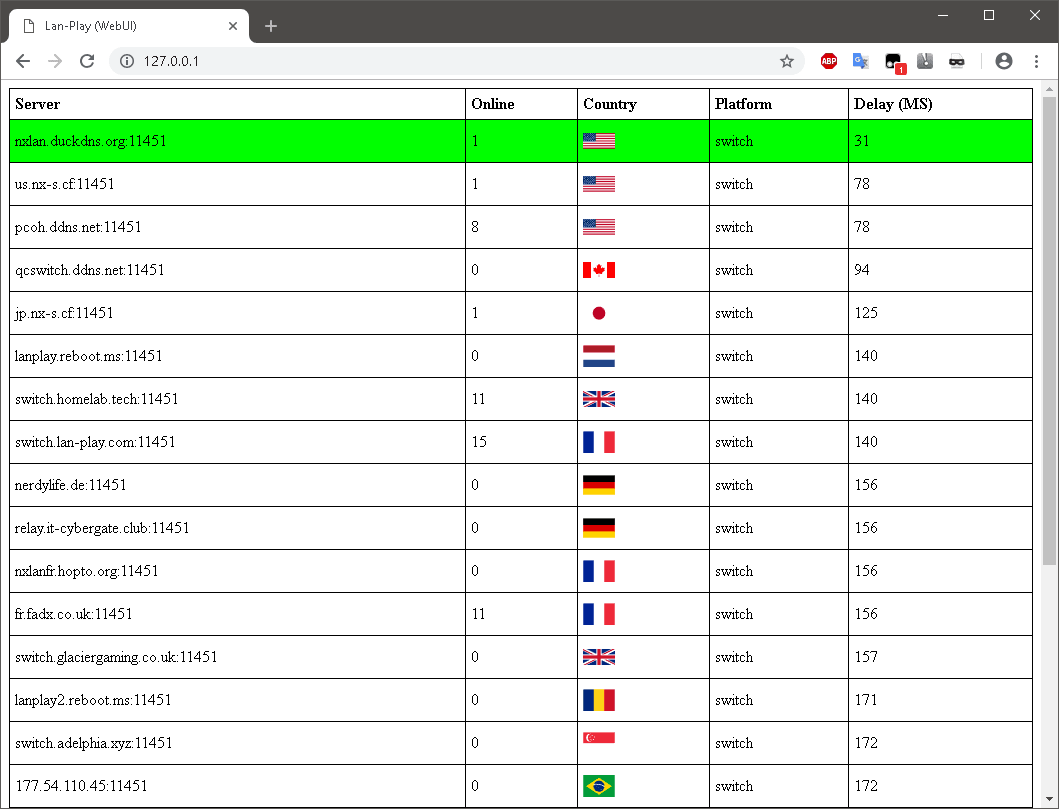
Screenshot.png


Features
:
  • Ability to add custom servers.
  • Ability to change port. (Defaults to 80)
  • Ability to set a login. (Useful If running on an open port.)
  • Smooth minimalist design, easy to use.
  • Open source.
  • View and connect to servers across multiple devices. (A smart phone, Nintendo Switch, etc)
Setup:
  1. Launch WebUI via the precompiled binary or through the AutoHotKey script.
  2. Select the Lan-Play client binary. (lan-play-win32.exe or lan-play-win64.exe)
  3. Select your network interface. (The one you use normally use with Lan-Play)
You should now see a new tray icon, you can hover over it to see the current status, double click to launch the UI, and right click for additional options.

Additional Notes:

This project is a WIP, It's written in AutoHotKey and originally was never intended to be released.
(Yes, I know the name kinda sucks, I'm bad with naming things.)

If you have any issues with it or have some suggestions, feel free to post them below and I'll respond whenever I can. Enjoy. :)

:arrow: Download WebUI
 
Last edited by HotdogWithMustard,
lan-play fr fell off once they got rid of the new york server tho

Every server i can connect to now has about 70ms or more ping, when that server had 18ms and tons of players

I should have a new york server up in the next few days. I'll try and grab a nice domain too.
 
  • Like
Reactions: orangy57
Nice! Thanks
Is it possible to add how many players there are for a specific game?

I mean there is 8 players in a room but how many are on Mario Kart, how many on smash bros,... etc...
 
so you can use this one with, for example, two legit switches, playing smash bros on the "local" mode?
or how do you use your switch?
Smash isn't supported by LAN play by itself. Smash uses local wireless, not LAN, to communicate locally so you would need the idn_mitm.kip enabled to suppress the local wireless signal and have it use LAN instead. This means both parties need CFW since you can't load that kip without it (SX OS comes with it built-in but you would need to pay for the license while the other CFW are completely free). Once everyone is using CFW and idn_mitm.kip, you can use the local wireless feature of Smash to play with anyone across the globe, after you configured the proper IP addresses and other settings required for LAN play.
 
  • Like
Reactions: Xabring
Smash isn't supported by LAN play by itself. Smash uses local wireless, not LAN, to communicate locally so you would need the idn_mitm.kip enabled to suppress the local wireless signal and have it use LAN instead. This means both parties need CFW since you can't load that kip without it (SX OS comes with it built-in but you would need to pay for the license while the other CFW are completely free). Once everyone is using CFW and idn_mitm.kip, you can use the local wireless feature of Smash to play with anyone across the globe, after you configured the proper IP addresses and other settings required for LAN play.
Oh, I see, I must take that into acount, thanks for the info!
 
  • Like
Reactions: Draxzelex
lan-play fr fell off once they got rid of the new york server tho

Every server i can connect to now has about 70ms or more ping, when that server had 18ms and tons of players


i complained that the official list back when it first started was all cali/oregon hosted servers and opted to host mine in dallas for a more central location. sadly after more and more youtube videos and guides posted the cali server ip no one came on the dallas one and its population died off :/
 
  • Like
Reactions: orangy57

Site & Scene News

Popular threads in this forum