Status
Not open for further replies.

Team-Xecuter Releases SX OS v1.4

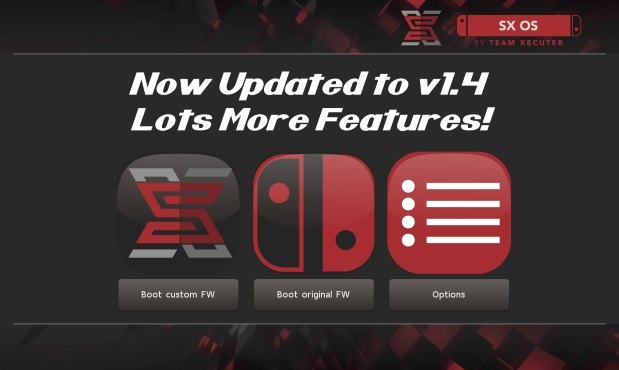
TX Releases Another Update To Their SX OS, with lots of nice improvements in v1.4
txos14.jpg

We have not heard from TX for a while, but don't worry, they back with nice new update to their SX OS, check out v1.4 below:

SX OS v1.4 Announcement
Good day, loyal users!

While we chip away at many different features for SX OS and additions to our SX hardware family we took a break to prepare an update for SX OS with some exciting new functionality and outstanding bug fixes.

Let's have a look at what's new and fixed in this release:
  • Integrated NSP installer
    With our last update we introduced the possibility of installing eShop NSP titles. However, this relied on using external tools and wasn't very user friendly. In this release we bring our own integrated NSP installer as part of our menu system. This is the neatest and easiest way of installing NSP titles, enjoy!
  • Integrated homebrew launcher
    Launching homebrew used to be done by launching NX HBMenu by holding R when entering the album. While we kept this possibility (mostly for developers), you can now also launch your favorite homebrew directly from our own menu!
  • IR / motion plus issue fixed
    A few games (like 1-2-Switch and Resident Evil) were suffering from freezes when enabling the joycon IR camera or motion controls.
  • Allow unsigned NCA
    People asked us if we could get rid of the NCA integrity checks, so we did! Custom NCA files, modified NCA files and repackaged NCA files should all work fine now.
  • Display SX OS version in menu
    To better distinguish the different versions of SX OS we introduced a small version number display in our menu.
  • LayeredFS fixes for 4.1.0
    There were certain issues with 'LayeredFS' for people on firmware 4.1.0. If you use 'LayeredFS' on that specific firmware there's good news for you: these issues have been identified and fixed!
And that's that for this release. We have quite the backlog of feature requests and todo's on our plate, but trust we'll get there!

-- Team-Xecuter - Rocking the Switch in 2018 and beyond! --
:arrow: Source: MaxConsole

 
This must be related to your microsd card speed ... the speed is good here
no, this is known issue

Game Specific Issues
  • DK Tropical FreezeSlow Loading Screens : Game works, but load times are extended compared to original card (BBB release and multiple personal dumps, trimmed and un-trimmed
    • Solution : Not needed, game runs, just takes a little longer to load.
 
Last edited by aos10,
Mario Kart 8 Deluxe nsp files didnt work with tinfoil but it worked flawlessly with this 1.4 release! Very noice

--------------------- MERGED ---------------------------

Now we need a simple method of transferring files and I’m set!

Does the nsp installer give the option on where to install?
Yes you can choose internal storage or sd card :)
 
  • Like
Reactions: andyhappypants
That's weird .. I played it with SX and loadings are not longer than my Wii U version that's for sure
xci or install?
the problem is from xci
xci is 25 seconds loading to the hub world.
install is 8-10 seconds to the hub world.
 
  • Like
Reactions: OrGoN3
I'd get SX Pro just for the jig and donglehonestly.

i probably already did if i can buy it directly. i have certain resistant to the idea of using my Visa card on shady cart websites. Don't think any accept paypal in UK. and i probably feel gutted if free alternative has major release a month or two after i bought SX OS, which seems likely at this point.
 
  • Like
Reactions: Kioku
i probably already did if i can buy it directly. i have certain resistant to the idea of using my Visa card on shady cart websites. Don't think any accept paypal in UK. and i probably feel gutted if free alternative has major release a month or two after i bought SX OS, which seems likely at this point.

It's not that much money for a few months of use...
 
One file is the game nsp and the other an update. It also allows you to choose where to store the game. Missing an install all and delete after installing button. World flawless tho. I like the new homebrew menu they made.
 

Attachments

  • 2018-07-24 19.17.40.jpg
    2018-07-24 19.17.40.jpg
    1.4 MB · Views: 326
Guys what if you try to install homebrews ?
Go to the homebrew menu and you will see (L) Install
 
TX Releases Another Update To Their SX OS, with lots of nice improvements in v1.4
View attachment 136989

We have not heard from TX for a while, but don't worry, they back with nice new update to their SX OS, check out v1.4 below:

SX OS v1.4 Announcement

:arrow: Source: MaxConsole
Woot woot. Now hopefully they fix the airplane mode crash that i've been encountering after having the switch on for over 75 hours
 
Do we know whether the bug is fixed where you get an error if you go to your album to switch games while in docked mode?
 
Its their own. Tinfoil never had the ability of installing updates or dlc or microsd/nand destination, this one does along with a front end..
but freeshop which just recently released has a front end ui, install to sdcard or internal.
 
Uhhh, after i deleted the game and the update, then installed the game alone it tells me to update the game in order to play it, however installing update will freeze the game, how not to make the switch not ask for update?

PS, i am on 4.1.
 
Status
Not open for further replies.

Site & Scene News

Popular threads in this forum