Homebrew Official Retroarch WiiU (wip.)

  • Thread starter Thread starter aliaspider
  • Start date Start date
  • Views Views 2,687,561
  • Replies Replies 15,196
  • Likes Likes 93
Post the most recent lpl file again.
I will check whats wrong with it

Thank you! :D

Snes ROMs, ugh, I can't for the life of me figure out why they show a "no content" message after "loading" (showing the load screen) then back to the menu.

Had to zip the file as the upload wouldn't let me use this extension :P
 

Attachments

  • Like
Reactions: ShadowOne333
Snes ROMs, ugh, I can't for the life of me figure out why they show a "no content" message after "loading" (showing the load screen) then back to the menu.

Had to zip the file as the upload wouldn't let me use this extension :P

Okay I seem to have noticed two things.
  1. You seem to be lacking the CRC line. Each entry should have one, you can use DEFAULT for each one (Take a look at the table I posted earlier today). If in doubt, let RA on PC make a random playlist of any rom just so you can be sure where and how it puts the CRC line for each entry.
  2. You have "Super Nintendo.lpl" in each entry. Iirc it should be "Nintendo - Super Nintendo Entertainment System.lpl" in order for RA to detect it properly. The lpl name should be the same.
 
Okay I seem to have noticed two things.
  1. You seem to be lacking the CRC line. Each entry should have one, you can use DEFAULT for each one (Take a look at the table I posted earlier today). If in doubt, let RA on PC make a random playlist of any rom just so you can be sure where and how it puts the CRC line for each entry.
  2. You have "Super Nintendo.lpl" in each entry. Iirc it should be "Nintendo - Super Nintendo Entertainment System.lpl" in order for RA to detect it properly. The lpl name should be the same.

Which is weird, I could've sworn I used it with just SNES before, the name seems unnecessarily long, oh well. Dammit -_- I don't want to generate the CRC, so I'll use DEFAULT I suppose. Sorry to bother ya, I'll try to find that table you posted earlier. What about the string with "Snes9x" in it, do I change that?
 
Last edited by the_randomizer,
Which is weird, I could've sworn I used it with just SNES before, the name seems unnecessarily long, oh well. Dammit -_- I don't want to generate the CRC, so I'll use DEFAULT I suppose. Sorry to bother ya, I'll try to find that table you posted earlier.
You dont have to generate a CRC for each entry, simply add the line in the proper place with Default in it.

Or at least thats what i think mine has haha
 
You dont have to generate a CRC for each entry, simply add the line in the proper place with Default in it.

Or at least thats what i think mine has haha

I found the post:
http://gbatemp.net/threads/retroarch-wiiu-wip.447670/page-341#post-7513282
What I find weird is

Code:
/Path/to/ROM/in/SD/Pokemon Ruby.gba
Pokemon - Ruby Version The Adventure of Link (USA)
/Path/to/Core/in/SD/libretro_mgba.rpx
mGBA
CRC here (Optional)
Nintendo - Game Boy Advance.lpl


CRC says optional, but yet you said it was required. Which is it?
 
I found the post:
http://gbatemp.net/threads/retroarch-wiiu-wip.447670/page-341#post-7513282
What I find weird is

Code:
/Path/to/ROM/in/SD/Pokemon Ruby.gba
Pokemon - Ruby Version The Adventure of Link (USA)
/Path/to/Core/in/SD/libretro_mgba.rpx
mGBA
CRC here (Optional)
Nintendo - Game Boy Advance.lpl


CRC says optional, but yet you said it was required. Which is it?
I meant optional in terms of adding the full CRC.
You have the option to either add that or put default in there.

I should have explained that better xD

--------------------- MERGED ---------------------------

https://github.com/libretro/RetroArch/wiki/Manually-Creating-Custom-Playlists

It seems it was DETECT and not DEFAULT.
Damnit haha.
Follow the example at the very end, just dont forget to add the lpl name after the crc line
 
  • Like
Reactions: the_randomizer
I meant optional in terms of adding the full CRC.
You have the option to either add that or put default in there.

I should have explained that better xD

--------------------- MERGED ---------------------------

https://github.com/libretro/RetroArch/wiki/Manually-Creating-Custom-Playlists

It seems it was DETECT and not DEFAULT.
Damnit haha.
Follow the example at the very end, just dont forget to add the lpl name after the crc line

Don't worry about it, I'll make the changes and then send them to you to double check, at least the Snes one if that's okay :P
 
  • Like
Reactions: ShadowOne333
Mine always are just like this

sd:/retroarch/downloads/Nintendo - Super Nintendo Entertainment System/ActRaiser (USA).sfc
ActRaiser (USA)
sd:/retroarch/cores/snes9x_libretro.rpx
SNES9X

Nintendo - Super Nintendo Entertainment System.lpl


So really I still think your path to your roms in the ones that don't work is wrong. Especially since you said some work. Unless you say all do not work. But i still think the path might be wrong either way.
 
Mine always are just like this

sd:/retroarch/downloads/Nintendo - Super Nintendo Entertainment System/ActRaiser (USA).sfc
ActRaiser (USA)
sd:/retroarch/cores/snes9x_libretro.rpx
SNES9X

Nintendo - Super Nintendo Entertainment System.lpl


So really I still think your path to your roms in the ones that don't work is wrong. Especially since you said some work. Unless you say all do not work. But i still think the path might be wrong either way.

I mostly just had the LPL file naming wrong, that was the biggest issue I hadn't realized, but has since been fixed.

Edit: *Sigh* And yes, I overlooked the ROM directory :lol:


How mine looks now:

sd:/roms/Super NES/2.68 MHz Demo (PD).smc
2.68 MHz Demo (NTSC)
sd:/retroarch/cores/snes9x_libretro.rpx
Snes9x
DETECT
Nintendo - Super Nintendo Entertainment System.lpl
 
Last edited by the_randomizer,
Is there a way to lower the volume on the music tracks for MSU-1 compatible roms on the Snes9x core?
I find a lot of these MSU-1 hacks have the tracks volume really loud through retroarch and you can barely enjoy the other original sounds in the games.
Its not quite like this on a SNES with SD2SNES card.

Any help is appreciated.
 
I updated devkitPPC as requested and as far as I can see dosbox built
Nice, Thanks mate. Add another Core to the list ;)

--------------------- MERGED ---------------------------

@the_randomizer Looks like ekeeke has commited the Gens Plus Vorbis fix :)
(should be on the buildbot now)
 
Last edited by ploggy,
  • Like
Reactions: the_randomizer
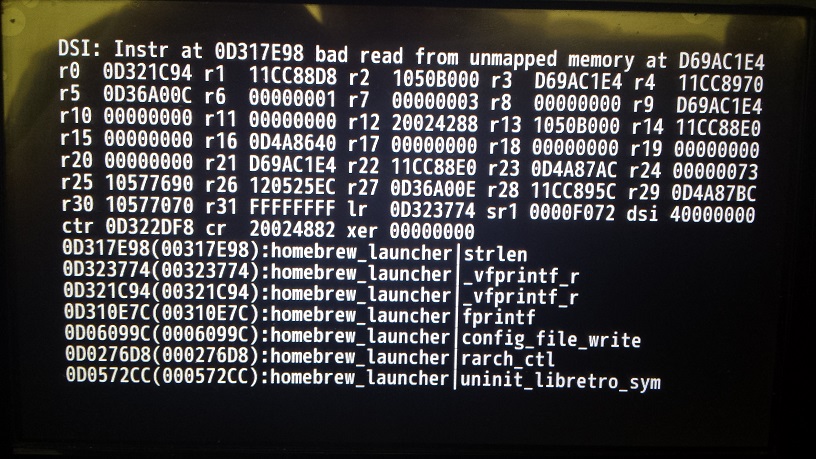
Which one?
29102616-a9dc335a-7c77-11e7-94f2-ec42cee5819f.jpg

The Vorbis DSI Error = Gensplus = FIXED
The WiiU_Input_Poll = Quark says it was probably fixed in a commit a few days ago..
This one = unknown (maybe RPX/ELF loader???)
 
  • Like
Reactions: ShadowOne333
It happens sometimes when you switch between Cores (doesn't happen if I use the Retroarch Channel) Which is why I think it has something to do with the RPX/ELF loader Code?
Oh that one.
Yeah I assume it must be something related to RPX/RPL/ELF loading, hopefully the DSI/Memory errors can get squashed like the bugs they are. xD
 
It happens sometimes when you switch between Cores (doesn't happen if I use the Retroarch Channel) Which is why I think it has something to do with the RPX/ELF loader Code?

Do you change the cores manually or with auto detecting via loading a ROM and picking the core to associate it with? I've swapped between Snes9x and Genesis Plus using the second method without issue, but I'm glad that a major Genesis Plus issue has been resolved. This app just keeps getting better and better :P

Edit; Oh right, yes, the RA channel itself seems to mitigate this issue.


Edit 2: Do we simply use the new core by itself or do we need to update all the RPX files?

Wait what?! Sonic CD works? I'm stunned by what's happening here lately when I'm just a few days off this thread.
Still waiting for SEGA Saturn and Road Rash to work. :P

Sega Saturn is so poorly documented and hard to emulate on PC, good luck seeing a port of it on other platforms XD
 
Last edited by the_randomizer,
  • Like
Reactions: lordelan

Site & Scene News

Popular threads in this forum