Hacking NOOB PARADISE - ask away

  • Thread starter Thread starter richglix
  • Start date Start date
  • Views Views 1,695,633
  • Replies Replies 15,247
  • Likes Likes 14
Is there a way to run NTFS + FAT32 partitions on the same HDD?
I remember this used to work but when I tried to run this recently, when I switch to the NTFS partition in CFG Loader Mod V70r75 it crashes with a stack exception.

I can try and take a photo of the exception if it helps, but is it possible to run it this way or should I just go with a FAT32 drive? It's 500GB.
 
I had that happen with my 1st Hard Drive. It seemed to happen because the drive would "go to sleep" & then there was no way to wake it up so it wouldnt show as being there. The drive I was using was an internal type that I'd placed in a sled. When I switched to a 1TB Western Digital ext. HDD the problem stopped occurring. I kniw that's not much help but it's all I can iffer.
 
Right now I'm using a 750gb western digital passport essentials se hard drive. I also have another 1tb western digital hd that I havent tried yet. What's the model of yours?

The manual says you can change the sleep timer on it so I'm going to give that a try and see if that solves the problem. If not I'll switch hds

I'm using a WD 1TB Elements Portable External Hard Drive - USB 3.0 - WDBUZG0010BBK-WESN. Also, in USB Loader Settings I turned the Multiple Partitions to "on" but honestly I'm new to all this so that may have done nothing as my HDD was formatted as a single FAT 32 Partition.
 
Hey everybody! I'm a clueless noob around here, just getting to grips with using an external HDD with USB Loader GX on my Wii. (You may have seen the thread. With its hilarious typo in the title.)

I've been battling with a WD Elements 500GB hard drive. The difficulties have mostly come from me being barely capable with computers and managing to mucj up the partitions on the drive. But I've got thing sback to a point where I can re-format the drive.

The only thing is, I've noticed that out of 500GB, USB Loader GX is only allowing me 127GB for game storage. Prior to formatting the HDD, if I selct a partition to format, it shows me a screen with four (apparently) available partitions, three of which are labelled 'cannot format partion.'

Does anybody know of a way I can use the full 500GB on the hard drive?


Just to give a little something back to the forum, I'll share that, during the process of my tinkering with the Wii, I've found that pretty much any hard drive from the WD Elements family works a treat. The real bonus with those is that there's no power management built into the drives, so no nasty spindown errors. I'll add a disclaimer here that I haven't really used my Wii-plus-HDD combo in anger yet, but a couple of long-ish sessions on Okami and Scarface (both of which I gather have been reported as glitchy when installed on an HDD) were bug free.

Thanks in advance to anyone who can help!

 
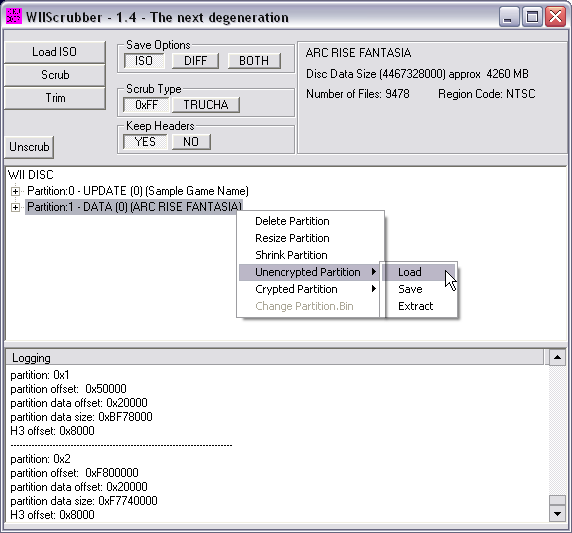
is there a program for pc that allows me to just explore/add/remove files to a wii iso because ive been looking for a while i want to add files especially wbfs sync wit and others just dont work for me im trying to compile a modded game like smash bros infinite etc
 
is there a program for pc that allows me to just explore/add/remove files to a wii iso because ive been looking for a while i want to add files especially wbfs sync wit and others just dont work for me im trying to compile a modded game like smash bros infinite etc
Well... for Smash there is :
Screenshot_2.png


For other games and normal iso extract is :
ARF_undub03.png
 
Last edited by ScarletDreamz,
What's the best way to install virtual console and WiiWare games to my USB hard drive? I currently have a 500gb USB hard drive formatted for FAT32, and my Wii games are in. WBFS format, and I am using USB Loader GX.

Thanks!
 
What's the best way to install virtual console and WiiWare games to my USB hard drive? I currently have a 500gb USB hard drive formatted for FAT32, and my Wii games are in. WBFS format, and I am using USB Loader GX.

Thanks!
Dumping your wii nand, and emulate it, and inject the wads of the WiiWare using ShowMiiWads
 
Got a tutorial? Is there a way to load VC and WiiWare games from USB Loader GX?
I am not a fan of having games in a bunch of channels on the home screen.
 
Isn't emuNAND and VC/WiiWare less compatible? Is there a way to have separate categories for Wii games. VC games, Gamecube games, and WiiWare games in USB Loader GX?
 
Last edited by XC-3730C,
Question re: WBFS file icons. Most of the wbfs files I have look like little game boxes like this:
Screen Shot 2017-05-14 at 3.21.36 PM.png

but a couple are simply blank/white like this:
Screen Shot 2017-05-14 at 3.21.00 PM.png

they all work/play fine I'm just OCD & wondering why this happens? I've moved the files around & even re-converted them but a few remain looking plain. Any info would be appreciated.
 
Question re: WBFS file icons. Most of the wbfs files I have look like little game boxes like this:View attachment 86895
but a couple are simply blank/white like this:View attachment 86896
they all work/play fine I'm just OCD & wondering why this happens? I've moved the files around & even re-converted them but a few remain looking plain. Any info would be appreciated.
icons are due to a program thst its already set to open them by default, as 7zip, winrar, among otherss, icons have 0 to do with the games files and format ;D
 
  • Like
Reactions: i0nzeu5
icons are due to a program thst its already set to open them by default, as 7zip, winrar, among otherss, icons have 0 to do with the games files and format ;D
Thank you!

--------------------- MERGED ---------------------------

icons are due to a program thst its already set to open them by default, as 7zip, winrar, among otherss, icons have 0 to do with the games files and format ;D
Thanks! Knowing that I just figured out how to get the image from tdb & then paste it onto the wbfs icon.
 
Possibly the best place I may have found to ask this question...
I just got the newest USB Loader GX (r1262) installed and I'm looking to use themes. I found out, http://wii.spiffy360.com/ is the website that hosts the themes and now requires an account to download them.
I sign up and get the verification email sent. I confirm it and it brings me back to the site saying "Sorry, we could not find your account."

What??

So I'm stuck here, in limbo, allowed to make an account, but for some reason cannot finish verifying it.

Wondering if anyone else experience this and/or knows what to do or what's happening.
 

Site & Scene News

Popular threads in this forum