Official hakchi2 - NES Mini very simple pimp tool

  • Thread starter Thread starter Cluster
  • Start date Start date
  • Views Views 4,406,609
  • Replies Replies 18,558
  • Likes Likes 138
Doesn't seem to be making a difference for me. I had already installed Cluster's mod, so I simply added the version with no smoothing to the user_mods folder, installed from within hakchi2, and flashed. When I started up Super Mario Kart (using Pixel Perfect display) it looked exactly as it did previously. Might this be because I installed the no-smoothing version on top of the stock version? Do I need to uninstall the stock module and then install the no-smoothing version?
try to unninstall madmonkey's / cluster mod, reinstall mine
 
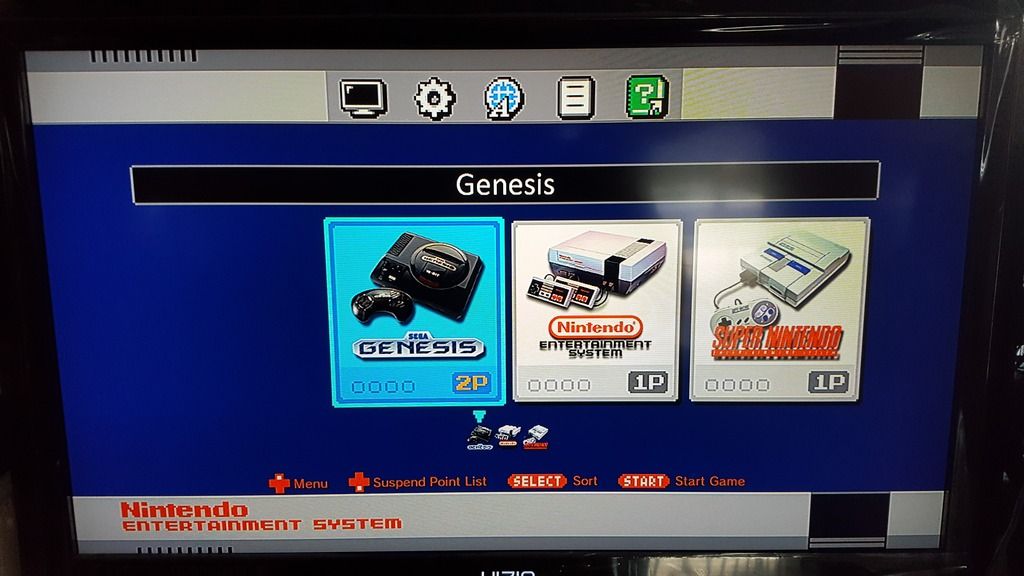
Do I put my Genesis Roms in with my NES roms (same folder games)? Cause when I add them they are not there...even under all files!!!

Bigjdoberman
 
Hope this video is helpful. I have never done a video like this before and it probably sucks and I probably sound like shit. Already forgot a bunch of stuff I wanted to cover but I will make another one.

This video covers:
(might be processing for a moment, be patient :))

BIG SHOUT OUT TO CLUSTER AND MADMONKEY FOR MAKING THIS POSSIBLE!!!!

Assumptions:

You have already downloaded and installed Hakchi2 v2.12

What we will cover:

1) Transfering files (kernel, games) from a previous version of Hakchi
2) Installing Retroarch MOD
https://github.com/ClusterM/retroarch-clover/releases
3) Adding GUPEN64 as a GUI Launchable CORE
4) Customizing your Folders
5) Other stuff that comes up as I talk through it out loud :)
6) adding a SEGA Game
 
i mean you can do pixel perfect with 4:3 with 1:1 (4:3 DAR) but i can't access it because i just have a nes controller and i can't access the retroarch menu
i think that would mess with other aspect ratios.

I moved video_aspect_ratio_auto = "false" to "true" and nothing changed when moving from Pixel Perfect to 4:3

There is also this solid video_aspect_ratio = "-1.000000" under the config file, so this is something that must be done with retroarch visual settings probably :/
 
Do I put my Genesis Roms in with my NES roms (same folder games)? Cause when I add them they are not there...even under all files!!!

Bigjdoberman

A lot of the foldering confusion stems from the fact that the organizational structure isn't surfaced until you click to Sync them.

The main screen just shows you ALL the games you have added to hakchi.

Once you click on Sync, it'll take you to the foldering screen where you can organize and change logos. If you back out of there after that, it'll ask if you want to save those changes. You can also click Sync and change the structure without actually having the console plugged in to flash yet.

edit - I also found I had to add all my SNES titles, then go organize them. Then go back and add Genesis, and repeat the organizing. Then finally went back and added the few hundred NES roms and rinse/repeat organizing.
 
Last edited by Lukano,
try to unninstall madmonkey's / cluster mod, reinstall mine
Confirmed this was the issue. Looks great, and the nice thing is that if smoothing is desired (I actually prefer it in Super Street Fighter II) I can simply toggle 4:3 display in the GUI. Thanks for this!
 
That's exactly what I have. I was unable to get it to work with RA though, NES itself it works great, but once I go into RA GUI, my "Y" button becomes "A" and "X" button becomes "B", same with L and R. I noticed this when I tried Super Punch out, and went to configuration button and noticed it would register only this. When I also edited how RA GUI would use the controller in settings to bind them all it set it up, but then nothing worked because it was all A's and B's. If you had same issue then it must be something in RA that is what I suspected.

--------------------- MERGED ---------------------------

You are right, the 8Bitdo SNES controller doesn't work. I mean it works but not with the NES mini with RetroArch. When I replied to you the first time I had just test it with one game. (Legend of the Mystical Ninja) which worked fine or at least I thought. After seeing your reply I tested out a bunch of other games and I've encountered the problems as you describe. So I used a Wii classic Controller which works just fine.

That's exactly what I have. I was unable to get it to work with RA though, NES itself it works great, but once I go into RA GUI, my "Y" button becomes "A" and "X" button becomes "B", same with L and R. I noticed this when I tried Super Punch out, and went to configuration button and noticed it would register only this. When I also edited how RA GUI would use the controller in settings to bind them all it set it up, but then nothing worked because it was all A's and B's. If you had same issue then it must be something in RA that is what I suspected.

--------------------- MERGED ---------------------------


You are right, the 8Bitdo SNES controller doesn't work. I mean it works but not with the NES mini with RetroArch. When I replied to you the first time I had just tested it with one game. (Legend of the Mystical Ninja) which worked fine or at least I thought. After seeing your reply I tested out a bunch of other games and I've encountered the problems as you describe. So I used a Wii classic Controller which works just fine.

So I think the 100MHz is much smoother.

 

Attachments

  • IMG_4957.JPG
    IMG_4957.JPG
    68.3 KB · Views: 234
a core is missing for PCE/TG16 games, maybe not tested yet? @nesito have you tried it?

--------------------- MERGED ---------------------------


Settings -> Pages/Folders -> Custom
It can be add same way as other nes or n64(as I do in video)
only change the name of the core to mednafen_pce_fast with notepad++ on the copied \bin file. Also Is needed to have this core in the libretro path on \retroarch.hmod

Last in hakchi2 comand line check that the binary is the name of the file you edit in \bin

Rgs.
 
@nesito thank you very much mate for the video. I dont understand spanish but got the process for what your doing :) one qtion to confirm please. Did you extract the retroarch_mod folder from the source code zip file and then copy that to hakchi2 folder? Looks like you did - from there you copy the n64 file, add glupen64 in the cfg and install the RA mod to point to the new core. Am i right ?
Yes, you're right. Only some more detailed info
On the hakchi2 folder \user_mods is where you extract the retroarch.hmod folder.
All the process the is in (full path) \yourhakchi22.12folder\user_mods\retroarch.hmod\bin this for the "malonito" in which edit to load GLupeN64 core. (I think this is you name cfg but the file is without extension ;))

Rgs.
 
Thank you sir! But I have a last problem, I don't know how to make a working command line?
As an exemple, my command line is:
/bin/nes2 /usr/share/games/nes/kachikachi/CLV-H-JUDHD/CLV-H-JUDHD.nes
but nothing start.
Please put here the content of your \yourhakchi22.12folder\user_mods\retroarch.hmod\bin\nes2 to check it.

Rgs.
 
It can be add same way as other nes or n64(as I do in video)
only change the name of the core to mednafen_pce_fast with notepad++ on the copied \bin file. Also Is needed to have this core in the libretro path on \retroarch.hmod

Last in hakchi2 comand line check that the binary is the name of the file you edit in \bin

Rgs.

your create five millions videos in 2 weeks.... which one ist the right one?
 

Site & Scene News

Popular threads in this forum