Gaming Resurrecting my gaming pc

  • Thread starter Thread starter elBenyo
  • Start date Start date
  • Views Views 1,604
  • Replies Replies 11

elBenyo

Wad of meat.
Member
Joined
Jan 2, 2016
Messages
487
Reaction score
106
Trophies
1
Age
35
XP
917
Country
United States
So I have an old gaming rig. The motherboard is 9 years old now. It has 4gb of 800mhz ddr2, an Intel core2quad at 2.83ghz, and an Nvidia GT730. It had a 580w PSU when it died. So last Christmas I was playing Batman AC when it locked up. I rebooted it and there was no output, no HDD activity. I figured it was the old PSU and I replaced it but nothing, still no output via HDMI. So I reset the CMOS and still nothing. Does it sound like my board finally gave out?
 
Possibly. What do the capacitors (tall cylindrical things) look like? If they are domed on top or look like they leaked/blew out on the bottom then those are a good start.

Likewise if the PSU did go it could have taken out something else along the way.

To be completely sure you are going to want to try out individual components --> put the CPU in another machine, put another CPU in it, RAM in another machine. You can probably pick up an old office machine of that vintage for next to nothing to test things against.
Before you do that you might also want to try minimum builds --> remove everything but one stick stick of ram and the CPU and try manually booting by shorting the appropriate cable. Build back up until you encounter your problem.
 
I was thinking I would have to test each part individually, that's the best place to start so thank you for reminding me. I was thinking when the PSU died it took the motherboard with it but it could have just as well toasted the GPU which was pulling full power when it crashed. Has anyone ever seen a CPU actually die? I overclocked one to blow it up on purpose once but otherwise I've never even heard of a CPU failing.
 
I've seen three dead CPUs, and one has an honorary place upon my shelf of memorabilia. One died due to ESD, one died to a power surge blowing the PSU (I don't get how the motherboard survived but not the CPU), and one died along with the motherboard when my friend spilled coffee down the top of his computer.

I've never had a CPU burn out on me from overclocking or thermals... but then again I always use third party coolers.
 
  • Like
Reactions: elBenyo
I've seen three dead CPUs, and one has an honorary place upon my shelf of memorabilia. One died due to ESD, one died to a power surge blowing the PSU (I don't get how the motherboard survived but not the CPU), and one died along with the motherboard when my friend spilled coffee down the top of his computer.

I've never had a CPU burn out on me from overclocking or thermals... but then again I always use third party coolers.
How did ESD happen? I've lost tube monitors that way.

--------------------- MERGED ---------------------------

Does your motherboard support bios error codes? if it does then you might try this page.

http://www.pcmag.com/encyclopedia/term/38515/beep-codes
It's worse. There's no beeping or BIOS displaying. I'm going to take the gpu out and use a DVI cable from the mobo port when I find it.
 
ESD can happen very easily because the voltage required to fry a component is a fraction of what you can actually feel. In this case it was when I was teaching a friend how to put a computer together and he decided to rush in before I finished warning him of the usual sensible precautions (i.e. touching a metal surface before you start, like the chassis or a radiator or something). It didn't help that he was wearing a woolly jumper, which only makes it more likely to happen.

Me? I've got a safety strap for when I'm handling more delicate components. Sure, I've heard lots of talk about how they don't actually help prevent ESD, but it gives me peace of mind. I've seen ESD kill other things too, like RAM and WiFi cards too.
 
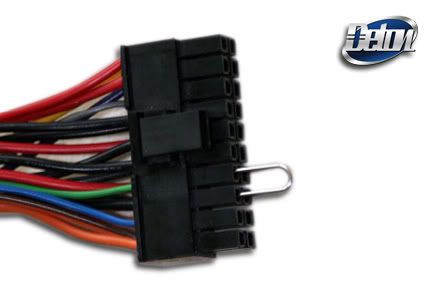
I cant remember which connectors you jumper, but you can test individual components directly with that if they are still alive or not
 
What do you mean? With a jumper? I think the only one I have is for reseting the BIOS.
I think he means this
psujump.jpg


you can turn on the psu its self and run a few different parts like fans and such to see if the psu is fried or not
 
Yeah, jump the green wire to a black wire. But unplug everything that the psu is plugged into before you jump them. The psu should start up.
If it starts then plug everything back up. Turn it on and listen for beeps. Write down how many you hear, and if they are long or short. You can look up the beep codes for that mobo and what they mean.
If you don't hear any codes then unplug one stick of ram and try it. Then switch the sticks and try again. Then unplug all the drives.
I also saw that someone suggested looking for leaking caps. They might look like they are bulging, or you might see a sticky looking goo. If you do then they need to be replaced. It won't be worth paying someone to replace them but would be a great way to learn to solder. Caps are dirt cheap. A 9 year old mobo wouldn't be a major loss if you mess up. If you take the heat sink off the cpu you HAVE to clean off the old thermal past and apply new past. Those are the things I do first when troubleshooting a dead pc.

--------------------- MERGED ---------------------------

I ment thermal paste.
 

Site & Scene News

Popular threads in this forum