
Tutorial Simple Guide to Downgrading your 3DS

Have you been able to successfully downgrade your 3DS/2DS?


  • Total voters
    1,055
Status
Not open for further replies.
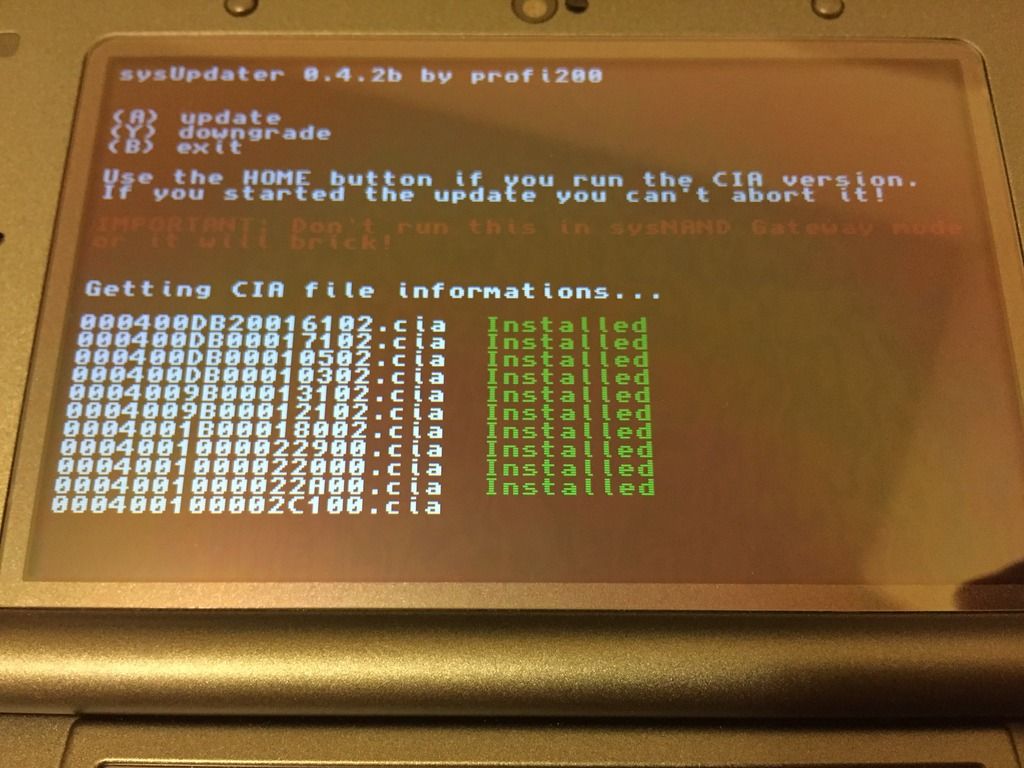
Perfect timing here, but right after I posted that the downgrade process started and was successful. It even rebooted normally after the process without requiring me to remove the micro SD card despite having HomeMenuHax being installed.

IMG_0664.jpg
Now I'm running stock 9.2.0-20E with no problems. It turns out you're not doing anything wrong, the exploit is just unreliable. Keep repeating the steps and eventually it will work. If you need further help, I will stay online and can walk you through via private messages. :)
So it's just complete RNG then? Lol I guess I will keep spamming it all day
 
Yes, haha.

Hopefully it will work.

It works without the SD card, System Settings shows 9.2E, I'm so happy! :D What is the offending Menuhax-file I have to delete so it works with the SD card?

How did you get it working? I've been sitting here with the same problem you've been having all morning.

To be honest all I did was renaming sysupdater to boot.3dsx so it started directly and eventually it just worked :/

You don't need to wait just turn it off, remove the sd and turn it on. If it doesn't work try recovery mode but I got a black screen on mine until I removed the sd so that's probably it.

Read above it works without the SD card, I'm on 9.2E :D What is the offending Themehax file I have to remove on the SD card?
 
Looks like so. Here's the setup I used:

N3DS XL 10.3.0-28E
HomeMenuHax + sysUpdater (Julian's build)
9.2.0-20E cia files from that site

Took about 4 hours of attempts, but it worked in the end.
Same setup as me except I'm on U instead of E (which I'm sure doesn't matter). I'll just keep trying. It's really comforting knowing that it's random chance and I didn't mess it up
 
  • Like
Reactions: NekoMichi
Memchunkhax2 of julian20's sysupdater is way more stable than FBI's memchunkhax2, I got it working the second try

I was kinda scared because nothing happened for like 10 second when I pressed Y, and then everything went okay
 
Last edited by MasterLel,
It works without the SD card, System Settings shows 9.2E, I'm so happy! :D What is the offending Menuhax-file I have to delete so it works with the SD card?

SD:\Nintendo 3DS\*random letters and numbers*\*random letters and numbers again*\extdata\00000000\000002ce (this is your themes data folder)
SD:\Nintendo 3DS\*random letters and numbers*\*random letters and numbers again*\extdata\00000000\00000098 (this is your home menu extdata,it contains home-menu savedata and cached icons for applications)

Source: https://3dbrew.org/wiki/Extdata

EDIT
As said earlier, check the 3dbrew link. These are region specific. Above is for EU region.
 
Last edited by Ridge,
It works without the SD card, System Settings shows 9.2E, I'm so happy! :D What is the offending Menuhax-file I have to delete so it works with the SD card?


To be honest all I did was renaming sysupdater to boot.3dsx so it started directly and eventually it just worked :/


Read above it works without the SD card, I'm on 9.2E :D What is the offending Themehax file I have to remove on the SD card?

Go in your SD card, delete sdmc:/Nintendo 3DS/<id0>/<id1>/extdata/00000000/000002ce/
 
Last edited by ,
If i have a 7.2.0-17E 2DS, can I "upgrade" to 9.2 with that tool ?
Or can I do all the stuff you can do on a 9.2 firmware ?
 
If i have a 7.2.0-17E 2DS, can I "upgrade" to 9.2 with that tool ?
Or can I do all the stuff you can do on a 9.2 firmware ?
You can run sysupdater through pasta cfw w/o firmlaunch to update to 9.2 yes.
minipasta might work if you have cubic ninja for homebrew launcher, unsure if it is compatible with 1.1b though
But rxTools devmode/pasta mode is the same thing so that would also work.
 
  • Like
Reactions: krz0001
If i have a 7.2.0-17E 2DS, can I "upgrade" to 9.2 with that tool ?
Or can I do all the stuff you can do on a 9.2 firmware ?

You could install emunand on that firmware, then update emunand. Or use sysUpdater to update to 9.2 for autoboot into emunand (as far as my knowledge goes)
 
  • Like
Reactions: krz0001
One question ... someone said to format sd and 3ds, but if i do so, how can i launch sysupdate without Homebrew Launcher (ironhax) on my sd?
 
You can run sysupdater through pasta cfw w/o firmlaunch to update to 9.2 yes.
minipasta might work if you have cubic ninja for homebrew launcher, unsure if it is compatible with 1.1b though
But rxTools devmode/pasta mode is the same thing so that would also work.
So, if I don't have Cubic Ninja, I must upgrade to 10.3, and then downgrade to 9.2?
 
No, you can run rxTools through the browser exploit, pray and hope you can boot it through browser otherwise you dont have many other options.
Some people have a lot of trouble running the web exploit, mainly people on -10 firmware though, yours is -17 so should work better.
 
  • Like
Reactions: krz0001
SD:\Nintendo 3DS\*random letters and numbers*\*random letters and numbers again*\extdata\00000000\000002ce (this is your themes data folder)
SD:\Nintendo 3DS\*random letters and numbers*\*random letters and numbers again*\extdata\00000000\00000098 (this is your home menu extdata,it contains home-menu savedata and cached icons for applications)

Source: https://3dbrew.org/wiki/Extdata

EDIT
As said earlier, check the 3dbrew link. These are region specific. Above is for EU region.

Go in your SD card, delete sdmc:/Nintendo 3DS/<id0>/<id1>/extdata/00000000/000002ce/

This worked, thanks both of you! :)

Next steps, figuring out how to install BrowserHax and MenuHax on 9.2, then backing up my sysNAND, settintg up emuNAND and RXTools!
 
  • Like
Reactions: Ridge
This worked, thanks both of you! :)

Next steps, figuring out how to install BrowserHax and MenuHax on 9.2, then backing up my sysNAND, settintg up emuNAND and RXTools!

If I were you I'd just backup your sysNAND and setup emuNAND right away since setting up emuNAND requires you to format your SD card ^_^
 
If I were you I'd just backup your sysNAND and setup emuNAND right away since setting up emuNAND requires you to format your SD card ^_^

Ah okay I see, so I'm backing up my SD card right now :o Could you maybe link me a tutorial for this and setting up BrowserHax on 9.2 before I pick something outdated out of the tutorial section? I just don't want to mess up after successfully downgrading D:
 
Ah okay I see, so I'm backing up my SD card right now :o Could you maybe link me a tutorial for this and setting up BrowserHax on 9.2 before I pick something outdated out of the tutorial section? I just don't want to mess up after successfully downgrading D:
Does this help? I'm not sure. https://gbatemp.net/threads/tutorial-setting-up-cfw-on-n3ds-after-downgrading.408087/
Apparently setting up *hax 2.5 is the same process. I couldn't get sliderhax to work on my 9.2 O3DS so I used Ocarina of Time 3D hax configured for 9.2 on a different 3DS. Sorry if that doesn't help you :(
 
I open sysupdater, click y nothing happens, tried it a bunch of times , any way to fix it?
 
Status
Not open for further replies.

Site & Scene News

Popular threads in this forum