Tutorial Simple Guide to Downgrading your 3DS

Have you been able to successfully downgrade your 3DS/2DS?


  • Total voters
    1,055
Status
Not open for further replies.
Hi! I read aaaall the pages (yeah, the 149) and I am trying to downgrade 1º time
o3DSXL 9.9U with julian20 sysupdater and the full zip cias.
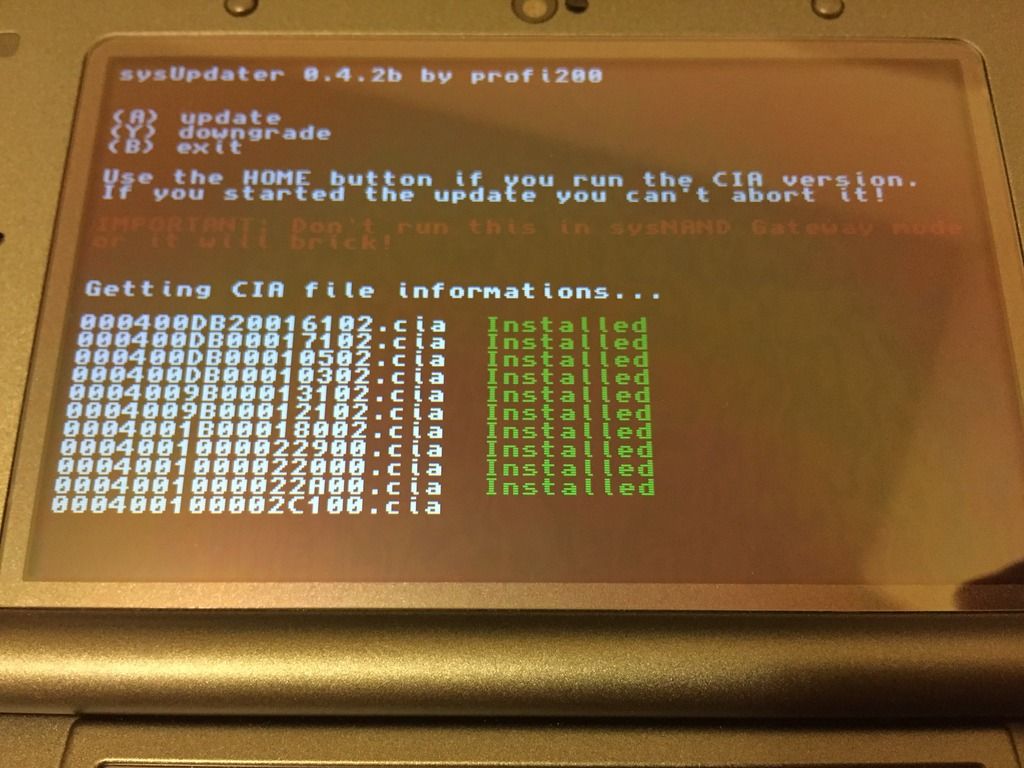
HBL running from menuhax, I'm stuck on this (I press Y a couple of times) for at least 10 minutes.
What I have to do? Wait more? Power off?
*image*

If you're stuck there (nothing works, not even B), it's safe to power off!
 
  • Like
Reactions: Hyura
Hi! I read aaaall the pages (yeah, the 149) and I am trying to downgrade 1º time
o3DSXL 9.9U with julian20 sysupdater and the full zip cias.
HBL running from menuhax, I'm stuck on this (I press Y a couple of times) for at least 10 minutes.
What I have to do? Wait more? Power off?
I used the version before that when I downgraded my consoles but when I got that it sometimes worked if I waited a minute and kept trying. Other times it froze there and I needed to shut it down.
 
I've successfully downgraded my o3ds, everything went fine... except the cia titles (many numbers) were kinda bugged during the downgrade, but no problem
 
Last edited by MasterLel,
  • Like
Reactions: Ridge
Just made an account to post this tried this on my sisters o3ds version 10.3.xx (dont remember the browser version numbers) and it worked flawlessly, kept wifi off and took me like 5 tries to get sysUpdater to work correctly, after that everything went flawless used @julian20 version plus i didnt check the sha-1 nor md5, kinda went rambo, next would be my mm n3dsxl but that can wait
 
If you're stuck there (nothing works, not even B), it's safe to power off!

I used the version before that when I downgraded my consoles but when I got that it sometimes worked if I waited a minute and kept trying. Other times it froze there and I needed to shut it down.

Thank you, I restart and try again, sysupdater install and reboots, now black screen.
Power off, take out the SD and power on?
 
wow it worked first time with my launch 3ds. Now I'm starting the grind with a N3ds. On N3ds I can use browserhax to get into sysudater right?

Patodox, after you press "y" wait at least 1 min for it to start installing cia. But if you press "y" and nothing happens then yeah power off.
 
Last edited by JAWS_XS,
Have you guys got the same "problem" as me, the cia names (like 000400DB00010502.cia) were kinda messy during the downgrade ?
 
I've tried about 15x. I can use menuhax and install all the CIA files, everything says it works, no errors. I then soft brick too a screen that says an error has occurred, hold power to reset and try again. I am able to enter recovery and restore to 10.3 without issue. I've tried removing the sdcard. I've confirmed that I have the right cia files.

Does anyone have any suggestions?
 
I've tried about 15x. I can use menuhax and install all the CIA files, everything says it works, no errors. I then soft brick too a screen that says an error has occurred, hold power to reset and try again. I am able to enter recovery and restore to 10.3 without issue. I've tried removing the sdcard. I've confirmed that I have the right cia files.

Does anyone have any suggestions?
One person tried formatting before downgrading and it worked for him
 
I've tried about 15x. I can use menuhax and install all the CIA files, everything says it works, no errors. I then soft brick too a screen that says an error has occurred, hold power to reset and try again. I am able to enter recovery and restore to 10.3 without issue. I've tried removing the sdcard. I've confirmed that I have the right cia files.

Does anyone have any suggestions?
Yes, format your console and sd card, setup the console, then retry ! It will work
 
MY DOWNGRADE JUST STARTED FOR THE FIRST TIME EVER! Help I think I'll pass out...
How did you manage to get it to start? Right now I'm stuck at the "main.cpp:148: Result: 0xD900182F Failed to get CIA file info!" error. The /updates/ files were copied over on Windows, not Mac and I tried running FTPBrony before running sysUpdater. Either the process freezes at this error message, or it freezes at the menu and doesn't do anything when I press Y.
 
Thank you to all the contributors :D
Mor0jBdl.jpg


A new question: without SD, boots fine, with SD, black screen. I can't change theme 'cause there is no SD.
I have to delete something on the SD?
 
How did you manage to get it to start? Right now I'm stuck at the "main.cpp:148: Result: 0xD900182F Failed to get CIA file info!" error. The /updates/ files were copied over on Windows, not Mac and I tried running FTPBrony before running sysUpdater. Either the process freezes at this error message, or it freezes at the menu and doesn't do anything when I press Y.
i'm hoping he doesn't just ditch the thread now that it's working for him because there is some potentially valuable information for both of us missing here orz
 
Thank you to all the contributors :D
Mor0jBdl.jpg


A new question: without SD, boots fine, with SD, black screen. I can't change theme 'cause there is no SD.
I have to delete something on the SD?
You can probably format the sd, or you could use a different sd or format the system
 
Thank you to all the contributors :D
*image*

A new question: without SD, boots fine, with SD, black screen. I can't change theme 'cause there is no SD.
I have to delete something on the SD?

Try backing up to your PC first and then delete these folders:

SD:\Nintendo 3DS\*random letters and numbers*\*random letters and numbers again*\extdata\00000000\000002cd (this is your themes data folder)
SD:\Nintendo 3DS\*random letters and numbers*\*random letters and numbers again*\extdata\00000000\0000008f (this is your home menu extdata,it contains home-menu savedata and cached icons for applications)

After that, try booting with the SD card in.

EDIT
The folders I listed above are for US version only. Look up your region specific folders here: https://3dbrew.org/wiki/Extdata
 
Last edited by Ridge,
i'm hoping he doesn't just ditch the thread now that it's working for him because there is some potentially valuable information for both of us missing here orz
Perfect timing here, but right after I posted that the downgrade process started and was successful. It even rebooted normally after the process without requiring me to remove the micro SD card despite having HomeMenuHax being installed.

IMG_0664.jpg
Now I'm running stock 9.2.0-20E with no problems. It turns out you're not doing anything wrong, the exploit is just unreliable. Keep repeating the steps and eventually it will work. If you need further help, I will stay online and can walk you through via private messages. :)
 
Status
Not open for further replies.

Site & Scene News

Popular threads in this forum