
Hacking Photo Kano Translation

  • Thread starter Thread starter Holyshield
  • Start date Start date
  • Views Views 30,232
  • Replies Replies 35
  • Likes Likes 3

Holyshield

Member
Newcomer
Joined
Dec 3, 2014
Messages
23
Reaction score
23
Trophies
0
Age
48
Location
Usa
XP
147
Country
United States
Hi Guys! Just started messing around in Hex editor and I started translating the eboot.bin file but when I save it and save the whole PSP game to .ISO file to proof the PSP doesn't read it it says Code 8002000.
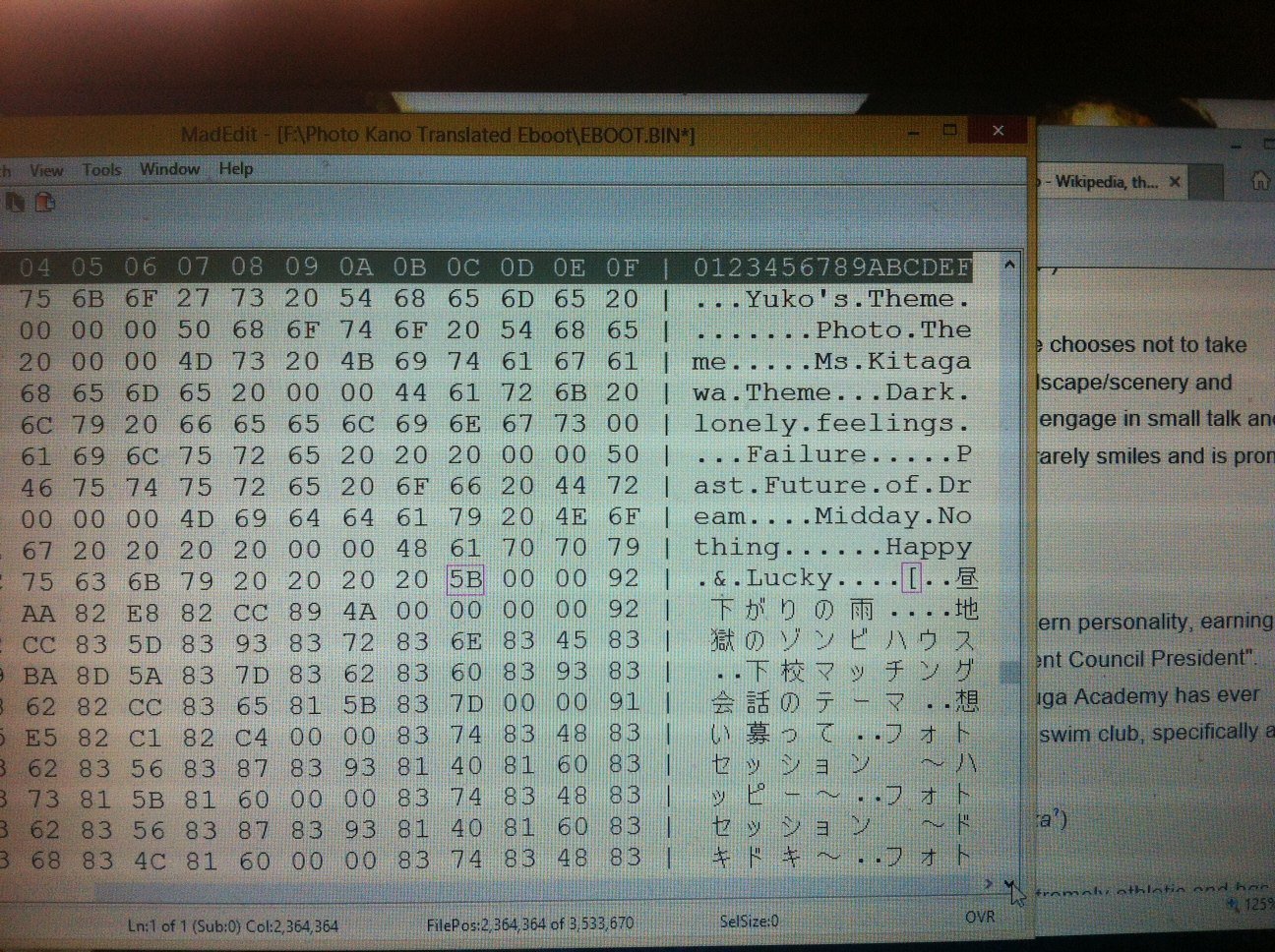
photo.JPG
What do you guys suggest? Ive included a pic so you can see what I am doing. Your Suggestions are much appreciated!
 
Does it sound like the error you get when you can't load a game (because signature does not match)? Or is it an in-game error?
Did you try fullwidth SHIFT-JIS?
Other than that, the only think I can think of is a signature check.

And I'm not sure the point of translated menus and such for a visual novel game. But whatever floats your boat.
 
I have no ideal about hacking but I have one thing to say, keep translating it. I will be waiting even if it takes years to finish.
 
  • Like
Reactions: Holyshield
Are you increasing the file by adding in extra bytes from your insertion?
If you did this, chances are, stuff is shifted around and not pointing to proper location.

Did you use UMDGen and make sure to create a File Allocation table?

This will make a table of the file locations in the ISO. When you edit something and put it back in, make sure you select the import option after you have loaded all the files back in BUT before you save it in an uncompressed format. The save option is under the "Save As" option just above "File List".

File Allocation Export.png


Try this stuff and see if it helps.
 
  • Like
Reactions: Holyshield
Thanks for your suggestions Zero_G Monkey Ill give them a shot. :)

--------------------- MERGED ---------------------------

Its a Sig Check Error. I am using Shift JIS. But Im gonna try some stuff. Thanks!
 
Almost done with the menus but I cannot for the heck of me find the script. Any suggestions?
 

Attachments

  • image.jpg
    image.jpg
    675.8 KB · Views: 792
  • image.jpg
    image.jpg
    1.4 MB · Views: 959
  • image.jpg
    image.jpg
    829.5 KB · Views: 843
Ok im sure the script is in the Data.DNS files anyone got a suggestion for a program that can extract data from these types? Much appreciated!
 
Ok im sure the script is in the Data.DNS files anyone got a suggestion for a program that can extract data from these types? Much appreciated!

Data1, 2, 3 and 4 are PGD files.
Change their file extensions to .PGD and use PSNPKGDecryptor&Extractor to decrypt them.
For 1, 2 and 3, the decrypted result is a Criware CPK file. Data4 looks compressed but I don't know how.
I tried using cpktools and CriPakTools to unpack the first three, but those tools weren't working. Using http://aluigi.altervista.org/bms/cpk.bms with quickbms did extract the archives, but without filenames.

The script files look to be contained in Data1. The script filetype's header is GSC2, with the text encoded as shift-jis.
 
  • Like
Reactions: Holyshield
look a nice work until now! o3o
I don't know this game I will look about it XD
do you need help with graphhics editing? o3oiswhat I can do lol
 
Data1, 2, 3 and 4 are PGD files.
Change their file extensions to .PGD and use PSNPKGDecryptor&Extractor to decrypt them.
For 1, 2 and 3, the decrypted result is a Criware CPK file. Data4 looks compressed but I don't know how.
I tried using cpktools and CriPakTools to unpack the first three, but those tools weren't working. Using http://aluigi.altervista.org/bms/cpk.bms with quickbms did extract the archives, but without filenames.

The script files look to be contained in Data1. The script filetype's header is GSC2, with the text encoded as shift-jis.
Forgive me ZZZZZZ but if you have access to this Data1 file could you send it my way? I would greatly appreciate it and It would help me ! I tried downloading several versions of PSNPKGDecryptor&Extractor but they didn't work. DO you have steps for trying your quickbms method? Thanks!

--------------------- MERGED ---------------------------

look a nice work until now! o3o
I don't know this game I will look about it XD
do you need help with graphhics editing? o3oiswhat I can do lol
Ill let you know Ok? Thanks!

--------------------- MERGED ---------------------------

Are you increasing the file by adding in extra bytes from your insertion?
If you did this, chances are, stuff is shifted around and not pointing to proper location.

Did you use UMDGen and make sure to create a File Allocation table?

This will make a table of the file locations in the ISO. When you edit something and put it back in, make sure you select the import option after you have loaded all the files back in BUT before you save it in an uncompressed format. The save option is under the "Save As" option just above "File List".

View attachment 30037

Try this stuff and see if it helps.
Thanks so much!
 
  • Like
Reactions: Sliter
Forgive me ZZZZZZ but if you have access to this Data1 file could you send it my way? I would greatly appreciate it and It would help me ! I tried downloading several versions of PSNPKGDecryptor&Extractor but they didn't work. DO you have steps for trying your quickbms method? Thanks!
To find the Data files, just extract the iso and navigate to PSP_GAME\INSDIR

Download PSNPKGDecryptor&Extractor from the bottom of the page at https://sites.google.com/site/theleecherman/psnpkgdecryptor-extractor
Before you use the tool, rename the files' extensions to .PGD and then you should be able to just drag n' drop to decrypt them.

To use the quickbms cpk unpack script, first download the quickbms application from http://aluigi.altervista.org/papers/quickbms.zip and unpack and save it somewhere. Then copy and paste the script from http://aluigi.altervista.org/bms/cpk.bms into a text file and save that with whatever name you like. Now open quickbms.exe, select the textfile, select the decrypted Data file, and then choose where you want to save the exported files. Because the script is only working somewhat correctly, it'll try to name everything NULL. Type r to choose to rename the files so that they don't overwrite each other
 
To find the Data files, just extract the iso and navigate to PSP_GAME\INSDIR

Download PSNPKGDecryptor&Extractor from the bottom of the page at https://sites.google.com/site/theleecherman/psnpkgdecryptor-extractor
Before you use the tool, rename the files' extensions to .PGD and then you should be able to just drag n' drop to decrypt them.

To use the quickbms cpk unpack script, first download the quickbms application from http://aluigi.altervista.org/papers/quickbms.zip and unpack and save it somewhere. Then copy and paste the script from http://aluigi.altervista.org/bms/cpk.bms into a text file and save that with whatever name you like. Now open quickbms.exe, select the textfile, select the decrypted Data file, and then choose where you want to save the exported files. Because the script is only working somewhat correctly, it'll try to name everything NULL. Type r to choose to rename the files so that they don't overwrite each other
Your help has been invaluable! Im working on translating some now. Do you know how I would go about in putting everything back once I'm done with the files? Thanks !!!
 
Your help has been invaluable! Im working on translating some now. Do you know how I would go about in putting everything back once I'm done with the files? Thanks !!!
You'll need a a tool that can rebuild the cpk, then you can rename that cpk to Data1.DNS and replace the iso's original file. Apparently it's not necessary to reencrypt it to PGD?
ULJS00378_00000.jpg


There are some programs like CriPackedFileMaker and CPKTools that can build a cpk given a directory of files, but when I tried these out the result wouldn't load in ppsspp. I'm not sure if that's because the quickbms script is unpacking the cpk improperly, thus preventing a proper rebuild, or if the rebuilt cpk is not compatible with the game's original cpk version CPKMC2.18.04, DLL2.78.04
 
You'll need a a tool that can rebuild the cpk, then you can rename that cpk to Data1.DNS and replace the iso's original file. Apparently it's not necessary to reencrypt it to PGD?
View attachment 31507

There are some programs like CriPackedFileMaker and CPKTools that can build a cpk given a directory of files, but when I tried these out the result wouldn't load in ppsspp. I'm not sure if that's because the quickbms script is unpacking the cpk improperly, thus preventing a proper rebuild, or if the rebuilt cpk is not compatible with the game's original cpk version CPKMC2.18.04, DLL2.78.04
Most excellent! I'll try some things I'll keep you updated! Thanks!
 
  • Like
Reactions: mdtank

Site & Scene News

Popular threads in this forum