ROM Hack Animal Crossing: New Leaf Save Editor

  • Thread starter Thread starter marc_max
  • Start date Start date
  • Views Views 1,686,112
  • Replies Replies 6,709
  • Likes Likes 78
Good news for ALL users!
You can already extract your retail/eShop savegame with ninjhax/tubehax/ironhax!

http://gbatemp.net/threads/whatever-happened-to-tdvs.395578/page-2#post-5643979

Haven't tried to inject yet, but it should work. Just be careful with the NAND value, do not touch it and never inject a different value.

Is there any way to edit things like the amount of tour medals and the town's public work projects with this method?

Since it has nothing to do with the ram, there's a lot of things that can't be done :(
 
@froggestspirit , I must ask... there's some way to use your Acres Editor with dumped saves through the new Save Manager homebrew (used through IronTubeHax)?
When I open your program, it doesn't recognize any of the files at the save dump, although I can use the garden.dat file with the web ACNL editor.

Sorry for my bad English, and thanks in advance.
With my editor (NLSE) you can export files that are identical to RAM dumps via the garden.dat editor.

-> open program
-> drop Save folder
-> open garden editor
-> Export RAM,
-> edit in acres editor
-> import RAM
-> save garden.dat
 
With my editor (NLSE) you can export files that are identical to RAM dumps via the garden.dat editor.

-> open program
-> drop Save folder
-> open garden editor
-> Export RAM,
-> edit in acres editor
-> import RAM
-> save garden.dat
Dragging the folder did nothing for me. Everything was still grayed out.
 
For some reason, dragging the folder didn't work but clicking the program then selecting my folder worked just fine.
 
How do I add a building with this program? I added a Police Station but can't get it to show in the actual game when I reinsert the save.

upload_2015-9-1_4-33-9.png
 
@froggestspirit , I must ask... there's some way to use your Acres Editor with dumped saves through the new Save Manager homebrew (used through IronTubeHax)?
When I open your program, it doesn't recognize any of the files at the save dump, although I can use the garden.dat file with the web ACNL editor.

Sorry for my bad English, and thanks in advance.
That program worked only for RAM dumps. It would need support for garden.dat.

You can truncate the header to turn it into a compatible file, then readd the header after editing though.
Marc_max summed it up pretty well. The data should be the same structure, just a different location. I don't really feel like going back to the editor, and it's not too hard to copy and paste the hex
 
I haven't checked up on this thread for a while.

Does this Garden editor only work with save files obtained with gateway/sky and fake 3ds flashcards or is it only used through the web exploit?

is it an offline editor, as an alternative to the online one?
 
Hi guys, I know I'm new here, but I've successfully gotten this to work on an old 3DS on version 9.9.

This is what I did, and it is a somewhat lengthy process, but I did get it to work successfully and I was able to edit my town.

1. I installed the homebrew TubeHax first. You can learn how to do that in this video:

2. After that, I installed the Save_Manager. When you download the file, place the "3ds" folder in the root of your SD card.

3. Next, boot up the TubeHax or IronHax (whichever one you use). If you've already managed to get to the menu screen of the homebrew, you should see a new option entitled, "Save_Manager" or something similar. Start that up using A, and you will be directed to a screen with various of your 3DS applications (i.e. System setting, etc.) Use the D-Pad to find animal crossing, then start that up with A.

4. The screen will glitch a little if working properly. You should later get a screen that reads:

"Press A to backup.
Press B to import.
Press X to exit."

You're going to want to press A to backup your save file, then wait around 5-10 seconds. When you're finished with that, press X to exit, then turn off your 3DS.

5. After that, open your 3DS SD card folder on your computer, and you should see a new folder entitled, "saveDataBackup".

6. Download the NLSE. When that's done, open up the application, and you will be prompted to select a folder. Choose the "saveDataBackup" folder directly from your SD card, and you can get around to editing your town by clicking "garden.dat".

7. When you've edited everything to your desire, click save at the bottom right corner of the application.

8. After everything's done, reinsert the SD card to your 3DS. Then, open up the TubeHax or IronHax, and access the Save_Manager again.

9. Later, when the screen glitches or something similar, press B to import your save file. I suggest waiting around 10-15 seconds to avoid any potential harm to your New Leaf save file.

10. That should be it! Hopefully if everything worked, when you boot up your save file in New Leaf, you should see all the changes you've made take place.

Hopefully this helped, guys!

 
Hi guys, I know I'm new here, but I've successfully gotten this to work on an old 3DS on version 9.9.

This is what I did, and it is a somewhat lengthy process, but I did get it to work successfully and I was able to edit my town.

[/spoiler]

Hi! I've been trying to restore my save file since yesterday but the save_manager glitches after selecting the game, it stops right before the "Backup/Import" menu, any idea? It works fine with any other game but ANC
 
Hi! I've been trying to restore my save file since yesterday but the save_manager glitches after selecting the game, it stops right before the "Backup/Import" menu, any idea? It works fine with any other game but ANC
Just press A to dump the save anyway and wait a little bit then turn off the 3ds (the program still works even tho the screen is glitched)
 
  • Like
Reactions: SoyAlexPop
Ended up accidentally editing an old save and injecting it and now the game isn't letting my load. Says something along the lines of "This isn't the most current save"

If I didn't backup the most current save (because I figured a save from two minutes prior would work), is there any way to fix this or do I have to start over? Can I inject my old save into a new file? Kinda doubt it but figured I would ask.
 
Anyone care to assist me? I wanted to put the crash building "island hut" in my town but had a little trouble getting it to show up....went to a dream recently and someone had it in their town. On the mini map it was labeled as "dock" which I was also a little confused about. If someone has the right information for getting an island hut to appear in your town, it woul be really helpful.
 
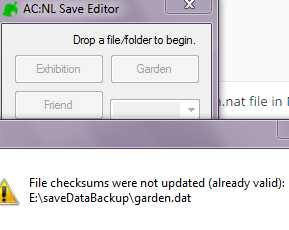
I have a problem with NLSE, when I try to drag the folder into the program, everything stays gray, and when I drag garden.dat into the program...
1TlhqlB.png

I get this error, am I doing something wrong?
 
Hey guys, new here. I'm having some trouble getting the save manager to work right? When I click on it, the only thing it shows me is the system settings; nothing else. Anyone know a way to fix this?
 
Hey guys, new here. I'm having some trouble getting the save manager to work right? When I click on it, the only thing it shows me is the system settings; nothing else. Anyone know a way to fix this?
You have to browse using the Dpad, just press left or right and it goes through things.

Also, does anyone know what this means and how I can fix it? I imagine maybe the SaveManager is not working properly, but since screen is glitched I can't see if any messages pop out. (Dragging whole folder does nothing, but doesn't show error either.)
9fca941e6377c686c4b20323e51552d9.png
 

Site & Scene News

Popular threads in this forum