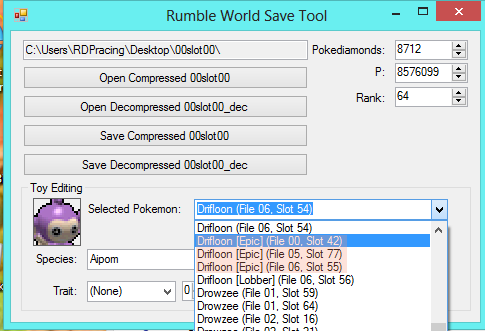
ROM Hack Pokemon Rumble World Diamonds/P Tool

  • Thread starter Thread starter SciresM
  • Start date Start date
  • Views Views 396,003
  • Replies Replies 657
  • Likes Likes 37
I used tubehax and savemanager but now my save is corrupted and i have a backup but cannot use it what do i do to make my file playable again and why is it corrupted also what does it mean by delete secure value
AFAIK there is no way to delete the secure value on this Homebrew Channel app
 
How can I one delete the secure value with Ironhax? 'Cause I may have corrupted my save file with the Save Manager. :/

I don't mind starting over (didn't had a lot of progress done), but it'd be nice to fix that.
 
But we are using the new Savedata program to do backups, and I can't put the save with that, now I can't play because only says "the sav is corrupted, delete the files" and I need to inject my sav now...
How do you inject a previous backup when your save is corrupted
 
Thx it's work with savemanager +tubehax (not get save corrupt)
How did you do it without corrupting the save file? Didn't you need to remove the secure value?

I'm just curious because I couldn't get mine to work.
 
How did you do it without corrupting the save file? Didn't you need to remove the secure value?

I'm just curious because I couldn't get mine to work.
As long as you edit the current save, i.e back up the save edit it, put it back, and not mess the save up to bad, bad editing for example, you should not get corruption using save_manager.
 
How did you do it without corrupting the save file? Didn't you need to remove the secure value?

I'm just curious because I couldn't get mine to work.
Just back up edit and put it back not any problem

*I edit money,gem,trait but not change rank,pokemon,move
my console is O3DS JPN 9.9
I also have some question some pokemon have 2-3 slots (in edit tool) even I have only one (in game). So I have to edit all or only one

example::
Untitled-1_zpsaxszi36s.png
 
ok this is becoming a pain in my butt ..... SOMEBODY make a UPDATED tutorial!!! I am using ironhax exported save and put into windows 10 pc opened exe as admin got int othe part ot open the folder and once opening that oo file I get this error I played and saved plus I know the save thing in hombrew works cause I just used super smash version so its this tool apparently ... any help would be great...

See the end of this message for details on invoking
just-in-time (JIT) debugging instead of this dialog box.

************** Exception Text **************
System.IO.FileNotFoundException: Could not load file or assembly 'Ionic.Zlib, Version=1.9.1.8, Culture=neutral, PublicKeyToken=edbe51ad942a3f5c' or one of its dependencies. The system cannot find the file specified.
File name: 'Ionic.Zlib, Version=1.9.1.8, Culture=neutral, PublicKeyToken=edbe51ad942a3f5c'
at Pokemon_Rumble_World_Save_Tool.Form1.Decompress(Byte[] enc)
at Pokemon_Rumble_World_Save_Tool.Form1.B_Open_CMP_Click(Object sender, EventArgs e)
at System.Windows.Forms.Control.OnClick(EventArgs e)
at System.Windows.Forms.Button.OnClick(EventArgs e)
at System.Windows.Forms.Button.OnMouseUp(MouseEventArgs mevent)
at System.Windows.Forms.Control.WmMouseUp(Message& m, MouseButtons button, Int32 clicks)
at System.Windows.Forms.Control.WndProc(Message& m)
at System.Windows.Forms.ButtonBase.WndProc(Message& m)
at System.Windows.Forms.Button.WndProc(Message& m)
at System.Windows.Forms.Control.ControlNativeWindow.OnMessage(Message& m)
at System.Windows.Forms.Control.ControlNativeWindow.WndProc(Message& m)
at System.Windows.Forms.NativeWindow.Callback(IntPtr hWnd, Int32 msg, IntPtr wparam, IntPtr lparam)

WRN: Assembly binding logging is turned OFF.
To enable assembly bind failure logging, set the registry value [HKLM\Software\Microsoft\Fusion!EnableLog] (DWORD) to 1.
Note: There is some performance penalty associated with assembly bind failure logging.
To turn this feature off, remove the registry value [HKLM\Software\Microsoft\Fusion!EnableLog].


************** Loaded Assemblies **************
mscorlib
Assembly Version: 4.0.0.0
Win32 Version: 4.6.96.0 built by: NETFXREL2STAGE
CodeBase: file:///C:/Windows/Microsoft.NET/Framework/v4.0.30319/mscorlib.dll
----------------------------------------
Pokemon Rumble World Save Tool
Assembly Version: 1.0.0.0
Win32 Version: 1.0.0.0
CodeBase: file:///C:/Users/YumiChi/Desktop/Pokemon%20Rumble%20World%20Save%20Tool.exe
----------------------------------------
System.Windows.Forms
Assembly Version: 4.0.0.0
Win32 Version: 4.6.79.0 built by: NETFXREL2
CodeBase: file:///C:/WINDOWS/Microsoft.Net/assembly/GAC_MSIL/System.Windows.Forms/v4.0_4.0.0.0__b77a5c561934e089/System.Windows.Forms.dll
----------------------------------------
System
Assembly Version: 4.0.0.0
Win32 Version: 4.6.79.0 built by: NETFXREL2
CodeBase: file:///C:/WINDOWS/Microsoft.Net/assembly/GAC_MSIL/System/v4.0_4.0.0.0__b77a5c561934e089/System.dll
----------------------------------------
System.Drawing
Assembly Version: 4.0.0.0
Win32 Version: 4.6.79.0 built by: NETFXREL2
CodeBase: file:///C:/WINDOWS/Microsoft.Net/assembly/GAC_MSIL/System.Drawing/v4.0_4.0.0.0__b03f5f7f11d50a3a/System.Drawing.dll
----------------------------------------
System.Core
Assembly Version: 4.0.0.0
Win32 Version: 4.6.79.0 built by: NETFXREL2
CodeBase: file:///C:/WINDOWS/Microsoft.Net/assembly/GAC_MSIL/System.Core/v4.0_4.0.0.0__b77a5c561934e089/System.Core.dll
----------------------------------------
System.Configuration
Assembly Version: 4.0.0.0
Win32 Version: 4.6.79.0 built by: NETFXREL2
CodeBase: file:///C:/WINDOWS/Microsoft.Net/assembly/GAC_MSIL/System.Configuration/v4.0_4.0.0.0__b03f5f7f11d50a3a/System.Configuration.dll
----------------------------------------
System.Xml
Assembly Version: 4.0.0.0
Win32 Version: 4.6.79.0 built by: NETFXREL2
CodeBase: file:///C:/WINDOWS/Microsoft.Net/assembly/GAC_MSIL/System.Xml/v4.0_4.0.0.0__b77a5c561934e089/System.Xml.dll
----------------------------------------

************** JIT Debugging **************
To enable just-in-time (JIT) debugging, the .config file for this
application or computer (machine.config) must have the
jitDebugging value set in the system.windows.forms section.
The application must also be compiled with debugging
enabled.

For example:

<configuration>
<system.windows.forms jitDebugging="true" />
</configuration>

When JIT debugging is enabled, any unhandled exception
will be sent to the JIT debugger registered on the computer
rather than be handled by this dialog box.

 
ok this is becoming a pain in my butt ..... SOMEBODY make a UPDATED tutorial!!! I am using ironhax exported save and put into windows 10 pc opened exe as admin got int othe part ot open the folder and once opening that oo file I get this error I played and saved plus I know the save thing in hombrew works cause I just used super smash version so its this tool apparently ... any help would be great...

See the end of this message for details on invoking
just-in-time (JIT) debugging instead of this dialog box.

************** Exception Text **************
System.IO.FileNotFoundException: Could not load file or assembly 'Ionic.Zlib, Version=1.9.1.8, Culture=neutral, PublicKeyToken=edbe51ad942a3f5c' or one of its dependencies. The system cannot find the file specified.
File name: 'Ionic.Zlib, Version=1.9.1.8, Culture=neutral, PublicKeyToken=edbe51ad942a3f5c'
at Pokemon_Rumble_World_Save_Tool.Form1.Decompress(Byte[] enc)
at Pokemon_Rumble_World_Save_Tool.Form1.B_Open_CMP_Click(Object sender, EventArgs e)
at System.Windows.Forms.Control.OnClick(EventArgs e)
at System.Windows.Forms.Button.OnClick(EventArgs e)
at System.Windows.Forms.Button.OnMouseUp(MouseEventArgs mevent)
at System.Windows.Forms.Control.WmMouseUp(Message& m, MouseButtons button, Int32 clicks)
at System.Windows.Forms.Control.WndProc(Message& m)
at System.Windows.Forms.ButtonBase.WndProc(Message& m)
at System.Windows.Forms.Button.WndProc(Message& m)
at System.Windows.Forms.Control.ControlNativeWindow.OnMessage(Message& m)
at System.Windows.Forms.Control.ControlNativeWindow.WndProc(Message& m)
at System.Windows.Forms.NativeWindow.Callback(IntPtr hWnd, Int32 msg, IntPtr wparam, IntPtr lparam)

WRN: Assembly binding logging is turned OFF.
To enable assembly bind failure logging, set the registry value [HKLM\Software\Microsoft\Fusion!EnableLog] (DWORD) to 1.
Note: There is some performance penalty associated with assembly bind failure logging.
To turn this feature off, remove the registry value [HKLM\Software\Microsoft\Fusion!EnableLog].


************** Loaded Assemblies **************
mscorlib
Assembly Version: 4.0.0.0
Win32 Version: 4.6.96.0 built by: NETFXREL2STAGE
CodeBase: file:///C:/Windows/Microsoft.NET/Framework/v4.0.30319/mscorlib.dll
----------------------------------------
Pokemon Rumble World Save Tool
Assembly Version: 1.0.0.0
Win32 Version: 1.0.0.0
CodeBase: file:///C:/Users/YumiChi/Desktop/Pokemon%20Rumble%20World%20Save%20Tool.exe
----------------------------------------
System.Windows.Forms
Assembly Version: 4.0.0.0
Win32 Version: 4.6.79.0 built by: NETFXREL2
CodeBase: file:///C:/WINDOWS/Microsoft.Net/assembly/GAC_MSIL/System.Windows.Forms/v4.0_4.0.0.0__b77a5c561934e089/System.Windows.Forms.dll
----------------------------------------
System
Assembly Version: 4.0.0.0
Win32 Version: 4.6.79.0 built by: NETFXREL2
CodeBase: file:///C:/WINDOWS/Microsoft.Net/assembly/GAC_MSIL/System/v4.0_4.0.0.0__b77a5c561934e089/System.dll
----------------------------------------
System.Drawing
Assembly Version: 4.0.0.0
Win32 Version: 4.6.79.0 built by: NETFXREL2
CodeBase: file:///C:/WINDOWS/Microsoft.Net/assembly/GAC_MSIL/System.Drawing/v4.0_4.0.0.0__b03f5f7f11d50a3a/System.Drawing.dll
----------------------------------------
System.Core
Assembly Version: 4.0.0.0
Win32 Version: 4.6.79.0 built by: NETFXREL2
CodeBase: file:///C:/WINDOWS/Microsoft.Net/assembly/GAC_MSIL/System.Core/v4.0_4.0.0.0__b77a5c561934e089/System.Core.dll
----------------------------------------
System.Configuration
Assembly Version: 4.0.0.0
Win32 Version: 4.6.79.0 built by: NETFXREL2
CodeBase: file:///C:/WINDOWS/Microsoft.Net/assembly/GAC_MSIL/System.Configuration/v4.0_4.0.0.0__b03f5f7f11d50a3a/System.Configuration.dll
----------------------------------------
System.Xml
Assembly Version: 4.0.0.0
Win32 Version: 4.6.79.0 built by: NETFXREL2
CodeBase: file:///C:/WINDOWS/Microsoft.Net/assembly/GAC_MSIL/System.Xml/v4.0_4.0.0.0__b77a5c561934e089/System.Xml.dll
----------------------------------------

************** JIT Debugging **************
To enable just-in-time (JIT) debugging, the .config file for this
application or computer (machine.config) must have the
jitDebugging value set in the system.windows.forms section.
The application must also be compiled with debugging
enabled.

For example:

<configuration>
<system.windows.forms jitDebugging="true" />
</configuration>

When JIT debugging is enabled, any unhandled exception
will be sent to the JIT debugger registered on the computer
rather than be handled by this dialog box.
Is there a smash version of this tool where
 
Worked for me, using ironhax + save file manager.
It's just like nekoneko said: don't make huge edits (I just edited Diamonds and P ) and you won't corrupt your save file.
 
This tool was made before the 1.1 update, and since that introduced a new balloon and other things, the save probably changed too.
Only way to make sure is to get a 1.0 clean save and a 1.1 clean save and compare.

About the secure value: it is a shared value stored in the DS and in the save, it should be possible to obtain it from a current savegame and apply it to an old save (maybe it is possible to get from the 3ds itself with another hb app, no need to search for it in each save...)
 
Just added 5000 Diamonds and it got corrupted.
Deffenitely its the 1.1 Update

The problem is, even after importing my Backup it say´s corrupted data.
Maybe the Homebrew app is not working
 
I changed Pokediamonds and P, and it worked well.
(Running Ironhax with IronFall 1.1)

But I can't manage to edit my Pokemon Shuffle save... I tried to edit with Winhex but also with the script provided on another thread but nothing seems to work... :(
 

Site & Scene News

Popular threads in this forum